




Analysis
If you run AI coding agents inside a business, the scary part isn't the writing of code. It's everything around it: an agent that quietly burns through your API budget, ships output in the wrong format, or touches a file it shouldn't. Hooks are the answer most teams reach for. They let you sit in the middle of what the agent does and say yes, no, or "do it differently."
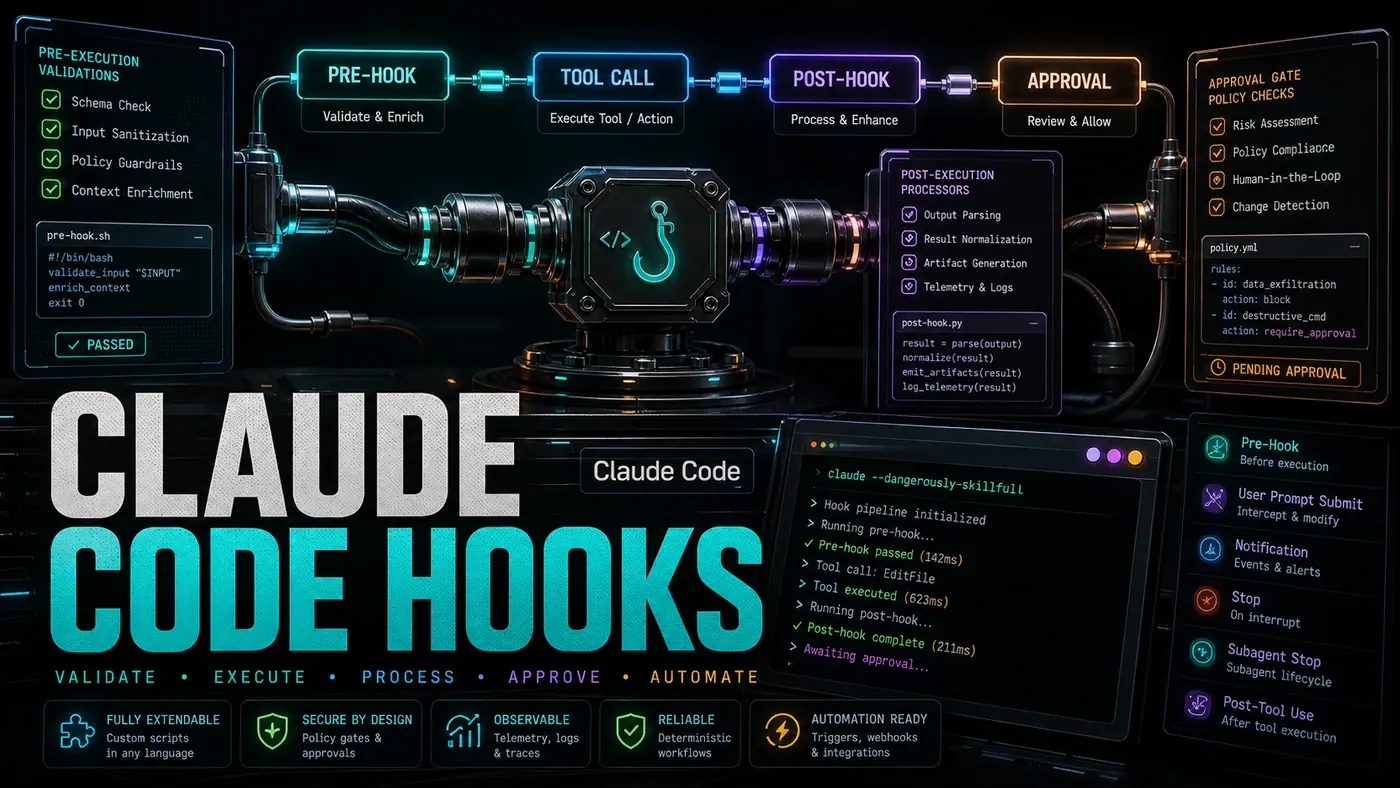
The idea is simple. At set moments in the agent's run, your own code gets to step in. Before it acts, you can check the request and block it. After it acts, you can reshape the result. When something breaks, you can retry or raise an alarm. When it finishes, you can log what happened for the audit trail.
One caveat worth stating plainly, because it affects every code sample here. The hook names, the YAML config file, and the SDK import used throughout this guide don't line up with how Claude Code actually ships hooks today. The real product uses tool-lifecycle events such as PreToolUse and PostToolUse, configured in JSON settings files rather than a .claude/hooks.yaml, and the handlers receive JSON on stdin and respond with exit codes (Claude Code Docs, Hooks reference (opens in a new tab)). Treat the patterns below as a mental model for the kinds of guardrails you want, then build them against the supported events (opens in a new tab). The snippets as written will not run.
With that said, here's the lifecycle and the four control points the rest of the guide is built around.
Analysis
Prerequisites
- Claude Code >= 0.38 (reportedly the version that added hooks, unconfirmed; the current product is on the 2.x line and hook features shipped across several 1.x releases, per the claude-code changelog (opens in a new tab))
- TypeScript 5.3+
- A working grasp of middleware patterns
Step-by-Step Framework
Step 1: Understand the Hook Lifecycle
User Request
 ↓
[Global preExecute hooks] → can modify input, add context, block execution
 ↓
[Skill-specific preExecute hooks]
 ↓
Skill Execution (the actual work)
 ↓
[Skill-specific postExecute hooks] → can modify/transform output
 ↓
[Global postExecute hooks]
 ↓
[onComplete hooks] → logging, cleanup, notifications
 ↓
Response to User

If error at any point:
 ↓
[onError hooks] → retry, fallback, alert
Read top to bottom, the flow is intuitive: requests pass through pre-execution checks, do the work, pass through post-execution shaping, then finish. Errors get diverted to their own handler. The real product groups these around tool calls rather than a generic request, and the official docs confirm that a pre-tool hook can approve or deny an action before it runs while a post-tool hook fires once it succeeds (Claude Code Docs, Hooks reference (opens in a new tab)). So the shape of the diagram is sound even though the names below are not the supported ones.
Step 2: Create a Global Pre-Execution Hook
This first example caps spend per session. The agent estimates the cost of an operation before it runs, and if running it would push the session over budget, the hook stops it.
// .claude/hooks/cost-limiter.ts
import { HookContext, PreExecuteHook } from '@anthropic/claude-sdk';

// Track spending per session
const sessionSpend = new Map<string, number>();
const BUDGET_LIMIT = 10.00; // $10 per session

export const costLimiterHook: PreExecuteHook = {
 name: 'cost-limiter',
 priority: 100, // Higher = runs first

 async beforeExecute(context: HookContext): Promise<HookContext> {
 const sessionId = context.sessionId;
 const estimatedCost = context.estimatedTokens * context.modelPricing.output / 1000;

 const currentSpend = sessionSpend.get(sessionId) || 0;

 if (currentSpend + estimatedCost > BUDGET_LIMIT) {
 throw new BudgetExceededError(
 `Session budget exceeded: $${currentSpend.toFixed(2)} / $${BUDGET_LIMIT}.
 Estimated cost of this operation: $${estimatedCost.toFixed(2)}.
 Request admin approval to continue.`
 );
 }

 // Add cost metadata for post-execution tracking
 context.metadata.estimatedCost = estimatedCost;
 context.metadata.budgetRemaining = BUDGET_LIMIT - currentSpend;

 return context;
 }
};
A few things to flag. The import is from @anthropic/claude-sdk, which isn't a real package, Anthropic ships `@anthropic-ai/claude-agent-sdk` (opens in a new tab), @anthropic-ai/claude-code, and @anthropic-ai/sdk instead. And the pattern of returning a mutated HookContext from a beforeExecute method is not how supported hooks work; they signal a block with exit code 2 or a deny decision rather than throwing inside a returned context object (Claude Code Docs, Hooks reference (opens in a new tab)). The budgeting logic is still a good template to port: track spend, estimate the next operation, refuse when the total crosses your limit.
Step 3: Create a Post-Execution Hook
Once the work is done, a post-execution hook can reshape what comes back. Here it tidies code output and appends a cost footer.
// .claude/hooks/output-formatter.ts
import { PostExecuteHook, HookContext } from '@anthropic/claude-sdk';

export const outputFormatterHook: PostExecuteHook = {
 name: 'output-formatter',
 priority: 50,

 async afterExecute(context: HookContext): Promise<HookContext> {
 const output = context.result;

 // Auto-format code blocks if the output contains code
 if (context.skillName === 'code-writer' || context.skillName === 'refactor') {
 context.result = await formatCodeOutput(output, context.metadata.language);
 }

 // Add metadata footer to responses
 if (context.metadata.estimatedCost) {
 context.result +=
How to use Claude Code Hooks for advanced workflows: answer-first summary
How to use Claude Code Hooks for advanced workflows matters because it can change how Australian business teams plan, build, or govern an AI implementation workflow. Claude Code Hooks let you intercept and modify agent behaviour at key lifecycle points.
The direct answer is this: do not treat the topic as a standalone trend. Treat it as a decision about inputs, outputs, review ownership, data exposure, and whether the workflow produces a result that is faster, safer, or more useful than the current process.
How to use Claude Code Hooks for advanced workflows: implementation checklist
- Define the user, job to be done, and success metric for the AI implementation workflow.
- Collect real examples, policies, source files, customer questions, or search queries before writing prompts or choosing tools.
- Separate low-risk drafts from decisions that need approval, privacy checks, or senior review.
- Document what the AI is allowed to access, what it must not access, and who signs off before production use.
- Review time saved, quality score, review effort, business outcome after a small pilot rather than judging the idea from a demo.
This keeps the work practical. It also gives search engines and AI answer engines a clean factual structure: what the topic is, who it helps, what to do next, and which risks matter before implementation.
Decision criteria for How to use Claude Code Hooks for advanced workflows
| Decision area | What to check | Production signal |
|---|---|---|
| Intent | Does How to use Claude Code Hooks for advanced workflows solve a real workflow problem? | The use case has a named owner and measurable outcome. |
| Data | Can the required data be used safely? | Sensitive data is classified and access is controlled. |
| Quality | Can a reviewer judge the output consistently? | Examples, rubrics, or acceptance criteria exist. |
| Scale | Can the workflow be repeated without hero effort? | The process is documented and can be handed to another team member. |
Practical example for How to use Claude Code Hooks for advanced workflows
A small business could use this article to choose one practical test. For example, a manager might take one customer-facing process, one internal document workflow, or one recurring content task and redesign only that step with AI support. The goal is not to automate the whole business at once; it is to learn where How-to Guide creates reliable leverage.
The useful deliverable is a short operating note: the trigger, the source material, the prompt or tool, the review checklist, the escalation rule, and the metric. That note becomes the handover asset for staff training, SEO/GEO content, service delivery, or future agent work.
Risks and controls for How to use Claude Code Hooks for advanced workflows
The common failure pattern is moving too quickly from a promising idea into an unmanaged workflow. For How to use Claude Code Hooks for advanced workflows, the risk is not only bad output. It can also be unclear data permission, staff confusion, duplicate content, unreviewed customer advice, or a tool that quietly changes cost or capability.
- Control unclear use case with a named owner, a review step, and written acceptance criteria.
- Control weak data quality with a named owner, a review step, and written acceptance criteria.
- Control missing governance with a named owner, a review step, and written acceptance criteria.
- Control no measurement with a named owner, a review step, and written acceptance criteria.
Measurement plan for How to use Claude Code Hooks for advanced workflows
A useful AI or SEO initiative should leave evidence. Track time saved, quality score, review effort, business outcome and compare the pilot against the current process. If the measure does not improve, keep the learning but avoid scaling the workflow.
For GEO readiness, the page should also answer the core question directly, define the entities involved, include implementation steps, explain tradeoffs, and link readers to the next relevant AI Kick Start service, guide, tool, or article.
Definitions and entities for How to use Claude Code Hooks for advanced workflows
For search, GEO, and staff handover, define the core entities in plain language. In this article the important entities are the workflow owner, the AI tool or model, the source material, the review process, the risk boundary, and the measurable business outcome. Clear definitions make the page easier for people to scan and easier for AI answer engines to quote accurately.
- Workflow owner: the person accountable for deciding whether How to use Claude Code Hooks for advanced workflows belongs in the business process.
- Source material: the documents, examples, policies, URLs, prompts, videos, or customer questions that ground the output.
- Review boundary: the point where a human checks accuracy, privacy, brand voice, or customer impact before the result is used.
- Success metric: the measure that proves whether the AI implementation workflow is worth repeating.
How to use Claude Code Hooks for advanced workflows versus doing nothing
Doing nothing is also a decision. The cost may be slow manual work, weaker search visibility, inconsistent advice, duplicated effort, or staff using unmanaged AI tools without a shared process. The practical question is whether a controlled pilot can reduce that cost without creating a larger governance problem.
| Option | When it makes sense | What to watch |
|---|---|---|
| Do nothing | The workflow is rare, low value, or already reliable. | Competitors may improve speed, content depth, or service consistency first. |
| Run a small pilot | The task repeats often and has clear review criteria. | Keep scope tight and measure the result against the current process. |
| Build a production workflow | The pilot is repeatable and risk controls are documented. | Assign ownership, monitoring, training, and a rollback path. |
AI Kick Start handover package for How to use Claude Code Hooks for advanced workflows
A production handover should be concrete enough that another person can run it. For How to use Claude Code Hooks for advanced workflows, that means a short brief, a workflow map, approved prompts or tool settings, source material, a review checklist, internal links to supporting resources, and a simple measurement sheet. This is the difference between reading about AI and turning it into operational capability.
That packaging also strengthens E-E-A-T. It shows experience through implementation notes, expertise through decision criteria, authoritativeness through source-aware structure, and trust through risks, controls, and review steps. The article becomes useful even if the reader never buys a tool because it helps them make a better operational decision.