



Analysis
Most coding agents are forgetful. They hit the same wall on Tuesday that tripped them up on Monday, fix it the same way, and learn nothing. You end up doing the remembering for them.
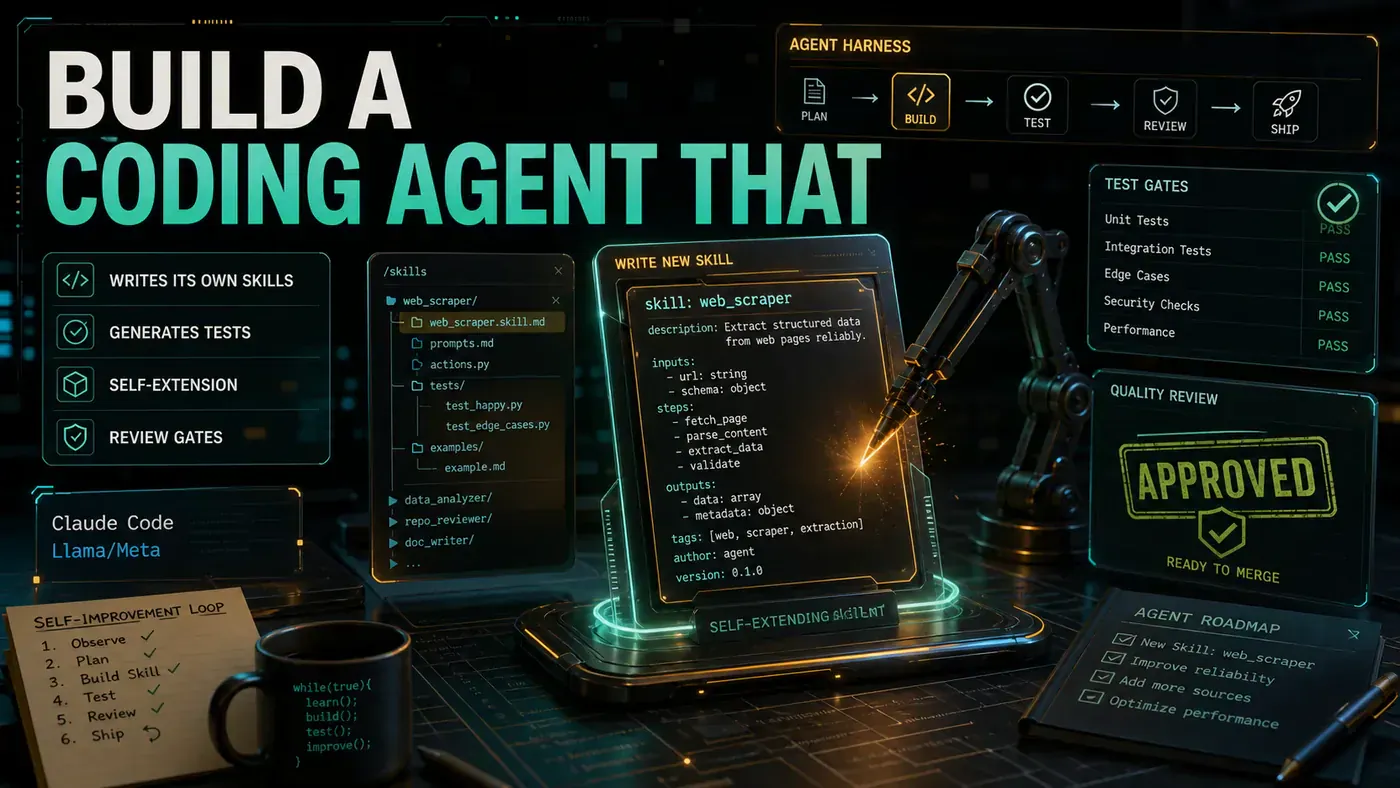
The idea behind this guide is to change that. Instead of an agent that only runs code, you build one that watches itself fail, works out why, and writes a small new tool, a Claude Code skill, to stop that failure happening again. The next time the same problem shows up, the agent already has an answer.
That sounds close to science fiction, and the risk is real: an agent that rewrites its own toolkit without supervision is exactly the kind of thing that goes sideways. So the whole design hangs on guardrails. Nothing gets installed without passing tests and getting a human nod first. The point is an agent that gets better at your codebase over time without quietly becoming something you can't predict.
One thing to flag up front, before you copy any of this into a real project. The code below uses an SDK import (import { defineSkill } from '@anthropic/claude-sdk') and a CLI command (claude skill register) that, as far as I can tell, do not exist in Anthropic's published tooling. Claude Code skills are real, but they are authored as SKILL.md files inside skill directories and discovered automatically from .claude/skills/ and ~/.claude/skills/, there's no defineSkill() factory and no register subcommand. Treat the snippets here as a design blueprint for the feedback loop, not as code that will compile against a real package. See the Claude Code skills docs (opens in a new tab) for the actual workflow.
Analysis
Prerequisites
- Claude Code with custom skills enabled. Custom skills are a beta feature that needs code execution turned on; the version threshold of 0.35 quoted in earlier drafts isn't tied to anything in Anthropic's release notes, so read it as illustrative rather than a hard floor. See the help centre guide on creating custom skills (opens in a new tab).
- TypeScript 5.3+. This is the author's pick rather than a documented constraint, worth knowing that current Zod (opens in a new tab) is officially tested against TypeScript 5.5+, so you may want to aim higher.
- Zod (opens in a new tab) for schema validation
- A project with a test suite (Jest/Vitest)
Step-by-Step Framework
Step 1: Define the Skill Template
The agent generates skills following this template:
// templates/skill-template.ts
export interface SkillTemplate {
 name: string;
 description: string;
 version: string;
 inputSchema: string; // Zod schema as string
 outputSchema: string; // Zod schema as string
 systemPrompt: string;
 handlerCode: string; // The actual implementation
 testCases: TestCase[];
}

export interface TestCase {
 name: string;
 input: Record<string, unknown>;
 expectedOutput: Record<string, unknown>;
 validator: string; // Function body as string
}
Step 2: Build the Failure Analyser
// self-improve/failure-analyser.ts
import { execSync } from 'child_process';
import { readFileSync } from 'fs';

interface Failure {
 type: 'syntax' | 'runtime' | 'test' | 'lint' | 'unknown';
 message: string;
 file?: string;
 line?: number;
 context: string;
 timestamp: Date;
}

export class FailureAnalyser {
 async analyse(lastOutput: string, workingDir: string): Promise<Failure[]> {
 const failures: Failure[] = [];

 // Parse test failures
 const testPattern = /FAIL.*\n(.*?)\n(.*?)/g;
 let match;
 while ((match = testPattern.exec(lastOutput)) !== null) {
 failures.push({
 type: 'test',
 message: match[2]?.trim() || 'Test failed',
 file: match[1]?.trim(),
 context: lastOutput.slice(Math.max(0, match.index - 200), match.index + 200),
 timestamp: new Date()
 });
 }

 // Parse TypeScript errors
 const tsPattern = /error TS\d+: (.*)/g;
 while ((match = tsPattern.exec(lastOutput)) !== null) {
 failures.push({
 type: 'syntax',
 message: match[1],
 context: lastOutput.slice(match.index - 100, match.index + 100),
 timestamp: new Date()
 });
 }

 // Parse runtime errors
 const runtimePattern = /(Error|Exception): (.*)/g;
 while ((match = runtimePattern.exec(lastOutput)) !== null) {
 failures.push({
 type: 'runtime',
 message: match[2],
 context: lastOutput.slice(match.index - 200, match.index + 200),
 timestamp: new Date()
 });
 }

 return failures;
 }

 categorisePattern(failures: Failure[]): string {
 // Group by error message similarity
 const patterns = failures.reduce((acc, f) => {
 const key = f.message.slice(0, 50); // First 50 chars as signature
 acc[key] = (acc[key] || 0) + 1;
 return acc;
 }, {} as Record<string, number>);

 return Object.entries(patterns)
 .sort((a, b) => b[1] - a[1])
 .map(([pattern, count]) => `${pattern} (${count} occurrences)`)
 .join('\n');
 }
}
The analyser does one job: read the agent's last batch of output and pull out what actually went wrong. It scans for three kinds of trouble, failed tests, TypeScript compiler errors, and runtime exceptions, and grabs a couple of hundred characters of surrounding text so the failure has some context attached. The categorisePattern method then counts how often each kind of error shows up, using the first 50 characters of the message as a rough fingerprint. If the same mistake keeps recurring, that's your strongest signal that a new skill would earn its keep.
Step 3: Implement the Skill Generator
// self-improve/skill-generator.ts
import { defineSkill } from '@anthropic/claude-sdk';
import { z } from 'zod';

export class SkillGenerator {
 private claude: any; // Claude Code SDK instance

 constructor(claudeInstance: any) {
 this.claude = claudeInstance;
 }

 async generateSkill(failure: Failure, existingSkills: string[]): Promise<SkillTemplate> {
 const prompt = `A coding agent encountered this failure:

Type: ${failure.type}
Message: ${failure.message}
Context: ${failure.context}

Existing skills: ${existingSkills.join(', ') || 'None'}

Generate a new Claude Code skill that would prevent this failure.
The skill should:
1. Detect the pattern that leads to this failure
2. Automatically fix or prevent it
3. Be reusable for similar cases

Return ONLY valid JSON matching the SkillTemplate interface.`;

 const generated = await this.claude.generate({
 prompt,
 outputSchema: z.object({
 name: z.string().regex(/^[a-z-]+$/),
 description: z.string(),
 version: z.string().default('0.1.0'),
 inputSchema: z.string(),
 outputSchema: z.string(),
 systemPrompt: z.string(),
 handlerCode: z.string(),
 testCases: z.array(z.object({
 name: z.string(),
 input: z.record(z.unknown()),
 expectedOutput: z.record(z.unknown()),
 validator: z.string()
 })).min(3)
 })
 });

 return generated;
 }

 async compileSkill(template: SkillTemplate): Promise<string> {
 // Generate the actual TypeScript file
 const skillCode = `import { defineSkill } from '@anthropic/claude-sdk';
import { z } from 'zod';

export default defineSkill({
 name: '${template.name}',
 description: '${template.description}',
 version: '${template.version}',

 input: ${template.inputSchema},
 output: ${template.outputSchema},

 systemPrompt: `${template.systemPrompt}`,

 async execute(input, { claude, fs, exec }) {
${template.handlerCode}
 }
});
`;

 return skillCode;
 }
}
This is where the agent hands the failure back to Claude and asks for a fix it can keep. The prompt describes the failure, lists the skills that already exist so nothing gets duplicated, and asks for a new skill that detects the pattern, fixes it, and works on similar cases later. The Zod outputSchema is doing real work here: it forces the model's reply into a shape your code can trust, including the rule that every skill arrives with at least three test cases (.min(3)). The compileSkill method then stitches that template into a TypeScript file.
A reminder from the prerequisites: the defineSkill import and the @anthropic/claude-sdk package in this snippet don't match any published Anthropic SDK (the real packages (opens in a new tab) are @anthropic-ai/sdk, @anthropic-ai/claude-agent-sdk and @anthropic-ai/claude-code). If you're porting this to a working system, the generated artefact should be a SKILL.md directory, not a defineSkill() call. The structure of the loop holds either way; the import line is the part that needs rewriting against reality.
Step 4: Build the Validation Pipeline
// self-improve/skill-validator.ts
import { execSync } from 'child_process';
import { writeFileSync, mkdirSync } from 'fs';
import { tmpdir } from 'os';
import { join } from 'path';

export class SkillValidator {
 async validate(skillCode: string, testCases: TestCase[]): Promise<ValidationResult> {
 const tempDir = join(tmpdir(), `skill-test-${Date.now()}`);
 mkdirSync(tempDir, { recursive: true });

 // Write the skill file
 const skillPath = join(tempDir, 'skill.ts');
 writeFileSync(skillPath, skillCode);

 const results: TestResult[] = [];

 for (const test of testCases) {
 try {
 // Write test harness
 const harness = this.generateTestHarness(skillCode, test);
 const harnessPath = join(tempDir, `test-${test.name}.ts`);
 writeFileSync(harnessPath, harness);

 // Run the test
 execSync(`npx tsx ${harnessPath}`, { timeout: 30000 });

 results.push({ test: test.name, passed: true });
 } catch (error) {
 results.push({
 test: test.name,
 passed: false,
 error: error instanceof Error ? error.message : 'Unknown error'
 });
 }
 }

 const allPassed = results.every(r => r.passed);

 return {
 passed: allPassed,
 tests: results,
 skillPath: allPassed ? skillPath : undefined
 };
 }

 private generateTestHarness(skillCode: string, testCase: TestCase): string {
 return `
import skill from './skill';

async function run() {
 const result = await skill.execute(${JSON.stringify(testCase.input)});
 const validator = ${testCase.validator};
 const isValid = validator(result, ${JSON.stringify(testCase.expectedOutput)});
 if (!isValid) {
 console.error('Expected:', ${JSON.stringify(testCase.expectedOutput)});
 console.error('Got:', result);
 process.exit(1);
 }
 console.log('PASS: ${testCase.name}');
}

run().catch(e => { console.error(e); process.exit(1); });
`;
 }
}
This is the gate that stops bad skills getting through. The validator writes the freshly generated skill to a temporary directory, then for each test case it builds a small harness, runs the skill against the test input, and checks the result with the validator function the generator supplied. It runs each harness with npx tsx, tsx (opens in a new tab) executes TypeScript files directly through Node, under a 30-second timeout so a hung skill can't stall the whole pipeline. A skill only earns a skillPath if every test passes. Anything less and it's rejected.
Step 5: Wire the Self-Improvement Loop
// self-improve/agent-loop.ts
export class SelfImprovingAgent {
 private analyser = new FailureAnalyser();
 private generator: SkillGenerator;
 private validator = new SkillValidator();
 private skillsDir: string;
 private maxNewSkills: number;
 private newSkillsThisSession = 0;

 constructor(claude: any, skillsDir: string, maxNewSkills = 5) {
 this.generator = new SkillGenerator(claude);
 this.skillsDir = skillsDir;
 this.maxNewSkills = maxNewSkills;
 }

 async run(task: string): Promise<TaskResult> {
 // Execute the task
 const result = await this.executeTask(task);

 // If failure detected, attempt self-improvement
 if (!result.success) {
 await this.attemptSelfImprovement(result.output);
 }

 return result;
 }

 private async attemptSelfImprovement(output: string): Promise<void> {
 // Check limit
 if (this.newSkillsThisSession >= this.maxNewSkills) {
 console.log('Self-improvement limit reached for this session.');
 return;
 }

 // Analyse failures
 const failures = await this.analyser.analyse(output, process.cwd());
 if (failures.length === 0) return;

 // Get existing skills
 const existingSkills = await this.listExistingSkills();

 for (const failure of failures) {
 // Check if we already have a skill for this
 if (this.hasSkillForFailure(failure, existingSkills)) {
 console.log(`Skill exists for: ${failure.message.slice(0, 50)}`);
 continue;
 }

 // Generate new skill
 console.log(`Generating skill for: ${failure.message.slice(0, 50)}...`);
 const template = await this.generator.generateSkill(failure, existingSkills);
 const skillCode = await this.generator.compileSkill(template);

 // Validate
 console.log(`Validating skill: ${template.name}...`);
 const validation = await this.validator.validate(skillCode, template.testCases);

 if (validation.passed) {
 // Human approval gate
 const approved = await this.requestApproval(template);
 if (approved) {
 await this.installSkill(template.name, skillCode);
 this.newSkillsThisSession++;
 console.log(`Skill '${template.name}' installed successfully.`);
 }
 } else {
 console.error(`Skill validation failed:`);
 validation.tests.forEach(t => {
 console.error(` ${t.passed ? '✓' : '✗'} ${t.test}`);
 });
 }
 }
 }

 private async requestApproval(template: SkillTemplate): Promise<boolean> {
 return claude.prompt({
 type: 'confirm',
 message: `Approve new skill:\nName: ${template.name}\nDescription: ${template.description}\nTests: ${template.testCases.length}\n\nInstall?`
 });
 }

 private async installSkill(name: string, code: string): Promise<void> {
 const skillPath = join(this.skillsDir, `${name}.ts`);
 writeFileSync(skillPath, code);
 // Register with Claude Code
 await execSync(`claude skill register ${skillPath}`);
 }
}
Here's where the pieces come together. The agent runs a task. If it succeeds, nothing happens, no point fixing what isn't broken. If it fails, attemptSelfImprovement kicks in: it checks it hasn't already hit the session limit, analyses the failures, and for each one that doesn't already have a matching skill, it generates, compiles, and validates a candidate. Only skills that pass validation reach the human approval prompt, and only approved skills get installed. The session counter ticks up with each one, so the agent can't go on a skill-writing spree.
Worth noting that the installSkill method ends with claude skill register, a command that, again, isn't part of Anthropic's documented CLI. In practice Claude Code finds skills by scanning the .claude/skills/ and ~/.claude/skills/ directories, so "installing" a skill means writing the SKILL.md directory into the right place, full stop. Drop the register call and put the file where Claude Code already looks.
Step 6: Configure the Agent
# .claude/self-improve.yaml
self_improvement:
 enabled: true
 max_new_skills_per_session: 5
 skill_expiry_days: 30
 require_approval: true

 allowed_skill_types:
 - linting
 - formatting
 - testing
 - refactoring
 - documentation

 forbidden_skill_types:
 - security_modifications
 - config_changes
 - dependency_management

 test_framework: vitest
 min_test_cases: 3
 min_pass_rate: 1.0 # All tests must pass
The config file is where you draw the boundaries. The allow-list keeps the agent to low-stakes territory, linting, formatting, testing, refactoring, documentation, and the forbidden list keeps it well away from anything that touches security, config, or dependencies. Those are decisions a human should be making, not an agent improvising at 2am. The min_pass_rate: 1.0 means there's no partial credit: a skill that fails one test is a skill that doesn't ship.
Do/Don't
| Do | Don't |
|---|---|
| Require human approval for all new skills | Let the agent install skills unsupervised |
| Set a max of 3-5 new skills per session | Allow unlimited skill creation |
| Require 3+ test cases per skill | Accept skills with no tests |
| Set 30-day expiry on auto-generated skills | Keep generated skills forever |
| Log every self-improvement decision | Run the loop without audit logging |
Conclusion
An agent that learns from its own mistakes is a tempting thing to build, and the loop in this guide, fail, analyse, generate, test, approve, install, is a sound shape for it. The safety mechanisms are the part that matters most: a human signs off before anything goes live, every skill ships with tests, and old skills expire so the agent's toolkit doesn't quietly sprawl. These are sensible engineering choices rather than features Anthropic ships, so treat the specific numbers (five skills a session, three tests, 30-day expiry) as starting points you'll tune to your own risk tolerance. Keep the gates honest and the agent can grow its capabilities without growing into something you no longer trust. Two parts of the code, the @anthropic/claude-sdk import and the claude skill register command, need rewriting against Anthropic's actual SKILL.md workflow before any of this runs for real.