





Briefing
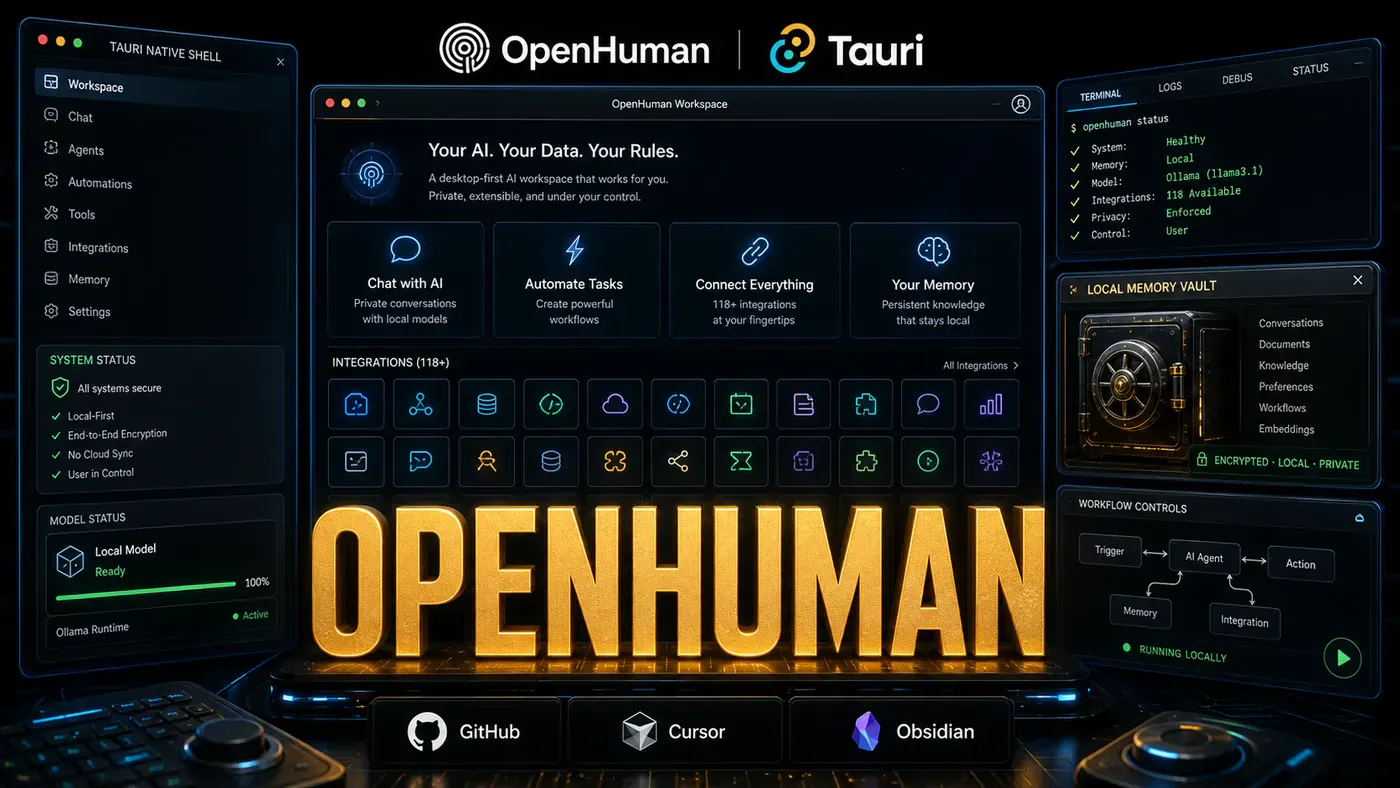
Most AI agents live somewhere you can't see: a cloud server, or a terminal window humming away on someone else's hardware. OpenHuman (opens in a new tab) takes the opposite bet. It puts the personal AI back on your desktop, wires it into the apps you already use, and keeps your data on your own machine. The project had picked up around 7,800 GitHub stars by mid-May 2026, and the audience has kept growing since.
For a business team weighing up AI tools, that location question isn't trivia. Where your assistant runs decides where your emails, files, and client notes end up. A cloud agent reads your data on someone else's servers. A desktop agent, at least in theme, reads it on yours. OpenHuman is built around that distinction, and it's worth understanding what the design actually delivers and where the marketing runs ahead of the facts.
A quick caveat before the specs: this project moves fast. The star count above was current in early May, but the live repo has climbed well past it since. Treat the numbers below as a snapshot of the launch window, not today's figures.
Desktop-First Philosophy
OpenHuman is built with Tauri (opens in a new tab), the Rust-based framework for lightweight desktop apps. That's a real engineering choice rather than a branding one: Tauri apps tend to be smaller and lighter on memory than the Electron equivalents most desktop software ships with. The project's own claims go further, citing a build under 15MB, a cold start under 2 seconds, and far lower RAM use than Electron rivals. Those specific figures aren't in the README or docs, though, so take them as unconfirmed performance claims rather than measured benchmarks. What is confirmed: it runs natively on macOS, Windows, and Linux.
The GPLv3 license (opens in a new tab) is the part that matters most for trust. The code is fully open source, with no proprietary core. The project also describes itself as having no telemetry and no required cloud dependencies, with your data staying local unless you opt out. That's mostly right, with one important asterisk: the default managed mode routes integration logins and model calls through OpenHuman's own backend (via Composio-brokered OAuth and a model proxy). So "no cloud dependencies" describes what's possible, not what happens out of the box, and the "no telemetry" line isn't spelled out in the documentation.
118+ Integrations
The headline number is reach. OpenHuman connects to:
- Development tools: GitHub, GitLab, VS Code, Cursor, terminal
- Communication: Slack, Discord, email clients, calendar
- Productivity: Notion, Obsidian, Todoist, calendars
- Media: Local file system, photos, music libraries
- Data sources: PostgreSQL, SQLite, CSV, APIs
The 118+ integrations figure checks out, per the integrations docs (opens in a new tab). Worth knowing how they're built, though: they come from Composio's connector catalog through one-click OAuth, not a local plugin system with a standard interface as the original framing suggested. The article elsewhere claims the community has contributed over 70 integration plugins, with new ones added weekly. No source backs that up, and given the Composio-powered model it looks unfounded, so treat it as an unconfirmed claim rather than a feature.
Memory Trees: The Knowledge System
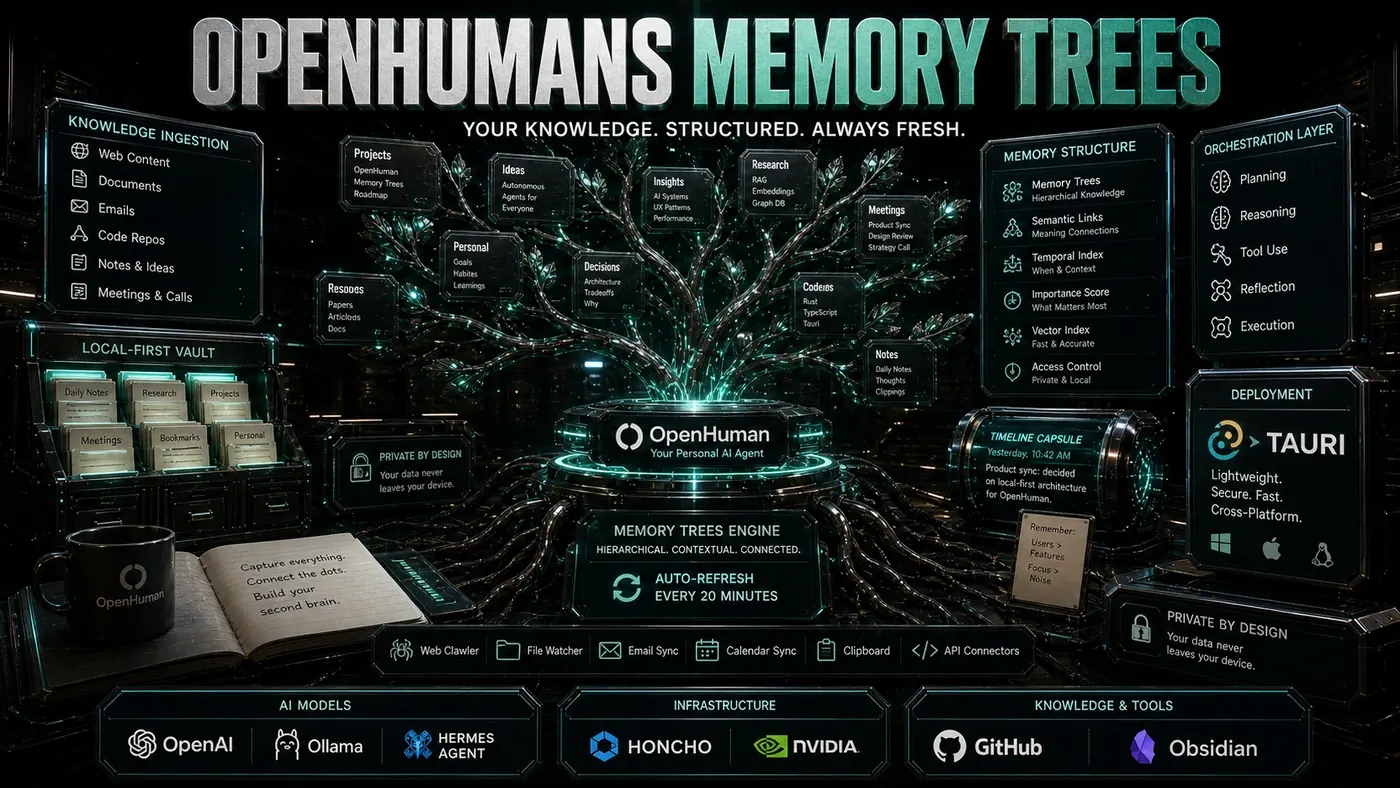
The most interesting piece is Memory Trees, a hierarchical knowledge system that organises information by context and relevance. Instead of a flat vector database, it keeps relationships intact: a conversation about a project stays linked to the files, emails, and earlier discussions that belong with it. The README (opens in a new tab) describes it as a memory graph of roughly 3K-token Markdown chunks, scored and folded into summary trees in local SQLite, with an Obsidian-compatible vault underneath.
The system auto-fetches updates every 20 minutes (opens in a new tab), so the knowledge base stays current without hammering your machine. The README puts it plainly: every twenty minutes the core walks each active connection and pulls fresh data into the memory tree. The project also says background indexing runs CPU-only, which would keep it usable on older hardware, but that detail isn't documented anywhere official, so consider it unconfirmed.
Technical Specifications
- 7,800 GitHub stars (early-May 2026 snapshot; the live repo is now far higher)
- GPLv3 license, fully open source
- 118+ integrations, connectors for major tools and services
- Tauri desktop app, native performance, cross-platform
- v0.53.43 (the May 13, 2026 launch-window build; later releases have shipped since)
- Auto-fetch interval: 20 minutes
- Minimum requirements: reportedly 4GB RAM and any modern CPU (not stated in official docs)
Who Is It For?
OpenHuman is aimed at knowledge workers who want AI help without handing over their data. Researchers, writers, developers, and project managers have all reported getting value out of it. The desktop-first approach means it works offline, keeps your information local, and behaves like a real part of the operating system rather than a browser tab.
The project is maintained by TinyHumans.ai (opens in a new tab), a small team. They've signalled plans for mobile companion apps, team collaboration features, and broader integration coverage, though those are roadmap intentions rather than shipped features. If you want a desktop AI that treats privacy as the starting point, OpenHuman is a serious one to watch.
OpenHuman: answer-first summary
OpenHuman matters because it can change how Founders and operators plan, build, or govern an tool evaluation workflow. OpenHuman brings personal AI to your desktop with Tauri, 118+ integrations, and a unique Memory Tree knowledge system, all under GPLv3.
The direct answer is this: do not treat the topic as a standalone trend. Treat it as a decision about inputs, outputs, review ownership, data exposure, and whether the workflow produces a result that is faster, safer, or more useful than the current process.
OpenHuman: implementation checklist
- Define the user, job to be done, and success metric for the tool evaluation workflow.
- Collect real examples, policies, source files, customer questions, or search queries before writing prompts or choosing tools.
- Separate low-risk drafts from decisions that need approval, privacy checks, or senior review.
- Document what the AI is allowed to access, what it must not access, and who signs off before production use.
- Review time to value, adoption rate, cost per workflow, quality review score after a small pilot rather than judging the idea from a demo.
This keeps the work practical. It also gives search engines and AI answer engines a clean factual structure: what the topic is, who it helps, what to do next, and which risks matter before implementation.
Decision criteria for OpenHuman
| Decision area | What to check | Production signal |
|---|---|---|
| Intent | Does OpenHuman solve a real workflow problem? | The use case has a named owner and measurable outcome. |
| Data | Can the required data be used safely? | Sensitive data is classified and access is controlled. |
| Quality | Can a reviewer judge the output consistently? | Examples, rubrics, or acceptance criteria exist. |
| Scale | Can the workflow be repeated without hero effort? | The process is documented and can be handed to another team member. |
Practical example for OpenHuman
A small business could use this article to choose one practical test. For example, a manager might take one customer-facing process, one internal document workflow, or one recurring content task and redesign only that step with AI support. The goal is not to automate the whole business at once; it is to learn where AI Tools creates reliable leverage.
The useful deliverable is a short operating note: the trigger, the source material, the prompt or tool, the review checklist, the escalation rule, and the metric. That note becomes the handover asset for staff training, SEO/GEO content, service delivery, or future agent work.
Risks and controls for OpenHuman
The common failure pattern is moving too quickly from a promising idea into an unmanaged workflow. For OpenHuman, the risk is not only bad output. It can also be unclear data permission, staff confusion, duplicate content, unreviewed customer advice, or a tool that quietly changes cost or capability.
- Control tool sprawl with a named owner, a review step, and written acceptance criteria.
- Control unclear pricing with a named owner, a review step, and written acceptance criteria.
- Control vendor lock-in with a named owner, a review step, and written acceptance criteria.
- Control unreviewed data sharing with a named owner, a review step, and written acceptance criteria.
Measurement plan for OpenHuman
A useful AI or SEO initiative should leave evidence. Track time to value, adoption rate, cost per workflow, quality review score and compare the pilot against the current process. If the measure does not improve, keep the learning but avoid scaling the workflow.
For GEO readiness, the page should also answer the core question directly, define the entities involved, include implementation steps, explain tradeoffs, and link readers to the next relevant AI Kick Start service, guide, tool, or article.
Definitions and entities for OpenHuman
For search, GEO, and staff handover, define the core entities in plain language. In this article the important entities are the workflow owner, the AI tool or model, the source material, the review process, the risk boundary, and the measurable business outcome. Clear definitions make the page easier for people to scan and easier for AI answer engines to quote accurately.
- Workflow owner: the person accountable for deciding whether OpenHuman belongs in the business process.
- Source material: the documents, examples, policies, URLs, prompts, videos, or customer questions that ground the output.
- Review boundary: the point where a human checks accuracy, privacy, brand voice, or customer impact before the result is used.
- Success metric: the measure that proves whether the tool evaluation workflow is worth repeating.
OpenHuman versus doing nothing
Doing nothing is also a decision. The cost may be slow manual work, weaker search visibility, inconsistent advice, duplicated effort, or staff using unmanaged AI tools without a shared process. The practical question is whether a controlled pilot can reduce that cost without creating a larger governance problem.
| Option | When it makes sense | What to watch |
|---|---|---|
| Do nothing | The workflow is rare, low value, or already reliable. | Competitors may improve speed, content depth, or service consistency first. |
| Run a small pilot | The task repeats often and has clear review criteria. | Keep scope tight and measure the result against the current process. |
| Build a production workflow | The pilot is repeatable and risk controls are documented. | Assign ownership, monitoring, training, and a rollback path. |
AI Kick Start handover package for OpenHuman
A production handover should be concrete enough that another person can run it. For OpenHuman, that means a short brief, a workflow map, approved prompts or tool settings, source material, a review checklist, internal links to supporting resources, and a simple measurement sheet. This is the difference between reading about AI and turning it into operational capability.
That packaging also strengthens E-E-A-T. It shows experience through implementation notes, expertise through decision criteria, authoritativeness through source-aware structure, and trust through risks, controls, and review steps. The article becomes useful even if the reader never buys a tool because it helps them make a better operational decision.