





Introduction: Why This One Belongs on the Watchlist
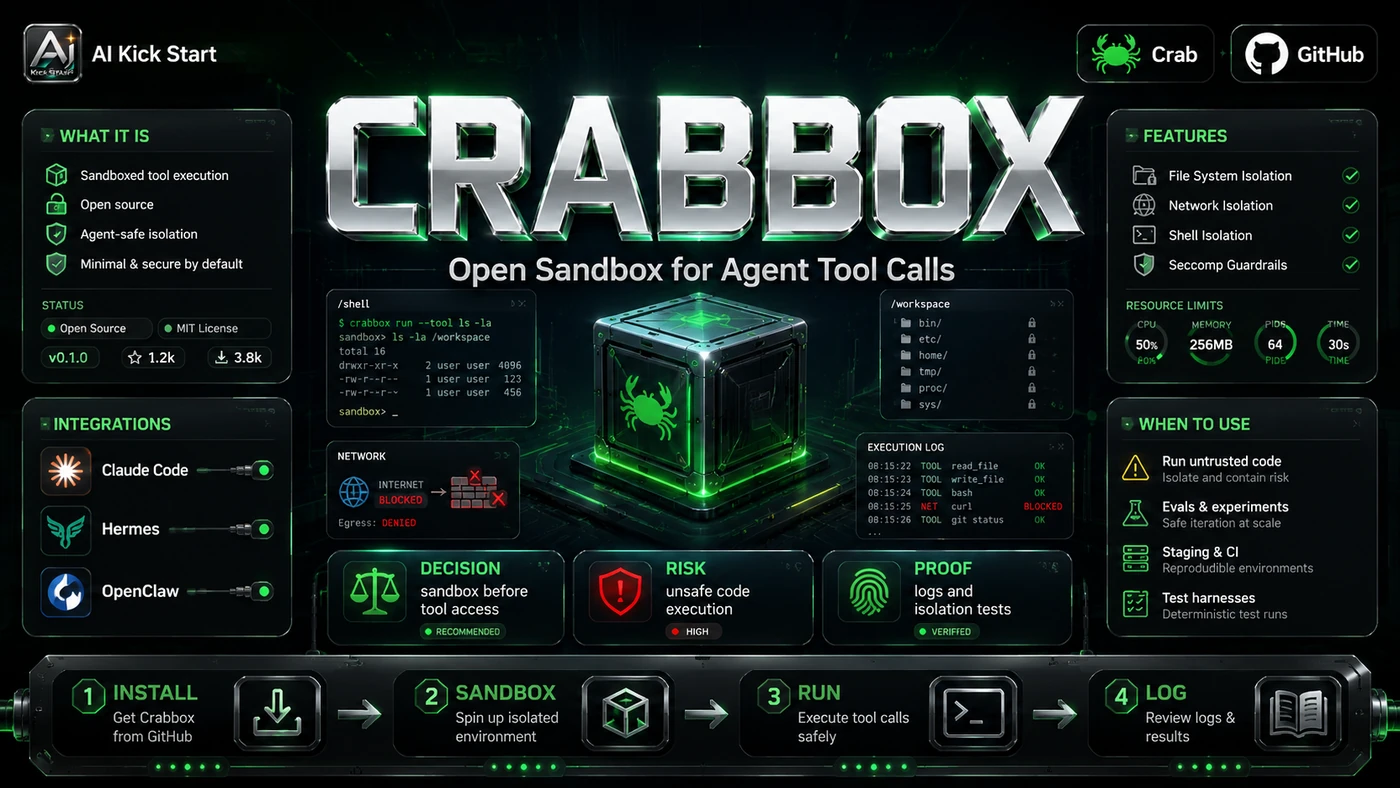
Crabbox, from OpenClaw creator Peter Steinberger and demonstrated by Jason Zhou of AI Jason, gives each AI coding agent its own disposable cloud sandbox so teams can verify generated code without polluting a local machine or main branch. The reason it matters for AI Kick Start readers is practical: this is not just another launch to admire from a distance. It changes how founders, operators, and technical teams should think about AI Engineering work over the next few months. The source transcript repeatedly centres on Crabbox, Daytona and AI agents, with the video framing the topic as a practical workflow rather than a detached product announcement. That is the useful lens. The video is worth treating as implementation intelligence: what should be tested, what should be ignored for now, and what should become part of a repeatable operating system. For Australian small businesses and technical teams, the right question is not "is this impressive?" The right question is "where does this reduce friction without creating a larger governance, security, or maintenance problem?"
What the Video Actually Shows
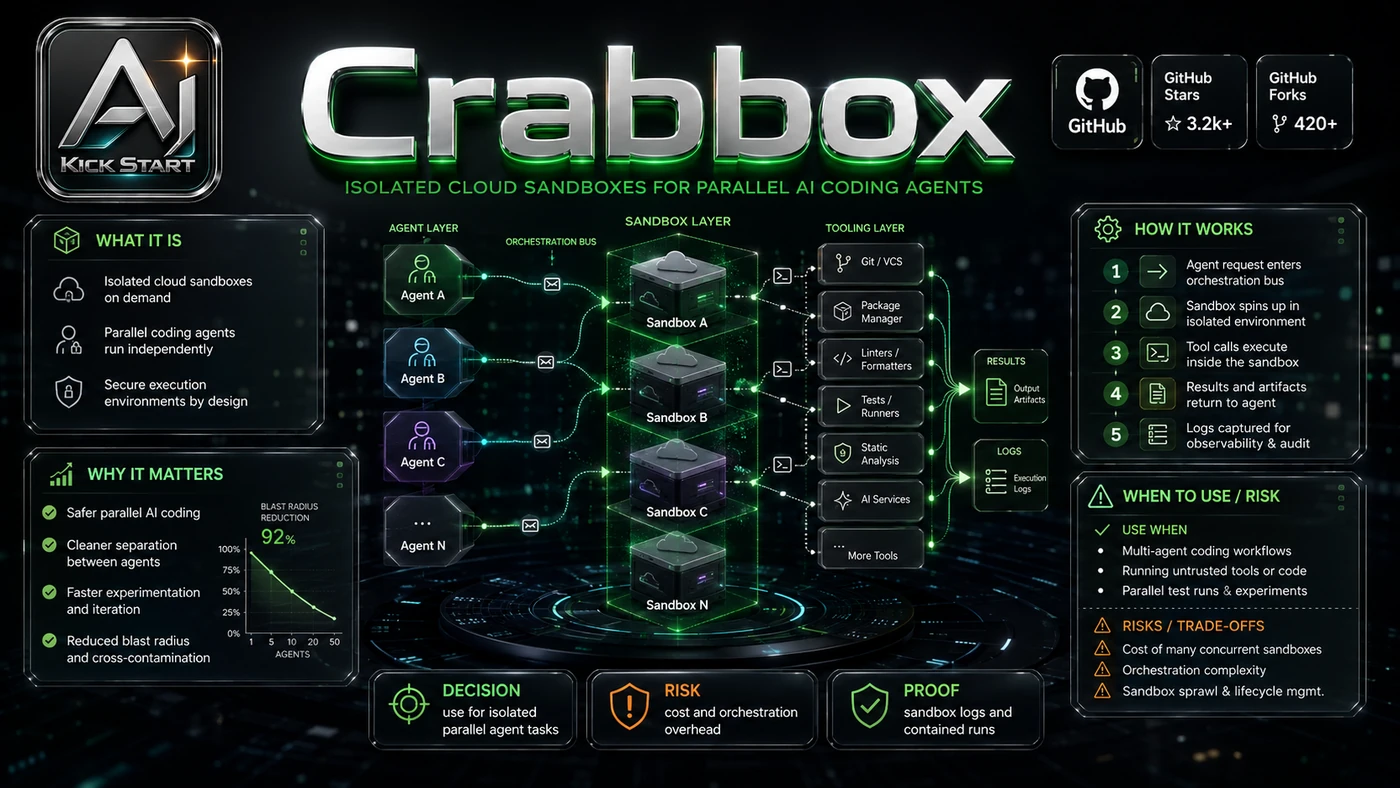
The core pattern is simple: give every agent task its own cloud box, sync the uncommitted diff, run the verification command remotely, collect screenshots or video evidence, and tear the box down once a human has reviewed the result. In practice, that means the update sits inside a broader shift from isolated AI prompts to managed systems. A tool, model, or method only becomes valuable when it has clear inputs, a measurable output, a review path, and a way to repeat the result next week. The video's most useful signal is the workflow shape. The moving parts can be summarised as: Local worktree Cloud sandbox Verification command Review artefact That is the level at which teams should evaluate it. A demo can be entertaining, but a workflow must survive messy source files, staff handoff, data boundaries, and real deadlines.
The Implementation Pattern
The first implementation lesson is to narrow the scope. Start with one repository and one repeatable verification task, such as running the test suite on a feature branch. Broad adoption is usually where AI systems fail first because nobody knows which decision the tool is allowed to make and which decision still belongs to a human. The second lesson is to create a test harness. Keep the first rollout narrow and set cost guardrails, including an idle timeout, so warm boxes do not become a surprise cloud bill. A useful harness does not have to be complicated. It can be a short brief, a fixed sample dataset, a few expected outputs, and one person responsible for judging whether the result is good enough. The third lesson is to capture the process. Treat the Dockerfile and .crabbox.yaml as production infrastructure, version them in pull requests, and keep provider API keys out of the repository. When the process is documented, it can become a reusable skill, checklist, prompt pack, repo pattern, or operating procedure. When it is not documented, the team is back to improvising in chat.
Research Update: What To Correct
This update adds a current-source pass rather than treating the original video summary as enough. The important corrections are the product surface, plan or pricing constraints, and what should be verified before a team depends on the workflow. First, the video's title calls Crabbox a "secret project," but it is publicly available at github.com/openclaw/crabbox under MIT licence and documented on GitHub Pages after its AI Engineer Summit debut. Second, auto-generated captions frequently render the product name as "Crapbox"; the actual name is Crabbox. Third, Daytona is the demo provider, yet Crabbox is provider-agnostic and lists dozens of options including AWS, Azure, GCP, Hetzner, E2B, Modal, Cloudflare, RunPod, local Docker, Proxmox, and static SSH hosts. Fourth, Crabbox itself is free and open-source; the real cost line is the cloud provider behind it. Finally, the README warns that Crabbox is a developer execution tool, not a hostile multi-tenant security sandbox, so it assumes the local user, repository configuration, and coordinator operators are trusted.
Practical Setup and How-To
The useful next step is a controlled pilot with a named owner, fixed inputs, a measurable output, and a review point. Use the sequence below as the first implementation path before expanding the workflow. Install the CLI with brew install openclaw/tap/crabbox or from GitHub releases, then define the environment in a Dockerfile containing the runtime, package manager, Docker-in-Docker if required, database CLIs, and project-specific tooling such as the Supabase CLI. Create .crabbox.yaml that names the provider, excludes folders like node_modules and .next, forwards only needed environment variables, and sets idleTimeout and ttl limits. Add a setup.sh script that installs dependencies, starts databases, and brings the dev server up. Then run crabbox warmup --id my-task, crabbox run --id my-task -- ./setup.sh, crabbox run --id my-task -- pnpm test, and crabbox stop my-task to release the box. For agents, wrap these into a skill or shell helper such as bash cbx.sh up and bash cbx.sh test so the agent reasons about intent, not individual CLI flags.
Pricing, Access, and Comparison Notes
Pricing and access should be checked at implementation time because AI products change quickly. The safer decision is to compare the tool against the job-to-be-done, not against launch hype. Crabbox is open-source and free; the variable cost is the cloud provider behind it. Daytona offers $200 trial credits, then pay-as-you-go compute at roughly $0.0504 per vCPU-hour, $0.0162 per GiB-hour, and storage above 5 GiB at $0.000108 per GiB-hour, and can be self-hosted under Apache 2.0. GitHub Codespaces gives 60 free hours monthly, then $0.18-$1.44 per hour. E2B offers $100 in one-time hobby credits with one-hour caps and Pro from around $150 per month. Modal gives $30 monthly free credits for GPU workloads. Cloudflare Containers bill in 10-millisecond increments with a $5 per month Workers Paid floor and no free tier. The right comparison is shape, not price: Crabbox suits long-lived, stateful workspaces that mirror a local dev environment, whereas E2B or Cloudflare Containers may be cheaper for a few seconds of untrusted code. Access Plan, preview status, region, account type, admin controls, and rate limits. Cost Subscription, credits, API tokens, retries, hardware, review time, and support burden. Fit Workflow reliability, data handling, output quality, observability, and human approval needs.
Implementation Notes for Teams
For AI Kick Start readers, this is the production filter: keep the first rollout narrow, make the evidence visible, and do not let the tool cross a business boundary until the review model is clear. Forward only the environment variables the agent actually needs; the README explicitly warns against passing secrets on the command line and reminds users that captured output is not automatically redacted. Give the agent a small wrapper script rather than arbitrary CLI invocations, which reduces the chance of an invented flag leaking credentials or provisioning an oversized machine. Add review gates before external messages, customer data access, or write actions, and keep the human review gate central because artefacts are meant to make review easier, not remove it.
Screenshot and Visual Guidance
The second inline image for this article should make the implementation concrete: a clean project bench with a labelled .crabbox.yaml file, secure API-key lockbox, wrapper script, and graded review artefact from a headless browser test. If the team is documenting a real rollout, capture setup screens, before/after outputs, permission settings, cost meters, and review evidence rather than decorative screenshots. The most useful visual artefacts prove a change works in a real browser or UI; Crabbox can publish screenshots and MP4 recordings to S3, GitHub release assets, or inline PR comments. In the demo, Jason Zhou shows Playwright returning a video recording of the login flow, so add one artefact-producing command to the agent's test skill, such as a screenshot or short recording of a critical path.
Where It Fits for Real Teams
For founders, the opportunity is speed with evidence. This kind of workflow can reduce the time between idea and first useful output, but it should still produce artefacts that a customer, manager, or developer can inspect. For operators, the value is consistency. If the same task is done slightly differently every time, AI can either make the inconsistency worse or help standardise the path. The difference is whether the workflow has rules, examples, and review checkpoints. For technical teams, the value is leverage. A strong setup lets agents take on repeatable work while engineers keep control over architecture, security, deployment, and final judgement. The practical fit is strongest when the task has clear source material, a known output format, and a low-cost way to verify quality. It is weaker when the task is vague, politically sensitive, legally risky, or dependent on facts that cannot be checked. Crabbox pays off fastest where multiple agent worktrees need Postgres, Redis, or local Supabase, and review is the bottleneck.
Trade-offs and Risks
The main risk is infrastructure complexity and the cost discipline required to keep warm boxes from becoming a surprise bill. That risk can be managed, but only if it is named before the workflow becomes normal. A second risk is agent misbehaviour and the gap between a clean demo and messy production repeatability. AI systems often look better in a screen recording than they feel inside a production workflow. The test is whether the result is repeatable when the source material changes, the operator changes, and the deadline is real. A third risk is security-boundary confusion. Crabbox is not designed to run untrusted, adversarial code in isolation, so treating it like E2B would be a mistake. This is why AI Kick Start generally recommends a staged rollout: sandbox first, internal use second, customer-facing deployment last.
The Next Sensible Test
The next sensible test is a small controlled implementation. Pick one workflow, one owner, one expected output, and one acceptance check. Run it twice. If the second run is easier than the first, the pattern is worth keeping. Do not judge the workflow by the best possible demo. Judge it by the worst acceptable production case. Ask: what happens when the source file is incomplete, the tool is unavailable, the output is wrong, or a staff member needs to explain the result to a customer? If those answers are clear, this belongs in the roadmap. If they are not, it belongs in the lab until the operating model catches up.