



Analysis
There is a quiet shift happening in how experienced developers use AI coding tools, and it comes down to one habit: making the machine think before it types.
For a while, the pitch for AI coding assistants was "tell it what you want and it writes the code." That works fine for small jobs. It falls apart on the kind of work senior engineers actually worry about, reworking authentication, migrating a service, untangling something that 23 other files depend on. Move fast there and you get a mess that someone has to clean up later.
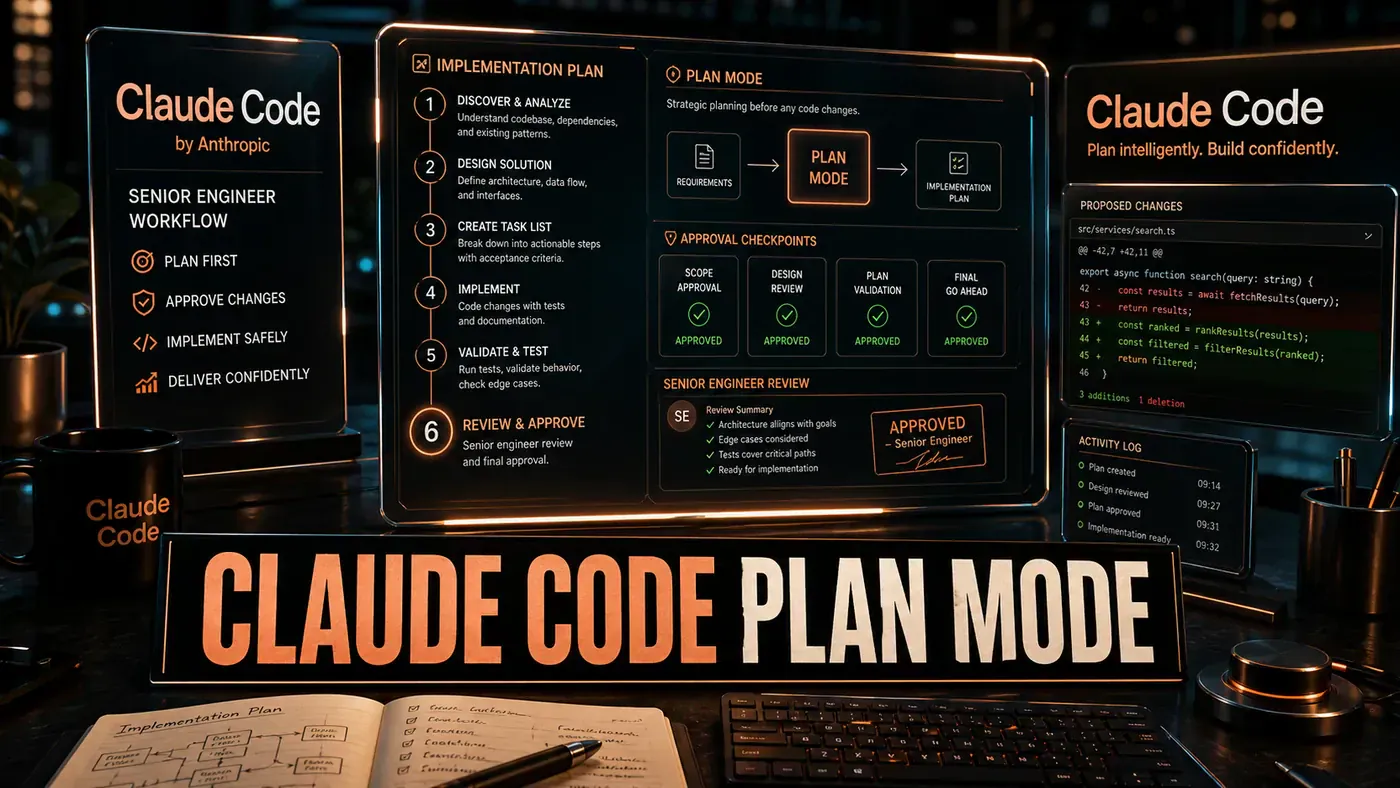
Claude Code's Plan Mode answers that by changing the order of operations. Instead of writing code straight away, the tool reads your codebase, works out what a change would touch, lists the risks, and hands you a plan. Nothing gets edited until you say go. In effect, it stops acting like an eager junior and starts acting like a tech lead who reads the requirements first.
That is the "so what" for a business team: fewer surprise breakages, fewer late-night rollbacks, and a written plan you can argue with before the work is done rather than after.
What Plan Mode Actually Does
You can turn on Plan Mode with the /plan command, by pressing Shift+Tab twice, or by launching with the --permission-mode plan flag. (Some write-ups describe a "plan first" prompt prefix, but that is not a documented way to switch it on.) Once it is active, Claude Code enters a read-only state and works through the problem before touching any files. It analyses the codebase, names the files it expects to change, surfaces the risks, and produces a reviewable plan that waits for your approval (opens in a new tab):
- Analyses the codebase: Scans the relevant files, identifies dependencies, and maps how much of the system the change will touch.
- Generates a task decomposition: Breaks the request into sub-tasks with explicit ordering.
- Identifies risks: Flags breaking changes, test gaps, and architectural conflicts.
- Produces a reviewable plan: Presents it as a numbered list with file references and rough complexity.
- Waits for approval: Nothing runs until you approve, modify, or reject the plan.
The transcript below is an illustrative example of what that output looks like, the file counts, coverage percentages, and effort estimates are made up to show the shape of a plan, not pulled from a real run:
> /plan Refactor the authentication middleware to use JWT instead of sessions

## Analysis
The auth middleware spans 3 files with 14 dependencies. Tests cover 67% of
paths. Session handling is referenced in 23 files across 2 services.

## Task Decomposition
1. Extract session interface to abstract auth provider (low risk)
2. Implement JWT provider with backward-compatible session fallback (medium risk)
3. Update middleware to route through new provider (medium risk)
4. Add JWT secret rotation mechanism (medium risk)
5. Update all 23 call sites (high risk - many edge cases)
6. Expand test coverage to 90%+ (medium risk)

## Identified Risks
- Risk #1: Rolling deployment requires both session and JWT active
- Risk #2: 6 integration tests depend on session-specific behaviour
- Risk #3: Mobile clients may not handle JWT expiry gracefully

## Estimated effort: 4-6 hours
Why Senior Engineers Prefer It
Newer developers tend to ask Claude Code to "just fix it." Engineers who have been burned know that charging into changes on a complex system creates debt. Plan Mode bakes in the discipline that experience teaches: understand the problem, map the territory, name the risks, then write the code.
The approval gate is the part that matters. Autonomous modes can rewrite a dozen files before you notice they took a wrong turn. Plan Mode stops at the line between planning and execution. You can reject a plan, ask for changes, or approve it with conditions, "skip step 4, we handle rotation in the gateway layer."
Integration with Sub-Agents
Plan Mode pairs well with Claude Code's sub-agent system (opens in a new tab). A complex plan can spin off specialised sub-agents, one for test generation, one for documentation, one for migration scripts, while a coordinator holds the overall plan and hands out the work. With Opus 4.8's Dynamic Workflows, Claude can plan the work and then run hundreds of parallel subagents in a single session (opens in a new tab), with the coordinator resolving conflicts at the merge points. Anthropic ships that capability as a research preview, aimed at codebase-scale migrations from kickoff to merge.
# Trigger Plan Mode
claude /plan "your complex task here"

# Or prefix any prompt
claude "plan first: migrate from REST to GraphQL"
When Not to Use Plan Mode
For a task under five files with a clear scope, Plan Mode is overhead you do not need. Direct mode, where Claude Code writes code straight away, is faster for bug fixes, small refactors, and adding a field to a data model. The skill is knowing which mode fits the job. Plan Mode earns its keep when the change is bigger than you can hold in your head at once, guides tend to suggest reaching for it when a change touches three or more files or cannot be summed up in a single sentence.
Pricing Context
Worth clearing up: Plan Mode is not a paid extra. It is a built-in Claude Code feature, available on individual Pro and Max plans as well as team seats. The $100 figure people quote is the Team Premium seat price, $100 per seat per month on annual billing, $125 month-to-month, with a five-seat minimum (opens in a new tab).
Where the spend makes sense is the same calculation any senior engineer runs: tool cost against the cost of a production incident. On the model side, Opus 4.8 is around four times less likely than its predecessor to let flaws in code it wrote pass unremarked (opens in a new tab), which is the kind of number that matters more than the seat price. Some teams report that Plan Mode cuts "Claude broke staging" rollbacks by something like 60% on complex tasks compared with direct mode, though that figure is anecdotal and not backed by any published study.
Claude Code Plan Mode: answer-first summary
Claude Code Plan Mode matters because it can change how Developers and technical teams plan, build, or govern an AI implementation workflow. Plan Mode makes Claude Code propose a plan before writing code.
The direct answer is this: do not treat the topic as a standalone trend. Treat it as a decision about inputs, outputs, review ownership, data exposure, and whether the workflow produces a result that is faster, safer, or more useful than the current process.
Claude Code Plan Mode: implementation checklist
- Define the user, job to be done, and success metric for the AI implementation workflow.
- Collect real examples, policies, source files, customer questions, or search queries before writing prompts or choosing tools.
- Separate low-risk drafts from decisions that need approval, privacy checks, or senior review.
- Document what the AI is allowed to access, what it must not access, and who signs off before production use.
- Review time saved, quality score, review effort, business outcome after a small pilot rather than judging the idea from a demo.
This keeps the work practical. It also gives search engines and AI answer engines a clean factual structure: what the topic is, who it helps, what to do next, and which risks matter before implementation.
Decision criteria for Claude Code Plan Mode
| Decision area | What to check | Production signal |
|---|---|---|
| Intent | Does Claude Code Plan Mode solve a real workflow problem? | The use case has a named owner and measurable outcome. |
| Data | Can the required data be used safely? | Sensitive data is classified and access is controlled. |
| Quality | Can a reviewer judge the output consistently? | Examples, rubrics, or acceptance criteria exist. |
| Scale | Can the workflow be repeated without hero effort? | The process is documented and can be handed to another team member. |
Practical example for Claude Code Plan Mode
A small business could use this article to choose one practical test. For example, a manager might take one customer-facing process, one internal document workflow, or one recurring content task and redesign only that step with AI support. The goal is not to automate the whole business at once; it is to learn where Code creates reliable leverage.
The useful deliverable is a short operating note: the trigger, the source material, the prompt or tool, the review checklist, the escalation rule, and the metric. That note becomes the handover asset for staff training, SEO/GEO content, service delivery, or future agent work.
Risks and controls for Claude Code Plan Mode
The common failure pattern is moving too quickly from a promising idea into an unmanaged workflow. For Claude Code Plan Mode, the risk is not only bad output. It can also be unclear data permission, staff confusion, duplicate content, unreviewed customer advice, or a tool that quietly changes cost or capability.
- Control unclear use case with a named owner, a review step, and written acceptance criteria.
- Control weak data quality with a named owner, a review step, and written acceptance criteria.
- Control missing governance with a named owner, a review step, and written acceptance criteria.
- Control no measurement with a named owner, a review step, and written acceptance criteria.
Measurement plan for Claude Code Plan Mode
A useful AI or SEO initiative should leave evidence. Track time saved, quality score, review effort, business outcome and compare the pilot against the current process. If the measure does not improve, keep the learning but avoid scaling the workflow.
For GEO readiness, the page should also answer the core question directly, define the entities involved, include implementation steps, explain tradeoffs, and link readers to the next relevant AI Kick Start service, guide, tool, or article.
Definitions and entities for Claude Code Plan Mode
For search, GEO, and staff handover, define the core entities in plain language. In this article the important entities are the workflow owner, the AI tool or model, the source material, the review process, the risk boundary, and the measurable business outcome. Clear definitions make the page easier for people to scan and easier for AI answer engines to quote accurately.
- Workflow owner: the person accountable for deciding whether Claude Code Plan Mode belongs in the business process.
- Source material: the documents, examples, policies, URLs, prompts, videos, or customer questions that ground the output.
- Review boundary: the point where a human checks accuracy, privacy, brand voice, or customer impact before the result is used.
- Success metric: the measure that proves whether the AI implementation workflow is worth repeating.
Claude Code Plan Mode versus doing nothing
Doing nothing is also a decision. The cost may be slow manual work, weaker search visibility, inconsistent advice, duplicated effort, or staff using unmanaged AI tools without a shared process. The practical question is whether a controlled pilot can reduce that cost without creating a larger governance problem.
| Option | When it makes sense | What to watch |
|---|---|---|
| Do nothing | The workflow is rare, low value, or already reliable. | Competitors may improve speed, content depth, or service consistency first. |
| Run a small pilot | The task repeats often and has clear review criteria. | Keep scope tight and measure the result against the current process. |
| Build a production workflow | The pilot is repeatable and risk controls are documented. | Assign ownership, monitoring, training, and a rollback path. |
AI Kick Start handover package for Claude Code Plan Mode
A production handover should be concrete enough that another person can run it. For Claude Code Plan Mode, that means a short brief, a workflow map, approved prompts or tool settings, source material, a review checklist, internal links to supporting resources, and a simple measurement sheet. This is the difference between reading about AI and turning it into operational capability.
That packaging also strengthens E-E-A-T. It shows experience through implementation notes, expertise through decision criteria, authoritativeness through source-aware structure, and trust through risks, controls, and review steps. The article becomes useful even if the reader never buys a tool because it helps them make a better operational decision.