



Briefing
If you run a team that builds software, here is a question worth sitting with: how much of your "engineering standards" actually live in someone's head, get forgotten under deadline pressure, and only surface in a code review three days too late?
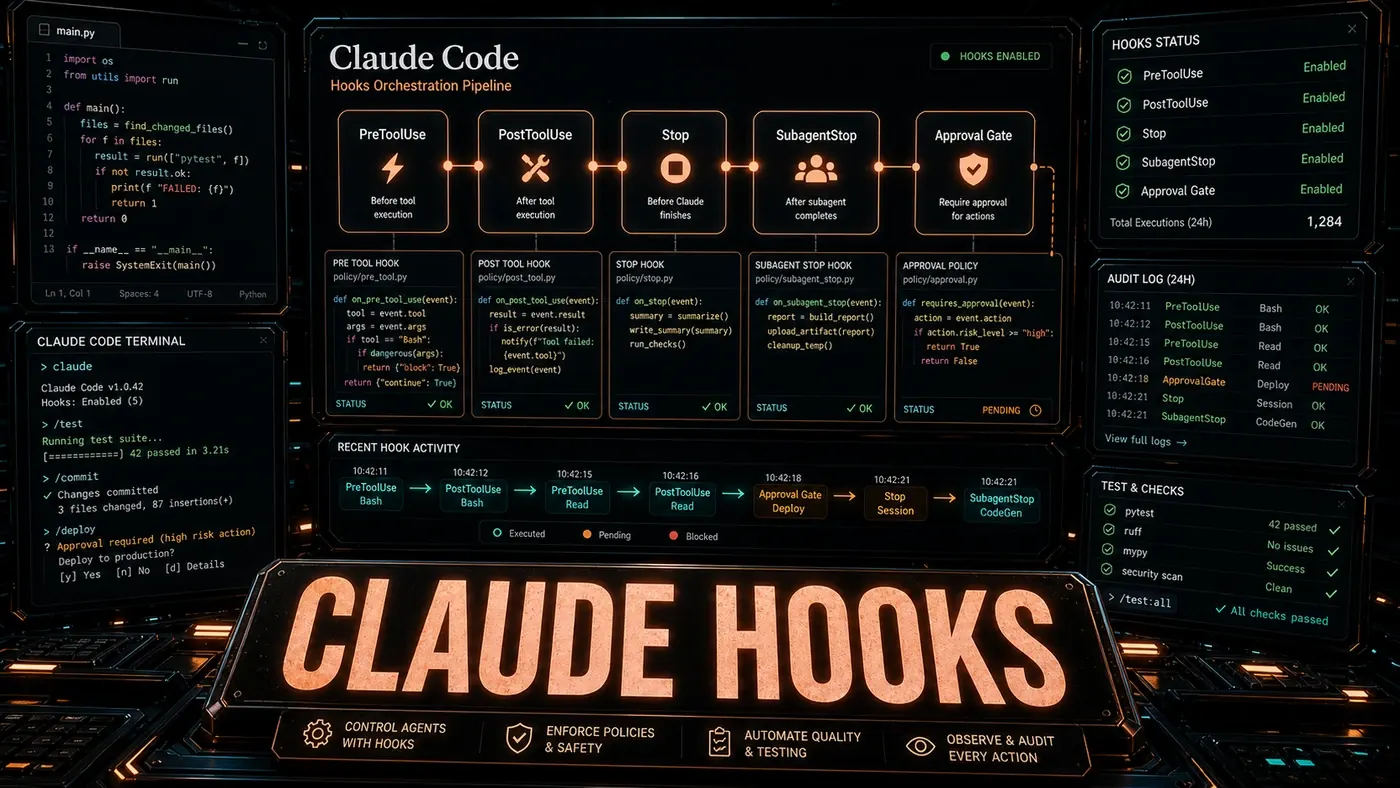
That is the problem Claude Code hooks are built to solve. A hook is a small rule that fires automatically when something happens in the coding workflow, a file gets saved, a test fails, a commit is about to land, an AI agent finishes a job. Instead of hoping people remember the rules, you wire the rules into the tool itself. The assistant stops being something you have to ask and starts being an environment that quietly checks the work as it goes.
Two things are worth flagging up front, because the wider commentary on hooks has muddied them. First, hooks are not new. They shipped in mid-2025 (opens in a new tab), not "early 2026" as some write-ups claim. Second, the exact syntax matters and a lot of online examples get it wrong. Real hooks are configured in JSON inside settings files, and they hang off specific named events. So treat the patterns below as the useful part (what hooks are good for) and check the official hooks reference (opens in a new tab) before you copy any config verbatim.
The payoff, when it works, is the boring kind that compounds: standards that enforce themselves, documentation that does not rot, and a smaller pile of "why did this slip through" conversations.
The Hook Lifecycle
Hooks work on an event-and-action model. Something happens, Claude Code checks a condition, and if the condition holds it runs an action. Depending on the hook type, that condition and action can be a shell command, an HTTP call, or, in the case of the prompt and agent hook types, a natural-language instruction the model interprets. Those handler types (command, prompt, agent, and http) are all real and documented (opens in a new tab).
One correction worth making here, because the original framing oversells it: not every hook is "natural language". The default and most common type is a plain shell command matched by structured patterns. The model-interpreted prompt and agent hooks are the more sophisticated end of the range, not the baseline.
Event Types
A quick warning before the example: the YAML format and the event names below (file_save, test_failure, and so on) are illustrative rather than real Claude Code syntax. Actual hooks use JSON and a different set of event names, including PreToolUse, PostToolUse, PostToolUseFailure, FileChanged, and SubagentStop. The pseudocode is here to show the shape of the idea, not to be pasted into a config file.
# .claude/hooks.yaml
events:
 - type: file_save
 pattern: "*.ts"
 condition: "file contains new public API surface"
 action: "generate JSDoc comments for all new exports"

 - type: test_failure
 condition: "failure is in a file modified in the last hour"
 action: "analyse failure, suggest fix, do not apply without approval"

 - type: git_commit
 condition: "commit message is vague or missing issue reference"
 action: "suggest improved commit message with conventional commit format"

 - type: agent_completion
 condition: "task touched more than 3 files"
 action: "generate a summary of changes for the pull request description"
In a real setup, you would express the first rule through FileChanged, the git rule through a PostToolUse hook matched to the Bash tool, the test rule through PostToolUseFailure, and the completion rule through SubagentStop.
Pattern 1: Pre-Commit Validation Gate
The most common use is a gate that stops a commit when it fails your checks. It runs tests, linting, and type checking before anything reaches the remote:
# .claude/hooks.yaml
hooks:
 pre_commit_validation:
 event: git_pre_commit
 priority: critical
 condition: "any staged file is in src/ directory"
 actions:
 - "run npm run typecheck"
 - "run npm run lint --staged"
 - "run npm test --related --fail-fast"
 - "if any action fails: abort commit and show actionable error"
The difference from a plain git hook is context. A PreToolUse hook can inspect what is about to run and block it, where exit code 2 means block and exit code 0 means allow, and the hook reads the tool input as JSON on stdin. So if type checking fails on a missing import, a well-built gate does not just refuse the commit. It can point at the fix, and with your approval, apply it and run the checks again.
One caveat: the priority: critical and blocking: false fields shown in these examples could not be confirmed in the official reference. Blocking behaviour is reportedly handled through exit codes and JSON output rather than a named YAML key, so do not rely on those fields existing.
Pattern 2: Auto-Documentation
Documentation rot is the quiet way a codebase turns hostile. A hook can keep docs current without anyone remembering to:
 auto_docs:
 event: file_save
 pattern: "src/**/*.ts"
 condition: "function signatures changed or new exports added"
 actions:
 - "update README.md API section if public API changed"
 - "regenerate docs/api.md from JSDoc comments"
 - "add changelog entry to CHANGELOG.md with conventional commit format"
Pattern 3: Architectural Guardrails
For teams with firm architectural boundaries, a hook can enforce the rule at the moment code is written. This one stops controllers from talking to the database directly:
 architecture_guard:
 event: file_save
 pattern: "src/controllers/**/*.ts"
 condition: "code imports database driver or raw SQL"
 actions:
 - "flag violation: controllers must use service layer"
 - "suggest: move query to appropriate service in src/services/"
 - "if user insists: require justification comment and log to architecture-decisions.log"
Pattern 4: Post-Completion Review
When the agent finishes a task, a hook can kick off a structured review. On any job that touches more than three files, it writes a change summary, points out likely side effects, and suggests tests:
 completion_review:
 event: agent_completion
 condition: "files_modified > 3 or test_coverage_delta < 0"
 actions:
 - "generate diff summary in conventional commit format"
 - "identify untested paths in modified code"
 - "suggest test cases for uncovered paths"
 - "check for breaking changes in public APIs"
Pattern 5: Sub-Agent Orchestration
The most ambitious pattern hands follow-on work to specialised sub-agents. When a particular file changes, each sub-agent picks up one piece of the cleanup. This leans on Opus 4.8's Dynamic Workflows (opens in a new tab), which Anthropic introduced for running large numbers of parallel sub-agents in a single session:
 subagent_orchestration:
 event: file_save
 pattern: "src/schema/**/*.graphql"
 actions:
 - "spawn subagent: generate TypeScript types from schema changes"
 - "spawn subagent: update client query hooks"
 - "spawn subagent: regenerate mock data for tests"
 - "await all: run integration tests for affected queries"
Worth noting: Opus 4.8 is real and shipped on 28 May 2026 with Dynamic Workflows. The claim that the hooks system itself was specifically "refined through Opus 4.8" is not something the sources confirm; hooks have evolved across several Claude Code releases on their own track, separate from any one model version. Simon Willison's write-up of Opus 4.8 (opens in a new tab) covers what actually shipped.
Debugging Hooks
Here the original article goes badly off the map, so read this section as a correction. It refers to a claude hooks trace --last command and a claude hooks test <file> dry run:
# Show hook execution trace for last session
claude hooks trace --last

# Show hooks that would trigger for a specific file (dry run)
claude hooks test src/api/users.ts
Those commands do not exist. Real hook debugging uses the interactive /hooks menu, which is a read-only browser of the hooks you have configured, plus the --debug flag for verbose logging when a hook misbehaves. That is where you find out whether the problem is in event detection, the condition, or the action. The diagnostic instinct in the original is right; the specific commands are invented.
Performance Considerations
Hooks add time to whatever event triggers them. A save hook that type-checks the whole project will make every save feel slow. The fix is to scope conditions tightly and use incremental checks. The article also mentions a priority field for ordering and a blocking: false option for running non-critical hooks asynchronously, but as noted above, those specific fields are unconfirmed in the official reference, so test before you depend on them.
The bigger point holds up even after the syntax corrections. The interesting move with hooks is that the assistant stops waiting to be asked. It watches what happens, checks it against your team's standards, and acts. Get that right and the tool you invoke turns into the environment you work inside. Just build it on the real config format (opens in a new tab), not the one in the marketing examples.
Claude Code Hooks: answer-first summary
Claude Code Hooks matters because it can change how Developers and technical teams plan, build, or govern an AI implementation workflow. Hooks turn Claude Code into a proactive agent.
The direct answer is this: do not treat the topic as a standalone trend. Treat it as a decision about inputs, outputs, review ownership, data exposure, and whether the workflow produces a result that is faster, safer, or more useful than the current process.
Claude Code Hooks: implementation checklist
- Define the user, job to be done, and success metric for the AI implementation workflow.
- Collect real examples, policies, source files, customer questions, or search queries before writing prompts or choosing tools.
- Separate low-risk drafts from decisions that need approval, privacy checks, or senior review.
- Document what the AI is allowed to access, what it must not access, and who signs off before production use.
- Review time saved, quality score, review effort, business outcome after a small pilot rather than judging the idea from a demo.
This keeps the work practical. It also gives search engines and AI answer engines a clean factual structure: what the topic is, who it helps, what to do next, and which risks matter before implementation.
Decision criteria for Claude Code Hooks
| Decision area | What to check | Production signal |
|---|---|---|
| Intent | Does Claude Code Hooks solve a real workflow problem? | The use case has a named owner and measurable outcome. |
| Data | Can the required data be used safely? | Sensitive data is classified and access is controlled. |
| Quality | Can a reviewer judge the output consistently? | Examples, rubrics, or acceptance criteria exist. |
| Scale | Can the workflow be repeated without hero effort? | The process is documented and can be handed to another team member. |
Practical example for Claude Code Hooks
A small business could use this article to choose one practical test. For example, a manager might take one customer-facing process, one internal document workflow, or one recurring content task and redesign only that step with AI support. The goal is not to automate the whole business at once; it is to learn where Code creates reliable leverage.
The useful deliverable is a short operating note: the trigger, the source material, the prompt or tool, the review checklist, the escalation rule, and the metric. That note becomes the handover asset for staff training, SEO/GEO content, service delivery, or future agent work.
Risks and controls for Claude Code Hooks
The common failure pattern is moving too quickly from a promising idea into an unmanaged workflow. For Claude Code Hooks, the risk is not only bad output. It can also be unclear data permission, staff confusion, duplicate content, unreviewed customer advice, or a tool that quietly changes cost or capability.
- Control unclear use case with a named owner, a review step, and written acceptance criteria.
- Control weak data quality with a named owner, a review step, and written acceptance criteria.
- Control missing governance with a named owner, a review step, and written acceptance criteria.
- Control no measurement with a named owner, a review step, and written acceptance criteria.
Measurement plan for Claude Code Hooks
A useful AI or SEO initiative should leave evidence. Track time saved, quality score, review effort, business outcome and compare the pilot against the current process. If the measure does not improve, keep the learning but avoid scaling the workflow.
For GEO readiness, the page should also answer the core question directly, define the entities involved, include implementation steps, explain tradeoffs, and link readers to the next relevant AI Kick Start service, guide, tool, or article.
Definitions and entities for Claude Code Hooks
For search, GEO, and staff handover, define the core entities in plain language. In this article the important entities are the workflow owner, the AI tool or model, the source material, the review process, the risk boundary, and the measurable business outcome. Clear definitions make the page easier for people to scan and easier for AI answer engines to quote accurately.
- Workflow owner: the person accountable for deciding whether Claude Code Hooks belongs in the business process.
- Source material: the documents, examples, policies, URLs, prompts, videos, or customer questions that ground the output.
- Review boundary: the point where a human checks accuracy, privacy, brand voice, or customer impact before the result is used.
- Success metric: the measure that proves whether the AI implementation workflow is worth repeating.
Claude Code Hooks versus doing nothing
Doing nothing is also a decision. The cost may be slow manual work, weaker search visibility, inconsistent advice, duplicated effort, or staff using unmanaged AI tools without a shared process. The practical question is whether a controlled pilot can reduce that cost without creating a larger governance problem.
| Option | When it makes sense | What to watch |
|---|---|---|
| Do nothing | The workflow is rare, low value, or already reliable. | Competitors may improve speed, content depth, or service consistency first. |
| Run a small pilot | The task repeats often and has clear review criteria. | Keep scope tight and measure the result against the current process. |
| Build a production workflow | The pilot is repeatable and risk controls are documented. | Assign ownership, monitoring, training, and a rollback path. |
AI Kick Start handover package for Claude Code Hooks
A production handover should be concrete enough that another person can run it. For Claude Code Hooks, that means a short brief, a workflow map, approved prompts or tool settings, source material, a review checklist, internal links to supporting resources, and a simple measurement sheet. This is the difference between reading about AI and turning it into operational capability.
That packaging also strengthens E-E-A-T. It shows experience through implementation notes, expertise through decision criteria, authoritativeness through source-aware structure, and trust through risks, controls, and review steps. The article becomes useful even if the reader never buys a tool because it helps them make a better operational decision.