

Analysis
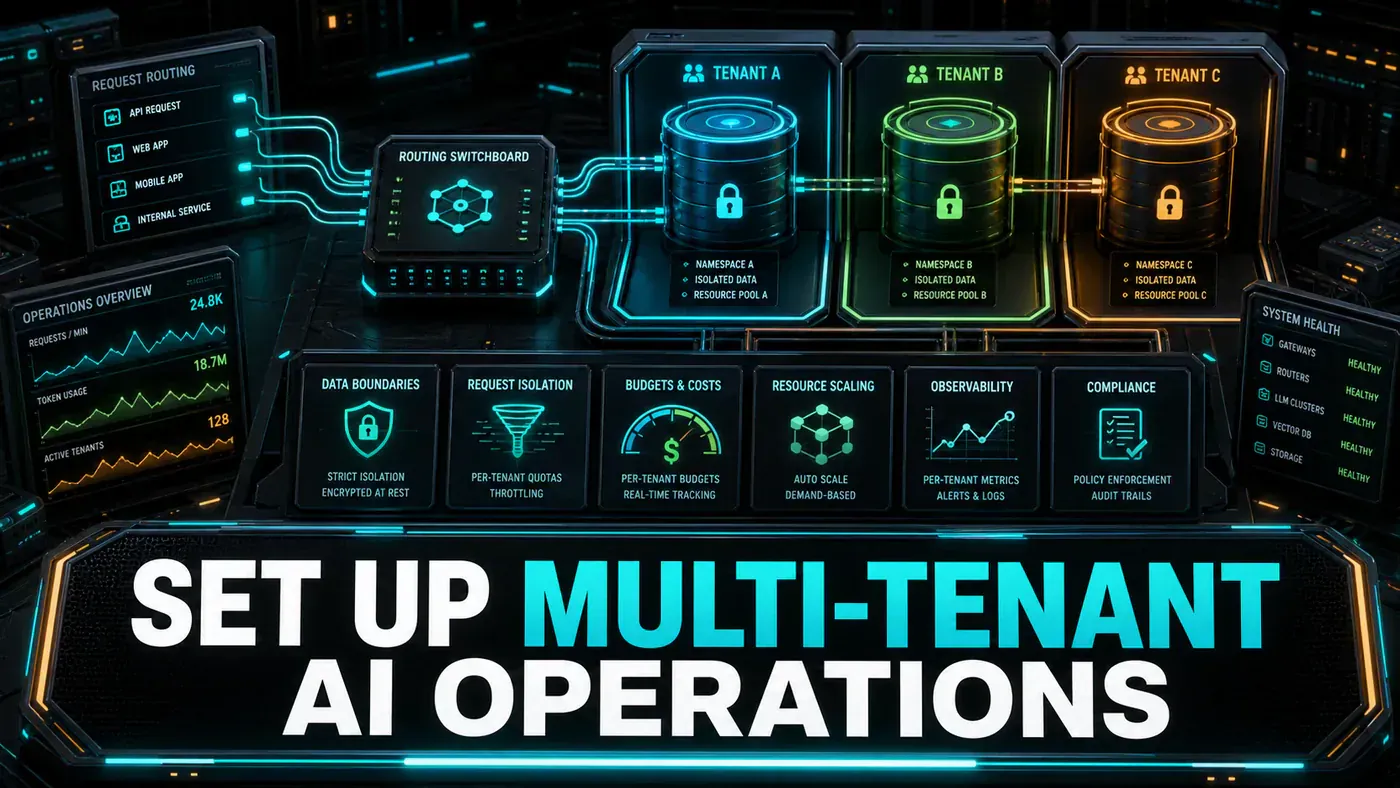
If you sell AI features to more than one customer, you have a multi-tenant problem whether you've named it or not. Every tenant's documents, prompts, and usage need to live in their own lane. The moment one customer's data leaks into another's answers, you don't have a bug, you have a breach, a lost contract, and possibly a regulator's letter.
The trick is that none of this is visible to your users. They just see a chat box. Behind it sits a small amount of plumbing that reads who's calling, points the request at the right data, counts the tokens, and bills accordingly. Get that plumbing right once and the rest of your code never has to think about tenancy again.
For Australian teams shipping a SaaS product, the stakes are practical. One runaway tenant can burn through your model budget overnight. One shared vector namespace can put you on the wrong side of the Privacy Act. The patterns below are the boring, load-bearing parts that decide whether your platform is safe to put a logo on.
What follows is the architecture, with working code for each piece.
Analysis
Prerequisites
- Kubernetes or Docker Compose
- PostgreSQL for tenant metadata
- Redis for rate limiting and caching
- Vector database with namespace support
- API gateway (Kong, Nginx, or custom)
Step-by-Step Framework
Step 1: Tenant Identification
Every request has to answer one question before anything else happens: who is this? You pull the tenant ID from a header, a query param, or the subdomain, check that the tenant is real and active, and only then let the request through. Starlette's `BaseHTTPMiddleware` (opens in a new tab) is the documented way to do this in FastAPI, and request.state is where you stash the resolved tenant so the rest of your code can read it.
# middleware/tenant.py
from fastapi import Request, HTTPException
from starlette.middleware.base import BaseHTTPMiddleware

class TenantMiddleware(BaseHTTPMiddleware):
 async def dispatch(self, request: Request, call_next):
 # Extract tenant ID from header or subdomain
 tenant_id = (
 request.headers.get("X-Tenant-ID")
 or request.query_params.get("tenant")
 or self._extract_from_subdomain(request)
 )

 if not tenant_id:
 raise HTTPException(status_code=400, detail="Tenant ID required")

 # Validate tenant
 tenant = await self.get_tenant(tenant_id)
 if not tenant or tenant["status"] != "active":
 raise HTTPException(status_code=403, detail="Invalid or inactive tenant")

 # Attach to request state
 request.state.tenant = tenant

 # Check rate limit
 if not await self.check_rate_limit(tenant_id):
 raise HTTPException(status_code=429, detail="Rate limit exceeded")

 return await call_next(request)

 def _extract_from_subdomain(self, request: Request) -> str:
 host = request.headers.get("host", "")
 if "." in host:
 return host.split(".")[0]
 return None

 async def get_tenant(self, tenant_id: str) -> dict:
 # Fetch from database
 pass

 async def check_rate_limit(self, tenant_id: str) -> bool:
 # Check Redis rate limiter
 pass
Step 2: Namespace Isolation in Vector DB
This is where data isolation lives or dies. Give each tenant its own collection rather than mixing everyone into one and filtering at query time, a missed filter in a shared collection is a data leak waiting to happen. Qdrant (opens in a new tab) supports exactly this through its Python client: create_collection, upsert, search, and delete_collection, with the collection named after the tenant. The delete_collection call also gives you a clean answer to a GDPR or Privacy Act deletion request, drop the collection and the tenant's data is gone.
The size=1536 here matches the output of OpenAI's `text-embedding-3-small` (opens in a new tab) and ada-002 models, so it's a sensible default if that's what you're embedding with.
# storage/vector_isolation.py
from qdrant_client import QdrantClient

class TenantAwareVectorStore:
 def __init__(self, client: QdrantClient):
 self.client = client

 def get_collection_name(self, tenant_id: str) -> str:
 """Each tenant gets their own collection."""
 return f"tenant_{tenant_id}_documents"

 async def create_tenant_collection(self, tenant_id: str):
 collection_name = self.get_collection_name(tenant_id)

 self.client.create_collection(
 collection_name=collection_name,
 vectors_config=VectorParams(size=1536, distance=Distance.COSINE)
 )

 async def upsert(self, tenant_id: str, documents: list, embeddings: list):
 collection = self.get_collection_name(tenant_id)

 points = [
 PointStruct(id=i, vector=emb, payload=doc)
 for i, (doc, emb) in enumerate(zip(documents, embeddings))
 ]

 self.client.upsert(collection_name=collection, points=points)

 async def search(self, tenant_id: str, query_embedding: list, top_k: int = 5):
 collection = self.get_collection_name(tenant_id)

 return self.client.search(
 collection_name=collection,
 query_vector=query_embedding,
 limit=top_k
 )

 async def delete_tenant(self, tenant_id: str):
 """GDPR right to deletion, remove all tenant data."""
 collection = self.get_collection_name(tenant_id)
 self.client.delete_collection(collection_name=collection)
Step 3: Per-Tenant Cost Metering
You can't bill what you don't measure, and you can't catch a runaway tenant without per-tenant counters. Record every call, model, input tokens, output tokens, latency, into Redis, keep an hourly time series for the recent window, and roll running totals into counters you can read instantly.
One caution on the pricing constant below. The code hardcodes a calculate_cost rate labelled as DeepSeek V3.5 at $0.15 per million input tokens and $0.60 per million output tokens. Treat that as a placeholder, not a real price: there is no confirmed "DeepSeek V3.5" model, and published DeepSeek pricing doesn't match those figures, DeepSeek-Chat V3.2 runs closer to $0.28/$0.42 per million and V4 around $0.30/$0.50. Before you bill anyone, swap in the current rates from DeepSeek's own docs (opens in a new tab) for whichever model you actually call. The code is left exactly as written so the metering logic is clear; just don't trust the number.
# metering/cost_tracker.py
import redis
import json
from datetime import datetime

class CostMeter:
 def __init__(self, redis_client: redis.Redis):
 self.redis = redis_client

 async def record_usage(
 self,
 tenant_id: str,
 model: str,
 input_tokens: int,
 output_tokens: int,
 latency_ms: int
 ):
 timestamp = datetime.utcnow().isoformat()
 usage = {
 "timestamp": timestamp,
 "model": model,
 "input_tokens": input_tokens,
 "output_tokens": output_tokens,
 "latency_ms": latency_ms
 }

 # Store in time-series (last 24 hours)
 key = f"usage:{tenant_id}:{datetime.utcnow().strftime('%Y%m%d%H')}"
 self.redis.lpush(key, json.dumps(usage))
 self.redis.expire(key, 86400)

 # Update counters
 self.redis.hincrby(f"tenant:{tenant_id}:counters", "total_tokens", input_tokens + output_tokens)
 self.redis.hincrby(f"tenant:{tenant_id}:counters", "total_requests", 1)

 async def get_current_hour_usage(self, tenant_id: str) -> dict:
 key = f"usage:{tenant_id}:{datetime.utcnow().strftime('%Y%m%d%H')}"
 entries = self.redis.lrange(key, 0, -1)

 total_input = sum(json.loads(e)["input_tokens"] for e in entries)
 total_output = sum(json.loads(e)["output_tokens"] for e in entries)

 return {
 "input_tokens": total_input,
 "output_tokens": total_output,
 "estimated_cost": self.calculate_cost(total_input, total_output)
 }

 def calculate_cost(self, input_tokens: int, output_tokens: int) -> float:
 # DeepSeek V3.5 pricing
 return (input_tokens / 1_000_000 * 0.15) + (output_tokens / 1_000_000 * 0.60)
Step 4: Tenant-Specific Model Configuration
Different plans deserve different engines. A free tier can run on a small, cheap model with tight limits; an enterprise tier gets the big model, a long context window, and headroom on rate limits. Storing this as per-tenant config means you change a customer's plan without touching application code.
A note on the model ids below. As of June 2026 these are real and current, Claude Sonnet 4.6 (opens in a new tab) (released 17 February 2026), Claude Opus 4.8 (opens in a new tab) (28 May 2026), Gemini 3.5 Flash (opens in a new tab) (19 May 2026), and GPT-5.5 Instant (opens in a new tab) (5 May 2026). The exception is deepseek-v3.5, used here as the free and pro default: that version name isn't confirmed in DeepSeek's lineup (which runs V3, V3.2, and V4), so substitute a real id before you ship. Provider model strings move fast in general, confirm the exact id with each vendor before you wire it in.
# config/tenant_models.py
from pydantic import BaseModel

class TenantConfig(BaseModel):
 tenant_id: str
 models: dict # {"default": "deepseek-v3.5", "coding": "claude-sonnet-4.6"}
 rate_limits: dict # {"requests_per_minute": 60, "tokens_per_hour": 100000}
 max_context: int # 4096, 8192, etc.
 features: list # ["rag", "code_generation", "image_analysis"]
 custom_prompts: dict # {"system": "You are a support agent for..."}

DEFAULT_CONFIGS = {
 "free": TenantConfig(
 models={"default": "gemini-3.5-flash"},
 rate_limits={"requests_per_minute": 10, "tokens_per_hour": 10000},
 max_context=4096,
 features=["basic_chat"],
 custom_prompts={}
 ),
 "pro": TenantConfig(
 models={"default": "deepseek-v3.5", "coding": "claude-sonnet-4.6"},
 rate_limits={"requests_per_minute": 120, "tokens_per_hour": 500000},
 max_context=128000,
 features=["rag", "code_generation", "memory"],
 custom_prompts={}
 ),
 "enterprise": TenantConfig(
 models={"default": "claude-opus-4.8", "fast": "gpt-5.5-instant"},
 rate_limits={"requests_per_minute": 1000, "tokens_per_hour": 10000000},
 max_context=1000000,
 features=["rag", "code_generation", "memory", "multi_agent", "fine_tuning"],
 custom_prompts={}
 )
}
Step 5: Dynamic Scaling
AI traffic is spiky, so fix your replica count and you'll either overpay during quiet hours or fall over during busy ones. A Kubernetes Horizontal Pod Autoscaler (opens in a new tab) (the autoscaling/v2 API) lets you scale on both requests per second and CPU, and the behavior block tunes how fast it reacts, scale up quickly when load arrives, scale down slowly so a brief lull doesn't kill pods you'll want back in a minute.
# k8s/hpa.yaml
apiVersion: autoscaling/v2
kind: HorizontalPodAutoscaler
metadata:
 name: ai-agent-hpa
spec:
 scaleTargetRef:
 apiVersion: apps/v1
 kind: Deployment
 name: ai-agent
 minReplicas: 3
 maxReplicas: 100
 metrics:
 - type: Pods
 pods:
 metric:
 name: requests_per_second
 target:
 type: AverageValue
 averageValue: "50"
 - type: Resource
 resource:
 name: cpu
 target:
 type: Utilization
 averageUtilization: 70
 behavior:
 scaleUp:
 stabilizationWindowSeconds: 60
 policies:
 - type: Pods
 value: 10
 periodSeconds: 60
 scaleDown:
 stabilizationWindowSeconds: 300
 policies:
 - type: Pods
 value: 2
 periodSeconds: 120
Do/Don't
| Do | Don't |
|---|---|
| Use separate collections/namespaces per tenant | Share a single namespace across tenants |
| Meter every API call per tenant | Estimate usage without tracking |
| Implement hard rate limits per tenant | Let one tenant consume all resources |
| Support GDPR data deletion | Ignore tenant data isolation requirements |
| Allow tenant-specific model selection | Force all tenants to use the same model |
Conclusion
The four pieces here do most of the work: a namespace per tenant keeps data isolated, per-tenant metering tells you what each customer costs and catches the ones running hot, autoscaling matches capacity to demand, and per-tenant config lets you offer real plan tiers. The payoff is the middleware pattern, once it resolves who's calling and where their data lives, the rest of your application code never has to think about tenancy, and your metering becomes the foundation you bill from. Before launch, replace the placeholder model ids and pricing with the real numbers from each provider.