




Analysis
Most teams that have tried retrieval-augmented generation know the frustration. You feed your handbook, your specs and your internal docs into a vector database, ask a question, and the answer comes back confident but shallow. Ask something that needs two or three facts joined together, such as "which services depend on the auth service?", and it falls apart. Vector search finds passages that look similar to your question. It does not understand how the things in those passages relate.
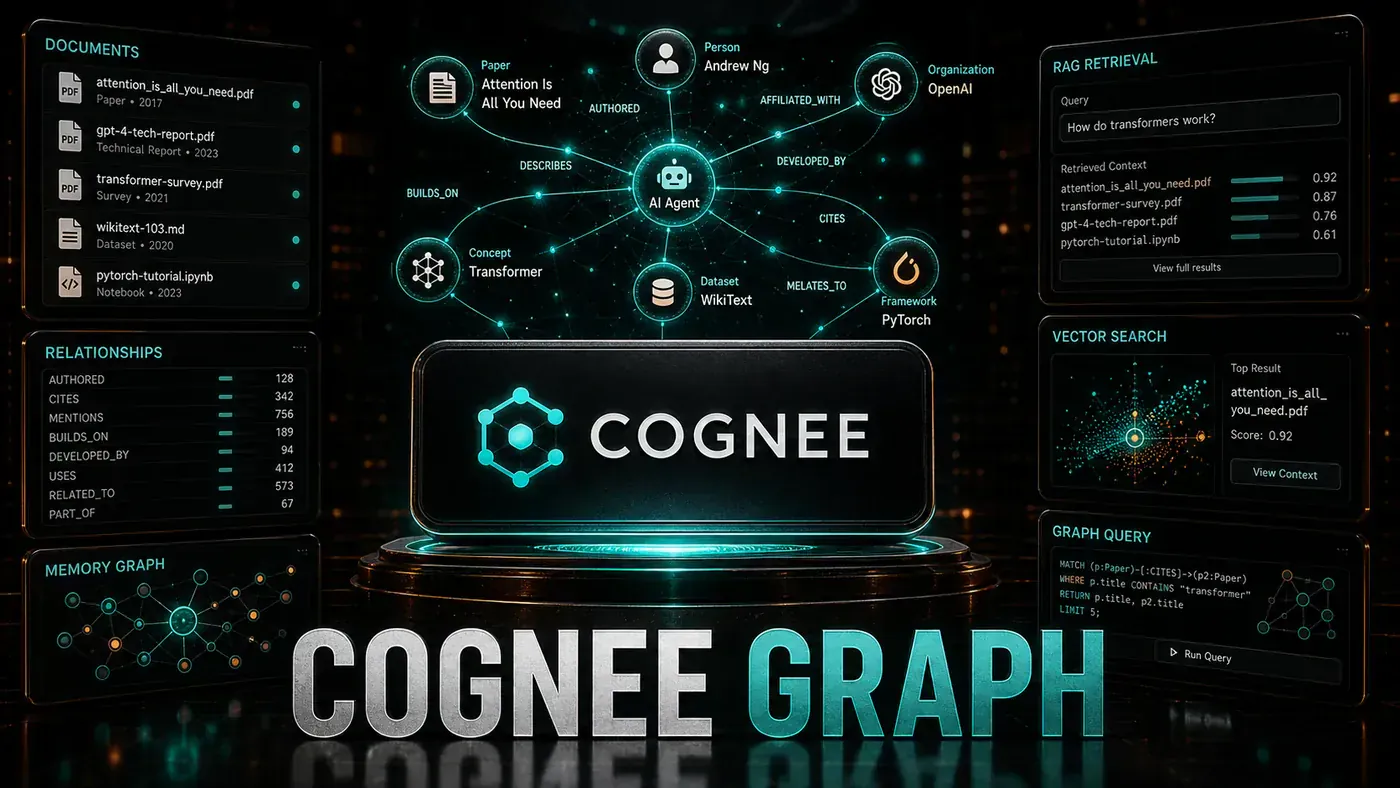
That gap is what knowledge graphs are meant to close. Instead of storing your documents as a pile of text fragments, a graph stores them as a web of entities and the links between them. Cognee, an open-source project from topoteretes (opens in a new tab), tries to make that automatic: drop in your files, and it reads them, identifies the people, systems and concepts inside, maps the connections, and saves the lot to a graph database you can query in plain English.
For an Australian business team sitting on years of documentation, the appeal is straightforward. You stop guessing which paragraph the model happened to retrieve, and start asking questions that follow the actual structure of your knowledge. The rest of this guide shows how to stand up that pipeline end to end.
One caveat before we start: Cognee moves quickly, and a few of the method names in the code below are illustrative rather than the exact current API. Where that matters, the article flags it so you check the live docs before copying anything verbatim.
Analysis
Prerequisites
- Python 3.10+
- Neo4j Community Edition (or Docker)
pip install cognee neo4j networkx- Documents to process (PDF, text, or markdown)
Cognee is published on PyPI, so the install is a plain `pip install cognee` (opens in a new tab).
Step-by-Step Framework
Step 1: Install and Configure
pip install cognee[all] neo4j networkx

# Start Neo4j (Docker)
docker run -p 7474:7474 -p 7687:7687 \
 -e NEO4J_AUTH=neo4j/password \
 neo4j:5-community
# config.py
import cognee
cognee.config.set({
"llm_provider": "anthropic",
"llm_model": "claude-sonnet-4.6",
"llm_api_key": "sk-ant-your-key",
"graph_db_provider": "neo4j",
"graph_db_url": "bolt://localhost:7687",
"graph_db_username": "neo4j",
"graph_db_password": "password",
"vector_db_provider": "lancedb",
"embedding_model": "text-embedding-3-large"
})A few notes on this config. Cognee does support Anthropic as an LLM provider, and `claude-sonnet-4.6` (opens in a new tab) (canonical id claude-sonnet-4-6, released 17 February 2026) is a valid model to point it at. The graph and vector backends are real too: Cognee lists Neo4j, NetworkX and Kuzu for graph storage, and LanceDB, pgvector, Qdrant and Weaviate for vectors, per the Cognee configuration docs (opens in a new tab). LanceDB and NetworkX are the embedded defaults for local work.
The one thing to double-check: the exact key shape. The dict above is a simplified illustration. In practice Cognee often takes env-style keys such as LLM_PROVIDER, LLM_MODEL and GRAPH_DB_PROVIDER, so copy from the live configuration docs rather than this snippet if you hit errors.
Step 2: Ingest Documents
# ingest.py
import cognee

async def ingest_documents(file_paths: list[str]):
 for path in file_paths:
 await cognee.add(path)

 # Process, extract entities and relationships
 await cognee.cognify()

# Ingest
await ingest_documents([
 "docs/company-handbook.pdf",
 "docs/product-specs.md",
 "docs/api-documentation.md",
 "docs/engineering-blog-posts/"
])
These two calls are the heart of Cognee. cognee.add() ingests your data, and cognee.cognify() does the work of turning that text into a graph: chunking, embedding, summarising, and writing out the nodes and edges. Both are confirmed in the Cognee docs (opens in a new tab). You point it at files or whole folders and let the pipeline run.
Step 3: Query the Knowledge Graph
# query.py
import cognee

# Natural language query
results = await cognee.search(
 query="What authentication methods does the API support?",
 search_type="GRAPH" # Uses knowledge graph
)

for result in results:
 print(f"Source: {result.source}")
 print(f"Answer: {result.text}")
 print(f"Confidence: {result.confidence}")
 print(f"Related entities: {result.related_entities}")

# Specific entity lookup
entities = await cognee.get_entities("authentication")
for entity in entities:
 print(f"Entity: {entity.name} ({entity.type})")
 print(f"Relationships: {entity.relationships}")
Cognee does support graph-based search, but check the signature against the current API before you run this. The real call uses search(query_text=... query_type=SearchType.GRAPH_COMPLETION) with a SearchType enum, not the query= and search_type="GRAPH" string arguments shown here, according to the Cognee search docs (opens in a new tab). Treat the get_entities helper as illustrative as well; it does not appear in the current Python API reference (opens in a new tab), so confirm the actual entity-lookup method before depending on it.
Step 4: Custom Entity Types
# custom_entities.py
from cognee import EntityType, RelationshipType

# Define custom entity types
cognee.register_entity_types([
 EntityType(name="API_ENDPOINT", description="REST API endpoint"),
 EntityType(name="DATABASE_TABLE", description="Database table"),
 EntityType(name="MICROSERVICE", description="Microservice component"),
 EntityType(name="DEPLOYMENT_TARGET", description="Deployment environment")
])

# Define relationship types
cognee.register_relationship_types([
 RelationshipType(name="CALLS", description="Service A calls Service B"),
 RelationshipType(name="STORES_DATA_IN", description="Service stores data in table"),
 RelationshipType(name="DEPLOYS_TO", description="Service deploys to environment"),
 RelationshipType(name="AUTHENTICATES_VIA", description="Uses auth method")
])
The idea here is sound: generic entity types only get you so far, and defining types that match your own domain (endpoints, tables, services, deploy targets) gives the graph far more useful structure. That said, the specific helpers register_entity_types and register_relationship_types do not appear in Cognee's official API reference, so treat this snippet as pseudo-code that shows the pattern. Look up how the current version lets you declare custom types before wiring it in.
Step 5: Build Graph RAG Pipeline
# graph_rag.py
class GraphRAG:
 def __init__(self):
 self.cognee = cognee

 async def answer(self, question: str) -> str:
 # Step 1: Extract entities from question
 question_entities = await self.extract_entities(question)

 # Step 2: Find relevant subgraph
 subgraph = await self.cognee.get_subgraph(
 entities=question_entities,
 depth=2 # 2-hop traversal
 )

 # Step 3: Generate answer with context
 context = self.format_subgraph(subgraph)

 response = await self.cognee.llm.complete(
 prompt=f"""Answer the question using the provided knowledge graph context.

Context:
{context}

Question: {question}

Answer:"""
 )

 return response

 def format_subgraph(self, subgraph) -> str:
 lines = []
 for node in subgraph.nodes:
 lines.append(f"Entity: {node.name} ({node.type})")
 for rel in node.relationships:
 lines.append(f" → {rel.type} → {rel.target.name}")
 return "\n".join(lines)
This is the part that earns graph RAG its keep. Pull the entities out of the question, fetch the slice of the graph around them, walk two hops out, and hand that connected context to the model. Two notes of caution: get_subgraph and cognee.llm.complete are not documented methods in the current Cognee surface, so read this as the shape of the pattern rather than a copy-paste recipe. Build your traversal and your completion call against whatever the live API actually exposes.
Step 6: Visualise the Graph
# visualise.py
import networkx as nx
import matplotlib.pyplot as plt

async def visualise_graph():
 # Export from Cognee to NetworkX
 G = await cognee.to_networkx()

 plt.figure(figsize=(20, 20))
 pos = nx.spring_layout(G, k=2, iterations=50)

 # Color by entity type
 node_colors = []
 for node in G.nodes():
 entity_type = G.nodes[node].get('type', 'unknown')
 colors = {
 'PERSON': '#ff9999',
 'ORGANIZATION': '#99ccff',
 'API_ENDPOINT': '#99ff99',
 'DATABASE_TABLE': '#ffcc99',
 'MICROSERVICE': '#cc99ff'
 }
 node_colors.append(colors.get(entity_type, '#cccccc'))

 nx.draw(G, pos, node_color=node_colors, with_labels=True,
 node_size=2000, font_size=8, font_weight='bold')
 plt.savefig('knowledge_graph.png', dpi=150, bbox_inches='tight')
 print("Graph saved to knowledge_graph.png")
Seeing the graph helps you trust it. Export to NetworkX, colour the nodes by type, and you get a picture of how your knowledge actually hangs together, which is often where you spot missing or wrong links. The to_networkx export shown here is, again, not a documented method name in the current docs, so check how your version exposes a NetworkX export. The matplotlib drawing code itself is standard.
Do/Don't
| Do | Don't |
|---|---|
| Define custom entity types for your domain | Rely solely on generic entity types |
| Use 2-3 hop depth for most queries | Traverse unlimited depth (slow, noisy) |
| Validate extracted entities | Trust extraction without verification |
| Combine graph RAG with vector RAG | Replace vector RAG entirely |
| Version your knowledge graph | Overwrite without backup |
Conclusion
Cognee closes the distance between a folder of unstructured documents and something you can actually interrogate. Graph RAG is at its best on questions that need you to follow a chain of relationships, the "which services depend on the auth service?" kind that plain vector search struggles with. Start with the automatic extraction, define the entity types that matter for your domain, and run graph RAG alongside your existing vector search rather than ripping it out. Just verify the method names against the live Cognee docs (opens in a new tab) as you go, because the project is still moving fast.
How to build a knowledge graph with Cognee: answer-first summary
How to build a knowledge graph with Cognee matters because it can change how Australian business teams plan, build, or govern an AI implementation workflow. Use Cognee to automatically extract entities, relationships, and insights from documents to build queryable knowledge graphs that power advanced RAG systems.
The direct answer is this: do not treat the topic as a standalone trend. Treat it as a decision about inputs, outputs, review ownership, data exposure, and whether the workflow produces a result that is faster, safer, or more useful than the current process.
How to build a knowledge graph with Cognee: implementation checklist
- Define the user, job to be done, and success metric for the AI implementation workflow.
- Collect real examples, policies, source files, customer questions, or search queries before writing prompts or choosing tools.
- Separate low-risk drafts from decisions that need approval, privacy checks, or senior review.
- Document what the AI is allowed to access, what it must not access, and who signs off before production use.
- Review time saved, quality score, review effort, business outcome after a small pilot rather than judging the idea from a demo.
This keeps the work practical. It also gives search engines and AI answer engines a clean factual structure: what the topic is, who it helps, what to do next, and which risks matter before implementation.
Decision criteria for How to build a knowledge graph with Cognee
| Decision area | What to check | Production signal |
|---|---|---|
| Intent | Does How to build a knowledge graph with Cognee solve a real workflow problem? | The use case has a named owner and measurable outcome. |
| Data | Can the required data be used safely? | Sensitive data is classified and access is controlled. |
| Quality | Can a reviewer judge the output consistently? | Examples, rubrics, or acceptance criteria exist. |
| Scale | Can the workflow be repeated without hero effort? | The process is documented and can be handed to another team member. |
Practical example for How to build a knowledge graph with Cognee
A small business could use this article to choose one practical test. For example, a manager might take one customer-facing process, one internal document workflow, or one recurring content task and redesign only that step with AI support. The goal is not to automate the whole business at once; it is to learn where How-to Guide creates reliable leverage.
The useful deliverable is a short operating note: the trigger, the source material, the prompt or tool, the review checklist, the escalation rule, and the metric. That note becomes the handover asset for staff training, SEO/GEO content, service delivery, or future agent work.
Risks and controls for How to build a knowledge graph with Cognee
The common failure pattern is moving too quickly from a promising idea into an unmanaged workflow. For How to build a knowledge graph with Cognee, the risk is not only bad output. It can also be unclear data permission, staff confusion, duplicate content, unreviewed customer advice, or a tool that quietly changes cost or capability.
- Control unclear use case with a named owner, a review step, and written acceptance criteria.
- Control weak data quality with a named owner, a review step, and written acceptance criteria.
- Control missing governance with a named owner, a review step, and written acceptance criteria.
- Control no measurement with a named owner, a review step, and written acceptance criteria.
Measurement plan for How to build a knowledge graph with Cognee
A useful AI or SEO initiative should leave evidence. Track time saved, quality score, review effort, business outcome and compare the pilot against the current process. If the measure does not improve, keep the learning but avoid scaling the workflow.
For GEO readiness, the page should also answer the core question directly, define the entities involved, include implementation steps, explain tradeoffs, and link readers to the next relevant AI Kick Start service, guide, tool, or article.
Definitions and entities for How to build a knowledge graph with Cognee
For search, GEO, and staff handover, define the core entities in plain language. In this article the important entities are the workflow owner, the AI tool or model, the source material, the review process, the risk boundary, and the measurable business outcome. Clear definitions make the page easier for people to scan and easier for AI answer engines to quote accurately.
- Workflow owner: the person accountable for deciding whether How to build a knowledge graph with Cognee belongs in the business process.
- Source material: the documents, examples, policies, URLs, prompts, videos, or customer questions that ground the output.
- Review boundary: the point where a human checks accuracy, privacy, brand voice, or customer impact before the result is used.
- Success metric: the measure that proves whether the AI implementation workflow is worth repeating.
How to build a knowledge graph with Cognee versus doing nothing
Doing nothing is also a decision. The cost may be slow manual work, weaker search visibility, inconsistent advice, duplicated effort, or staff using unmanaged AI tools without a shared process. The practical question is whether a controlled pilot can reduce that cost without creating a larger governance problem.
| Option | When it makes sense | What to watch |
|---|---|---|
| Do nothing | The workflow is rare, low value, or already reliable. | Competitors may improve speed, content depth, or service consistency first. |
| Run a small pilot | The task repeats often and has clear review criteria. | Keep scope tight and measure the result against the current process. |
| Build a production workflow | The pilot is repeatable and risk controls are documented. | Assign ownership, monitoring, training, and a rollback path. |
AI Kick Start handover package for How to build a knowledge graph with Cognee
A production handover should be concrete enough that another person can run it. For How to build a knowledge graph with Cognee, that means a short brief, a workflow map, approved prompts or tool settings, source material, a review checklist, internal links to supporting resources, and a simple measurement sheet. This is the difference between reading about AI and turning it into operational capability.
That packaging also strengthens E-E-A-T. It shows experience through implementation notes, expertise through decision criteria, authoritativeness through source-aware structure, and trust through risks, controls, and review steps. The article becomes useful even if the reader never buys a tool because it helps them make a better operational decision.