



Analysis
The pitch for AI agents is that they get on with the work so your people don't have to. The catch is that an agent willing to edit a file is, with the same confidence, willing to drop a production table. It doesn't pause to ask whether this one is different.
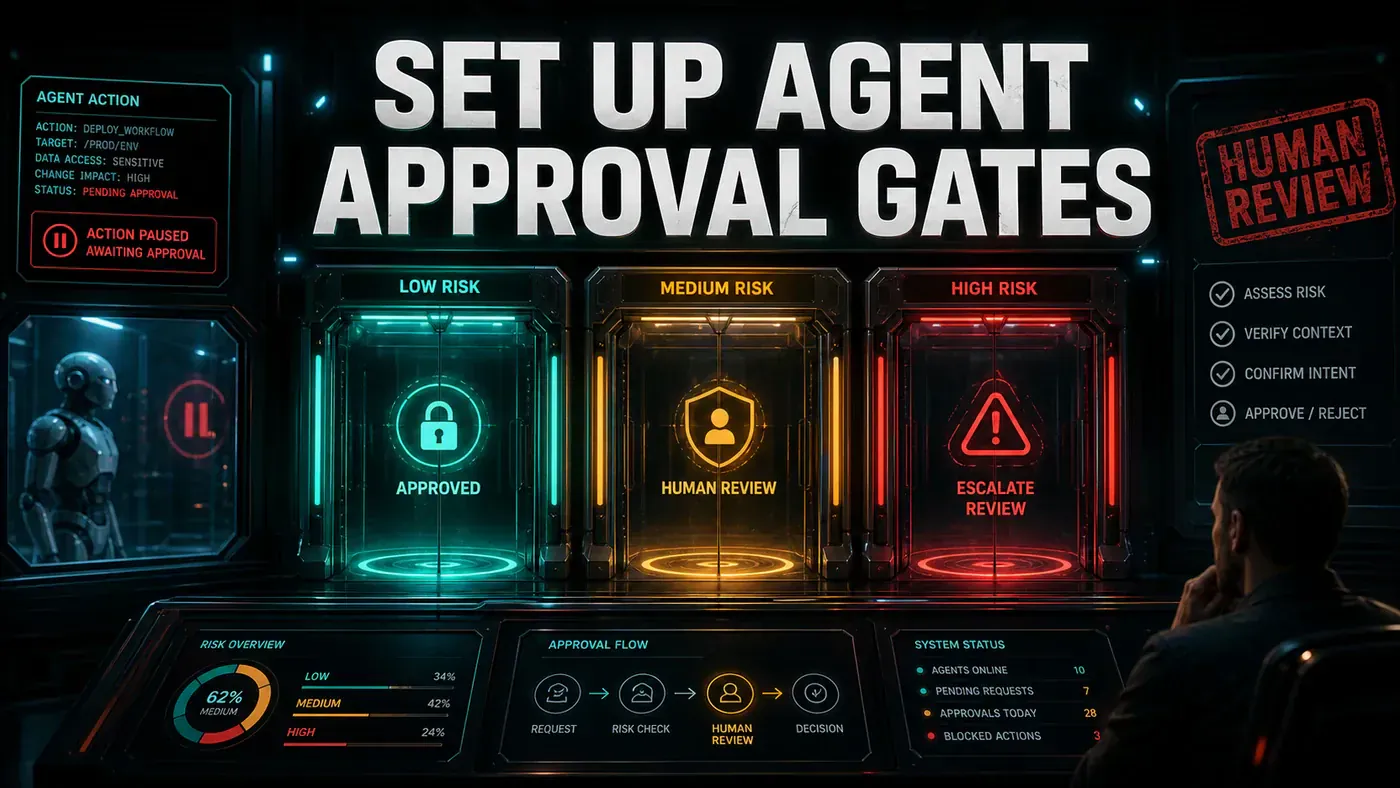
So the real question for any team running agents isn't "can it do the task?" It's "what happens the moment it tries to do something it shouldn't?" A read-only lookup and a database migration both arrive as the same kind of request. Treat them the same way and you either slow everything to a crawl with sign-offs, or you wave through the one action that takes the business down.
The fix most teams land on is approval gates: a layer that sorts each action by how much damage it could do, then routes it accordingly. Harmless work runs on its own. Risky work waits for a human. Genuinely dangerous work needs more than one set of eyes. Below is a working version of that pattern, in Python, with a Slack hook so approvers can respond where they already are.
One thing worth flagging up front, because it bites people: Slack's interactive Approve and Reject buttons don't reliably work through a plain incoming webhook. The example here shows the message shape, but for live buttons you'll need a proper Slack app. More on that at the end.
Analysis
Prerequisites
- Web application for the approval UI (or a Slack/Teams integration)
- Database to hold approval state
- Notification system (email, Slack, PagerDuty)
- Authentication system for approvers
Step-by-Step Framework
Step 1: Risk Classification
Start by deciding what each action is worth. The classifier reads the action type and scope, then sorts it into one of four tiers. Anything that doesn't match a riskier rule falls through to auto-approve, so read-only work never waits on a person.
# approval/risk_classifier.py
from enum import Enum
from dataclasses import dataclass

class RiskLevel(Enum):
 AUTO_APPROVE = "auto"
 SINGLE_APPROVAL = "single"
 MULTI_APPROVAL = "multi"
 EMERGENCY_STOP = "emergency"

@dataclass
class AgentAction:
 action_type: str
 target: str
 scope: str # "single_file", "directory", "database", "infrastructure"
 description: str
 estimated_impact: str # "none", "local", "service", "organisation"

class RiskClassifier:
 RULES = {
 # Read-only operations
 RiskLevel.AUTO_APPROVE: [
 {"action_type": "read", "scope": "*"},
 {"action_type": "search", "scope": "*"},
 {"action_type": "lint", "scope": "*"},
 {"action_type": "test", "scope": "*"},
 ],
 # File modifications (non-critical)
 RiskLevel.SINGLE_APPROVAL: [
 {"action_type": "write", "scope": "single_file", "estimated_impact": "local"},
 {"action_type": "refactor", "scope": "single_file", "estimated_impact": "local"},
 {"action_type": "generate_tests", "scope": "*"},
 ],
 # Wide-scope or impactful changes
 RiskLevel.MULTI_APPROVAL: [
 {"action_type": "write", "scope": "directory"},
 {"action_type": "migrate", "scope": "*"},
 {"action_type": "deploy", "scope": "*"},
 {"action_type": "modify_schema", "scope": "*"},
 {"action_type": "delete", "scope": "*"},
 ],
 # Critical infrastructure
 RiskLevel.EMERGENCY_STOP: [
 {"action_type": "modify", "target": "production_database"},
 {"action_type": "delete", "target": "production_*"},
 {"action_type": "rotate", "target": "master_key"},
 ]
 }

 def classify(self, action: AgentAction) -> RiskLevel:
 # Check emergency rules first
 for level, rules in [
 (RiskLevel.EMERGENCY_STOP, self.RULES[RiskLevel.EMERGENCY_STOP]),
 (RiskLevel.MULTI_APPROVAL, self.RULES[RiskLevel.MULTI_APPROVAL]),
 (RiskLevel.SINGLE_APPROVAL, self.RULES[RiskLevel.SINGLE_APPROVAL])
 ]:
 for rule in rules:
 if self._matches(action, rule):
 return level

 return RiskLevel.AUTO_APPROVE

 def _matches(self, action: AgentAction, rule: dict) -> bool:
 for key, pattern in rule.items():
 value = getattr(action, key, "")
 if pattern != "*" and not self._match_pattern(value, pattern):
 return False
 return True

 def _match_pattern(self, value: str, pattern: str) -> bool:
 import fnmatch
 return fnmatch.fnmatch(value, pattern)
The order matters. Emergency rules get checked first, then multi-approval, then single. That way a delete against production_* trips the emergency tier before any looser rule can claim it. The pattern matching leans on Python's standard-library `fnmatch` (opens in a new tab), which handles shell-style wildcards like production_* out of the box, so you write the rules and the library does the comparison.
Step 2: Approval Workflow Engine
Once an action has a risk level, something has to track it from request to decision. The workflow engine creates the request, records who approved it, and closes it out when enough people have signed off. Auto-approved actions skip the queue entirely and return straight away.
# approval/workflow.py
import uuid
from datetime import datetime, timedelta
from typing import Optional

class ApprovalRequest:
 def __init__(self, action: AgentAction, risk_level: RiskLevel):
 self.id = str(uuid.uuid4())
 self.action = action
 self.risk_level = risk_level
 self.status = "pending" # pending, approved, rejected, expired, auto_approved
 self.created_at = datetime.utcnow()
 self.expires_at = self.created_at + timedelta(hours=24)
 self.approvals = []
 self.rejection_reason = None

class ApprovalWorkflow:
 REQUIREMENTS = {
 RiskLevel.AUTO_APPROVE: {"approvers": 0, "timeout_minutes": 0},
 RiskLevel.SINGLE_APPROVAL: {"approvers": 1, "timeout_minutes": 60},
 RiskLevel.MULTI_APPROVAL: {"approvers": 2, "timeout_minutes": 240},
 }

 def __init__(self, db, notifier):
 self.db = db
 self.notifier = notifier
 self.classifier = RiskClassifier()

 async def submit(self, action: AgentAction) -> ApprovalRequest:
 risk = self.classifier.classify(action)

 request = ApprovalRequest(action, risk)

 if risk == RiskLevel.AUTO_APPROVE:
 request.status = "auto_approved"
 return request

 # Save to database
 await self.db.save(request)

 # Notify approvers
 await self.notifier.send_approval_request(request)

 return request

 async def approve(self, request_id: str, approver_id: str) -> ApprovalRequest:
 request = await self.db.get(request_id)

 if request.status != "pending":
 raise ValueError(f"Request is {request.status}")

 request.approvals.append({
 "approver": approver_id,
 "timestamp": datetime.utcnow()
 })

 required = self.REQUIREMENTS[request.risk_level]["approvers"]

 if len(request.approvals) >= required:
 request.status = "approved"
 await self.notifier.notify_agent(request)

 await self.db.save(request)
 return request

 async def reject(self, request_id: str, approver_id: str, reason: str):
 request = await self.db.get(request_id)
 request.status = "rejected"
 request.rejection_reason = reason
 await self.db.save(request)
 await self.notifier.notify_agent(request)
The REQUIREMENTS table is where you tune the trade-off between speed and safety. Single-approval requests carry a 60-minute timeout; multi-approval gets four hours, because rounding up two people takes longer than rounding up one. Each request also expires 24 hours after it's created, so nothing sits in the queue forever. Notice that approve raises if the request isn't pending any more, which stops a stale Slack button from double-approving something that's already been decided.
Step 3: Slack Integration
Most teams don't want approvers logging into a separate dashboard. Pushing the request into Slack, where they already spend their day, is what makes the gate get used instead of bypassed.
# approval/notifiers.py
class SlackNotifier:
 def __init__(self, webhook_url: str):
 self.webhook_url = webhook_url

 async def send_approval_request(self, request: ApprovalRequest):
 color = {
 RiskLevel.SINGLE_APPROVAL: "warning",
 RiskLevel.MULTI_APPROVAL: "danger",
 }.get(request.risk_level, "info")

 payload = {
 "attachments": [{
 "color": color,
 "title": f"Approval Required: {request.action.action_type}",
 "fields": [
 {"title": "Action", "value": request.action.description, "short": False},
 {"title": "Target", "value": request.action.target, "short": True},
 {"title": "Risk Level", "value": request.risk_level.value, "short": True},
 {"title": "Request ID", "value": request.id, "short": True},
 ],
 "actions": [
 {
 "name": "approve",
 "text": "Approve",
 "type": "button",
 "style": "primary",
 "value": request.id
 },
 {
 "name": "reject",
 "text": "Reject",
 "type": "button",
 "style": "danger",
 "value": request.id
 }
 ]
 }]
 }

 import requests
 requests.post(self.webhook_url, json=payload)
The colour mapping does some quiet work here: single-approval messages come through amber (warning), multi-approval comes through red (danger), so an approver reads the stakes before reading a word. The attachment shape itself is sound. Slack documents that interactive buttons live in an actions array inside an attachment, and that attachments accept warning and danger colour values, per its legacy interactive message field guide (opens in a new tab).
There's a catch, though, and it's the one I flagged at the top. This example POSTs to a plain incoming webhook, and Slack's own docs are blunt that legacy incoming webhooks don't support interactive messages (opens in a new tab). Drop this code in as-is and the buttons either won't render or won't do anything when clicked. To get working Approve and Reject buttons you need a proper Slack app: post the message with chat.postMessage, turn on interactivity, and point it at an endpoint that catches the button clicks and feeds them back into the approve and reject methods from Step 2. Treat the snippet as the message template, not the whole integration.
Do/Don't
| Do | Don't |
|---|---|
| Auto-approve all read-only operations | Require approval for every action |
| Set expiration timeouts on approval requests | Leave requests open indefinitely |
| Escalate unreviewed requests after timeout | Let requests sit in queues |
| Log every approval/rejection with full context | Skip audit logging for "convenience" |
| Support emergency override with post-hoc review | Block critical incident response |
Conclusion
If you're putting agents anywhere near production, approval gates aren't optional. The tiered approach earns its keep by matching the level of scrutiny to the level of risk: read-only work runs on its own, file edits get one reviewer, and anything that touches schemas or deployments needs two people to agree. Log every decision, expire every request, and keep an emergency override so the gate never gets in the way of a real incident. Build that, and you get most of the speed agents promise without betting the business on a single bad call.
How to set up agent approval gates and human review: answer-first summary
How to set up agent approval gates and human review matters because it can change how Australian business teams plan, build, or govern an agent workflow. Implement tiered approval workflows for AI agent actions: auto-approve low-risk operations, require human confirmation for medium-risk, and enforce multi-person review for high-risk changes.
The direct answer is this: do not treat the topic as a standalone trend. Treat it as a decision about inputs, outputs, review ownership, data exposure, and whether the workflow produces a result that is faster, safer, or more useful than the current process.
How to set up agent approval gates and human review: implementation checklist
- Define the user, job to be done, and success metric for the agent workflow.
- Collect real examples, policies, source files, customer questions, or search queries before writing prompts or choosing tools.
- Separate low-risk drafts from decisions that need approval, privacy checks, or senior review.
- Document what the AI is allowed to access, what it must not access, and who signs off before production use.
- Review successful task completion, review time, fallback rate, operator corrections after a small pilot rather than judging the idea from a demo.
This keeps the work practical. It also gives search engines and AI answer engines a clean factual structure: what the topic is, who it helps, what to do next, and which risks matter before implementation.
Decision criteria for How to set up agent approval gates and human review
| Decision area | What to check | Production signal |
|---|---|---|
| Intent | Does How to set up agent approval gates and human review solve a real workflow problem? | The use case has a named owner and measurable outcome. |
| Data | Can the required data be used safely? | Sensitive data is classified and access is controlled. |
| Quality | Can a reviewer judge the output consistently? | Examples, rubrics, or acceptance criteria exist. |
| Scale | Can the workflow be repeated without hero effort? | The process is documented and can be handed to another team member. |
Practical example for How to set up agent approval gates and human review
A small business could use this article to choose one practical test. For example, a manager might take one customer-facing process, one internal document workflow, or one recurring content task and redesign only that step with AI support. The goal is not to automate the whole business at once; it is to learn where How-to Guide creates reliable leverage.
The useful deliverable is a short operating note: the trigger, the source material, the prompt or tool, the review checklist, the escalation rule, and the metric. That note becomes the handover asset for staff training, SEO/GEO content, service delivery, or future agent work.
Risks and controls for How to set up agent approval gates and human review
The common failure pattern is moving too quickly from a promising idea into an unmanaged workflow. For How to set up agent approval gates and human review, the risk is not only bad output. It can also be unclear data permission, staff confusion, duplicate content, unreviewed customer advice, or a tool that quietly changes cost or capability.
- Control unclear tool permissions with a named owner, a review step, and written acceptance criteria.
- Control silent failures with a named owner, a review step, and written acceptance criteria.
- Control prompt drift with a named owner, a review step, and written acceptance criteria.
- Control weak audit trails with a named owner, a review step, and written acceptance criteria.
Measurement plan for How to set up agent approval gates and human review
A useful AI or SEO initiative should leave evidence. Track successful task completion, review time, fallback rate, operator corrections and compare the pilot against the current process. If the measure does not improve, keep the learning but avoid scaling the workflow.
For GEO readiness, the page should also answer the core question directly, define the entities involved, include implementation steps, explain tradeoffs, and link readers to the next relevant AI Kick Start service, guide, tool, or article.
Definitions and entities for How to set up agent approval gates and human review
For search, GEO, and staff handover, define the core entities in plain language. In this article the important entities are the workflow owner, the AI tool or model, the source material, the review process, the risk boundary, and the measurable business outcome. Clear definitions make the page easier for people to scan and easier for AI answer engines to quote accurately.
- Workflow owner: the person accountable for deciding whether How to set up agent approval gates and human review belongs in the business process.
- Source material: the documents, examples, policies, URLs, prompts, videos, or customer questions that ground the output.
- Review boundary: the point where a human checks accuracy, privacy, brand voice, or customer impact before the result is used.
- Success metric: the measure that proves whether the agent workflow is worth repeating.
How to set up agent approval gates and human review versus doing nothing
Doing nothing is also a decision. The cost may be slow manual work, weaker search visibility, inconsistent advice, duplicated effort, or staff using unmanaged AI tools without a shared process. The practical question is whether a controlled pilot can reduce that cost without creating a larger governance problem.
| Option | When it makes sense | What to watch |
|---|---|---|
| Do nothing | The workflow is rare, low value, or already reliable. | Competitors may improve speed, content depth, or service consistency first. |
| Run a small pilot | The task repeats often and has clear review criteria. | Keep scope tight and measure the result against the current process. |
| Build a production workflow | The pilot is repeatable and risk controls are documented. | Assign ownership, monitoring, training, and a rollback path. |
AI Kick Start handover package for How to set up agent approval gates and human review
A production handover should be concrete enough that another person can run it. For How to set up agent approval gates and human review, that means a short brief, a workflow map, approved prompts or tool settings, source material, a review checklist, internal links to supporting resources, and a simple measurement sheet. This is the difference between reading about AI and turning it into operational capability.
That packaging also strengthens E-E-A-T. It shows experience through implementation notes, expertise through decision criteria, authoritativeness through source-aware structure, and trust through risks, controls, and review steps. The article becomes useful even if the reader never buys a tool because it helps them make a better operational decision.