


Analysis
Picture an AI agent running in your business overnight. It edits code, calls tools, spends money on model tokens, and makes dozens of small decisions without anyone watching. In the morning, something is broken. The obvious question is the one most teams cannot answer: what did the agent actually do, and why?
That gap is the whole story here. When a human employee makes a bad call, you can ask them about it. When an autonomous agent makes one, you are left with whatever it bothered to record. If it recorded nothing, you are guessing.
The teams getting real value from agents in 2026 have figured this out. They treat monitoring as part of shipping the agent, not as an afterthought you bolt on once something goes wrong. The good news is that the tooling has caught up. The standard observability stack most engineering teams already run can watch agents too, once you know which signals matter.
So this is the practical version: what to log, what to trace, what to measure, and how to wire it into tools you probably already have.
Why Agent Monitoring is Different
Ordinary application monitoring watches three things: errors, performance, and availability. Agents need all of that, plus a few dimensions that traditional monitoring never had to care about (Claude Code Docs, 2026 (opens in a new tab)):
- Intent tracking: What did the agent think it was doing?
- Decision tracing: Why did it pick that approach over another?
- Tool call telemetry: Every tool invocation, with its parameters and results.
- Context window analysis: What was actually in context when each decision was made?
- Quality metrics: Was the output correct, safe, and aligned with the goal?
- Cost tracking: Token usage, model selection, and spend per task.
The Three Pillars of Agent Observability
Pillar 1: Logging
Structured logging records every agent action along with its context:
{
 "timestamp": "2026-06-15T10:30:00Z",
 "agent_id": "hermes-prod-1",
 "session_id": "sess_abc123",
 "event_type": "tool_call",
 "tool": "file_write",
 "params": {
 "path": "src/auth.ts",
 "lines": 47,
 "diff_hash": "sha256:abc..."
 },
 "model": "sonnet-4.8",
 "tokens_used": { "input": 4200, "output": 1800 },
 "latency_ms": 3200,
 "result": "success",
 "user_id": "engineer_42"
}
(The sonnet-4.8 model id above is illustrative. As of June 2026 the released Sonnet line tops out at Sonnet 4.6; there is no public Sonnet 4.8. Anthropic did ship Claude Opus 4.8 (opens in a new tab) in late May 2026, but treat the field here as a placeholder rather than a real version.)
Different agents log in different ways. Hermes (Nous Research) is built on a SQLite state store that uses an FTS5 full-text-search table, so the data it keeps lives in a searchable local database (NousResearch/hermes-agent (opens in a new tab)); whether you can lean on that as a full monitoring layer depends on how you wire it up. Claude Code emits structured log events through its built-in OpenTelemetry instrumentation, covering prompts, tool results, token usage, and costs, and you turn it on with CLAUDE_CODE_ENABLE_TELEMETRY=1 (Claude Code Docs, 2026 (opens in a new tab)). The tool sometimes referred to as OpenClaw reportedly logs to files with configurable verbosity, though that project and its commands could not be confirmed against a primary source, so take it as unverified.
Pillar 2: Tracing
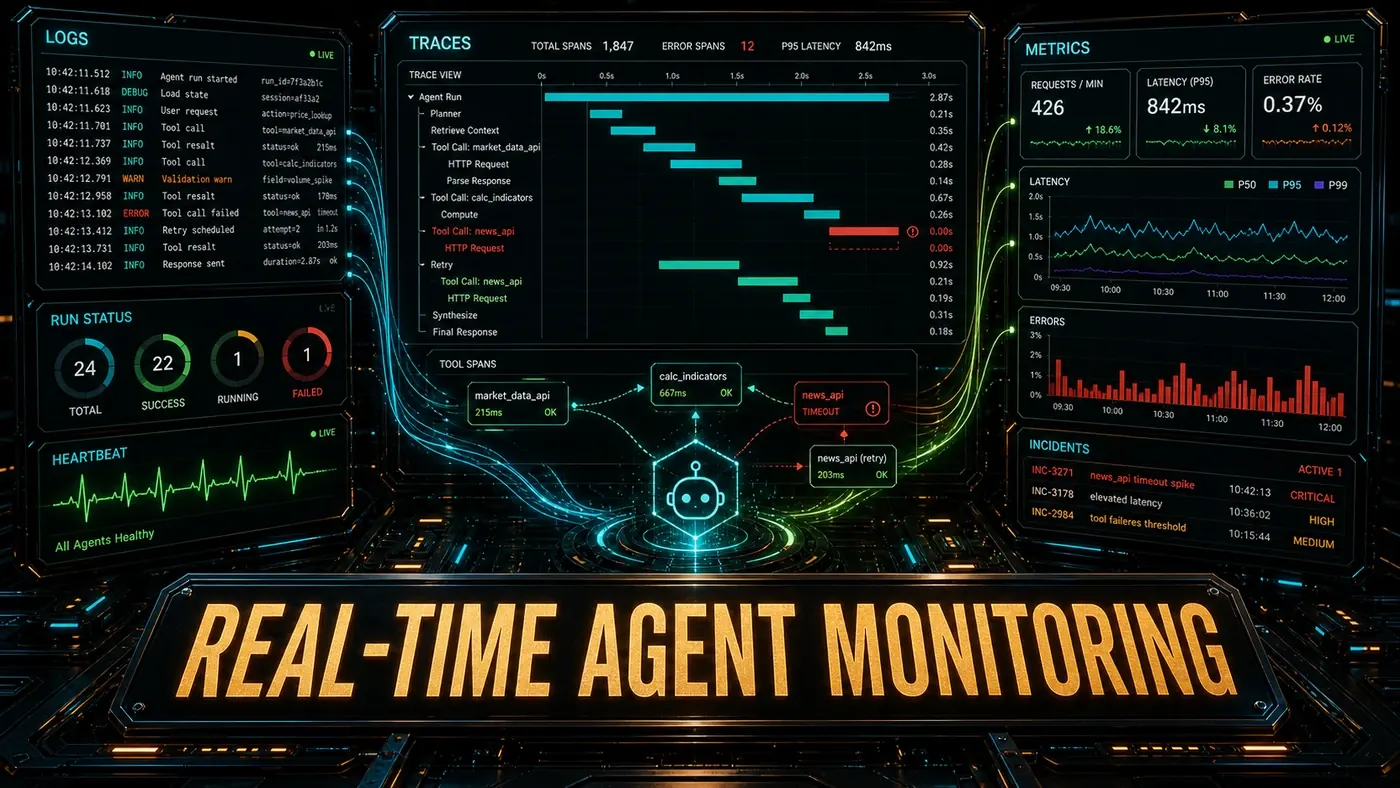
Distributed traces follow a single task across multiple agent calls and tool invocations:
[Trace: migrate-auth-system]
 [Span: plan_generation] 1.2s
 [Span: codebase_analysis] 0.4s
 [Span: migration_plan_draft] 0.8s
 [Span: plan_approval] 45.0s (human)
 [Span: execution] 128.0s
 [Span: file_read(src/auth.ts)] 0.1s
 [Span: file_write(src/auth.ts)] 3.2s
 [Span: test_run] 12.4s
 [Span: file_write(tests/auth.test.ts)] 2.8s
 [Span: verification] 8.1s
 [Span: lint_check] 2.1s
 [Span: typecheck] 6.0s
A trace shows you where the time went and where the failure happened. In Claude Code, this comes from the OpenTelemetry instrumentation, which records spans around each model request and tool execution (Claude Code Docs, 2026 (opens in a new tab)). Its Dynamic Workflows (opens in a new tab) feature is real (a script that orchestrates subagents at scale), but the idea that it generates traces on its own overstates things: tracing is the job of the opt-in OpenTelemetry layer, not a side effect of running a workflow. For Hermes, an OpenTelemetry integration via a hermes-opentelemetry package has been mentioned, but no registry or repo confirms such a package exists, so treat it as unconfirmed.
Pillar 3: Metrics
Aggregate metrics are what feed your dashboards and alerts:
| Metric | Type | Alert Threshold |
|---|---|---|
| Tasks per hour | Counter | Drop >50% |
| Success rate | Gauge | <80% |
| Average latency | Histogram | p95 >60s |
| Token cost per task | Histogram | >200% of baseline |
| Rollback rate | Gauge | >5% |
| Approval gate triggers | Counter | Spike >300% |
| Tool error rate | Gauge | >2% per tool |
Monitoring Stack Recommendations
For Small Teams (< 10 engineers)
Hermes: Built-in FTS5 logs + `hermes metrics` command
Claude Code: Built-in telemetry + JSON log export
OpenClaw: File logs + basic metrics dashboard
Export to: Grafana Cloud (free tier) or Datadog
A note on those Hermes and OpenClaw commands: the specific subcommands shown here are illustrative. Hermes ships a CLI, but the trace, metrics, and dashboard verbs below were not confirmed in its primary docs, and the OpenClaw commands could not be verified at all. Claude Code's telemetry, by contrast, is documented, and its OpenTelemetry export feeds Grafana, Datadog, and similar backends directly (Claude Code Docs, 2026 (opens in a new tab)).
For Large Teams (10+ engineers)
Hermes: OpenTelemetry export to Jaeger + Prometheus
Claude Code: Anthropic-managed telemetry + SIEM integration
OpenClaw: Structured logging to ELK/Loki stack
Dashboards: Grafana with custom agent dashboards
Alerting: PagerDuty/Opsgenie for critical thresholds
The SIEM piece is worth flagging because it is real and useful: Claude Code's tool_decision, tool_result, mcp_server_connection, and permission_mode_changed events form a per-user audit trail you can forward to a security information and event management platform (Claude Code Docs, 2026 (opens in a new tab)). Grafana, Jaeger, Prometheus, ELK, Loki, PagerDuty, and Opsgenie are all standard tools, and OpenTelemetry's OTLP export plugs into them, so this stack is technically sound rather than aspirational.
Real-Time Dashboards
A useful agent dashboard surfaces:
- Current activity: Active agents, running tasks, queued requests.
- Health overview: Success rates, error rates, latency percentiles.
- Cost tracking: Spend today, this week, this month, broken down per agent.
- Quality trends: Rollback rate, human correction rate, approval gate stats.
- Alert feed: Active alerts and recent resolutions.
# Hermes built-in dashboard
hermes dashboard --port 8080

# Claude Code telemetry export
claude telemetry export --format prometheus

# OpenClaw metrics
openclaw metrics --serve --port 9090
One caveat on the Claude Code line: there is no documented claude telemetry export --format prometheus subcommand. In practice you configure the export through OpenTelemetry environment variables (OTEL_METRICS_EXPORTER and the standard OTLP settings), and a Prometheus or Grafana backend consumes the metrics from there (Claude Code Docs, 2026 (opens in a new tab)). Read the command above as shorthand for "point your OTEL config at Prometheus."
Alerting Best Practices
- Alert on symptoms, not causes: "Success rate dropped," not "CPU usage high."
- Use dynamic thresholds: Static thresholds breed alert fatigue. Lean on anomaly detection.
- Include context: An alert should link straight to the relevant traces and logs.
- Escalation paths: Low-priority alerts to Slack, high-priority to PagerDuty.
- Review regularly: A weekly alert review to clear out false positives.
Debugging with Traces
When an agent does something you did not expect, the trace is the first place to look:
# Find the failing trace
hermes traces list --since 1h --status failed

# Inspect the trace
hermes traces show trace_abc123 --format tree

# Compare with a successful trace
hermes traces compare trace_abc123 trace_def456
The comparison shows where two runs diverged: a different tool choice, different context, a different model response. That is usually enough to pin down the root cause. (As above, the exact hermes traces verbs are illustrative and not confirmed in the project's primary docs, but the workflow holds for any tracing tool you adopt.)
Monitoring is not optional for production agents. An agent you cannot see is a risk on your books. An agent you can see, with logs, traces, and metrics behind it, is an accountable member of the team.
Real-Time Agent Monitoring: answer-first summary
Real-Time Agent Monitoring matters because it can change how Australian business teams plan, build, or govern an agent workflow. The three-pillar monitoring stack for production agents: structured logging, distributed tracing and aggregate metrics, plus debugging workflows.
The direct answer is this: do not treat the topic as a standalone trend. Treat it as a decision about inputs, outputs, review ownership, data exposure, and whether the workflow produces a result that is faster, safer, or more useful than the current process.
Real-Time Agent Monitoring: implementation checklist
- Define the user, job to be done, and success metric for the agent workflow.
- Collect real examples, policies, source files, customer questions, or search queries before writing prompts or choosing tools.
- Separate low-risk drafts from decisions that need approval, privacy checks, or senior review.
- Document what the AI is allowed to access, what it must not access, and who signs off before production use.
- Review successful task completion, review time, fallback rate, operator corrections after a small pilot rather than judging the idea from a demo.
This keeps the work practical. It also gives search engines and AI answer engines a clean factual structure: what the topic is, who it helps, what to do next, and which risks matter before implementation.
Decision criteria for Real-Time Agent Monitoring
| Decision area | What to check | Production signal |
|---|---|---|
| Intent | Does Real-Time Agent Monitoring solve a real workflow problem? | The use case has a named owner and measurable outcome. |
| Data | Can the required data be used safely? | Sensitive data is classified and access is controlled. |
| Quality | Can a reviewer judge the output consistently? | Examples, rubrics, or acceptance criteria exist. |
| Scale | Can the workflow be repeated without hero effort? | The process is documented and can be handed to another team member. |
Practical example for Real-Time Agent Monitoring
A small business could use this article to choose one practical test. For example, a manager might take one customer-facing process, one internal document workflow, or one recurring content task and redesign only that step with AI support. The goal is not to automate the whole business at once; it is to learn where Code creates reliable leverage.
The useful deliverable is a short operating note: the trigger, the source material, the prompt or tool, the review checklist, the escalation rule, and the metric. That note becomes the handover asset for staff training, SEO/GEO content, service delivery, or future agent work.
Risks and controls for Real-Time Agent Monitoring
The common failure pattern is moving too quickly from a promising idea into an unmanaged workflow. For Real-Time Agent Monitoring, the risk is not only bad output. It can also be unclear data permission, staff confusion, duplicate content, unreviewed customer advice, or a tool that quietly changes cost or capability.
- Control unclear tool permissions with a named owner, a review step, and written acceptance criteria.
- Control silent failures with a named owner, a review step, and written acceptance criteria.
- Control prompt drift with a named owner, a review step, and written acceptance criteria.
- Control weak audit trails with a named owner, a review step, and written acceptance criteria.
Measurement plan for Real-Time Agent Monitoring
A useful AI or SEO initiative should leave evidence. Track successful task completion, review time, fallback rate, operator corrections and compare the pilot against the current process. If the measure does not improve, keep the learning but avoid scaling the workflow.
For GEO readiness, the page should also answer the core question directly, define the entities involved, include implementation steps, explain tradeoffs, and link readers to the next relevant AI Kick Start service, guide, tool, or article.
Definitions and entities for Real-Time Agent Monitoring
For search, GEO, and staff handover, define the core entities in plain language. In this article the important entities are the workflow owner, the AI tool or model, the source material, the review process, the risk boundary, and the measurable business outcome. Clear definitions make the page easier for people to scan and easier for AI answer engines to quote accurately.
- Workflow owner: the person accountable for deciding whether Real-Time Agent Monitoring belongs in the business process.
- Source material: the documents, examples, policies, URLs, prompts, videos, or customer questions that ground the output.
- Review boundary: the point where a human checks accuracy, privacy, brand voice, or customer impact before the result is used.
- Success metric: the measure that proves whether the agent workflow is worth repeating.
Real-Time Agent Monitoring versus doing nothing
Doing nothing is also a decision. The cost may be slow manual work, weaker search visibility, inconsistent advice, duplicated effort, or staff using unmanaged AI tools without a shared process. The practical question is whether a controlled pilot can reduce that cost without creating a larger governance problem.
| Option | When it makes sense | What to watch |
|---|---|---|
| Do nothing | The workflow is rare, low value, or already reliable. | Competitors may improve speed, content depth, or service consistency first. |
| Run a small pilot | The task repeats often and has clear review criteria. | Keep scope tight and measure the result against the current process. |
| Build a production workflow | The pilot is repeatable and risk controls are documented. | Assign ownership, monitoring, training, and a rollback path. |
AI Kick Start handover package for Real-Time Agent Monitoring
A production handover should be concrete enough that another person can run it. For Real-Time Agent Monitoring, that means a short brief, a workflow map, approved prompts or tool settings, source material, a review checklist, internal links to supporting resources, and a simple measurement sheet. This is the difference between reading about AI and turning it into operational capability.
That packaging also strengthens E-E-A-T. It shows experience through implementation notes, expertise through decision criteria, authoritativeness through source-aware structure, and trust through risks, controls, and review steps. The article becomes useful even if the reader never buys a tool because it helps them make a better operational decision.