




Briefing
Most teams running AI agents have no idea whether the thing is actually working. It writes code, it answers tickets, it drafts emails, and the dashboard looks busy. But ask a simple question, "is this agent better or worse than it was last month?", and the room goes quiet.
That gap is the whole problem. An agent that feels productive can be quietly burning money, shipping bugs, and creating cleanup work that nobody is counting. The only way to know the difference is to measure it properly, and most organisations measure the easy stuff (tokens, speed) while ignoring the parts that decide whether the agent earns its keep.
This is a practical guide to closing that gap. It lays out a four-level way to score agent performance, from the nuts-and-bolts technical numbers up to the business outcomes your finance team cares about. None of it requires a data science team. It does require deciding, on purpose, what good looks like before you deploy.
You cannot improve what you do not measure. Agent evaluation is the discipline of measuring agent performance with rigour rather than intuition. Here is the framework that separates reliable agent deployments from hopeful experiments.
The Measurement Pyramid
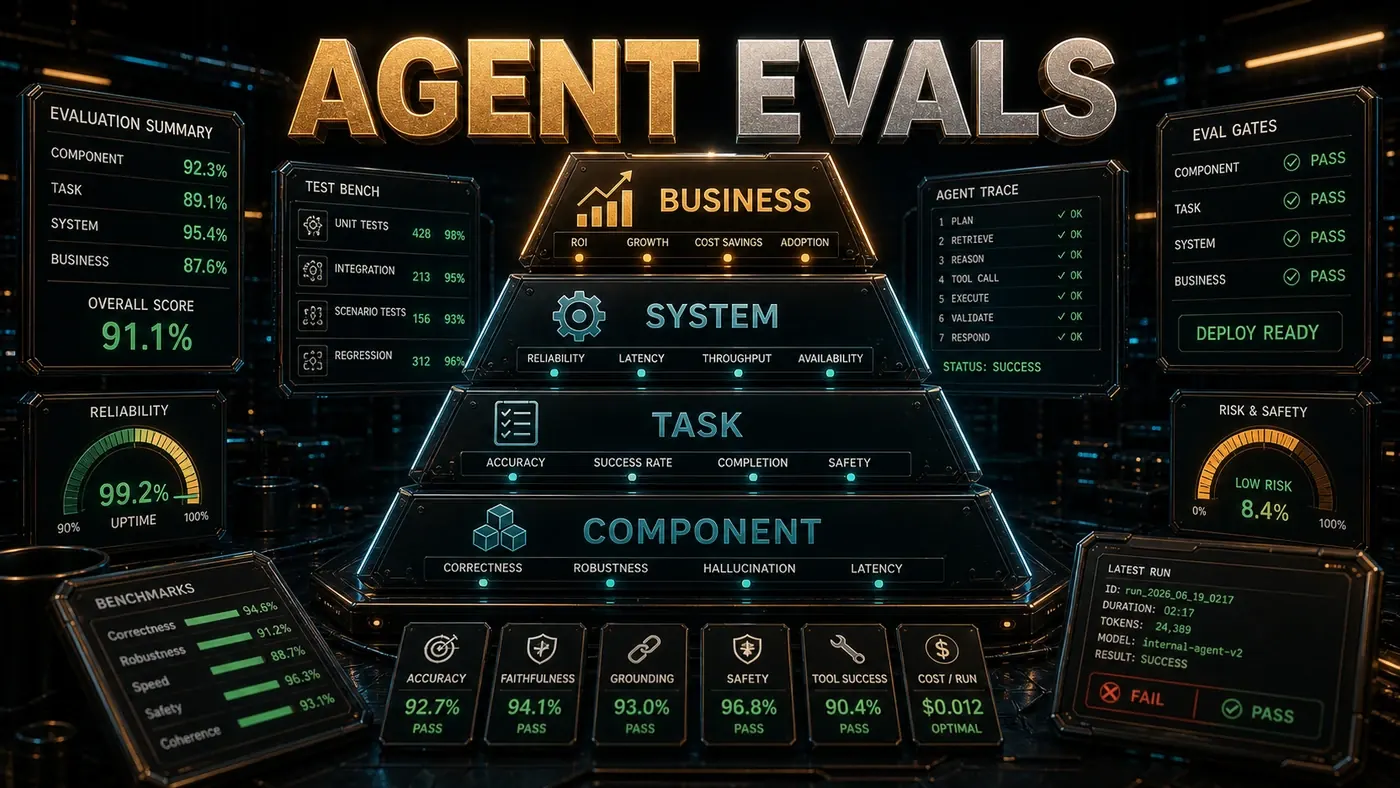
Agent evaluation works at four levels:
Level 4: Business Impact (revenue, velocity, satisfaction)
Level 3: Task Outcomes (success rate, quality, time)
Level 2: Technical Metrics (token usage, latency, error rate)
Level 1: Component Metrics (tool accuracy, context relevance, prompt adherence)
Most teams measure Level 2 and stop there. The teams getting real value measure all four, and they understand how each level feeds the next.
Level 1: Component Metrics
Component metrics tell you which specific thing is breaking:
| Metric | Definition | Target |
|---|---|---|
| Tool accuracy | % of tool calls with correct parameters | >95% |
| Context relevance | % of retrieved context actually used | >80% |
| Prompt adherence | % of constraints followed in output | >90% |
| Hallucination rate | % of outputs containing fabricated information | <2% |
| Format compliance | % of outputs matching requested format | >95% |
These need automated evaluation, usually model-based. Claude Code's built-in telemetry covers some of them: with OpenTelemetry turned on, it emits token usage, cost, session counts, and tool-execution events you can mine for component data (Anthropic Claude Code docs, Monitoring usage (opens in a new tab)). For retrospective digging, Hermes' FTS5 session database lets you full-text search across past sessions and pull patterns out of old transcripts (Nous Research Hermes Agent, Session Storage (opens in a new tab)).
Level 2: Technical Metrics
Technical metrics watch system health:
| Metric | Definition | Target |
|---|---|---|
| Token usage per task | Average tokens consumed | Minimise |
| Latency (p50/p95) | Time to task completion | p50<60s, p95<300s |
| Error rate | % of tasks ending in error | <5% |
| Retry rate | % of tasks requiring human intervention | <20% |
| Cost per task | Token cost + compute | Track and optimise |
Level 3: Task Outcomes
Task outcome metrics ask the question that matters: did the agent actually get the job done?
| Metric | Definition | Measurement |
|---|---|---|
| Success rate | % of tasks completed without human fix | Human review |
| First-attempt success | % correct on first try | Automated + spot check |
| Code quality score | Composite of lint, test, review | Automated pipeline |
| Regression rate | % of changes that break existing code | CI/CD |
| Time saved | (Human estimate) - (Agent time) | Self-report |
Level 4: Business Impact
Business impact metrics tie agent usage back to what the organisation actually cares about:
| Metric | Definition |
|---|---|
| Developer velocity | Story points or PRs per sprint |
| Bug escape rate | Bugs found in production vs. development |
| Developer satisfaction | Survey scores |
| Time to resolution | Mean time to fix bugs or implement features |
| Knowledge transfer speed | Time for new developers to become productive |
Evaluation Methodologies
Human Evaluation
The gold standard, and expensive. Use it for:
- Calibrating your automated evaluators at the start
- Edge cases and task types you haven't seen before
- Final sign-off on production deployments
Model-Based Evaluation
Use a stronger model to grade a weaker model's output. For example, an Opus-class model can score the work of a faster Sonnet-class model. (One commonly cited version of this, that Claude Code internally uses Opus 4.8 to grade Sonnet 4.8 outputs, is unconfirmed: it has no public source, and "Sonnet 4.8" does not appear to be a released model. The current Sonnet is Sonnet 4.6 (opens in a new tab); Opus 4.8 (opens in a new tab) is real.) The approach scales well, but it inherits whatever biases the evaluator model carries.
def model_evaluate(output, criteria, evaluator="opus-4.8"):
 prompt = f"Evaluate this output on {criteria}. Score 1-10. Explain."
 return claude.generate(prompt, model=evaluator)
Reference-Based Evaluation
Compare agent output against human-written reference solutions, using BLEU, ROUGE (opens in a new tab), or custom similarity metrics. It's only as good as the reference solutions you have, in quality and in coverage.
Execution-Based Evaluation
Run the generated code and see if it passes the tests. For coding tasks this is the most objective metric you'll get. The catch is that it leans entirely on the quality of your test suite.
Building an Evaluation Suite
evaluation_suite/
├── unit_tests/ # Does generated code compile and pass?
├── integration_tests/ # Does it work with the rest of the system?
├── regression_tests/ # Does it break anything?
├── quality_checks/ # Lint, format, complexity
├── reference_compare/ # Similarity to human-written solutions
└── human_review/ # Manual quality assessment
Run the full suite before you deploy any prompt or model change. Run component metrics continuously. Review business impact monthly.
Red Flags
These patterns tell you the evaluation itself is broken:
- Measuring proxy metrics: "Lines of code generated" barely correlates with value
- Cherry-picking examples: Testing only on tasks you already know the agent handles well
- No human baseline: If you don't know how a person performs, the agent's numbers mean nothing
- Static benchmarks: Agent performance drifts, so evaluate continuously
- Ignoring failure modes: Counting wins without categorising the losses
Agent evaluation isn't a one-off. It's an ongoing practice, and it decides whether your deployment gets better or worse over time. Teams that evaluate well ship with confidence. Teams that don't are just hoping.
Agent Evaluation: answer-first summary
Agent Evaluation matters because it can change how Australian business teams plan, build, or govern an agent workflow. The four-level measurement pyramid that separates reliable agent deployments from hopeful experiments, from component metrics to business impact.
The direct answer is this: do not treat the topic as a standalone trend. Treat it as a decision about inputs, outputs, review ownership, data exposure, and whether the workflow produces a result that is faster, safer, or more useful than the current process.
Agent Evaluation: implementation checklist
- Define the user, job to be done, and success metric for the agent workflow.
- Collect real examples, policies, source files, customer questions, or search queries before writing prompts or choosing tools.
- Separate low-risk drafts from decisions that need approval, privacy checks, or senior review.
- Document what the AI is allowed to access, what it must not access, and who signs off before production use.
- Review successful task completion, review time, fallback rate, operator corrections after a small pilot rather than judging the idea from a demo.
This keeps the work practical. It also gives search engines and AI answer engines a clean factual structure: what the topic is, who it helps, what to do next, and which risks matter before implementation.
Decision criteria for Agent Evaluation
| Decision area | What to check | Production signal |
|---|---|---|
| Intent | Does Agent Evaluation solve a real workflow problem? | The use case has a named owner and measurable outcome. |
| Data | Can the required data be used safely? | Sensitive data is classified and access is controlled. |
| Quality | Can a reviewer judge the output consistently? | Examples, rubrics, or acceptance criteria exist. |
| Scale | Can the workflow be repeated without hero effort? | The process is documented and can be handed to another team member. |
Practical example for Agent Evaluation
A small business could use this article to choose one practical test. For example, a manager might take one customer-facing process, one internal document workflow, or one recurring content task and redesign only that step with AI support. The goal is not to automate the whole business at once; it is to learn where Code creates reliable leverage.
The useful deliverable is a short operating note: the trigger, the source material, the prompt or tool, the review checklist, the escalation rule, and the metric. That note becomes the handover asset for staff training, SEO/GEO content, service delivery, or future agent work.
Risks and controls for Agent Evaluation
The common failure pattern is moving too quickly from a promising idea into an unmanaged workflow. For Agent Evaluation, the risk is not only bad output. It can also be unclear data permission, staff confusion, duplicate content, unreviewed customer advice, or a tool that quietly changes cost or capability.
- Control unclear tool permissions with a named owner, a review step, and written acceptance criteria.
- Control silent failures with a named owner, a review step, and written acceptance criteria.
- Control prompt drift with a named owner, a review step, and written acceptance criteria.
- Control weak audit trails with a named owner, a review step, and written acceptance criteria.
Measurement plan for Agent Evaluation
A useful AI or SEO initiative should leave evidence. Track successful task completion, review time, fallback rate, operator corrections and compare the pilot against the current process. If the measure does not improve, keep the learning but avoid scaling the workflow.
For GEO readiness, the page should also answer the core question directly, define the entities involved, include implementation steps, explain tradeoffs, and link readers to the next relevant AI Kick Start service, guide, tool, or article.
Definitions and entities for Agent Evaluation
For search, GEO, and staff handover, define the core entities in plain language. In this article the important entities are the workflow owner, the AI tool or model, the source material, the review process, the risk boundary, and the measurable business outcome. Clear definitions make the page easier for people to scan and easier for AI answer engines to quote accurately.
- Workflow owner: the person accountable for deciding whether Agent Evaluation belongs in the business process.
- Source material: the documents, examples, policies, URLs, prompts, videos, or customer questions that ground the output.
- Review boundary: the point where a human checks accuracy, privacy, brand voice, or customer impact before the result is used.
- Success metric: the measure that proves whether the agent workflow is worth repeating.
Agent Evaluation versus doing nothing
Doing nothing is also a decision. The cost may be slow manual work, weaker search visibility, inconsistent advice, duplicated effort, or staff using unmanaged AI tools without a shared process. The practical question is whether a controlled pilot can reduce that cost without creating a larger governance problem.
| Option | When it makes sense | What to watch |
|---|---|---|
| Do nothing | The workflow is rare, low value, or already reliable. | Competitors may improve speed, content depth, or service consistency first. |
| Run a small pilot | The task repeats often and has clear review criteria. | Keep scope tight and measure the result against the current process. |
| Build a production workflow | The pilot is repeatable and risk controls are documented. | Assign ownership, monitoring, training, and a rollback path. |
AI Kick Start handover package for Agent Evaluation
A production handover should be concrete enough that another person can run it. For Agent Evaluation, that means a short brief, a workflow map, approved prompts or tool settings, source material, a review checklist, internal links to supporting resources, and a simple measurement sheet. This is the difference between reading about AI and turning it into operational capability.
That packaging also strengthens E-E-A-T. It shows experience through implementation notes, expertise through decision criteria, authoritativeness through source-aware structure, and trust through risks, controls, and review steps. The article becomes useful even if the reader never buys a tool because it helps them make a better operational decision.