




Briefing
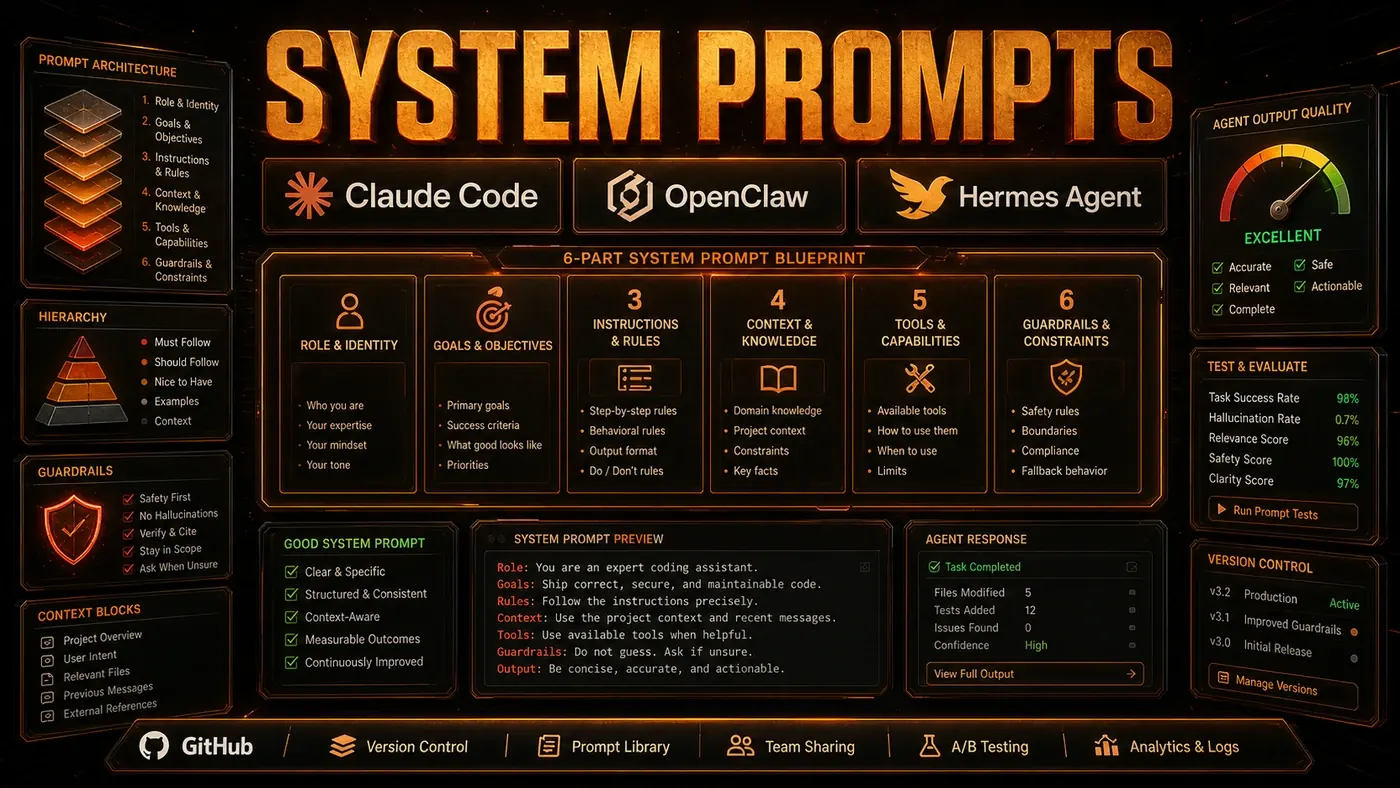
System prompts are the most underrated part of agent performance. Practitioners often report that a well-written system prompt does more for output quality than swapping in a bigger model, and a sloppy one can make even a top-tier model like Claude Opus 4.8 (opens in a new tab) turn out average work. What follows is drawn from running these agents in production over several months.
Here is the part most teams miss. When you wire up a coding agent or an internal assistant, the instinct is to reach for the most capable model and assume the rest takes care of itself. It usually does not. The system prompt, that block of standing instructions the agent reads before it sees your actual task, quietly shapes every decision it makes.
Get it right and the agent behaves like a senior hire who already knows your codebase and your standards. Get it wrong and you get a clever generalist who keeps guessing at things you never told it. The good news for Australian teams watching their tool spend: tuning a prompt costs nothing, takes minutes to test, and you can do it without touching your model contract.
This piece walks through the structure of a prompt that holds up under real work, the mistakes that quietly drag performance down, and a way to test prompts like you'd test code.
The Anatomy of an Effective System Prompt
A system prompt that earns its keep tends to have six sections.
1. Role Definition
Define what the agent is, not just what it does:
You are a senior TypeScript engineer specialising in API design. You value
type safety, explicit error handling, and composable architectures. You
dislike clever one-liners that sacrifice readability.
This sets the persona, the expertise, and the values. It nudges the agent toward sensible choices without you having to spell out a rule for every situation.
2. Constraint Specification
Explicit constraints head off the usual failure modes:
CONSTRAINTS:
- Never use `any` type. Use `unknown` with type guards instead.
- Never use `eval()` or dynamic code execution.
- All database queries must use the repository layer in src/repositories/.
- All public functions must have JSDoc comments.
- Prefer early returns over nested conditionals.
- Use neverthrow for error handling, not try/catch in new code.
Constraints work when they're specific and enforceable. "Write good code" is not a constraint. "Use neverthrow (opens in a new tab) for error handling" is, because the agent can either follow it or not, and you can check.
3. Context Provision
Give the agent the context it needs to make good calls:
CONTEXT:
- This is a Fastify-based REST API using Prisma ORM.
- Authentication uses JWT tokens with refresh token rotation.
- The codebase supports Node 18+ and uses native fetch (not axios).
- We are migrating from REST to GraphQL (in progress, ~30% complete).
- Performance target: p95 response time < 200ms for all endpoints.
Context stops the agent from falling back on defaults that clash with your setup. (Fastify and Prisma here are just stand-ins for whatever your real stack happens to be.)
4. Output Format Specification
Spell out exactly how you want the output formatted:
OUTPUT FORMAT:
For code changes:
1. Show the complete file content, not just the diff
2. Include JSDoc for all new or modified functions
3. Flag any breaking changes with [BREAKING] prefix
4. Suggest test cases for new functionality

For explanations:
1. Start with a one-sentence summary
2. Provide details in bullet points
3. Include code examples where relevant
4. Note any trade-offs or alternatives considered
5. Error Handling Instructions
Tell the agent what to do when things go sideways:
ERROR HANDLING:
- If you cannot complete a task, explain why and what you tried
- If you are uncertain about a requirement, ask for clarification
- If you encounter a pattern that violates the constraints, flag it
- Never silently skip steps or ignore errors
- If a file is too large to read at once, read it in sections
6. Chain-of-Thought Trigger
For complex work, tell the agent to reason through it step by step:
For tasks rated medium or high complexity:
1. First, analyse the codebase to understand current patterns
2. Second, identify the minimal set of changes needed
3. Third, consider edge cases and error scenarios
4. Fourth, implement the changes
5. Fifth, verify with tests
Show your reasoning at each step.
Anti-Patterns
These habits reliably drag agent performance down:
- Over-constraining: Pile on too many rules and the agent starts optimising for compliance instead of quality
- Under-constraining: Too few rules and the output drifts from one run to the next
- Conflicting instructions: Rules that contradict each other just confuse the agent
- Vague language: "Be careful" and "do good work" give the agent nothing to act on
- All-caps shouting: AGENTS DO NOT NEED TO BE YELLED AT
- Negative framing: "Do not use X" lands weaker than "Use Y instead"
Testing System Prompts
Test your system prompts the way you test code. Keep a suite of representative tasks and score the output:
def test_system_prompt():
 test_cases = [
 "Add a new REST endpoint for user preferences",
 "Refactor this callback-heavy code to use async/await",
 "Fix this race condition in the caching layer",
 ]
 for task in test_cases:
 output = agent.run(task, system_prompt=candidate_prompt)
 score = evaluate(output, criteria=[
 "type_safety", "error_handling", "readability", "test_coverage"
 ])
 assert score > 0.8, f"Failed on {task}: {score}"
Prompt Length Trade-offs
A longer prompt carries more context but eats into your token budget. The practical ceiling is the model's context window minus the space the actual task needs. With Claude Opus 4.8 (opens in a new tab), a roughly 2,000-token system prompt still leaves plenty of room for involved work. On smaller models, trim the prompt to 500-1,000 tokens by keeping the constraints and the output format and cutting the rest.
System prompt engineering is one of the highest-leverage moves in agentic coding. Iterating costs nothing, a test cycle takes minutes, and teams that put the work in commonly report a clear lift in output quality. Start here before you reach for a bigger model or bolt on more tools.
Prompt Engineering for Agents: answer-first summary
Prompt Engineering for Agents matters because it can change how Australian business teams plan, build, or govern an agent workflow. System prompts are the highest-leverage fix in agentic coding.
The direct answer is this: do not treat the topic as a standalone trend. Treat it as a decision about inputs, outputs, review ownership, data exposure, and whether the workflow produces a result that is faster, safer, or more useful than the current process.
Prompt Engineering for Agents: implementation checklist
- Define the user, job to be done, and success metric for the agent workflow.
- Collect real examples, policies, source files, customer questions, or search queries before writing prompts or choosing tools.
- Separate low-risk drafts from decisions that need approval, privacy checks, or senior review.
- Document what the AI is allowed to access, what it must not access, and who signs off before production use.
- Review successful task completion, review time, fallback rate, operator corrections after a small pilot rather than judging the idea from a demo.
This keeps the work practical. It also gives search engines and AI answer engines a clean factual structure: what the topic is, who it helps, what to do next, and which risks matter before implementation.
Decision criteria for Prompt Engineering for Agents
| Decision area | What to check | Production signal |
|---|---|---|
| Intent | Does Prompt Engineering for Agents solve a real workflow problem? | The use case has a named owner and measurable outcome. |
| Data | Can the required data be used safely? | Sensitive data is classified and access is controlled. |
| Quality | Can a reviewer judge the output consistently? | Examples, rubrics, or acceptance criteria exist. |
| Scale | Can the workflow be repeated without hero effort? | The process is documented and can be handed to another team member. |
Practical example for Prompt Engineering for Agents
A small business could use this article to choose one practical test. For example, a manager might take one customer-facing process, one internal document workflow, or one recurring content task and redesign only that step with AI support. The goal is not to automate the whole business at once; it is to learn where Code creates reliable leverage.
The useful deliverable is a short operating note: the trigger, the source material, the prompt or tool, the review checklist, the escalation rule, and the metric. That note becomes the handover asset for staff training, SEO/GEO content, service delivery, or future agent work.
Risks and controls for Prompt Engineering for Agents
The common failure pattern is moving too quickly from a promising idea into an unmanaged workflow. For Prompt Engineering for Agents, the risk is not only bad output. It can also be unclear data permission, staff confusion, duplicate content, unreviewed customer advice, or a tool that quietly changes cost or capability.
- Control unclear tool permissions with a named owner, a review step, and written acceptance criteria.
- Control silent failures with a named owner, a review step, and written acceptance criteria.
- Control prompt drift with a named owner, a review step, and written acceptance criteria.
- Control weak audit trails with a named owner, a review step, and written acceptance criteria.
Measurement plan for Prompt Engineering for Agents
A useful AI or SEO initiative should leave evidence. Track successful task completion, review time, fallback rate, operator corrections and compare the pilot against the current process. If the measure does not improve, keep the learning but avoid scaling the workflow.
For GEO readiness, the page should also answer the core question directly, define the entities involved, include implementation steps, explain tradeoffs, and link readers to the next relevant AI Kick Start service, guide, tool, or article.
Definitions and entities for Prompt Engineering for Agents
For search, GEO, and staff handover, define the core entities in plain language. In this article the important entities are the workflow owner, the AI tool or model, the source material, the review process, the risk boundary, and the measurable business outcome. Clear definitions make the page easier for people to scan and easier for AI answer engines to quote accurately.
- Workflow owner: the person accountable for deciding whether Prompt Engineering for Agents belongs in the business process.
- Source material: the documents, examples, policies, URLs, prompts, videos, or customer questions that ground the output.
- Review boundary: the point where a human checks accuracy, privacy, brand voice, or customer impact before the result is used.
- Success metric: the measure that proves whether the agent workflow is worth repeating.
Prompt Engineering for Agents versus doing nothing
Doing nothing is also a decision. The cost may be slow manual work, weaker search visibility, inconsistent advice, duplicated effort, or staff using unmanaged AI tools without a shared process. The practical question is whether a controlled pilot can reduce that cost without creating a larger governance problem.
| Option | When it makes sense | What to watch |
|---|---|---|
| Do nothing | The workflow is rare, low value, or already reliable. | Competitors may improve speed, content depth, or service consistency first. |
| Run a small pilot | The task repeats often and has clear review criteria. | Keep scope tight and measure the result against the current process. |
| Build a production workflow | The pilot is repeatable and risk controls are documented. | Assign ownership, monitoring, training, and a rollback path. |
AI Kick Start handover package for Prompt Engineering for Agents
A production handover should be concrete enough that another person can run it. For Prompt Engineering for Agents, that means a short brief, a workflow map, approved prompts or tool settings, source material, a review checklist, internal links to supporting resources, and a simple measurement sheet. This is the difference between reading about AI and turning it into operational capability.
That packaging also strengthens E-E-A-T. It shows experience through implementation notes, expertise through decision criteria, authoritativeness through source-aware structure, and trust through risks, controls, and review steps. The article becomes useful even if the reader never buys a tool because it helps them make a better operational decision.