





Briefing
If you run a self-hosted AI agent, the past few months have probably forced a decision you were hoping to put off. Two open-source frameworks, OpenClaw and Hermes, have become the default choices for teams who want an agent wired into their own messaging tools rather than a vendor's hosted product. Lately a lot of those teams are weighing a move from the first to the second.
Two things are driving it. In early February, OpenClaw was hit with a serious security flaw, CVE-2026-25253, a one-click remote-code-execution bug that let an attacker steal auth tokens over a WebSocket. Security vendors found tens of thousands of exposed instances before a patch landed. At the same time, Hermes has been winning over engineers with its memory system, which learns from how your team actually works instead of forgetting everything between sessions.
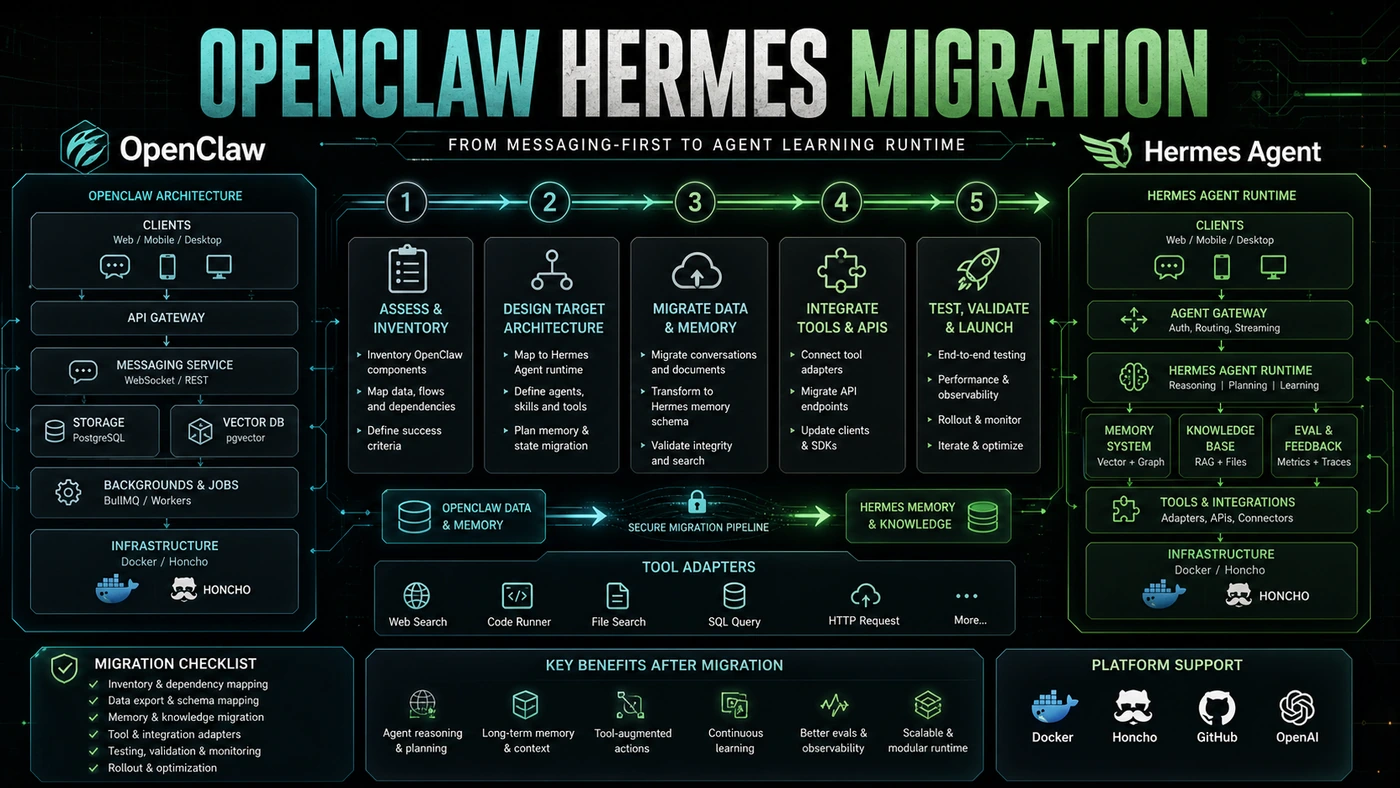
The catch is that switching is not a copy-paste job. The two tools are built on opposite ideas. OpenClaw puts an agent on top of messaging plumbing. Hermes does the reverse: it puts messaging on top of an agent designed to learn. Move between them and you are not just changing software, you are changing the shape of how your agent thinks.
This guide walks through the migration end to end, from the audit you should run before you touch anything, through the official tooling, to the cutover.
OpenClaw's CVE-2026-25253 incident and the learning advantages of Hermes' Honcho memory are pushing the decision. The patch for the CVE shipped in OpenClaw version 2026.1.29, so if you are staying on OpenClaw for any stretch, update first. As for community sentiment, reviews of Reddit discussion suggest no clear winner and plenty of people running both; one widely shared breakdown reportedly put the split near 35% OpenClaw, 30% Hermes, and 20% both, though that exact figure is unconfirmed. Either way, migration is not trivial. The two architectures differ at the root: OpenClaw wraps an agent around messaging infrastructure, while Hermes wraps messaging around a learning agent.
Pre-Migration Assessment
Before you run hermes claw migrate, take stock of your current OpenClaw setup.
# Audit installed skills and their sources
openclaw skills list --verbose > skills_audit.json

# Check which messaging channels are active
openclaw channels list > channels_audit.json

# Export memory files
cp MEMORY.md hermes_migration/
cp -r .openclaw/journal/ hermes_migration/journal/

# Document custom configurations
openclaw config export > config_backup.json
What you are looking for:
- Custom skills that aren't published on agentskills.io
- Channel-specific workflows, like Discord bot commands
- Cron-scheduled sub-agents
- Integrations with external services
Phase 1: Run the Migration Tool
Hermes ships `hermes claw migrate` for exactly this transition.
# Install Hermes
pip install hermes-agent

# Run the migration
hermes claw migrate \
  --source ~/.openclaw \
  --target ./hermes_project \
  --import-memory \
  --import-channels \
  --import-skills
According to the official docs, the migration tool handles three things. The exact internal breakdown below is illustrative, but it matches the documented behaviour:
- Memory conversion:
MEMORY.mdand journal files are turned into Honcho dialectic memory entries. Each journal entry becomes a conversation with its context attached. - Channel migration: Discord, Slack, Telegram, and other channel configs are mapped onto Hermes' messaging adapters.
- Skill mapping: OpenClaw AgentSkills are matched to Hermes tool equivalents where one exists. Anything without a direct match gets flagged for you to review by hand.
Phase 2: Review and Remediate
The tool gives you a report of what it sorted out on its own and what still needs you. The numbers below are example output, not figures from a real run:
Migration Report
================
Memory entries: 1,247 imported (100%)
Channels: 5 imported, 2 require manual config
Skills: 23 mapped automatically, 8 flagged for review
Sub-agents: 3 cron schedules migrated
Warnings:
  - Custom skill "internal-deploy" has no Hermes equivalent
  - Telegram webhook URL needs updating
  - Discord bot permissions may need re-authorisation
Manual Skill Migration
When a skill doesn't map on its own, you have three options:
- Find an equivalent on [agentskills.io](https://github.com/VoltAgent/awesome-openclaw-skills): Look for a community-maintained alternative.
- Port the skill: Convert the Node.js skill to Python for Hermes.
- Keep OpenClaw for that one function: Run both systems through the transition.
# Porting an OpenClaw skill to Hermes
# OpenClaw version (Node.js)
# module.exports = { onMessage: async (msg) => { ... } }

# Hermes version (Python)
from hermes.tools import tool

@tool("deploy_service")
async def deploy_service(environment: str, version: str) -> dict:
    """Deploy service to specified environment."""
    # Ported logic from OpenClaw skill
    result = await run_deploy_script(environment, version)
    return {"status": result.status, "url": result.url}
Channel Re-Authorisation
Your messaging channels need re-authorising, because Hermes connects with its own bot credentials rather than OpenClaw's.
# Discord
hermes channels discord connect \
  --bot-token $DISCORD_BOT_TOKEN \
  --guild-id $DISCORD_GUILD_ID

# Slack
hermes channels slack connect \
  --app-token $SLACK_APP_TOKEN \
  --bot-token $SLACK_BOT_TOKEN

# Telegram
hermes channels telegram connect \
  --api-token $TELEGRAM_API_TOKEN \
  --webhook-url https://your-hermes-instance/webhook/telegram
Phase 3: Parallel Operation
Run both systems side by side for a while. Two weeks is a sensible window. Move channels across one at a time rather than all at once.
Phase 4: Cutover
Once every channel is working on Hermes:
- Disable OpenClaw's bot accounts
- Point OpenClaw webhooks at Hermes
- Update any docs that still reference OpenClaw commands
- Hang on to the OpenClaw config backup for 30 days
Cost Impact
The figures below are estimates to give you a rough sense of the trade-off, not published numbers. Real hosting cost depends on the VPS or serverless provider you pick (Hermes supports VPS, Docker, Modal, and Daytona).
| Component | OpenClaw | Hermes | Change |
|---|---|---|---|
| Hosting | $0-24/mo | ~$5/mo | Lower |
| Token costs | Similar | Similar | Neutral |
| Setup time | N/A | 4-8 hours | Upfront cost |
| Maintenance | Higher (security) | Lower | Savings over time |
The upfront hours are real, but for most teams the move pays back through less security firefighting and an agent that gets better at the job over time.