


Introduction: Why This One Belongs on the Watchlist
Consumer GPU leaks rarely make the cut for an AI implementation briefing, but this one touches the binding constraints of on-premise and edge inference: VRAM, memory cost, and hardware lifecycle planning. The reason it matters for AI Kick Start readers is practical: this is not just another launch to admire from a distance. It changes how founders, operators, and technical teams should think about AI Infrastructure work over the next few months. The source transcript repeatedly centres on VRAM capacity, system memory cost and hardware lifecycle planning, with the video framing the topic as a practical workflow rather than a detached product announcement. That is the useful lens. The video is worth treating as implementation intelligence: what should be tested, what should be ignored for now, and what should become part of a repeatable operating system. For Australian small businesses and technical teams, the right question is not "is this impressive?" The right question is "where does this reduce friction without creating a larger governance, security, or maintenance problem?"
What the Video Actually Shows
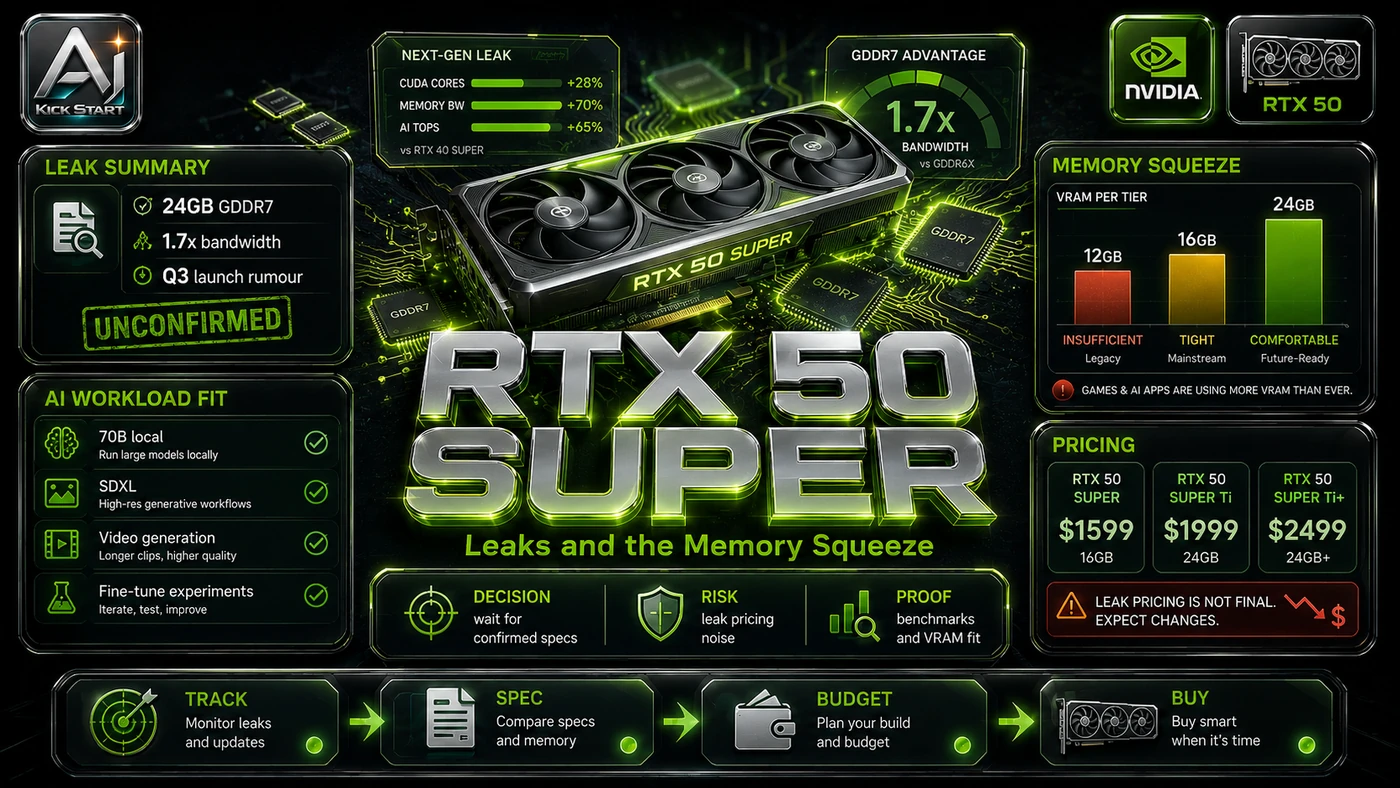
Gamer Meld's breakdown is a rumour-roundup covering AMD FSR 4.1 back-porting to older Radeons, Nvidia RTX 50 Super leaks with larger memory pools, and the PC industry restarting DDR4 production. The core pattern is simple: Audit current workloads, set a minimum VRAM and memory floor, compare upgrade paths against total cost of ownership, and schedule a review gate before committing. In practice, that means the update sits inside a broader shift from isolated AI prompts to managed systems. A tool, model, or method only becomes valuable when it has clear inputs, a measurable output, a review path, and a way to repeat the result next week. The video's most useful signal is the workflow shape. The moving parts can be summarised as: Workload audit Cost baseline Platform horizon Review gate. That is the level at which teams should evaluate it. A demo can be entertaining, but a workflow must survive messy source files, staff handoff, data boundaries, and real deadlines.
The Implementation Pattern
The first implementation lesson is to narrow the scope. Start with one model family or inference workload before deciding whether a fleet refresh is justified. Broad adoption is usually where AI systems fail first because nobody knows which decision the tool is allowed to make and which decision still belongs to a human. The second lesson is to create a test harness. Compare a candidate configuration against current cloud or rental cost for the same throughput and context window. A useful harness does not have to be complicated. It can be a short brief, a fixed sample dataset, a few expected outputs, and one person responsible for judging whether the result is good enough. The third lesson is to capture the process. Document how the workload is sized, how the hardware was chosen, and when the next review gate fires. When the process is documented, it can become a reusable skill, checklist, prompt pack, repo pattern, or operating procedure. When it is not documented, the team is back to improvising in chat.
Research Update: What To Correct
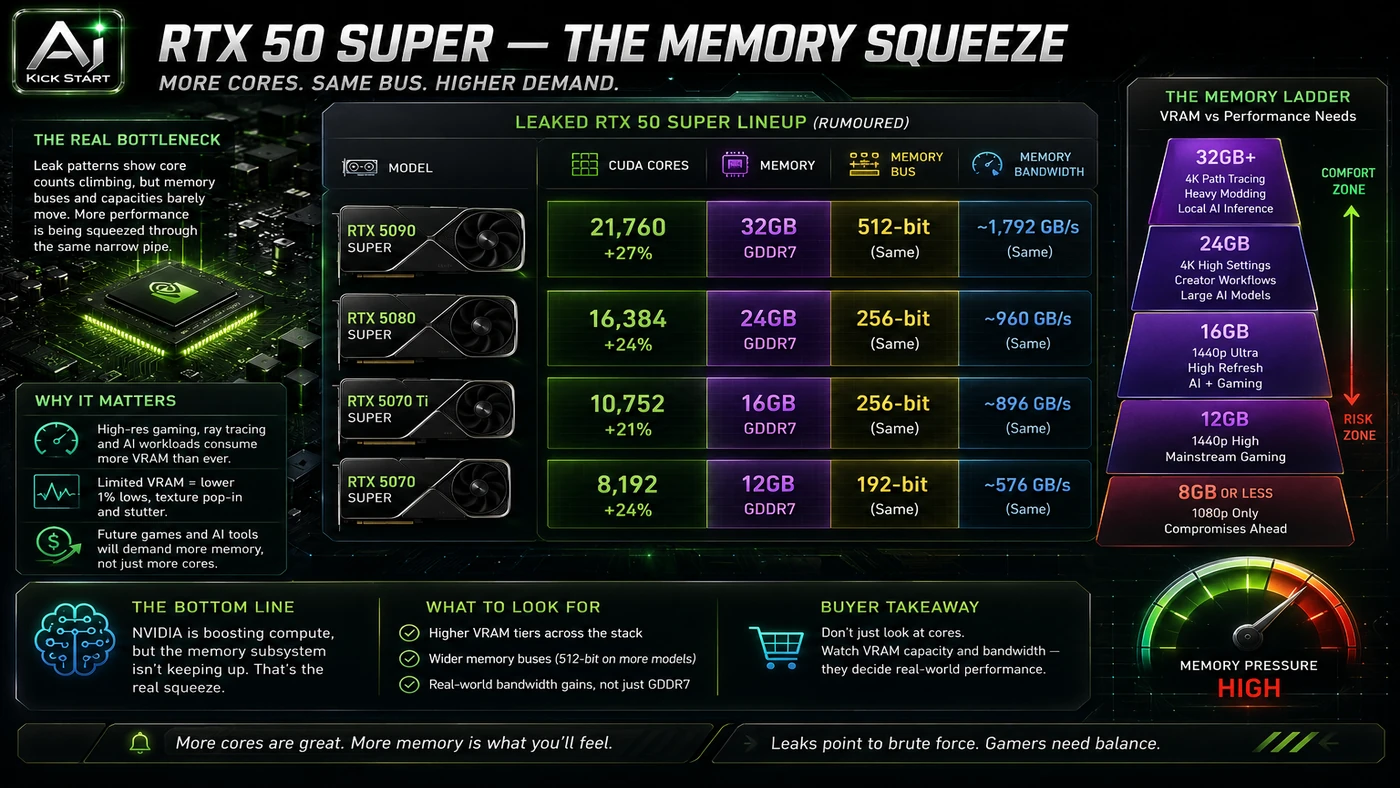
This update adds a current-source pass rather than treating the original video summary as enough. The important corrections are the product surface, plan or pricing constraints, and what should be verified before a team depends on the workflow. AMD FSR 4.1 for RX 7000 shipped on 22 June 2026, earlier than the video's July mention, with broad support; the RX 6000 timeline of early 2027 is unchanged. RDNA 3.5 iGPU support is a development target, not a hard no, with AMD developing lightweight ML models for RDNA 3 and RDNA 3.5 APUs but no date set. The RTX 50 Super lineup is unconfirmed by Nvidia, so the "back on track" claim should be treated as a rumour. The DDR4 restart is real, but Samsung B-die has been end-of-life since 2019 and new kits will likely top out around DDR4-3600. Memory prices are volatile: DDR4 spot prices have risen and DDR5 has spiked, so the restart responds to demand for cheaper platforms rather than guaranteeing low pricing.
Practical Setup and How-To
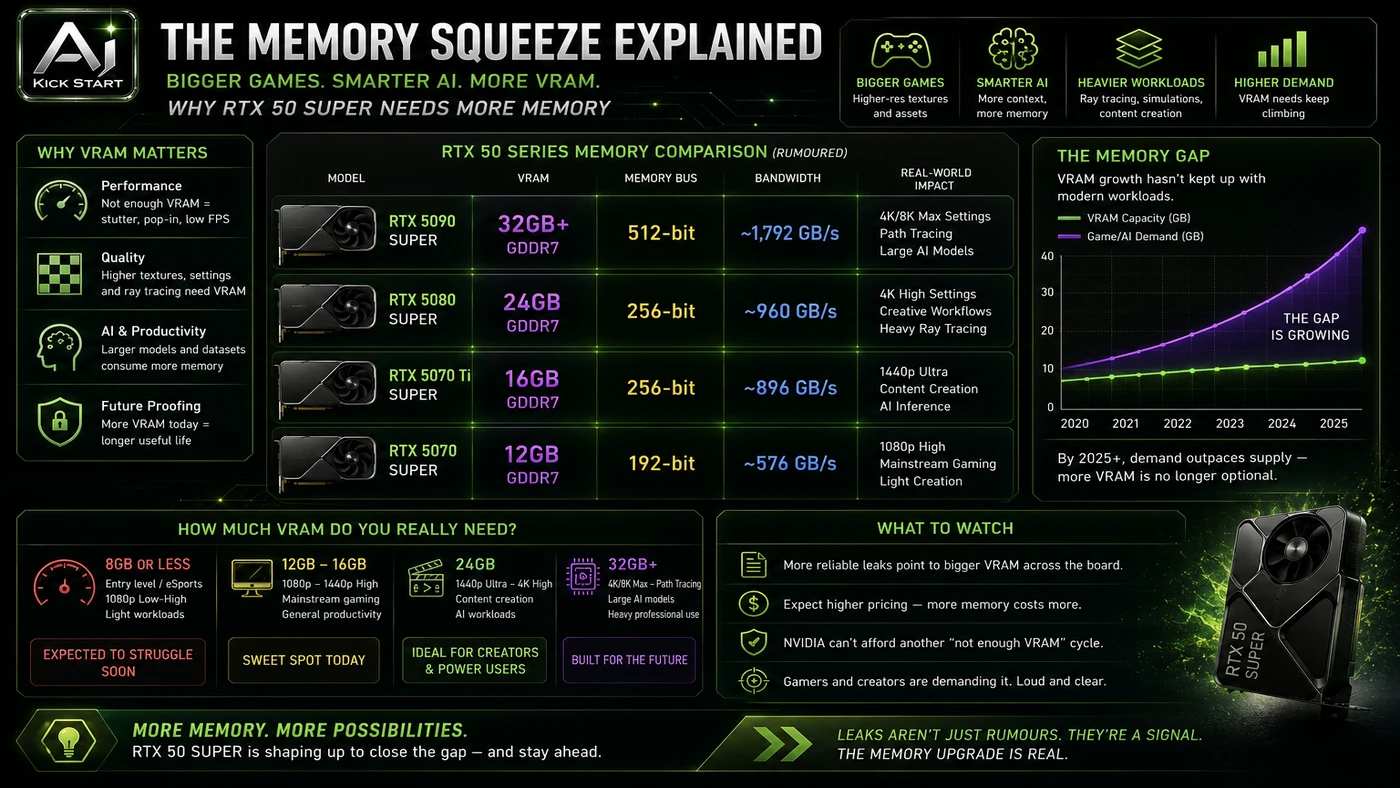
The useful next step is a controlled pilot with a named owner, fixed inputs, a measurable output, and a review point. Use the sequence below as the first implementation path before expanding the workflow. Size your workloads first: a 7 B model at Q4 needs roughly 4–6 GB of VRAM, a 14 B model needs 8–10 GB, and a 70 B model at Q4 needs 40+ GB, with multimodal and long contexts adding more. Audit your existing fleet before retiring viable RTX 3090 24 GB, RTX 4090 24 GB, or Radeon RX 7900 XTX 24 GB machines. Treat the RTX 50 Super leaks as a "wait or buy now" signal: a 24 GB 5080 Super could suit 14 B to 32 B inference if it lands near the current 5080 price, otherwise a used RTX 4090 may still win. Do not build a DDR4 inference fleet from scratch: the platform is end-of-life and prices are inflated, so use it only to extend an existing fleet or build one budget node, not as a multi-year strategy. Set a review date and revisit the decision after the rumoured launch window.
Pricing, Access, and Comparison Notes
Pricing and access should be checked at implementation time because AI products change quickly. The safer decision is to compare the tool against the job-to-be-done, not against launch hype. No official pricing exists for the rumoured RTX 50 Super cards. Current roughly comparable cards include the RTX 4060 Ti 16 GB for small models and LoRA experiments, the RTX 4070 Ti Super and RTX 4080 Super 16 GB for development and larger single-GPU inference, the RTX 4090 24 GB for heavy local inference and 70 B quantised models, the RTX 5090 32 GB for flagship local inference, and the Radeon RX 7900 XTX 24 GB for open-source ROCm workloads. The rumoured 5080 Super at 24 GB would sit between the 4080 Super and the 4090, the 5070 Super at 18 GB would be a new middle tier, and the 5060 12 GB would be a limited budget entry point. A 64 GB DDR5 kit is the practical minimum for a workstation running local LLMs; DDR4 may offer short-term savings but brings higher power draw, slower bandwidth, and zero upgrade path. Access Plan, preview status, region, account type, admin controls, and rate limits. Cost Subscription, credits, API tokens, retries, hardware, review time, and support burden. Fit Workflow reliability, data handling, output quality, observability, and human approval needs.
Implementation Notes for Teams
For AI Kick Start readers, this is the production filter: keep the first rollout narrow, make the evidence visible, and do not let the tool cross a business boundary until the review model is clear. Keep the first hardware rollout to one workload or model family until throughput, latency, and cost of ownership are measured. Confirm driver and framework support before purchase, because consumer cards rely on Game Ready, Studio, CUDA, and ROCm stacks. Treat local inference as on-premise infrastructure: data residency is improved, but patching, encryption, and access control remain the team's responsibility. Bias toward the highest VRAM the workload budget allows, because high-end GPUs hold value better than mid-range cards.
Screenshot and Visual Guidance
The second inline image for this article should make the implementation concrete: A spreadsheet showing candidate cards, target model, VRAM required, tokens per second at target context length, power draw, and total cost of ownership. If the team is documenting a real rollout, capture setup screens, before/after outputs, permission settings, cost meters, and review evidence rather than decorative screenshots.
Where It Fits for Real Teams
For founders, the opportunity is speed with evidence. This signal can reduce the time between guessing at hardware and running a measured pilot, but it should still produce inspectable artefacts. For operators, the value is consistency. If the same inference task runs on different hardware every quarter, AI can worsen inconsistency or standardise the path; the difference is whether the workflow has rules, examples, and review checkpoints. For technical teams, the value is leverage. A strong decision model lets teams pick the right GPU, memory, and platform for repeatable inference while engineers keep control over architecture, security, deployment, and final judgement. The practical fit is strongest when the task has clear source material, a known output format, and a low-cost way to verify quality. It is weaker when the task is vague, politically sensitive, legally risky, or dependent on facts that cannot be checked.
Trade-offs and Risks
The main risk is overcommitting to unconfirmed hardware. That risk can be managed, but only if it is named before the workflow becomes normal. A second risk is unclear ownership. AI systems often look better in a screen recording than they feel inside a production workflow. The test is whether the result is repeatable when the source material changes, the operator changes, and the deadline is real. A third risk is the legacy trap on ageing platforms. This is why AI Kick Start generally recommends a staged rollout: sandbox first, internal use second, customer-facing deployment last.
The Next Sensible Test
The next sensible test is a small controlled implementation. Pick one workflow, one owner, one expected output, and one acceptance check. Run it twice. If the second run is easier than the first, the pattern is worth keeping. Do not judge the workflow by the best possible demo. Judge it by the worst acceptable production case. Ask: what happens when the source file is incomplete, the tool is unavailable, the output is wrong, or a staff member needs to explain the result to a customer? If those answers are clear, this belongs in the roadmap. If they are not, it belongs in the lab until the operating model catches up.