








Briefing
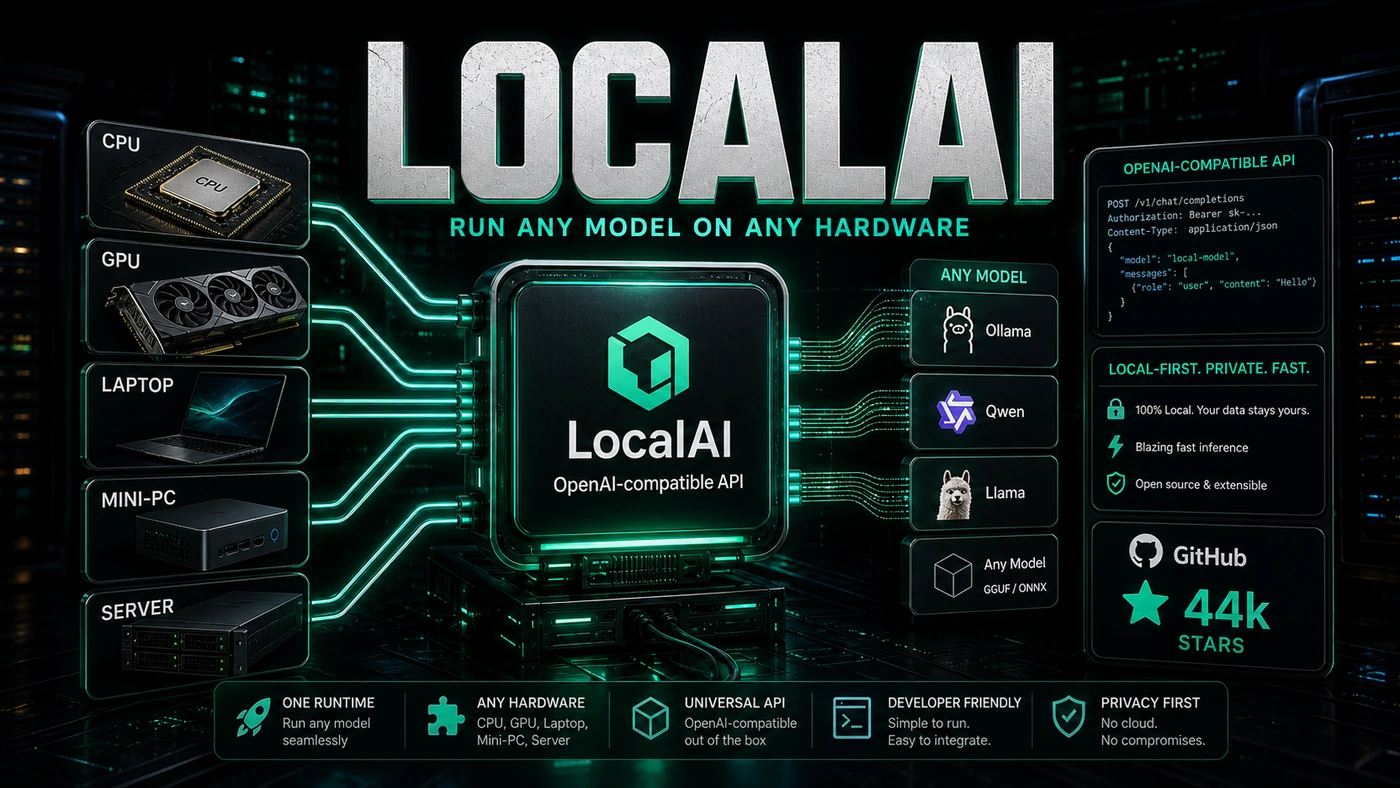
The cloud isn't always the right place to run AI. Privacy rules, slow round-trips, unpredictable bills, and the simple need to work offline all push teams to run models on their own machines instead. That's the gap LocalAI fills: it runs language models, image generators, embeddings, and speech models on ordinary hardware, with no GPU required (mudler/LocalAI). The project sits at roughly 44,000 GitHub stars, and it has become a common pick for teams who want self-hosted AI.
For a lot of Australian businesses, the appeal is easy to explain. You have customer records, legal documents, or health data that legally cannot leave the building, but you still want the same kind of AI features everyone else is shipping. Sending that data to a US cloud provider is either against the rules or against the spirit of them.
LocalAI's pitch is that you don't have to choose. You point your existing code at a server running on your own machine, the data stays put, and the application behaves the same way it did when it talked to the cloud. No rewrite, no new SDK to learn, no leaking sensitive records across the internet.
The catch most people expect is hardware cost: surely running models locally means buying expensive GPUs. LocalAI's main claim is that you can run a useful chunk of this on a plain CPU. Whether that holds for your specific workload is worth testing, but it changes the starting question from "what GPU budget do we need?" to "can our existing servers already do this?"
The Local AI Promise
LocalAI is an OpenAI-compatible API that runs on your own hardware. Swap it in for OpenAI's API and your existing code keeps working, except now the data never leaves your machine. That compatibility is the whole trick. You don't have to rewrite an application to move it off the cloud.
from openai import OpenAI

client = OpenAI(base_url="http://localhost:8080/v1", api_key="not-needed")
response = client.chat.completions.create(
    model="llama3-8b",
    messages=[{"role": "user", "content": "Hello!"}]
)
Model Support
LocalAI runs a wide spread of model types.
LLMs: Llama in its various sizes, Mistral, Qwen, Phi, Gemma, and many more through GGUF support (LocalAI model compatibility).
Vision Models: LLaVA, BakLLaVA, and other multi-modal models that can read images.
Embedding Models: Sentence-transformers, BGE, and custom embedding models for RAG pipelines.
Diffusion Models: Stable Diffusion, SDXL, and Flux for image generation.
Audio Models: Whisper for transcription, plus text-to-speech models for generating voice.
TTS/STT: A full speech pipeline if you're building voice interfaces.
Hardware Flexibility
The part that wins LocalAI most of its fans is running on CPU-only systems, done through quantisation and tuned inference backends.
llama.cpp: The C++ inference engine that makes CPU inference actually usable (LocalAI model compatibility).
Vulkan: GPU acceleration for AMD and Intel cards, not only NVIDIA.
CUDA: Full NVIDIA support when you have it, with the backend picked automatically.
OpenVINO: Intel's own optimisations for their hardware.
ONNX Runtime: Reportedly available for cross-platform acceleration, though it isn't listed among LocalAI's headline backends and we couldn't confirm it as a first-class option in the current docs.
Deployment Options
Docker: Single-container deployment with pre-built images for the common setups.
Kubernetes: Helm charts for production, with auto-scaling and load balancing.
Bare Metal: Direct binary installs on Linux, macOS, and Windows.
Embedded: Experimental support for ARM devices, including the Raspberry Pi (mudler/LocalAI).
By The Numbers
- ~44,000 GitHub stars (a snapshot; the count has since climbed past 47,000)
- OpenAI-compatible API, drop-in replacement
- 100+ model families supported, by the project's own approximate framing
- CPU inference, no GPU required
- Multiple backends, llama.cpp, Vulkan, CUDA, OpenVINO
LocalAI vs Ollama
Ollama is the other big name in local model runners. Here's how they stack up.
Where LocalAI wins: OpenAI API compatibility, broader model support across vision, audio, and diffusion, more deployment options, and a Kubernetes-native setup.
Where Ollama wins: simpler setup, a nicer CLI, strong Mac support, and a larger model library that's easy to pull from.
For production and maximum compatibility, LocalAI tends to be the pick. For quick experiments and day-to-day developer convenience, Ollama is hard to beat. Some teams reportedly run both: Ollama on their laptops, LocalAI in production. Treat that split as a sensible pattern rather than a hard rule, since it's an editorial call rather than a documented one.
The Self-Hosting Movement
LocalAI is part of a wider shift toward keeping AI in-house. Regulated industries, governments with data-residency rules, and privacy-minded individuals all need a local option, and LocalAI gives them one without throwing away the large ecosystem of tools built around OpenAI's API.
If you need AI and you can't, or won't, send your data to the cloud, LocalAI is a serious piece of infrastructure to look at.