




Briefing
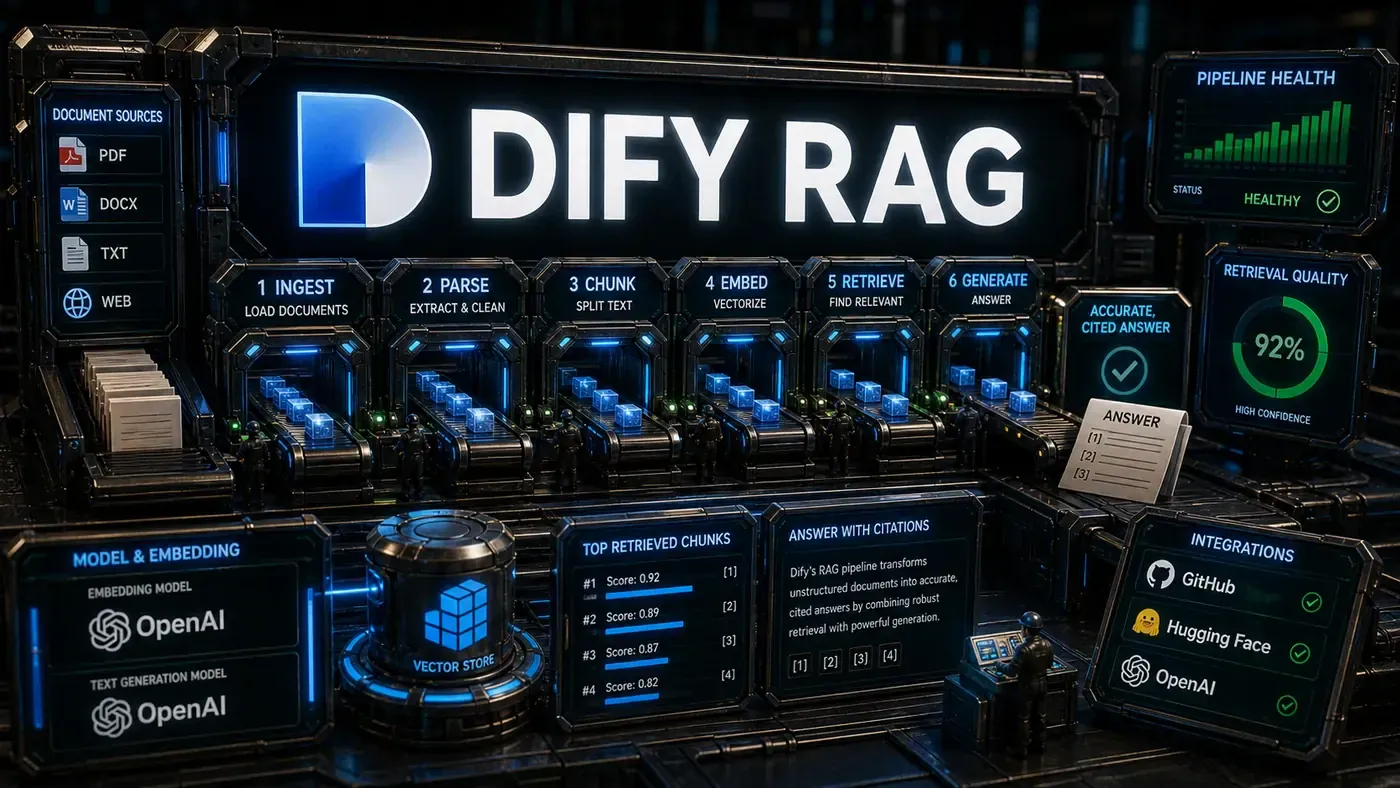
Retrieval-Augmented Generation (RAG) sits underneath most production LLM applications. Dify's RAG pipeline (opens in a new tab), part of a platform that has gathered roughly 146,000 stars on GitHub (opens in a new tab) (the figure of 136,000 cited in some write-ups is now out of date), is one of the more capable open-source implementations you can pick up today. Here is how it gets from a pile of raw documents to an accurate, cited answer.
The RAG Pipeline Overview
Dify's pipeline runs in five stages:
- Document Ingestion: Accepting dozens of formats
- Chunking: Intelligent text segmentation
- Embedding: Converting text to vectors
- Retrieval: Finding relevant content
- Generation: Producing answers with citations
Every stage is configurable, so you can tune it for the document types and use cases you actually deal with. (Dify Blog: Introducing Knowledge Pipeline (opens in a new tab))
If you have ever asked an AI tool a question about your own company's documents and watched it confidently make something up, you already understand why RAG matters. The trick is not making the model smarter. It is feeding the model the right paragraph from the right document at the right moment, and then telling it to answer from that and nothing else.
Dify is open-source software that does exactly this plumbing. You point it at your PDFs, spreadsheets, and web pages; it reads them, breaks them into searchable pieces, and stands up a system that can answer questions with a link back to the source. For an Australian business team, the appeal is plain: you can run it yourself, keep your documents in-house, and stop paying per question to a black-box vendor.
The reason it is worth a close look is that the gap between a RAG demo and a RAG system you would trust with customer-facing answers is enormous. Most of that gap lives in the unglamorous middle steps, how you split a document, how you search it, how you stop the model from inventing. Dify exposes those steps as knobs you can turn. The rest of this piece walks through each stage and where the real decisions are.
Stage 1: Document Ingestion
Dify takes in a wide spread of input formats. Official materials cite support for 30-plus formats; some third-party explainers push that number higher, so treat the longer lists as indicative rather than exact. The supported types include:
- Text: Markdown, TXT
- Documents: PDF, DOCX, Word
- Spreadsheets: CSV, XLSX, Excel
- Presentations: PPT
- Web: HTML, URL crawling
- Cloud storage: pulled directly from connected sources
Each format gets a dedicated parser that pulls out the text while keeping its structure intact. PDFs are the hard case. Dify reportedly uses more than one extraction approach, OCR for scanned pages, direct text extraction for digital PDFs, table detection for structured data, and picks whichever gives the best result. (Dify Blog: Introducing Knowledge Pipeline (opens in a new tab))
Stage 2: Chunking
Chunking is where a lot of RAG systems quietly fall over. Dify's documented modes are General (paragraph and recursive splitting with configurable size and overlap), Parent-Child, and Q&A. Beyond those, the broader RAG toolkit it draws on supports several common strategies, though not all are named as distinct Dify options in the official docs:
Recursive Character Splitting: Splits on natural boundaries, paragraphs, then sentences, with a chunk size and overlap you set. Good for general text.
Semantic Chunking: Uses an embedding model to find topic boundaries and split where the subject shifts. Suits documents that move between clearly different topics. (Reported as a general RAG technique rather than a confirmed standalone Dify mode.)
Fixed-Size Chunking: Cuts the text into equal blocks with overlap. Fast and simple, but it will happily slice a sentence in half.
Markdown Header Splitting: Splits on Markdown headers so the document's hierarchy survives. Useful for structured Markdown. (Also a general technique rather than a documented Dify-specific mode.)
Custom Splitting: Write your own splitting rules with regex.
Parent-Document Retrieval: Stores small chunks for searching but hands back the full parent document for context. The right call when an individual chunk is too thin to make sense on its own.
Chunk size and overlap are the parameters that matter most. Too small and you lose context; too large and irrelevant text dilutes the precision of your retrieval. Dify gives you tools to test different settings rather than guess. (Dify Blog: Introducing Knowledge Pipeline (opens in a new tab))
Stage 3: Embedding
Dify works with a range of embedding providers (Dify Docs: Model Providers (opens in a new tab)):
- OpenAI: text-embedding-3-small, text-embedding-3-large, ada-002
- Cohere: embed-english-v3, embed-multilingual-v3
- Hugging Face: hundreds of models via the inference API
- Local: run embedding models on your own hardware for privacy and cost control
Which embedding model you choose has a real effect on retrieval quality. Dify provides benchmarks so you can compare models against your own documents instead of taking a vendor's word for it.
Stage 4: Retrieval
Dify uses hybrid retrieval, combining several signals (Dify Blog: Introducing Knowledge Pipeline (opens in a new tab)):
Vector Similarity: Semantic search across the embedding space. Finds related content even when the wording is different.
Keyword Matching (BM25): Old-fashioned text search for exact term matches. Catches the specific terms vector search can miss.
Reranking: A cross-encoder model re-orders the first batch of results for relevance. This second pass lifts quality noticeably.
Metadata Filtering: Narrow results by document source, date, author, or your own custom fields.
Multi-Query Expansion: The system reportedly generates several variations of a query and merges the results, which helps recall on vague questions. This feature was not confirmed in the official knowledge pipeline documentation, so treat it as unconfirmed.
Stage 5: Generation
The last stage writes the answer (Dify Blog: Introducing Knowledge Pipeline (opens in a new tab)):
Context Assembly: The retrieved chunks are stitched into a context window, each tagged with where it came from.
Prompt Engineering: Dify's default prompt tells the LLM to answer only from the supplied context and to cite its sources. You can swap in your own prompt.
Citation Tracking: Claims in the answer link back to the source document and chunk, so a reader can check the work and dig into the original.
Hallucination Guardrails: When the context doesn't hold enough information, the prompt instructs the model to say so rather than invent an answer.
Edge Cases Handled
Dify reportedly copes with the messier realities of real documents, though several of the specifics below are not confirmed in official documentation and read as idealised descriptions:
Tables in PDFs: Pulls out the table structure and keeps the relationships between cells. (PDF and table handling is supported; the exact behaviour is not fully documented.)
Images with Captions: Reads image captions and folds them into the text. (Dify does support multimodal text-plus-image knowledge bases, see Dify Blog: Multimodal retrieval in the knowledge base (opens in a new tab).)
Multi-language Documents: Reportedly detects the language per chunk and routes each to a suitable embedding model. (Unconfirmed in official docs.)
Duplicate Content: Reportedly strips out repeated boilerplate, headers, footers, that would otherwise muddy retrieval. (Unconfirmed.)
Document Updates: Reportedly re-embeds only the sections that changed when a document is updated, rather than the whole thing. (Unconfirmed.)
Performance Optimisations
Dify performs asynchronous document indexing. Several other optimisations are described in capability write-ups but are not confirmed against official documentation, so the list below mixes confirmed and reported behaviour:
- Async processing: Document ingestion runs asynchronously (confirmed)
- Batch processing: Documents reportedly processed in parallel batches
- Caching: Embedding results reportedly cached to skip re-computation
- Index optimisation: Vector indices reportedly tuned to the specific embedding model
- Query caching: Common queries reportedly cached for instant response
- Partial results: Async ingestion reportedly lets you query partial results before a full document finishes indexing
Evaluation
Dify's pipeline emphasises step-by-step inspection and real-time debugging of each node, so you can see what each stage produced. Some explainers also describe a built-in evaluation suite with named metrics:
- Answer relevance: Does the answer address the question?
- Context precision: Are the retrieved chunks relevant?
- Faithfulness: Does the answer stick to the provided context?
- Citation accuracy: Are the citations correct and helpful?
These metrics mirror RAGAS-style evaluation frameworks. Their presence as native, built-in Dify tools was not confirmed in the documentation reviewed, so don't assume them without checking your own install. (Dify Blog: Introducing Knowledge Pipeline (opens in a new tab))
Dify's RAG pipeline: answer-first summary
Dify's RAG pipeline matters because it can change how Founders and operators plan, build, or govern an tool evaluation workflow. Inside Dify's document processing pipeline, which turns unstructured content into accurate, cited answers your team can actually trust.
The direct answer is this: do not treat the topic as a standalone trend. Treat it as a decision about inputs, outputs, review ownership, data exposure, and whether the workflow produces a result that is faster, safer, or more useful than the current process.
Dify's RAG pipeline: implementation checklist
- Define the user, job to be done, and success metric for the tool evaluation workflow.
- Collect real examples, policies, source files, customer questions, or search queries before writing prompts or choosing tools.
- Separate low-risk drafts from decisions that need approval, privacy checks, or senior review.
- Document what the AI is allowed to access, what it must not access, and who signs off before production use.
- Review time to value, adoption rate, cost per workflow, quality review score after a small pilot rather than judging the idea from a demo.
This keeps the work practical. It also gives search engines and AI answer engines a clean factual structure: what the topic is, who it helps, what to do next, and which risks matter before implementation.
Decision criteria for Dify's RAG pipeline
| Decision area | What to check | Production signal |
|---|---|---|
| Intent | Does Dify's RAG pipeline solve a real workflow problem? | The use case has a named owner and measurable outcome. |
| Data | Can the required data be used safely? | Sensitive data is classified and access is controlled. |
| Quality | Can a reviewer judge the output consistently? | Examples, rubrics, or acceptance criteria exist. |
| Scale | Can the workflow be repeated without hero effort? | The process is documented and can be handed to another team member. |
Practical example for Dify's RAG pipeline
A small business could use this article to choose one practical test. For example, a manager might take one customer-facing process, one internal document workflow, or one recurring content task and redesign only that step with AI support. The goal is not to automate the whole business at once; it is to learn where AI Tools creates reliable leverage.
The useful deliverable is a short operating note: the trigger, the source material, the prompt or tool, the review checklist, the escalation rule, and the metric. That note becomes the handover asset for staff training, SEO/GEO content, service delivery, or future agent work.
Risks and controls for Dify's RAG pipeline
The common failure pattern is moving too quickly from a promising idea into an unmanaged workflow. For Dify's RAG pipeline, the risk is not only bad output. It can also be unclear data permission, staff confusion, duplicate content, unreviewed customer advice, or a tool that quietly changes cost or capability.
- Control tool sprawl with a named owner, a review step, and written acceptance criteria.
- Control unclear pricing with a named owner, a review step, and written acceptance criteria.
- Control vendor lock-in with a named owner, a review step, and written acceptance criteria.
- Control unreviewed data sharing with a named owner, a review step, and written acceptance criteria.
Measurement plan for Dify's RAG pipeline
A useful AI or SEO initiative should leave evidence. Track time to value, adoption rate, cost per workflow, quality review score and compare the pilot against the current process. If the measure does not improve, keep the learning but avoid scaling the workflow.
For GEO readiness, the page should also answer the core question directly, define the entities involved, include implementation steps, explain tradeoffs, and link readers to the next relevant AI Kick Start service, guide, tool, or article.
Definitions and entities for Dify's RAG pipeline
For search, GEO, and staff handover, define the core entities in plain language. In this article the important entities are the workflow owner, the AI tool or model, the source material, the review process, the risk boundary, and the measurable business outcome. Clear definitions make the page easier for people to scan and easier for AI answer engines to quote accurately.
- Workflow owner: the person accountable for deciding whether Dify's RAG pipeline belongs in the business process.
- Source material: the documents, examples, policies, URLs, prompts, videos, or customer questions that ground the output.
- Review boundary: the point where a human checks accuracy, privacy, brand voice, or customer impact before the result is used.
- Success metric: the measure that proves whether the tool evaluation workflow is worth repeating.
Dify's RAG pipeline versus doing nothing
Doing nothing is also a decision. The cost may be slow manual work, weaker search visibility, inconsistent advice, duplicated effort, or staff using unmanaged AI tools without a shared process. The practical question is whether a controlled pilot can reduce that cost without creating a larger governance problem.
| Option | When it makes sense | What to watch |
|---|---|---|
| Do nothing | The workflow is rare, low value, or already reliable. | Competitors may improve speed, content depth, or service consistency first. |
| Run a small pilot | The task repeats often and has clear review criteria. | Keep scope tight and measure the result against the current process. |
| Build a production workflow | The pilot is repeatable and risk controls are documented. | Assign ownership, monitoring, training, and a rollback path. |
AI Kick Start handover package for Dify's RAG pipeline
A production handover should be concrete enough that another person can run it. For Dify's RAG pipeline, that means a short brief, a workflow map, approved prompts or tool settings, source material, a review checklist, internal links to supporting resources, and a simple measurement sheet. This is the difference between reading about AI and turning it into operational capability.
That packaging also strengthens E-E-A-T. It shows experience through implementation notes, expertise through decision criteria, authoritativeness through source-aware structure, and trust through risks, controls, and review steps. The article becomes useful even if the reader never buys a tool because it helps them make a better operational decision.