




Analysis
Every business sitting on a pile of PDFs, contracts, and internal docs eventually asks the same question: why can't we just chat with this stuff? Pasting a 40-page policy into a chatbot and hoping for the best is not a system. It's a guess. And when the answer is wrong, you usually can't tell.
RAG is the pattern that fixes that. Instead of asking a model to recall facts from training, you feed it your actual documents at question time, then ask it to answer only from what it was given. The model stops improvising and starts citing. For an Australian business team, that's the difference between a toy and something you'd let a customer near.
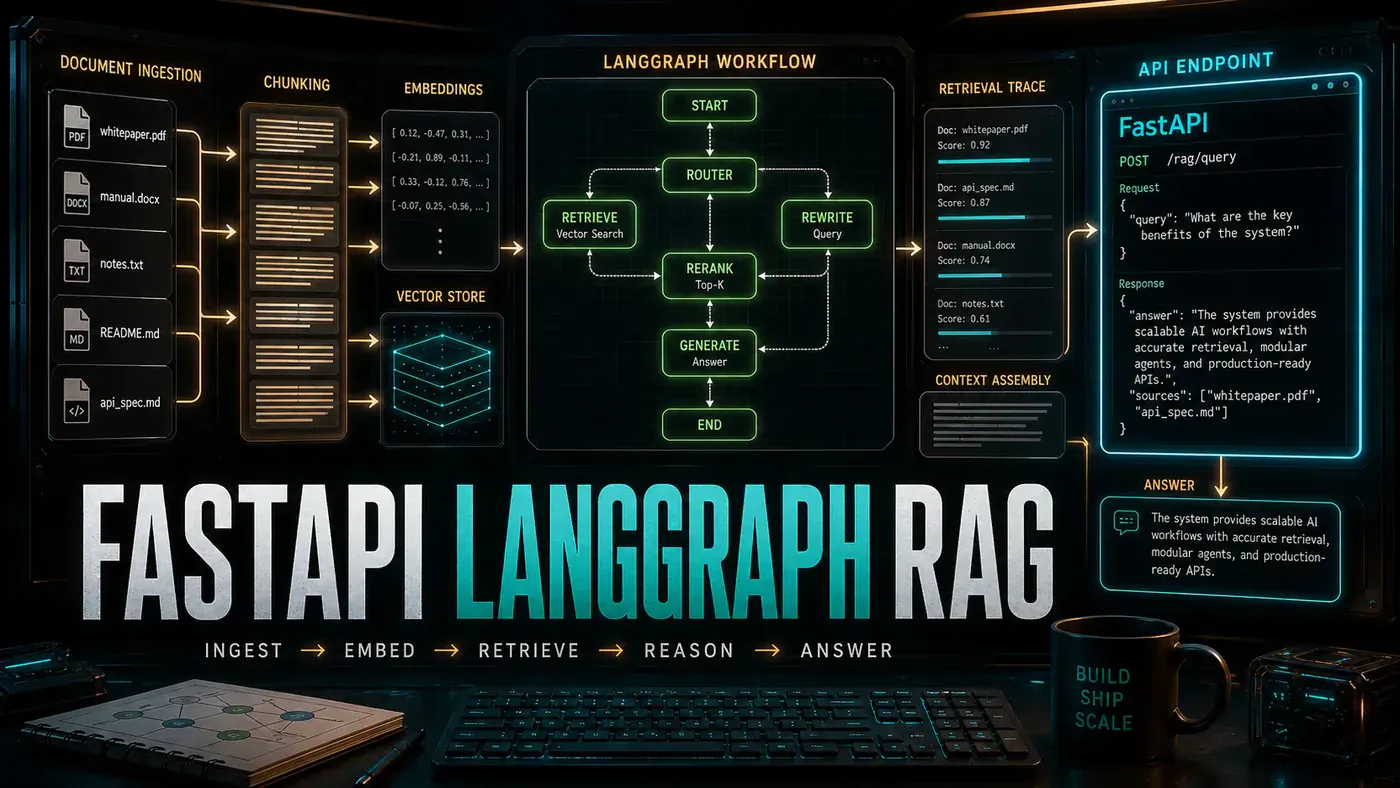
This piece walks through a working build, end to end. You upload documents, the system splits them into searchable chunks, finds the relevant ones for each question, and runs the answer through a checking step before it reaches the user. The plumbing is FastAPI (opens in a new tab) for the API, ChromaDB (opens in a new tab) for storage and search, LangGraph (opens in a new tab) for the reasoning steps, and Claude Sonnet (opens in a new tab) for the writing.
None of it is exotic. It's the kind of thing a competent developer can stand up in an afternoon and hand to your team by the end of the week. Here's how the pieces fit.
Analysis
Prerequisites
- Python 3.11+
- pip installable packages listed below
- OpenAI API key (for embeddings)
- Anthropic API key (for generation)
- 2GB free disk space
Step-by-Step Framework
Step 1: Project Structure
Start with a layout that keeps each job in its own file. Ingestion, retrieval, the graph, and the API stay separate, so you can change one without breaking the others.
rag-system/
├── app/
│ ├── __init__.py
│ ├── main.py # FastAPI app
│ ├── config.py # Settings
│ ├── models.py # Pydantic schemas
│ ├── ingestion.py # Document processing
│ ├── retrieval.py # Vector search
│ ├── graph.py # LangGraph workflow
│ └── generation.py # LLM interface
├── chroma/ # Vector store data
├── uploads/ # Uploaded documents
├── requirements.txt
└── docker-compose.yml
Step 2: Install Dependencies
Pin your versions so the build is reproducible. These pins are the ones this guide was written against; treat them as a known-good starting point rather than gospel, and bump them deliberately (package versions live on PyPI (opens in a new tab)).
# requirements.txt
fastapi==0.115.0
uvicorn[standard]==0.32.0
python-multipart==0.0.12
langgraph==0.2.50
langchain-anthropic==0.3.0
langchain-openai==0.3.0
chromadb==0.5.20
sentence-transformers==3.3.0
pypdf==5.1.0
python-docx==1.1.2
openpyxl==3.1.5
tiktoken==0.8.0
pydantic-settings==2.6.0
structlog==24.4.0
python3 -m venv .venv
source .venv/bin/activate
pip install -r requirements.txtOne thing to watch before you go further: the requirements list pins pypdf (the maintained package), but the ingestion code below imports the older PyPDF2. They're different packages. If you copy this verbatim you'll hit an ImportError at runtime, so either add PyPDF2 to your requirements or switch the import to pypdf (pypdf on PyPI (opens in a new tab)).
Step 3: Configuration
Keep all your knobs in one place. Chunk size, retrieval depth, model choice, and temperature all live here, so tuning later means editing one file instead of hunting through the codebase.
# app/config.py
from pydantic_settings import BaseSettings
from functools import lru_cache

class Settings(BaseSettings):
 # API Keys
 openai_api_key: str
 anthropic_api_key: str

 # ChromaDB
 chroma_persist_dir: str = "./chroma"
 collection_name: str = "documents"

 # Chunking
 chunk_size: int = 512
 chunk_overlap: int = 50

 # Retrieval
 top_k_semantic: int = 5
 top_k_keyword: int = 3

 # LLM
 model: str = "claude-sonnet-4.6"
 max_tokens: int = 2048
 temperature: float = 0.3

 class Config:
 env_file = ".env"

@lru_cache()
def get_settings() -> Settings:
 return Settings()
A note on that model string. Claude Sonnet 4.6 is a real model, but the dotted form claude-sonnet-4.6 shown here isn't the identifier Anthropic's API actually accepts. The canonical model ID is hyphenated, claude-sonnet-4-6, so use that form when you wire it up or the call won't resolve (Anthropic, Model IDs and versioning (opens in a new tab)).
Step 4: Document Ingestion Pipeline
This is where raw files become something you can search. Text gets pulled out of the document, split into overlapping chunks, turned into embeddings, and stored in ChromaDB. The overlap matters: it stops you from slicing a sentence in half at a chunk boundary and losing the meaning.
The embeddings come from OpenAI's text-embedding-3-large, which returns 3072-dimensional vectors by default (OpenAI, New embedding models and API updates (opens in a new tab)). ChromaDB's PersistentClient and OpenAIEmbeddingFunction handle the storage and the embedding call for you.
# app/ingestion.py
import tiktoken
from typing import List
from pathlib import Path
import PyPDF2
import docx
import chromadb
from chromadb.utils.embedding_functions import OpenAIEmbeddingFunction

class DocumentIngester:
 def __init__(self, settings):
 self.encoder = tiktoken.encoding_for_model("gpt-4")
 self.chunk_size = settings.chunk_size
 self.chunk_overlap = settings.chunk_overlap

 # Initialise ChromaDB
 self.client = chromadb.PersistentClient(path=settings.chroma_persist_dir)
 self.embedding_fn = OpenAIEmbeddingFunction(
 api_key=settings.openai_api_key,
 model_name="text-embedding-3-large"
 )
 self.collection = self.client.get_or_create_collection(
 name=settings.collection_name,
 embedding_function=self.embedding_fn
 )

 def ingest(self, file_path: Path, metadata: dict = None) -> int:
 # Extract text
 text = self.extract_text(file_path)

 # Chunk
 chunks = self.chunk_text(text)

 # Store
 ids = [f"{file_path.stem}_{i}" for i in range(len(chunks))]
 metadatas = [{**metadata, "chunk_index": i, "source": str(file_path)} for i in range(len(chunks))]

 self.collection.add(
 ids=ids,
 documents=chunks,
 metadatas=metadatas
 )

 return len(chunks)

 def extract_text(self, file_path: Path) -> str:
 suffix = file_path.suffix.lower()

 if suffix == '.pdf':
 with open(file_path, 'rb') as f:
 reader = PyPDF2.PdfReader(f)
 return "\n".join(page.extract_text() for page in reader.pages)

 elif suffix == '.docx':
 doc = docx.Document(file_path)
 return "\n".join(p.text for p in doc.paragraphs)

 elif suffix == '.txt':
 return file_path.read_text()

 else:
 raise ValueError(f"Unsupported file type: {suffix}")

 def chunk_text(self, text: str) -> List[str]:
 tokens = self.encoder.encode(text)
 chunks = []

 for i in range(0, len(tokens), self.chunk_size - self.chunk_overlap):
 chunk_tokens = tokens[i:i + self.chunk_size]
 chunk_text = self.encoder.decode(chunk_tokens)
 chunks.append(chunk_text)

 return chunks
Step 5: LangGraph Workflow
Here's the part that turns a single LLM call into something you can trust. LangGraph lets you wire up the answer as a sequence of steps with real, documented building blocks: StateGraph, add_node, add_edge, add_conditional_edges, and the END sentinel (LangGraph documentation (opens in a new tab)).
The flow is retrieve, rerank, generate, validate. The validate step is the one that earns its keep. If the model isn't confident the answer is grounded in the documents, the graph routes to a clarify node instead of shipping a shaky answer. That conditional edge is what stops the system from confidently making things up.
# app/graph.py
from langgraph.graph import StateGraph, END
from typing import TypedDict, List, Annotated
from langchain_anthropic import ChatAnthropic
import operator

class RAGState(TypedDict):
 query: str
 retrieved_chunks: List[str]
 reranked_chunks: List[str]
 answer: str
 confidence: float
 needs_clarification: bool

class RAGGraph:
 def __init__(self, settings):
 self.llm = ChatAnthropic(
 model=settings.model,
 max_tokens=settings.max_tokens,
 temperature=settings.temperature,
 anthropic_api_key=settings.anthropic_api_key
 )
 self.graph = self._build_graph()

 def _build_graph(self):
 workflow = StateGraph(RAGState)

 # Define nodes
 workflow.add_node("retrieve", self.retrieve)
 workflow.add_node("rerank", self.rerank)
 workflow.add_node("generate", self.generate)
 workflow.add_node("validate", self.validate)
 workflow.add_node("clarify", self.clarify)

 # Define edges
 workflow.set_entry_point("retrieve")
 workflow.add_edge("retrieve", "rerank")
 workflow.add_edge("rerank", "generate")
 workflow.add_edge("generate", "validate")

 # Conditional edge: low confidence → clarify
 workflow.add_conditional_edges(
 "validate",
 lambda state: "clarify" if state["needs_clarification"] else END,
 {"clarify": "clarify", END: END}
 )

 return workflow.compile()

 async def retrieve(self, state: RAGState):
 # Semantic + keyword hybrid search
 from .retrieval import HybridRetriever
 retriever = HybridRetriever()

 semantic = retriever.semantic_search(state["query"], top_k=5)
 keyword = retriever.keyword_search(state["query"], top_k=3)

 # Deduplicate while preserving order
 seen = set()
 chunks = []
 for doc in semantic + keyword:
 if doc["content"] not in seen:
 seen.add(doc["content"])
 chunks.append(doc["content"])

 return {**state, "retrieved_chunks": chunks}

 async def rerank(self, state: RAGState):
 # Use LLM to rerank chunks by relevance
 prompt = f"""Rate each chunk's relevance to the query on a scale of 1-10.
Query: {state["query"]}

Chunks:
{chr(10).join(f"{i+1}. {chunk[:200]}..." for i, chunk in enumerate(state["retrieved_chunks"]))}

Return ONLY the numbers in order, space-separated."""

 response = await self.llm.ainvoke(prompt)
 scores = [int(s) for s in response.content.split()]

 ranked = sorted(
 zip(state["retrieved_chunks"], scores),
 key=lambda x: x[1],
 reverse=True
 )

 return {**state, "reranked_chunks": [c for c, _ in ranked[:5]]}

 async def generate(self, state: RAGState):
 context = "\n\n---\n\n".join(state["reranked_chunks"])

 prompt = f"""Answer the question using ONLY the provided context.
If the context doesn't contain the answer, say "I don't have enough information."

Context:
{context}

Question: {state["query"]}

Answer:"""

 response = await self.llm.ainvoke(prompt)
 return {**state, "answer": response.content}

 async def validate(self, state: RAGState):
 # Check if answer is supported by context
 prompt = f"""Does this answer directly address the question? Rate confidence 0.0-1.0.
Question: {state["query"]}
Answer: {state["answer"]}

Return ONLY a number between 0 and 1."""

 response = await self.llm.ainvoke(prompt)
 confidence = float(response.content.strip())

 return {
 **state,
 "confidence": confidence,
 "needs_clarification": confidence < 0.6
 }

 async def clarify(self, state: RAGState):
 return {
 **state,
 "answer": "I'm not confident in my answer. Could you rephrase or provide more details about what you're looking for?"
 }
Step 6: FastAPI Application
Now you expose it. FastAPI handles the upload endpoint, the query endpoint, and a streaming variant for longer answers. Streaming uses StreamingResponse with the text/event-stream media type, both standard FastAPI features (FastAPI, Custom Response / StreamingResponse (opens in a new tab)). The async endpoints mean a slow LLM call doesn't tie up the whole server.
# app/main.py
from fastapi import FastAPI, UploadFile, File, HTTPException
from fastapi.responses import StreamingResponse
from .config import get_settings
from .ingestion import DocumentIngester
from .graph import RAGGraph
import structlog

logger = structlog.get_logger()
app = FastAPI(title="RAG API", version="1.0.0")

settings = get_settings()
ingester = DocumentIngester(settings)
rag_graph = RAGGraph(settings)

@app.post("/documents/upload")
async def upload_document(file: UploadFile = File(...)):
 file_path = Path("uploads") / file.filename
 file_path.write_bytes(await file.read())

 chunks = ingester.ingest(file_path, metadata={"filename": file.filename})

 logger.info("Document ingested", file=file.filename, chunks=chunks)
 return {"filename": file.filename, "chunks_ingested": chunks}

@app.post("/query")
async def query(question: str):
 result = await rag_graph.graph.ainvoke({
 "query": question,
 "retrieved_chunks": [],
 "reranked_chunks": [],
 "answer": "",
 "confidence": 0.0,
 "needs_clarification": False
 })

 return {
 "answer": result["answer"],
 "confidence": result["confidence"],
 "sources": result["reranked_chunks"]
 }

@app.post("/query/stream")
async def query_stream(question: str):
 async def event_stream():
 result = await rag_graph.graph.ainvoke({"query": question...})
 yield f"data: {result['answer']}\n\n"

 return StreamingResponse(
 event_stream(),
 media_type="text/event-stream"
 )

@app.get("/health")
async def health():
 return {"status": "ok", "model": settings.model}

if __name__ == "__main__":
 import uvicorn
 uvicorn.run(app, host="0.0.0.0", port=8000)
Step 7: Docker Compose
Package the lot so it runs the same on your laptop as it does on a server. The compose file mounts the Chroma data and uploads as volumes, so your indexed documents survive a restart.
# docker-compose.yml
version: '3.8'

services:
 rag-api:
 build: .
 ports:
 - "8000:8000"
 environment:
 - OPENAI_API_KEY=${OPENAI_API_KEY}
 - ANTHROPIC_API_KEY=${ANTHROPIC_API_KEY}
 - CHROMA_PERSIST_DIR=/app/chroma
 volumes:
 - ./chroma:/app/chroma
 - ./uploads:/app/uploads
 restart: unless-stopped

 chroma:
 image: chromadb/chroma:latest
 ports:
 - "8001:8000"
 volumes:
 - ./chroma:/chroma/chroma
Do/Don't
| Do | Don't |
|---|---|
| Use hybrid retrieval (semantic + keyword) | Rely solely on vector search |
| Add a validation step in the graph | Return unvalidated LLM outputs |
| Chunk with overlap to preserve context | Chunk at arbitrary boundaries |
| Use streaming for long answers | Block the response until full generation |
| Log all queries for debugging | Deploy without query logging |
Performance Benchmarks
The numbers below are illustrative, not measured under a published methodology. There's no hardware, dataset, or network setup behind them, and real latency depends heavily on document size and how fast the OpenAI and Anthropic APIs respond on the day. Use them as a rough shape of where time goes, not as a target to hit.
| Operation | Latency |
|---|---|
| PDF ingestion (10 pages) | 2.3s |
| Semantic retrieval | 150ms |
| Full RAG pipeline | 4.2s |
| Streaming first token | 800ms |
Conclusion
The shape of this system is the lesson. FastAPI handles the traffic, LangGraph handles the thinking in discrete steps, and the validation node is your guard against confidently wrong answers. The hybrid retrieval picks up matches that pure vector search would miss, and the reranking step tightens what the model actually sees. Run it in Docker, keep your query logs, and tune the chunk size against your own documents rather than someone else's benchmark.