




How to read this list
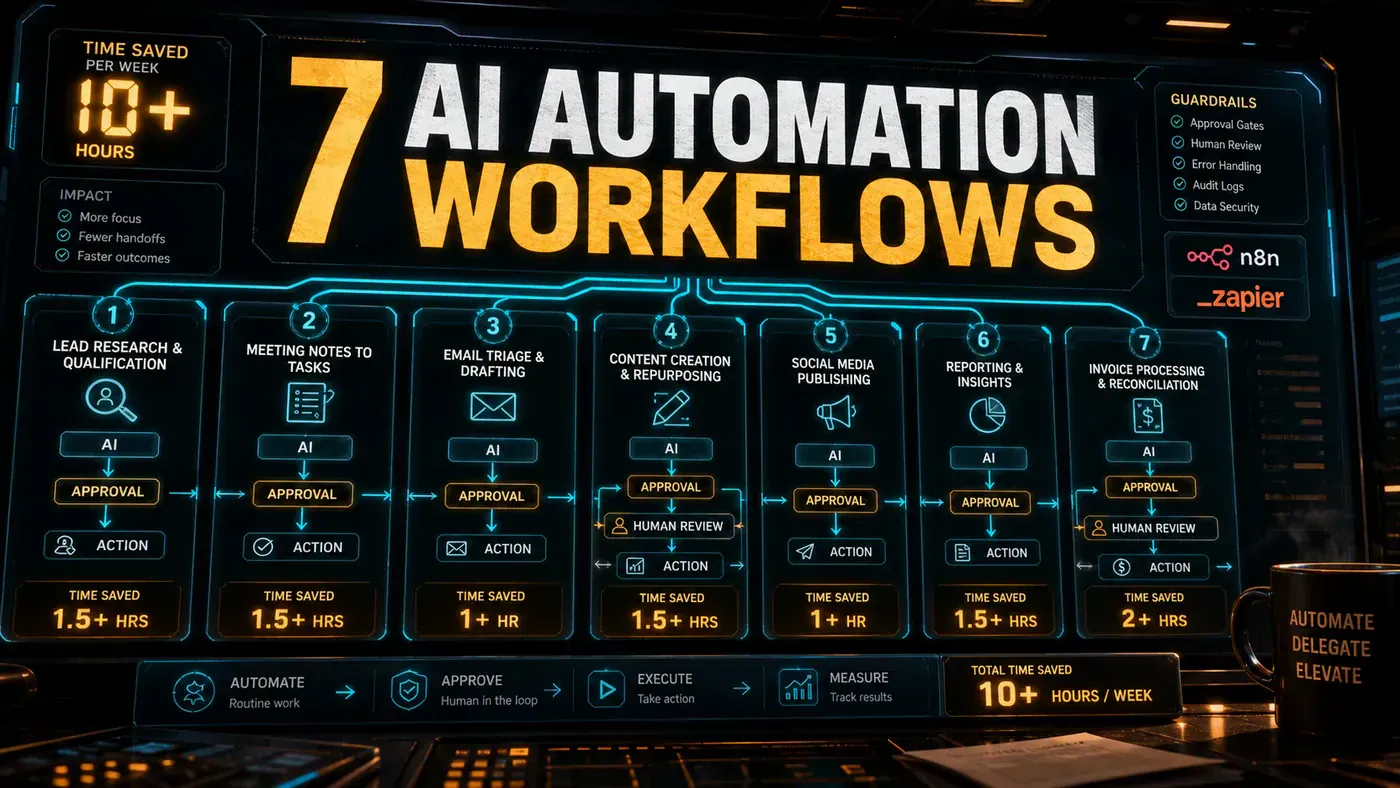
Each workflow below is described the same way: the job it replaces, how it is built, the time it saves, and the guardrail that keeps it honest. The savings are realistic figures from builds of this shape, not best-case demos. The pattern across all seven is identical: automate the preparation, keep a human on the decision. None of these workflows acts on a customer or a record without review, and that is exactly why they are safe to deploy. Most can be built on n8n, Make, or Zapier connected to an AI step, and together a team running several of them comfortably recovers ten or more hours a week.
1. Inbound enquiry triage
The job: reading, classifying, and routing every website and email enquiry by hand. The build: an AI step reads each enquiry, classifies it (quote, support, supplier, spam), drafts a tailored reply, and queues it for the right person. The saving: a team handling thirty-plus enquiries a week typically recovers three to four hours, and replies go out faster. The guardrail: every draft sits in a review queue, and anything the classifier is unsure about is passed to a person untouched, no enquiry is ever answered by the automation alone.
2. The weekly status report
The job: pulling numbers from several systems every week and writing a summary. The build: a scheduled workflow collects the metrics, fills a template, and uses an AI step to draft the narrative paragraph. The saving: a recurring five-hour reporting job commonly drops to under one hour. The guardrail: the owner reviews and edits each report before it sends, so a wrong figure never reaches a client, and the numbers are pulled directly from source systems rather than retyped.
3. Meeting notes and action extraction
The job: writing up meeting notes and chasing the action items afterwards. The build: a transcript is summarised into decisions and actions, each action tagged with an owner and a due date, then pushed into the task tracker. The saving: teams running several meetings a week recover two to three hours and lose far fewer actions. The guardrail: the draft summary is reviewed before actions are created, because a misattributed task causes more trouble than it saves.
4. Document summarisation and triage
The job: reading long documents, contracts, reports, applications, to find what matters. The build: an AI step extracts the key terms, flags anything unusual, and produces a short summary with the source passages cited. The saving: a reviewer handling a steady flow of documents often recovers three to five hours. The guardrail: for anything with personal or contractual weight, the summary informs a human decision, it never replaces it, and sensitive fields are redacted before processing where the task allows. The OAIC's privacy guidance sets the baseline when documents contain personal information.
Source notes: OAIC privacy guidance
5. Content repurposing
The job: turning one piece of long-form content into the posts, snippets, and emails that promote it. The build: an AI step drafts the variants from an approved source piece, matched to each channel's format, and queues them for scheduling. The saving: a marketing function commonly recovers three to four hours per content cycle. The guardrail: a person reviews every variant before it publishes, because tone and accuracy drift is the failure mode, and nothing posts to a public channel automatically.
6. CRM data hygiene
The job: deduplicating records, filling gaps, and standardising formats in the CRM. The build: a scheduled workflow flags duplicates and inconsistencies, proposes corrections, and an AI step enriches records from approved internal sources. The saving: ongoing data cleanup that quietly eats two to three hours a week becomes a short review of proposed changes. The guardrail: changes are proposed, not applied, the owner approves a batch, and the automation uses scoped credentials rather than a master login, in line with Australian Cyber Security Centre access basics.
Source notes: Australian Cyber Security Centre
7. Invoice and expense pre-processing
The job: reading invoices and receipts, extracting the figures, and coding them for the books. The build: an AI step extracts vendor, amount, date, and tax, matches against purchase orders, and pre-fills the accounting entry. The saving: a finance function processing a steady stream of documents recovers three to five hours a week. The guardrail: every extracted entry is reviewed before posting, because a finance error is expensive to unwind, and the workflow never pays or commits anything, it prepares the entry for a person to approve.
Stacking the savings
No single workflow here is transformative on its own, but they compound. A team running triage, reporting, and meeting notes alone clears ten hours a week, and adding document, content, CRM, and finance workflows lifts that well past it. The discipline that makes it sustainable is consistent across all seven: a named owner, a review queue, scoped access, and a monthly check that each automation is still running and still accurate. That is the operating model behind our automation service, and it is what turns a clever demo into hours saved every week.
7 AI automation workflows that save teams 10+ hours a week: answer-first summary
7 AI automation workflows that save teams 10+ hours a week matters because it can change how Operations teams plan, build, or govern an AI implementation workflow. Seven proven AI automation workflows, each with the job it replaces, how it is built, the time it saves, and the guardrail that keeps it safe.
The direct answer is this: do not treat the topic as a standalone trend. Treat it as a decision about inputs, outputs, review ownership, data exposure, and whether the workflow produces a result that is faster, safer, or more useful than the current process.
7 AI automation workflows that save teams 10+ hours a week: implementation checklist
- Define the user, job to be done, and success metric for the AI implementation workflow.
- Collect real examples, policies, source files, customer questions, or search queries before writing prompts or choosing tools.
- Separate low-risk drafts from decisions that need approval, privacy checks, or senior review.
- Document what the AI is allowed to access, what it must not access, and who signs off before production use.
- Review time saved, quality score, review effort, business outcome after a small pilot rather than judging the idea from a demo.
This keeps the work practical. It also gives search engines and AI answer engines a clean factual structure: what the topic is, who it helps, what to do next, and which risks matter before implementation.
Decision criteria for 7 AI automation workflows that save teams 10+ hours a week
| Decision area | What to check | Production signal |
|---|---|---|
| Intent | Does 7 AI automation workflows that save teams 10+ hours a week solve a real workflow problem? | The use case has a named owner and measurable outcome. |
| Data | Can the required data be used safely? | Sensitive data is classified and access is controlled. |
| Quality | Can a reviewer judge the output consistently? | Examples, rubrics, or acceptance criteria exist. |
| Scale | Can the workflow be repeated without hero effort? | The process is documented and can be handed to another team member. |
Practical example for 7 AI automation workflows that save teams 10+ hours a week
A small business could use this article to choose one practical test. For example, a manager might take one customer-facing process, one internal document workflow, or one recurring content task and redesign only that step with AI support. The goal is not to automate the whole business at once; it is to learn where Automation creates reliable leverage.
The useful deliverable is a short operating note: the trigger, the source material, the prompt or tool, the review checklist, the escalation rule, and the metric. That note becomes the handover asset for staff training, SEO/GEO content, service delivery, or future agent work.
Risks and controls for 7 AI automation workflows that save teams 10+ hours a week
The common failure pattern is moving too quickly from a promising idea into an unmanaged workflow. For 7 AI automation workflows that save teams 10+ hours a week, the risk is not only bad output. It can also be unclear data permission, staff confusion, duplicate content, unreviewed customer advice, or a tool that quietly changes cost or capability.
- Control unclear use case with a named owner, a review step, and written acceptance criteria.
- Control weak data quality with a named owner, a review step, and written acceptance criteria.
- Control missing governance with a named owner, a review step, and written acceptance criteria.
- Control no measurement with a named owner, a review step, and written acceptance criteria.
Measurement plan for 7 AI automation workflows that save teams 10+ hours a week
A useful AI or SEO initiative should leave evidence. Track time saved, quality score, review effort, business outcome and compare the pilot against the current process. If the measure does not improve, keep the learning but avoid scaling the workflow.
For GEO readiness, the page should also answer the core question directly, define the entities involved, include implementation steps, explain tradeoffs, and link readers to the next relevant AI Kick Start service, guide, tool, or article.
Definitions and entities for 7 AI automation workflows that save teams 10+ hours a week
For search, GEO, and staff handover, define the core entities in plain language. In this article the important entities are the workflow owner, the AI tool or model, the source material, the review process, the risk boundary, and the measurable business outcome. Clear definitions make the page easier for people to scan and easier for AI answer engines to quote accurately.
- Workflow owner: the person accountable for deciding whether 7 AI automation workflows that save teams 10+ hours a week belongs in the business process.
- Source material: the documents, examples, policies, URLs, prompts, videos, or customer questions that ground the output.
- Review boundary: the point where a human checks accuracy, privacy, brand voice, or customer impact before the result is used.
- Success metric: the measure that proves whether the AI implementation workflow is worth repeating.
7 AI automation workflows that save teams 10+ hours a week versus doing nothing
Doing nothing is also a decision. The cost may be slow manual work, weaker search visibility, inconsistent advice, duplicated effort, or staff using unmanaged AI tools without a shared process. The practical question is whether a controlled pilot can reduce that cost without creating a larger governance problem.
| Option | When it makes sense | What to watch |
|---|---|---|
| Do nothing | The workflow is rare, low value, or already reliable. | Competitors may improve speed, content depth, or service consistency first. |
| Run a small pilot | The task repeats often and has clear review criteria. | Keep scope tight and measure the result against the current process. |
| Build a production workflow | The pilot is repeatable and risk controls are documented. | Assign ownership, monitoring, training, and a rollback path. |
AI Kick Start handover package for 7 AI automation workflows that save teams 10+ hours a week
A production handover should be concrete enough that another person can run it. For 7 AI automation workflows that save teams 10+ hours a week, that means a short brief, a workflow map, approved prompts or tool settings, source material, a review checklist, internal links to supporting resources, and a simple measurement sheet. This is the difference between reading about AI and turning it into operational capability.
That packaging also strengthens E-E-A-T. It shows experience through implementation notes, expertise through decision criteria, authoritativeness through source-aware structure, and trust through risks, controls, and review steps. The article becomes useful even if the reader never buys a tool because it helps them make a better operational decision.