
Lesson 31 of 38 · Core - 03:30-03:45
From skill to plugin: build your own tooling
Understand the capability ladder and know exactly when to promote a personal skill into a shared, installable plugin, then how to package, version, distribute, and govern that plugin safely. By the end you can read a real plugin manifest, lay out a plugin directory from memory, choose between explicit-version and commit-SHA release strategies, and write a least-privilege trust note that an installer can act on.
A skill solves your problem. A plugin solves your team's problem. There is a natural ladder from a one-off prompt all the way to an internal app, and most of the value sits on the lower rungs, yet the moment a second person needs your workflow, the economics flip: the time you spend hand-walking colleagues through setup, copying folders around, and fixing 'it doesn't work on my machine' quickly exceeds the cost of packaging it once. A plugin is that packaging. In 2026 both Claude Code and OpenAI's Codex converged on the same idea: bundle skills, connectors/MCP servers, sub-agents (helper agents a plugin can define), hooks, and commands into a single manifest-driven directory that installs with one command and runs with zero manual configuration. This lesson shows you the ladder, then walks the full lifecycle of the plugin rung, the real manifest format, the directory layout, how distribution through marketplaces actually works, how versioning controls who gets your changes and when, and the governance discipline that keeps a shared plugin from becoming a shared liability. The load-bearing idea throughout: a plugin is software you ship, so treat it like software, least privilege, semantic versioning, a changelog, and a trust note.
The capability ladder, from skills to shared plugins
A cinematic walkthrough in the AI Kick Start brand style: when to climb from prompts to standing instructions, reusable skills, and shared plugins, and the reach, cost, and governance trade-offs at each rung.
What to understand
- Think of a capability ladder: Prompt -> Template -> Skill -> Plugin -> MCP server -> Internal app. Each rung adds reach and durability but also adds cost to build and maintain, and the value gained per extra unit of effort drops as you climb. Climb only as far as the problem actually demands, the most common mistake on this topic is climbing for its own sake.
- A prompt is a one-off. A template is a saved prompt you reuse. A skill (Lesson 14) packages a workflow reliably for you, the single user. The first three rungs cover the large majority of personal knowledge-work needs and should be your default; you only leave them when sharing or programmatic integration becomes the real requirement.
- A plugin is the sharing rung, it is what turns 'my skill' into 'our tool'. Codex describes plugins as bundling skills, app connectors, and MCP servers into reusable, installable workflows; Claude Code describes a plugin as a self-contained directory of components (skills, agents, hooks, MCP servers, LSP servers, monitors) that others install in one step and get a ready-to-go setup with no manual configuration.
- An MCP server is the integration rung: a service that exposes tools and live data from an external system to the agent. You reach for it only when a skill needs structured, programmatic access to a system rather than just instructions, and a plugin can then bundle that server. An internal app is the top rung, for when the workflow needs its own UI, persistence, and users beyond the agent.
- In Claude Code a plugin is a folder whose only required file is .claude-plugin/plugin.json (and even that is optional, components auto-discover, and the name can come from the directory). Components live at the plugin ROOT, never inside .claude-plugin/: skills/, commands/, agents/, hooks/hooks.json (scripts that fire automatically on agent events).mcp.json connectors.lsp.json (language-server integrations), plus optional bin/, monitors/ (background watchers that react to agent activity), themes/, and output-styles/. The single field that is required when you do write a manifest is name.
- Codex uses a parallel layout: a .codex-plugin/plugin.json manifest (JSON) at the plugin root, with name, version, and description as the core fields, declaring skills/, an .mcp.json for MCP servers, and an .app.json for app connectors. The two ecosystems deliberately mirror each other, the same mental model (manifest + component folders) ports across both tools.
- Plugins are distributed through marketplaces, which are just catalogues. In Claude Code a marketplace is a .claude-plugin/marketplace.json listing plugins and their sources; you add one with `claude plugin marketplace add <owner>/<repo>` (or a local path) and install with `claude plugin install <plugin>@<marketplace>`. Anthropic ships curated marketplaces (Knowledge Work, Financial Services, Legal, Life Sciences). In Codex you `codex plugin marketplace add` from GitHub shorthand, a git/SSH URL, or a local folder, browse the Plugins directory / `/plugins`, and choose 'Add to Codex'.
- Versioning decides who gets your changes and when, it is not a formality. In Claude Code, if you set `version` in plugin.json you must bump it on every release or users keep the cached copy; if you OMIT version, the git commit SHA becomes the version so every push is an update. That gives two deliberate strategies: explicit semver for published, stable plugins; commit-SHA for internal, fast-moving ones. Pick one consciously per plugin.
- Trust is the load-bearing constraint when you climb to plugins and MCP. Claude's own guidance is blunt: only install plugins from sources you trust, because a plugin may bundle local MCP servers that run with program-level permissions on the installer's machine. The same caution binds you as a publisher: every connector you bundle widens the trust surface you are asking others to accept, so bundle exactly what the workflow uses and document it.
- Governance scales the discipline to a team. Claude Code supports install scopes (user, project, project-local, managed) so a plugin can be personal, checked into a repo for collaborators, or pushed read-only by an admin via managed settings; project-scope plugins load only after the workspace trust gate, and admins can restrict which marketplaces are allowed. Codex respects existing approval settings on install and lets a plugin be disabled with `enabled = false` in config. Shipping for an org means thinking in these controls, not just in 'does it work for me'.
Deeper dive
Anatomy of a real plugin manifest, what each field is actually for
The manifest is small, and almost every field exists to serve discovery, namespacing, versioning, or trust, read it through that lens and it stops being boilerplate. In Claude Code's .claude-plugin/plugin.json the ONLY required field is `name` (kebab-case, no spaces), and it does real work: it namespaces every component the plugin ships, so a skill `review` inside a plugin named `quality-tools` is invoked as `/quality-tools:review` and can never collide with your personal `/review`. `version` is the lever that controls updates (covered in the next block), set it and you pin; omit it and the git SHA drives updates. `description`, `keywords`, `author`, `homepage`, `repository`, and `license` are the marketplace's storefront: they are what an installer reads before deciding to trust you, and a missing license or repository is a quiet signal of an unmaintained or unaccountable plugin. The component-path fields (`skills`, `commands`, `agents`, `hooks`, `mcpServers`, `lspServers`) are optional because Claude Code auto-discovers the standard folders; you only set them to add extra paths or override defaults, and they must be relative and start with `./`. Two fields matter specifically for safe sharing. `defaultEnabled: false` ships the plugin INSTALLED-BUT-OFF, so a plugin that connects to an external service or adds token cost requires a deliberate opt-in rather than springing to life on install, exactly right for anything with a permission or cost footprint. `userConfig` declares values the installer is prompted for at enable time (an API endpoint, a token) instead of making them hand-edit settings.json; marking a value `sensitive: true` masks it and routes it to the OS keychain rather than plaintext settings. The governing principle: the manifest is a contract you publish. Every component folder it exposes and every connector it wires is something you are asking strangers to run with their permissions, so the smallest honest manifest is the most trustworthy one. (Codex's .codex-plugin/plugin.json mirrors this with name/version/description plus skills.mcp.json, and .app.json, same shape, different ecosystem, but note its self-serve publishing surface was still 'coming soon' as of mid-2026, so re-verify its manifest details against the official build page before relying on specifics.)
Sharing safely, least privilege, the trust gate, and the install-scope ladder
The first time someone else installs your plugin, you have handed them code that may start MCP servers running at program-level permission on their machine. Anthropic says this in plain language, and it is the whole reason 'only install from sources you trust' is the standing advice. As a publisher you are on the other side of that sentence, so safe sharing is mostly about shrinking what you ask people to trust. Least privilege is the core move: bundle only the connectors the workflow genuinely uses. A plugin that wires three MCP servers when the skill needs one has tripled its trust surface for no benefit, and every extra server is one more thing the installer's security team has to vet and one more thing that can break. Pair that with `defaultEnabled: false` for anything that touches an external system, so installation is consent to HAVE the plugin, not consent to RUN its integrations, the user flips it on once they have read what it does. Claude Code's install-scope ladder is the team-level expression of the same principle. A `user`-scope plugin lives in your own settings and runs everywhere with full trust because it is yours. A `project`-scope plugin is checked into a repository and reaches every collaborator who clones it, but precisely because that content comes from the repo rather than from the individual, it loads only after the workspace trust gate, its MCP servers go through the same per-server approval as a project .mcp.json, and its background monitors do not auto-run at all. `local` scope keeps a plugin gitignored and personal to one checkout; `managed` scope lets an admin push a read-only, org-approved plugin that users cannot disable. The practical discipline when you publish: write the trust note BEFORE you share, name every MCP server and app connector the plugin runs and the access each needs, state the minimum scope it should be installed at, and tell the installer to enable integrations only if they trust the source. That note is not paperwork; it is the thing that lets a reviewer say yes quickly, and the thing that lets a security team say yes at all.
Versioning and release channels, controlling who gets your changes
A plugin that other people depend on has a release problem the moment you fix a bug: how does the fix reach them, and how do you avoid breaking them with the next change? Claude Code resolves a plugin's version from the first of these that is set, the `version` in plugin.json, then the `version` in the marketplace entry, then the git commit SHA of the source, then 'unknown'. That single rule gives you two clean release channels, and choosing between them is a real decision. The EXPLICIT-VERSION channel (set `"version": "2.1.0"` and follow semver) is for published, stable plugins: users receive an update only when you bump the field, so pushing commits in between is invisible to them and `/plugin update` correctly reports 'already at the latest version'. The cost is discipline, forget to bump and your fix never ships, because Claude Code sees the same string and keeps the cached copy. The COMMIT-SHA channel (omit `version` entirely) is for internal, fast-moving plugins: every commit to the source is treated as a new version, so collaborators track HEAD automatically with no release ceremony. The cost is that there is no stable point to pin to and no signal of what changed. Semver itself is the contract that makes the explicit channel trustworthy: MAJOR for breaking changes (a renamed command, a removed skill, a connector that now needs different auth), MINOR for additive features, PATCH for fixes, so an installer reading '2.x to 3.0' knows to expect breakage and read the CHANGELOG, while '2.1.0 to 2.1.1' is safe to take blind. This is why a real plugin ships a CHANGELOG.md and bumps deliberately: the version number plus the changelog is the entire interface through which your users decide whether and when to take your change. Treat a plugin release exactly as you would a library release, because to the people who installed it, that is what it is.
Plugin packaging & distribution compared (Claude Code vs Codex, June 2026)
How each tool packages, distributes, versions, and governs plugins. These are the mechanics you'll use in the hands-on. Both tools ship fast and the plugin systems are young. Codex's self-serve publishing was still 'coming soon' as of mid-2026, so verify file names, fields, and CLI commands at the official docs linked below before relying on specifics.
| Concern | Claude Code | OpenAI Codex | What it means for you |
|---|---|---|---|
| Manifest file | .claude-plugin/plugin.json (JSON); only `name` required; manifest itself optional (auto-discovery) | .codex-plugin/plugin.json (JSON); name + version + description as core fields | Same mental model both sides: a manifest plus component folders at the plugin root |
| What it bundles | skills/, commands/, agents/, hooks/hooks.json.mcp.json.lsp.json, bin/, monitors/, themes/ | skills/.mcp.json (MCP servers).app.json (app connectors), hooks/ | Bundle ONLY what the workflow uses, every component is trust surface |
| Distribution | .claude-plugin/marketplace.json catalogue; `claude plugin marketplace add <owner>/<repo>` then `claude plugin install <plugin>@<mkt>` | `codex plugin marketplace add` (GitHub shorthand / git / SSH / local); Plugins directory + 'Add to Codex' or `/plugins` | A GitHub repo is a marketplace; you don't need a hosted registry to share with a team |
| Versioning | version in plugin.json (pin, bump per release) OR omit -> git SHA (every commit is an update) | version field in manifest; git-backed marketplaces; `--ref` to pin a ref | Choose semver-pin for published plugins, commit-SHA for internal fast-moving ones |
| Install scopes / governance | user / project / local / managed; project-scope gated by workspace trust; admins restrict marketplaces | Respects existing approval settings on install; disable with `enabled = false` in ~/.codex/config.toml | Scope is how you make a plugin personal, team-shared, or admin-enforced |
| Trust model | 'Only install from sources you trust'; bundled local MCP servers run with program-level permissions | External-app auth follows each app's own policy; uninstall leaves connected apps intact | Write a least-privilege trust note before you publish, on either platform |
Sources (as of June 2026): Claude Code. Plugins reference (manifest schema, layout, versioning) · Claude Code. Plugin marketplaces (marketplace.json, add/install) · Codex. Plugins (bundles skills/apps/MCP, install, governance) · Codex. Build plugins (manifest, publishing 'coming soon')
The capability ladder: climb only as far as the problem demands
Read top to bottom, each rung adds reach and durability but also build/maintain cost, and value gained per extra unit of effort drops as you descend. The plugin is the sharing rung; stop at the lowest rung that solves the real problem.
- PromptA one-off instruction. Solves the problem once, for you, right now, zero packaging.
- TemplateA saved prompt you reuse. Still personal, near-zero cost. The first three rungs cover most personal knowledge work.
- Skill (Lesson 14)Packages a workflow reliably for you, the single user. If only you need it and it works, stop here, this is usually the right answer.
- PluginThe SHARING rung: turns 'my skill' into 'our tool', a manifest-driven directory others install in one step with zero manual config.
- MCP serverThe INTEGRATION rung: a service exposing tools and live external data. Climb here only when no existing connector reaches the system; a plugin can bundle it.
- Internal appThe top rung: its own UI, persistence, and users beyond the agent. Highest reach, highest cost, reserve for workflows that truly need it.
Step by step
Locate your skill on the ladder
Take the skill you built in Lesson 14 and ask one honest question: who needs it? If it's just you, stop at the Skill rung, you're done, and that is the right answer. Only consider climbing if you have concrete evidence of shared need: a teammate keeps asking you to run it for them, or you find yourself copying the folder around to other machines. Write your placement and the one piece of evidence (or its absence) in a sentence. The lesson's funnel visualisation above is the ladder, find your skill's rung on it before writing your sentence.
HintThe honest answer is usually 'it's fine as a skill'. Reach drops in value per extra unit of effort as you climb, resist promoting for its own sake.
Decide: plugin or MCP server
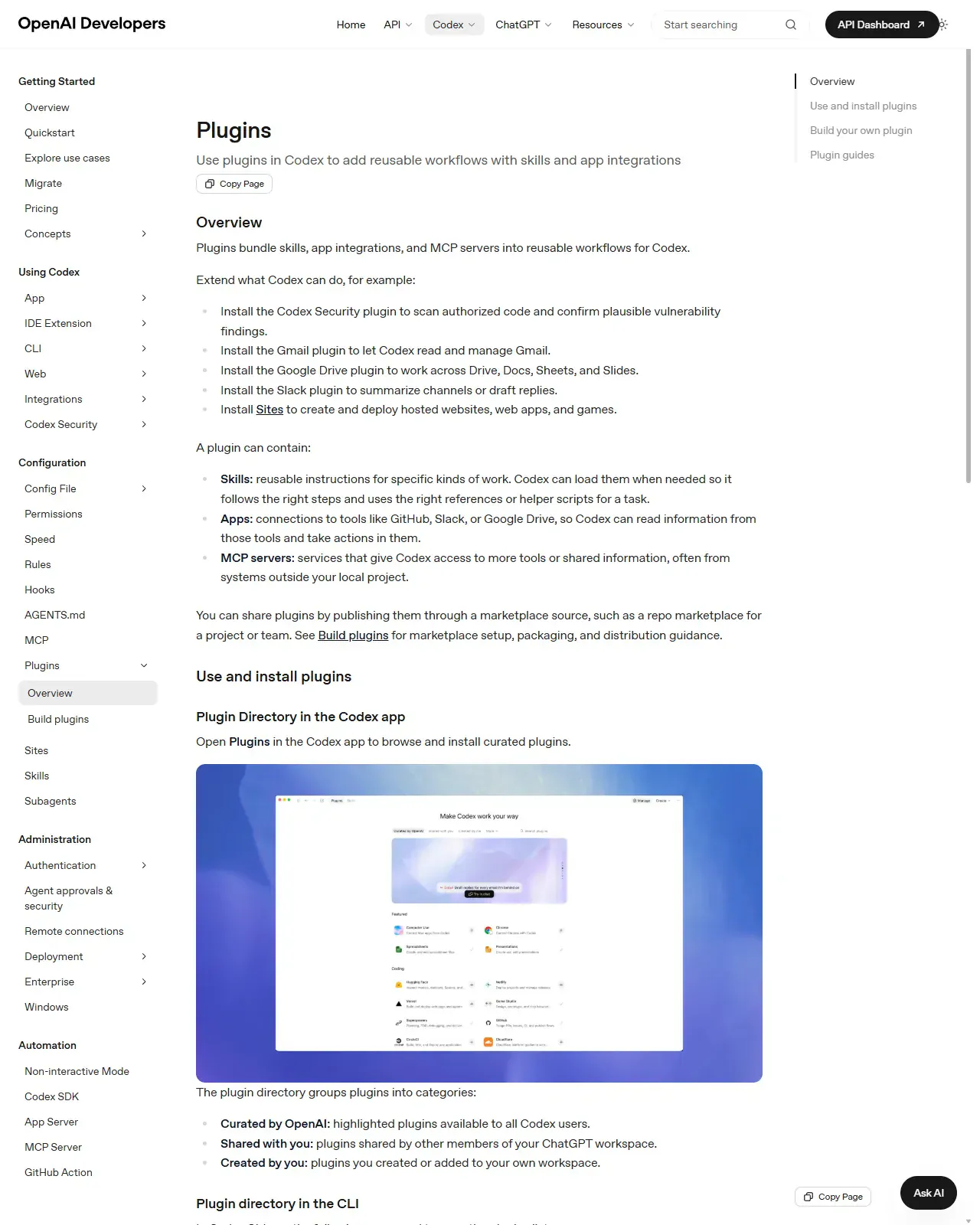
If your need is SHARING a workflow made of instructions plus existing connectors, that's a plugin. If your need is new PROGRAMMATIC access to a system the agent can't reach today, live queries, writes to an internal database, that's an MCP server, which a plugin can then bundle. Most teams need a plugin, not a new server. Name which one your case is, and if it's a server, name the specific data the agent genuinely cannot reach with an existing connector. Done when you've written one line naming plugin or server, and, if server, the specific data no existing connector reaches.
HintBuild a new MCP server only when no existing connector reaches the data. The server is the deepest, highest-maintenance rung, don't take it on speculatively.
On this screen
- 1'A plugin can contain' (page bullets). Skills, apps, and MCP servers. Codex's own menu of what the sharing rung bundles; if your need is instructions plus existing connectors, it is a plugin.
- 2MCP servers in the same list. The integration rung, only build one when no existing connector reaches the data; a plugin can then bundle it.
Lay out the plugin and write the manifest
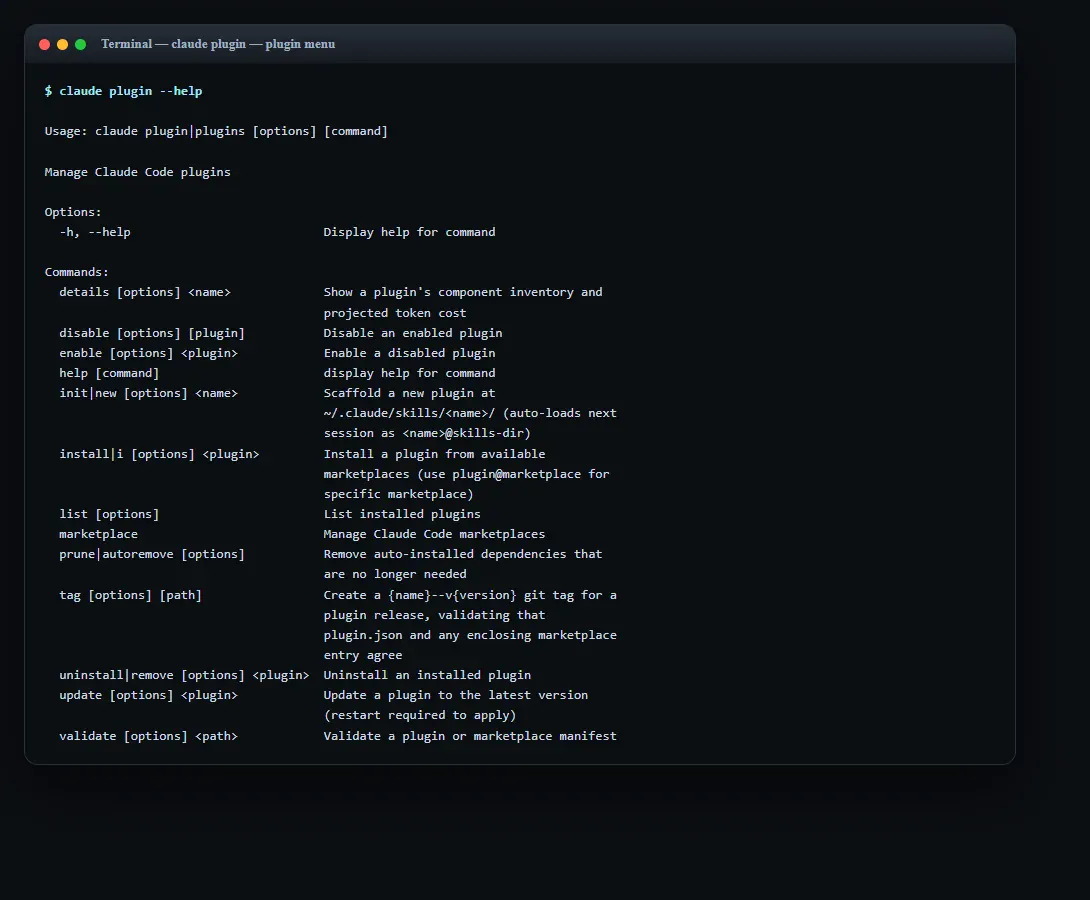
Build the directory: .claude-plugin/plugin.json at the top, and ALL component folders (skills/, commands/, hooks/.mcp.json) at the plugin ROOT, never inside .claude-plugin/. Write the manifest using the production example in this lesson: name (kebab-case, it namespaces your components), description, an explicit version, license/repository/homepage for the trust storefront, defaultEnabled:false if it touches an external system, and userConfig (with sensitive:true on any token). For Codex, mirror the same shape under .codex-plugin/plugin.json with skills/.mcp.json, and .app.json. Keep the connector list to exactly what the workflow uses. Shortcut: claude plugin --help shows an init|new subcommand that scaffolds this exact layout for you, run it, then check the result matches the rule: only plugin.json inside .claude-plugin/, every component folder at the root. Done when your tree shows .claude-plugin/plugin.json plus your component folders at the root.
HintComponents inside .claude-plugin/ is the #1 'plugin loads but skills are missing' bug. Only plugin.json belongs in .claude-plugin/; everything else sits at the root.
On this screen
- 1init|new. Scaffolds a new plugin with the correct layout, the fastest way to avoid the components-inside-.claude-plugin bug.
- 2validate. Validates a plugin or marketplace manifest, you'll run it with --strict in step 5 before sharing.
Choose a version strategy and write the changelog
Decide the release channel deliberately. For a published, stable plugin set an explicit semver `version` in plugin.json and commit to bumping it every release (MAJOR=breaking, MINOR=feature, PATCH=fix), pushing commits without bumping ships nothing. For an internal, fast-moving plugin, OMIT version so the git commit SHA drives updates and collaborators track HEAD automatically. Start a CHANGELOG.md now; the version number plus the changelog is the entire interface your users use to decide whether to take a change.
HintIf you set `version`, you MUST bump it for users to get changes. Claude Code keeps the cached copy when the string is unchanged. If you're iterating fast, leave it unset on purpose.
Distribute via a marketplace and test on a clean profile
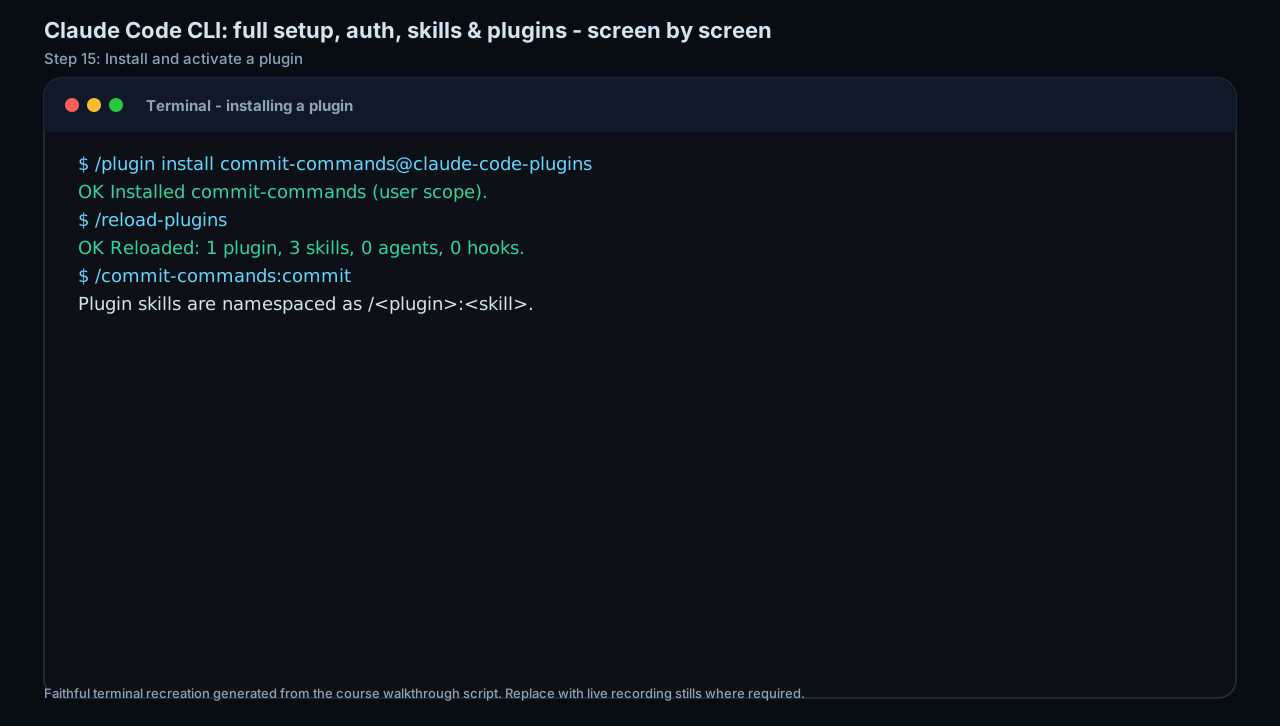
Create a .claude-plugin/marketplace.json (name, owner, plugins[] with name + source), a GitHub repo is itself a marketplace. Test locally first: `claude plugin marketplace add ./your-marketplace`, then `claude plugin install <plugin>@<marketplace>`, and run `claude plugin validate ./plugins/<plugin> --strict` to catch typo'd fields. Then add it the real way (`claude plugin marketplace add <owner>/<repo>`) and install at the right scope (--scope project for team-shared, local for gitignored personal). Run the bundled command end to end on a clean profile or a colleague's machine. Done when the namespaced command (/your-plugin:your-skill) runs end to end on the clean profile.
Hint'Works on mine' is not 'ready to share'. A clean-room install on a fresh profile catches the missing userConfig prompt, the path-traversal reference, and the connector that only worked because YOUR machine already had it.
On this screen
- 1@marketplace suffix. install <plugin>@<marketplace> names which catalogue the plugin comes from, the marketplace you added with /plugin marketplace add (use a local path first for the clean-room test).
- 2Namespaced commands. Plugin skills invoke as /plugin-name:skill-name, so they never clash with the installer's personal skills.
Set trust, scope, and governance boundaries
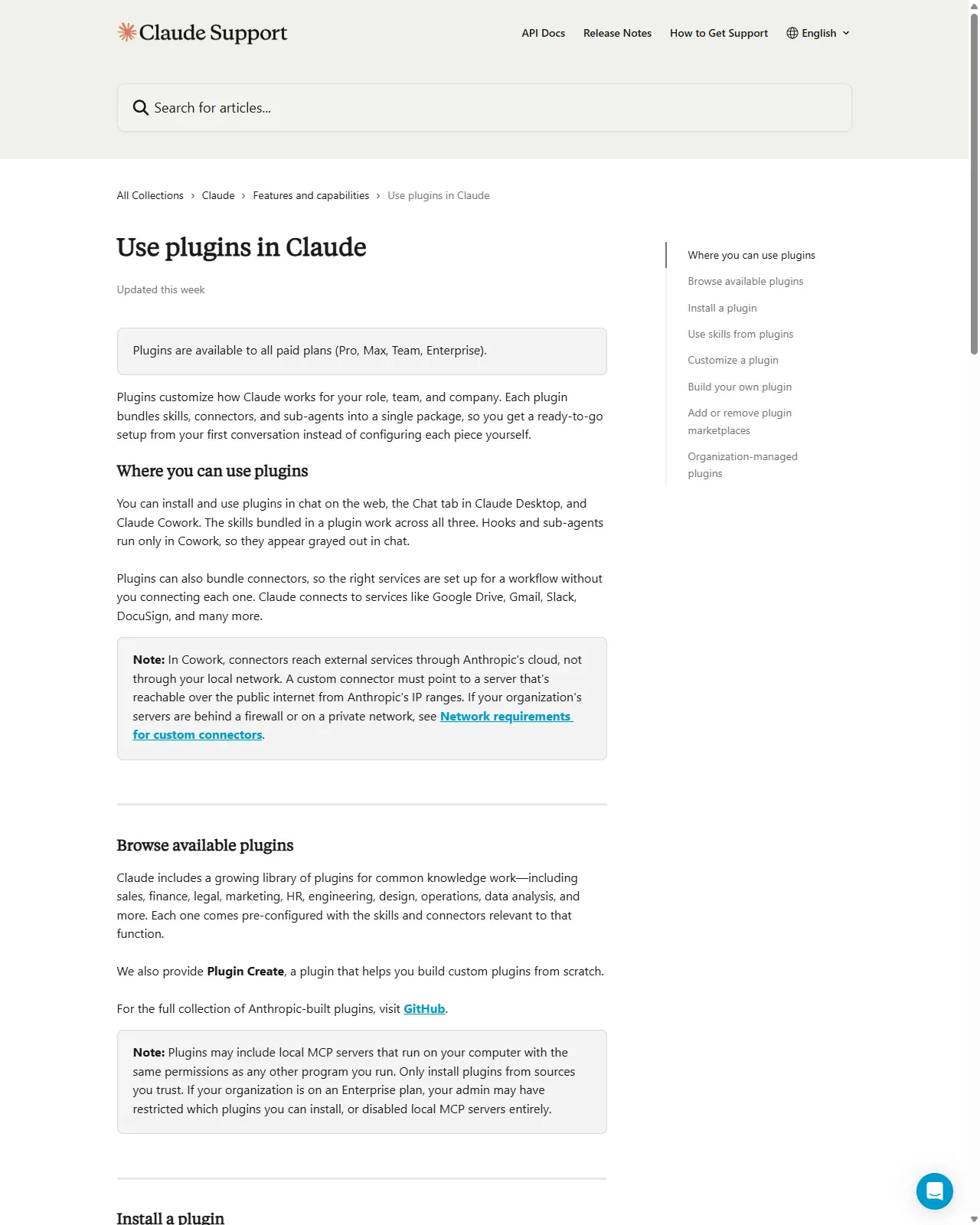
Before sharing, write the trust note an installer can act on: name every MCP server and app connector the plugin runs and the access each needs, state the minimum scope it should be installed at, and tell installers to enable integrations only if they trust the source, reminding them that bundled local MCP servers run with program-level permissions. Decide governance: defaultEnabled:false for anything with a cost or permission footprint, project scope (trust-gated) for team sharing, managed scope when an admin should enforce it org-wide. On Enterprise, expect admins to restrict which marketplaces are allowed.
HintTreat publishing a plugin like shipping software: a trusted source, a clear changelog, least-privilege connectors, and a trust note that lets a reviewer, or a security team, say yes quickly.
On this screen
- 1Trust warning (boxed note). The note on this support page is the exact warning your trust note answers: bundled local MCP servers run with the same permissions as installed software, only install from trusted sources.
- 2Enterprise restriction (same note). 'Your organization may have restricted which plugins you can install', the admin-side control; state the minimum scope your plugin needs so a reviewer can approve it quickly.
Place your Lesson-14 skill on the capability ladder and write one sentence justifying whether it stays a skill or becomes a plugin, citing the specific evidence (or its absence). If it warrants promotion, build the plugin layout: .claude-plugin/plugin.json (name, description, explicit version, license/repository, defaultEnabled and userConfig where they fit), component folders at the ROOT, a .mcp.json listing ONLY the connectors it truly needs, and a .claude-plugin/marketplace.json. Choose a version strategy (explicit semver vs commit-SHA) and start a CHANGELOG.md. Install it from a LOCAL marketplace on a clean profile, run `claude plugin validate --strict`, then write the least-privilege trust note you'd hand an installer.
A reasoned ladder placement for your skill plus, if justified, a complete plugin package: a valid plugin.json manifest, component folders at the plugin root, a least-privilege .mcp.json connector list, a marketplace.json, a chosen version strategy with a CHANGELOG.md started, a clean-profile install you ran and verified, and an installer trust note naming every connector and the minimum install scope.
Production prompt examples
// .claude-plugin/plugin.json
// Lives in .claude-plugin/; ALL component folders (skills/, commands/, agents/,
// hooks/.mcp.json) sit at the plugin ROOT, never inside .claude-plugin/.
{
 "$schema": "https://json.schemastore.org/claude-code-plugin-manifest.json",
 "name": "deal-desk-review",
 "displayName": "Deal Desk Review",
 "version": "1.2.0",
 "description": "Reviews inbound sales contracts against our redline playbook and drafts a summary for legal.",
 "author": { "name": "RevOps Tooling", "email": "revops-tools@example.com" },
 "homepage": "https://wiki.example.com/plugins/deal-desk-review",
 "repository": "https://github.com/example/deal-desk-review",
 "license": "Apache-2.0",
 "keywords": ["sales", "contracts", "legal", "review"],

 // Ship installed-but-OFF: this plugin connects to an external system and adds
 // token cost, so require a deliberate opt-in rather than auto-running on install.
 "defaultEnabled": false,

 // Only the connector the workflow actually uses. One server, least privilege.
 "mcpServers": "./.mcp.json",

 // Prompt the installer for their own values at enable time instead of making
 // them hand-edit settings.json. The token is sensitive -> goes to the keychain.
 "userConfig": {
 "clm_base_url": {
 "type": "string",
 "title": "Contract system base URL",
 "description": "Your CLM instance, e.g. https://clm.example.com",
 "required": true
 },
 "clm_api_token": {
 "type": "string",
 "title": "CLM API token (read-only scope)",
 "description": "Use a READ-ONLY token. The plugin never writes to the CLM.",
 "sensitive": true,
 "required": true
 }
 }
}- `name` (the only strictly required field) namespaces every component, the bundled skill invokes as /deal-desk-review:<skill>, so it can never collide with a user's personal skills.
- `version: "1.2.0"` puts this plugin on the EXPLICIT-version channel: installers only receive updates when you bump this field, so pair it with a CHANGELOG.md and semver discipline. Omit it instead and the git commit SHA drives updates (the internal/fast-moving channel).
- `repository` + `license` + `homepage` are the trust storefront, an installer reads these before deciding to run your code; leaving them blank is a quiet 'unmaintained' signal.
- `defaultEnabled: false` is the single most important safety field here: the plugin installs dormant, so connecting to the external CLM is an explicit opt-in, not a side effect of install.
- `mcpServers` points to ONE connector .mcp.json, least privilege. Adding servers the workflow doesn't use would widen the trust surface installers (and their security teams) must accept for zero benefit.
- `userConfig` with `sensitive: true` on the token masks input and stores it in the OS keychain instead of plaintext settings.json; the description steers the installer to a READ-ONLY token so the bundled server can't write.
- Component folders (skills/, commands/, hooks/) are NOT listed here because Claude Code auto-discovers them at the plugin root, only declare paths to override defaults or add extra ones, and they must start with ./.
// .claude-plugin/marketplace.json (at the repo ROOT of your marketplace repo)
// A GitHub repo IS a marketplace, no hosted registry needed to share with a team.
{
 "$schema": "https://json.schemastore.org/claude-code-marketplace.json",
 "name": "revops-tools",
 "owner": { "name": "RevOps Tooling", "email": "revops-tools@example.com" },
 "metadata": { "pluginRoot": "./plugins" },
 "plugins": [
 {
 "name": "deal-desk-review",
 "source": "deal-desk-review", // resolved under metadata.pluginRoot -> ./plugins/deal-desk-review
 "description": "Contract review against our redline playbook.",
 "version": "1.2.0",
 "category": "sales",
 "defaultEnabled": false // marketplace entry wins over plugin.json for this field
 }
 ]
}

// ---- Installer flow (Claude Code CLI) ----
// Add the marketplace by GitHub owner/repo (or a local path for testing first):
// claude plugin marketplace add example/revops-tools
// claude plugin marketplace add ./revops-tools # local, for a clean-room test
//
// Install at the right SCOPE (team-shared = project; gitignored personal = local):
// claude plugin install deal-desk-review@revops-tools --scope project
//
// Validate before publishing; --strict turns warnings (typo'd fields) into errors:
// claude plugin validate ./plugins/deal-desk-review --strict
//
// Release a change the EXPLICIT-version way: bump plugin.json version, commit, push.
// Users pick it up with: claude plugin update deal-desk-review@revops-tools- A marketplace is just a catalogue: `name`, `owner`, and a `plugins[]` array where each entry needs at minimum `name` + `source`. Hosting it is `git push`, a GitHub repo is a fully working marketplace.
- `metadata.pluginRoot` lets each entry's `source` be a short relative name; without it you'd write the full `./plugins/deal-desk-review` path per entry.
- `source` can also be an object like { "source": "github", "repo": "org/other-plugin" } to pull a plugin from a DIFFERENT repo, your marketplace can aggregate plugins it doesn't host.
- `--scope project` writes the plugin into .claude/settings.json so everyone who clones the repo gets it, but project-scope plugins load only after the workspace trust gate and their MCP servers re-prompt per the project-.mcp.json approval. Use `local` for a gitignored personal install, `managed` for admin-enforced.
- `claude plugin validate ... --strict` in CI catches a misspelled field or a leftover-from-another-tool key before publishing, unrecognised fields are warnings by default, errors under --strict.
- The release loop is deliberate: bump the semver in plugin.json, push, and users run `claude plugin update`. If you'd omitted `version`, every commit would auto-update collaborators instead, choose the channel on purpose, per plugin.
- Test the whole flow on a LOCAL marketplace path first (`marketplace add ./revops-tools`) before pushing to GitHub, 'works on mine' is not 'installs clean on a teammate's machine'.
Common mistakes to avoid
- Climbing to a plugin or MCP server when a personal skill already does the job for one user, packaging reach nobody asked for is pure overhead.
- Building a new MCP server when an existing connector already reaches the data, taking on the highest-maintenance rung speculatively.
- Putting component folders (skills/, commands/, hooks/) INSIDE .claude-plugin/, only plugin.json belongs there; everything else sits at the plugin root, and getting this wrong makes the plugin load with its components silently missing.
- Bundling more connectors than the workflow uses, widening the trust and permission surface installers (and their security teams) must accept for no benefit.
- Setting an explicit `version` and then pushing fixes without bumping it. Claude Code keeps the cached copy, so the change never reaches users while `/plugin update` reports 'already latest'.
- Publishing with no license, repository, or CHANGELOG, the trust storefront an installer reads before running your code, left blank, reads as 'unmaintained and unaccountable'.
- Letting a plugin auto-enable its external integrations on install instead of shipping defaultEnabled:false for anything with a cost or permission footprint.
- Publishing without a trust note, leaving installers unaware that bundled MCP servers run with program-level permissions and at what minimum scope the plugin should be installed.
- Calling 'works on my machine' done, never doing a clean-profile install that would expose the missing userConfig prompt, a path-traversal reference, or a connector that only worked because your machine was already set up.
Source conflicts to review
- FORMAT DRIFT (Codex): Codex's plugin manifest is documented less completely than Claude Code's.codex-plugin/plugin.json (JSON) with skills/.mcp.json/.app.json is the reported shape, but OpenAI stated self-serve publishing to the official Plugin Directory was 'coming soon' as of mid-2026, so the manifest field names and publishing flow are provisional. Re-verify at developers.openai.com/codex/plugins/build before relying on Codex specifics.
- VERSION-GATED FIELDS (Claude Code): several manifest fields are tied to client versions, displayName requires Claude Code v2.1.143+, defaultEnabled v2.1.154+, plugin background monitors v2.1.105+, plugin prune v2.1.121+. A field shown in this lesson may not exist on an older client; confirm against your installed version with `claude plugin validate`.
- SCHEMA EVOLUTION: marketplace 'strict' mode and the version-resolution precedence (plugin.json version > marketplace entry version > git SHA > unknown) have changed across point releases, and third-party blogs lag the official docs. Cite code.claude.com/docs/en/plugins-reference and /plugin-marketplaces over secondary sources, and treat all CLI command names and field names as accurate only as of June 2026.
Key terms
- Capability ladder
- Prompt -> Template -> Skill -> Plugin -> MCP server -> Internal app; rising reach and durability at rising cost, with value-per-effort dropping as you climb.
- Plugin
- A self-contained directory of components (skills, agents, hooks, MCP/LSP servers, commands) bundled behind a manifest and distributed via a marketplace for ready-to-go, zero-config setup.
- plugin.json
- The manifest under .claude-plugin/ (Codex: .codex-plugin/) that declares a plugin and what it bundles; only `name` is strictly required in Claude Code.
- Component root
- The plugin's top-level directory where all component folders (skills/, commands/, agents/, hooks/.mcp.json) must live, never inside .claude-plugin/, which holds only the manifest.
- marketplace.json
- The catalogue (name, owner, plugins[]) that lists plugins and their sources; a GitHub repo containing one is a working marketplace.
- Install scope
- Where an installed plugin is registered and who gets it: user (personal, everywhere), project (checked-in, trust-gated, team), local (gitignored, one checkout), managed (admin-enforced, read-only).
- defaultEnabled
- Manifest field controlling whether a plugin starts enabled on install; set false to ship installed-but-off so external integrations require a deliberate opt-in.
- userConfig
- Manifest field declaring values the installer is prompted for at enable time (URL, token); `sensitive: true` masks the value and routes it to the OS keychain instead of plaintext settings.
- Version pinning
- Setting an explicit semver `version` so users update only when you bump it; omitting it makes the git commit SHA the version, so every commit is an update.
- Semantic versioning
- MAJOR.MINOR.PATCH: MAJOR for breaking changes, MINOR for additive features, PATCH for fixes, the contract a CHANGELOG makes legible to installers.
- MCP server
- A service exposing tools and live external-system data to the agent; the integration rung, which a plugin can bundle, that runs at program-level permission on the installer's machine.
- Trust note
- The publisher-written disclosure naming every connector/MCP server a plugin runs, the access each needs, and the minimum install scope, what lets a reviewer or security team approve quickly.
- Least privilege
- Bundling only the connectors a workflow genuinely uses, so the trust and permission surface an installer must accept is as small as the function allows.
Resources
- docClaude Code. Plugins reference (manifest schema, layout, versioning, CLI)
- docClaude Code. Plugin marketplaces (marketplace.json, add/install/host)
- docCodex. Plugins (bundling skills, apps, MCP; install & governance)
- docCodex. Build plugins (manifest, marketplace publishing)
- docKnowledge-work plugins (reference marketplace + plugin layout)
- docAnthropic official plugins (marketplace.json reference)
Checkpoint