
Lesson 32 of 38 · Core - 03:45-04:00
Capstone: personal AI workbench and take-home standards
Assemble every part of the course, the safety preamble, the system map, cost discipline, the task brief, standing instructions, review gates, the reviewed-run loop, scheduling, role automations, your first skill, and the skill-to-plugin ladder, into ONE real, shipped workbench workflow you actually run, plus a Day 1-7 plan and a one-page charter of durable standards. By the end you can chain the course concepts into a single operating workflow, verify it against a written success criterion, and have a maintenance cadence that keeps the whole thing trustworthy over months, not just the day you built it.
This is where the course comes together into something you keep. Across fifteen lessons you built the pieces in isolation: a safety mindset (Lesson 1), a map of the two tools (Lesson 2), a cost model (Lesson 3), a working install (Lesson 4), a reusable task brief (Lesson 5), standing-instruction files (Lesson 6), configured review gates (Lesson 7), the full propose-review-verify loop run end to end (Lesson 8), the Codex app and Claude Cowork surfaces (Lessons 9-10), mobile-to-desktop handoff (Lesson 11), scheduled automations (Lesson 12), a role-fit micro-automation (Lesson 13), your first reusable skill (Lesson 14), and the capability ladder up to plugins (Lesson 15). The capstone is not a sixteenth new idea, it is the assembly. You will take one genuinely repeated task from your own week and run it through the entire chain: a brief that names scope and acceptance, standing instructions that carry your conventions, a review gate that keeps you on the irreversible step, a skill that makes the workflow repeatable, and, if it fits, a schedule that runs it for you. The result is a personal AI workbench: a small, trusted set of skills, connectors, and standing rules, deliberately kept small because every skill you keep is recurring context cost and one more thing to maintain. Calm and incremental beats big-bang: the operators who still trust their agents in month three are the ones who shipped one verified workflow, let it earn reliability, and only then added a second. This lesson gives you the assembly recipe, the week-one plan to embed it without overreaching, the deeper why of turning one workflow into an operating system of workflows, and the maintenance cadence that stops the whole thing from rotting.
The personal AI workbench, assemble the whole course
A branded walkthrough: chain scope, brief, standing instructions, review gates, skills, scheduling, and the plugin ladder into one shipped workbench, with take-home standards and a recurring review.
What to understand
- A personal AI workbench is your curated toolkit: a handful of trusted skills (Lesson 14), the connectors you actually use (Lesson 13's role catalogue), and a small set of standing rules about how you work with agents (Lessons 1, 6, 7). It is deliberately small, because every skill you keep is recurring context cost (Lesson 3) and another thing to maintain. The test of a workbench is not how many skills it has, it is how many you would trust to run unsupervised on real work tomorrow.
- The capstone is an assembly, not a new concept. One shipped workbench workflow chains the whole course: SCOPE the task (Lesson 8), write it as a BRIEF with acceptance criteria (Lesson 5), let your STANDING INSTRUCTIONS carry the conventions (Lesson 6), keep a HUMAN on the irreversible step via a review gate (Lessons 1, 7), package it as a SKILL so it is repeatable (Lesson 14), SCHEDULE it if the cadence is rhythmic (Lesson 12), and PROMOTE to a plugin only when a teammate needs it (Lesson 15). If you can name which lesson each link comes from, you understand the workbench.
- The whole course reduces to one loop, and the capstone is you running it once for real and keeping the result: pick a bounded task, write it as a brief with a runnable success criterion, keep a human on every send/pay/delete/write-to-record, verify against that criterion, and promote to a plugin only when others need it. Everything else, modes, surfaces, cron syntax, frontmatter, is detail that serves this loop.
- Take-home standards are the rules you carry into all future work, portable across tools and version churn: human approval before any send/pay/delete/write-to-record (Lesson 1); least-privilege tool and connector access (Lessons 7, 13); concise skills with progressive disclosure (Lesson 14); a runnable success criterion on every skill (Lessons 5, 8); one source of truth for standing instructions so Codex and Claude never drift (Lesson 6); and only ever installing or publishing plugins through trusted sources (Lesson 15). These are the constants that survive when the command names change.
- Verification is non-negotiable, and it is what makes the difference between a workbench and a pile of hopeful prompts. Each skill needs a one-sentence success criterion you can check, the same way you would accept a colleague's work, and ideally one the agent can run itself (a test, a lint, a diff against expected output), because a runnable check closes the verify step inside the agent's own loop (Lesson 8) instead of leaving you to babysit. Without a criterion you cannot tell a good run from a confident-sounding wrong one, the silent failure that costs the most.
- Scope discipline is the quiet skill that separates durable workbenches from abandoned ones. Add a skill only when you have done its task by hand at least a few times and felt the friction (Lesson 13's 'shop for shapes, then narrow to the one task you want back this week'). Speculative skills rot: they accumulate context cost and maintenance burden while never quite matching a real need, and they are the first thing your review cadence should prune.
- Trust compounds in one direction, so build in that direction. Start with read-and-summarise automations (Lesson 13), let them earn reliability over days of real use, and only then widen scope toward drafting, then toward acting. You can always grant the agent more; clawing back a bad habit after it has touched a customer, a payment, or a record is far harder. The capability ladder (Lesson 15) and the trust ladder run in parallel, climb both slowly and only when the problem demands it.
- The workbench is a living system, not a one-time build, which is why the week-one plan ends with a recurring review rather than a finish line. Plan a short recurring review where you prune skills you stopped using, tighten descriptions that misfire (Lesson 14's trigger-rich description is the thing most likely to drift), re-check that connector permissions are still least-privilege (Lesson 7), and confirm each success criterion still matches how you actually work. The review is the maintenance that keeps the toolkit trustworthy as your work and the tools both change underneath it.
- One workflow is a tool; a workbench is the beginning of a personal operating system. The strategic payoff of the course is not the single automation you ship this week, it is the repeatable assembly recipe that lets you turn the next repeated task, and the one after that, into trusted workflows at low marginal cost. Each verified skill that lands makes the next one cheaper to build because the standards, the brief template, and the standing-instruction file are already in place. That is the compounding the deep dives below unpack: the goal is a system where each unit of work makes the next unit easier, not harder.
Deeper dive
From one workflow to an operating system of workflows (the compounding thesis)
The single shipped automation is the visible deliverable of this course; the durable asset is the assembly recipe that produced it. This is the difference between owning a tool and owning a system. A tool does one job. A system is a set of conventions, templates, and trusted components arranged so that producing the next tool is cheap, and producing the one after that is cheaper still. The framing that captures this best in 2026 is 'compound engineering' (Every, January 2026): the principle that each unit of work should make subsequent units EASIER, not harder. Applied to your workbench, that means the first skill is expensive, you write the brief template (Lesson 5), set up the standing-instruction file (Lesson 6), decide your review-gate posture (Lesson 7), and figure out a runnable success criterion (Lesson 8) all at once. But every one of those is now a reusable asset. The second skill reuses the brief template, inherits the same standing instructions, drops into the same review posture, and only has to add its own success criterion. The marginal cost of trustworthy automation falls with each one you ship, because the scaffolding is shared. The mistake that breaks the compounding is treating each workflow as a fresh one-off, re-deciding your safety posture, re-writing conventions in chat instead of in the file, re-inventing how you verify. That keeps the cost flat: every workflow is as expensive as the first. The operator move is to invest deliberately in the shared layer. The compound-engineering literature recommends splitting your time roughly evenly between shipping specific features and improving the system that produces them, for a knowledge worker, that translates to: when you build the third skill and notice you keep re-typing the same constraint, stop and promote it to your standing-instruction file so the fourth skill never needs it. The workbench review (your Day 7 cadence) is where this happens on schedule: it is not just pruning, it is the regular act of moving repeated detail out of individual workflows and into the shared standards, which is what turns a collection of skills into an operating system.
Why small and trusted beats large and hopeful (the maintenance economics)
The instinct after a course like this is to build everything, a skill for every task, a connector for every tool, an automation for every rhythm. Resist it, for reasons that are economic, not aesthetic. Every skill you keep has three ongoing costs. First, context cost (Lesson 3): even with progressive disclosure, the description of every available skill sits in the agent's context so it knows when to fire, and a sprawling toolkit means more tokens spent on routing before any work begins, and more chances for the agent to pick the wrong skill. Second, maintenance cost: tools churn (the course is littered with 'verify the command name, it may have changed since June 2026' for exactly this reason), connectors deprecate, conventions evolve, and every skill is a thing that can silently break or drift out of date. A skill you built and forgot is worse than no skill, because you will eventually invoke it, trust its old assumptions, and inherit a silent failure. Third, trust cost: each skill with side effects is a small standing grant of capability, and the more of them you have, the harder it is to keep your least-privilege posture honest, over-broad permissions accumulate by neglect, not by decision. Against all three costs, the benefit of a skill is only realised when you actually use it on real, repeated work. So the economics favour a small, high-use, well-maintained set over a large, mostly-idle one. Two skills you run weekly and trust completely deliver more value than ten you run occasionally and half-trust, and they cost a fraction to maintain. This is why the capstone caps the build at two skills in week one, why the mistakes list flags hoarding, and why the review cadence prunes. The discipline is the same one that runs through the whole course: add capability only when real friction earns it, and remove it the moment it stops paying for itself.
The charter is the artefact that outlives the course (portable standards under churn)
Everything concrete in this course has a shelf life. Command names change (plan mode's activation, Codex's approval defaults), version numbers advance (Claude Code v2.1's six modes, auto-memory in v2.1.59+), products get renamed, pricing tiers shift, the April 2026 metering change will not be the last. If your competence is a memory of specific buttons, it decays the moment the tools update. The charter is the antidote: it captures the things that DON'T churn, the loop (pick, brief, gate, verify, promote-if-needed), the standing rules (human-on-irreversible, least privilege, runnable success criteria, trusted sources, one source of truth), and your current workbench state (which skills, what each one's success criterion is, when you review). These are portable across tools precisely because they are stated at the level of principle, not mechanism. A new teammate handed your charter could pick up Codex or Claude Code or whatever ships in 2027 and work safely from day one, because the charter tells them how to think about the work, not which key to press. There is a deeper reason to write it down rather than keep it in your head, and it is the same argument the course made for standing instructions over chat corrections (Lesson 6): a rule that lives only in your memory is applied inconsistently and lost when you move teams; a rule written into a charter (and, for the project-specific parts, into CLAUDE.md / AGENTS.md) is applied every time and transferable. The charter is also a forcing function for honesty, writing 'I keep a human on every irreversible step' forces you to check whether you actually do, and writing each skill's success criterion forces you to confirm each one has a checkable definition of done. The test of a good charter is the question this lesson ends on: could a new teammate start working safely with agents from this page alone? If yes, you have not just finished a course, you have built a transferable practice.
Where each shipped workflow should LIVE, the capability ladder as a decision
The capstone forces one real decision per workflow: how far up the ladder (Lesson 15) does this task actually belong? Most knowledge-work value sits on the lower rungs; climbing adds reach but also build and maintenance cost. Use this to place YOUR workbench workflow deliberately rather than defaulting to the most impressive rung. Tool specifics churn, verify command names and paths at the official docs before relying on them.
| Rung | What it is | Choose it when | Cost / maintenance | Course lesson |
|---|---|---|---|---|
| Prompt | A one-off message you type when you need it | The task is rare or one-time; not worth saving | Near zero; nothing to maintain | Lessons 5, 8 |
| Template / brief | A saved, reusable brief skeleton you fill in | You repeat a shape of task but each instance differs | Tiny; update the skeleton when the shape changes | Lesson 5 |
| Skill | A SKILL.md folder with a trigger-rich description the agent invokes | You've done the task by hand a few times and feel the friction; only YOU need it | Low; one description + body to keep accurate | Lesson 14 |
| Scheduled skill / automation | A skill run on a cadence (cron / preset) into a Triage inbox | The task is rhythmic (daily digest, weekly summary) and largely read-and-summarise | Low-medium; watch for stale runs + scope drift over time | Lesson 12 |
| Plugin | Skills + connectors + sub-agents bundled, installable by others | A teammate keeps asking you to run it, or you copy the folder around | Medium; you now own a shared artefact + a trust boundary | Lesson 15 |
| MCP server / internal app | Programmatic tool access, or a workflow with its own UI/users | The workflow needs structured live data access, persistence, or non-agent users | High; real software you build, secure, and operate | Lesson 15 |
Sources (as of June 2026): Claude Code. Extend Claude with skills · Codex. Skills (portable skill standard) · Codex. Automations (scheduling, Triage) · Claude Code. Plugins (bundling, distribution)
The workbench operating loop, assemble it once, then keep it turning
Read clockwise: each link names the course lesson(s) it draws on; the final link is the maintenance habit this lesson adds. Step 8's review feeds back into step 1, which is why the workbench is a living system, not a one-time build.
- 1Scope the task
Pick ONE bounded, reversible, read-and-summarise task you genuinely repeat and state its single outcome in a sentence (Lesson 8).
- 2Write the success criterion
Define a runnable, one-sentence check for a good output BEFORE building, it stops every later link from drifting (Lessons 5, 8).
- 3Draft the brief
Capture role, scope-IN, scope-OUT, constraints, and the verification step as a reusable task brief (Lesson 5).
- 4Carry conventions in standing instructions
Move repeated rules into CLAUDE.md / AGENTS.md so the brief stays lean and Codex and Claude never drift (Lesson 6).
- 5Keep a human on the gate
Mark every send / pay / delete / write-to-record HUMAN-APPROVED and grant least-privilege tools only (Lessons 1, 7).
- 6Package as a skill
Wrap it in a trigger-rich SKILL.md so the workflow is repeatable, with progressive disclosure for anything long (Lesson 14).
- 7Schedule + place on the ladder
Schedule it only if the cadence is rhythmic (Lesson 12); promote to a plugin only when a teammate needs it (Lesson 15).
- 8Review and prune
On a recurring cadence, prune unused skills, tighten descriptions, re-check permissions, then loop back to scope the next task.
Step by step
Day 1. Inventory and pick one
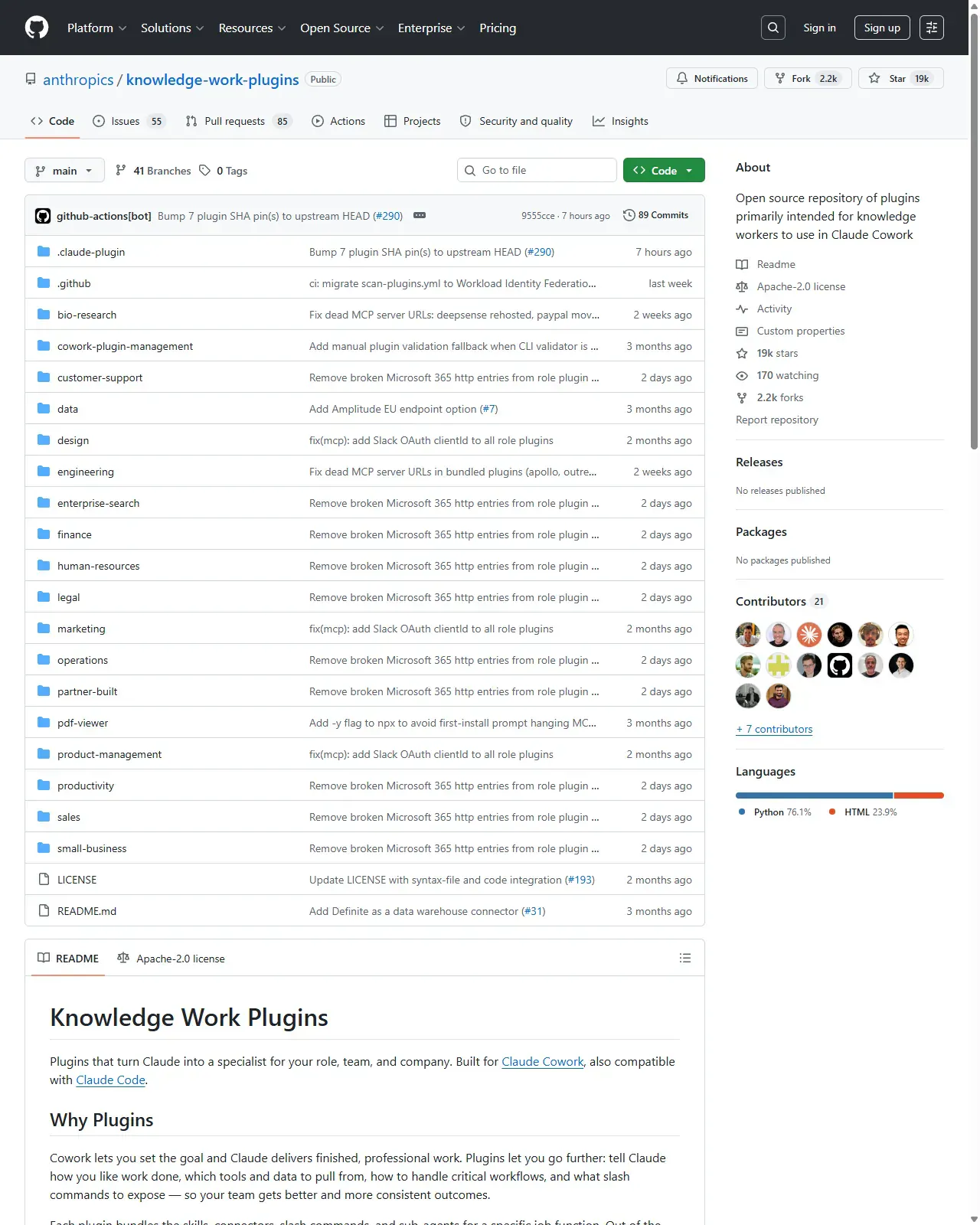
List the genuinely repetitive tasks in your week and the tools that hold their source data (reuse your Lesson 13 shortlist and the role catalogue). Choose the SINGLE highest-leverage, reversible, read-and-summarise task as your first workbench workflow, the one you'd most like back this week. Write its one-sentence success criterion now, before you build anything (Lessons 5, 8).
HintKeep the inventory honest: only tasks you genuinely repeat and have done by hand a few times. A workbench built on real, felt friction survives; one built on wishes rots. If you can't write the success criterion in one checkable sentence, the task isn't scoped tightly enough yet, narrow it. Start read-and-summarise: trust compounds one direction, you can widen scope later, but clawing back a bad habit is hard.
On this screen
- 1The role catalogue (Lesson 13). The knowledge-work-plugins repo you shopped in Lesson 13, re-open your role's plugin folder and shortlist; your inventory starts from what you already scored there.
- 2Plugin folders = proven shapes. Each visible folder is a validated workflow shape; pick the reversible read-and-summarise winner from your shortlist, not a new idea.
Day 2-3. Build and harden your core workflow with the capstone brief
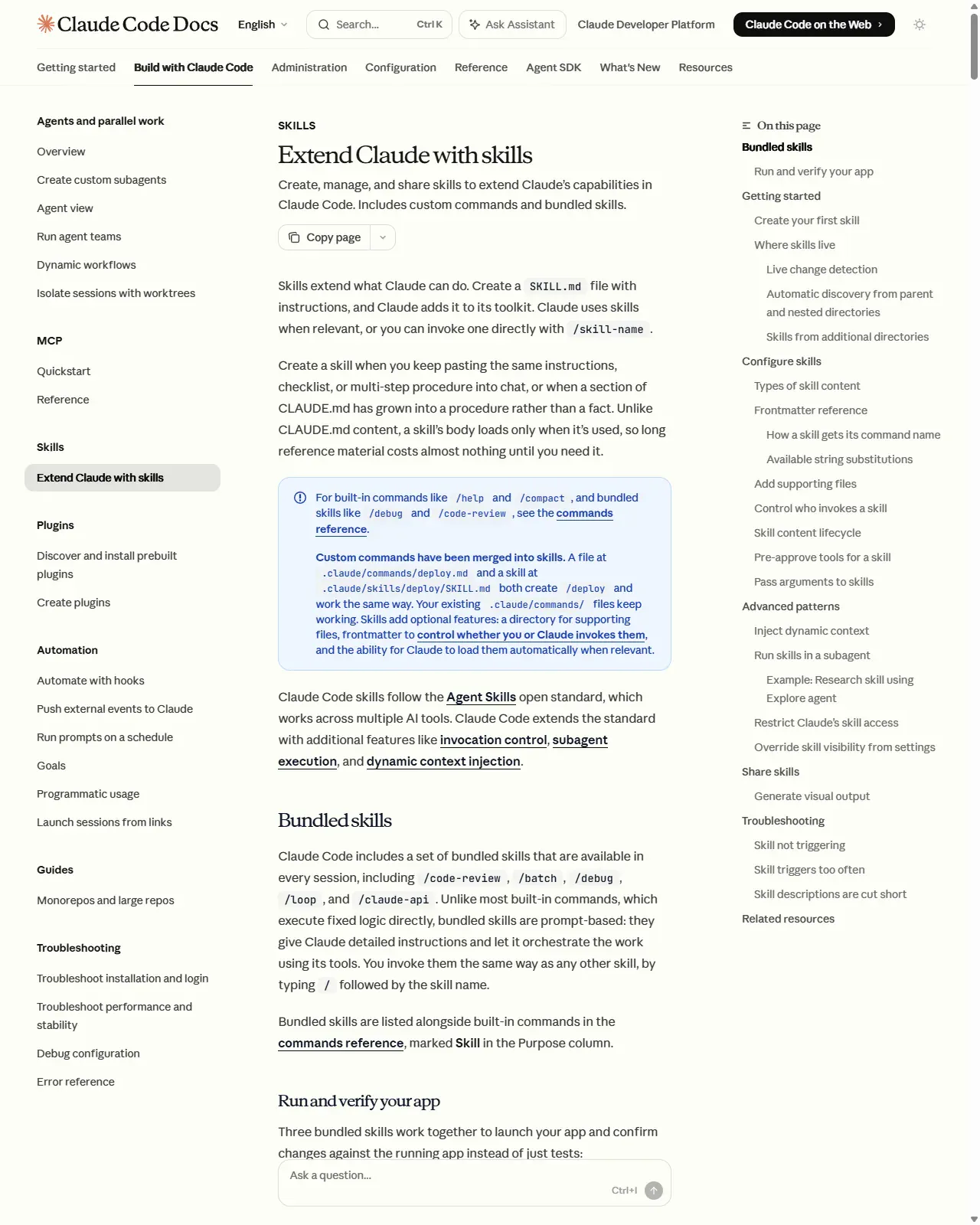
Run the capstone assembly brief (the first production prompt in this lesson) on your chosen task. It chains the course: scope, success criterion, brief, standing instructions, human gate, SKILL.md, schedule decision, and ladder placement. Then harden the skill: trigger-rich description, irreversible steps kept OUT of the skill, disable-model-invocation if it has side effects, and only the tools it needs pre-approved (Lessons 7, 14). Trim the body for progressive disclosure.
HintRun it on three real, different inputs before you trust it. One happy-path success is not reliability, it's the silent-failure trap from Lesson 8. The first build is expensive because it sets up your shared scaffolding (brief template, standing-instruction file); that cost pays back on every later skill. Each link of the capstone brief names its source lesson, producing the artefacts IS the assembly.
On this screen
- 1Skills docs (Lesson 14). The 'Frontmatter reference' in the right-hand contents is where the hardening fields, disable-model-invocation and allowed-tools, are documented; verify current names while you harden.
- 2Troubleshooting entries. 'Skill not triggering' / 'Skill triggers too often', the failures your three-real-inputs test is designed to catch before you trust the skill.
Day 4-5. Add a second skill and write your standing rules
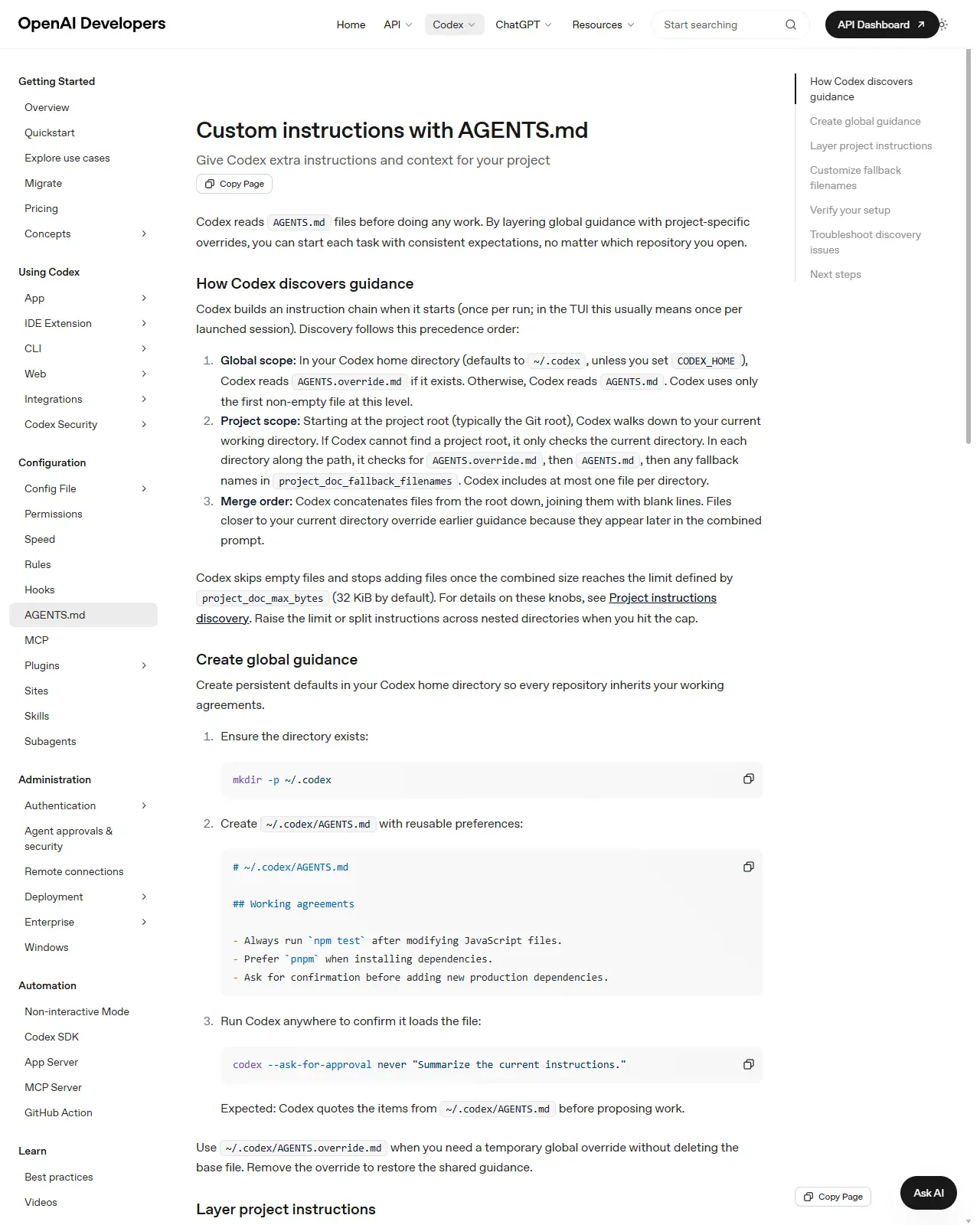
Add ONE more skill for your next-most-repeated task using the same capstone brief, and notice it's cheaper this time, because it reuses your brief template and standing-instruction file (that's the compounding from the deep dive). Then write your short personal standards note: human-approves-irreversible, least-privilege access, concise skills with runnable success criteria, one source of truth for instructions, trusted sources only. Keep it where you'll actually see it.
HintTwo solid, trusted skills and clear rules beat ten half-trusted ones, the maintenance economics are decisive (deep dive 2). Stop adding once this week's real friction is covered; the build-everything instinct is the thing to resist. State the rules as principle, not mechanism, so they survive when command names churn.
On this screen
- 1AGENTS.md docs (Lesson 6). The project-specific lines of your standards note belong here / in CLAUDE.md, written rules get applied every time; chat corrections do not.
- 2How Codex discovers guidance. The visible discovery hierarchy (global vs project) is where one-source-of-truth lives: personal standards globally, repo conventions in the repo file.
Day 6. Decide what to share (place each on the ladder)
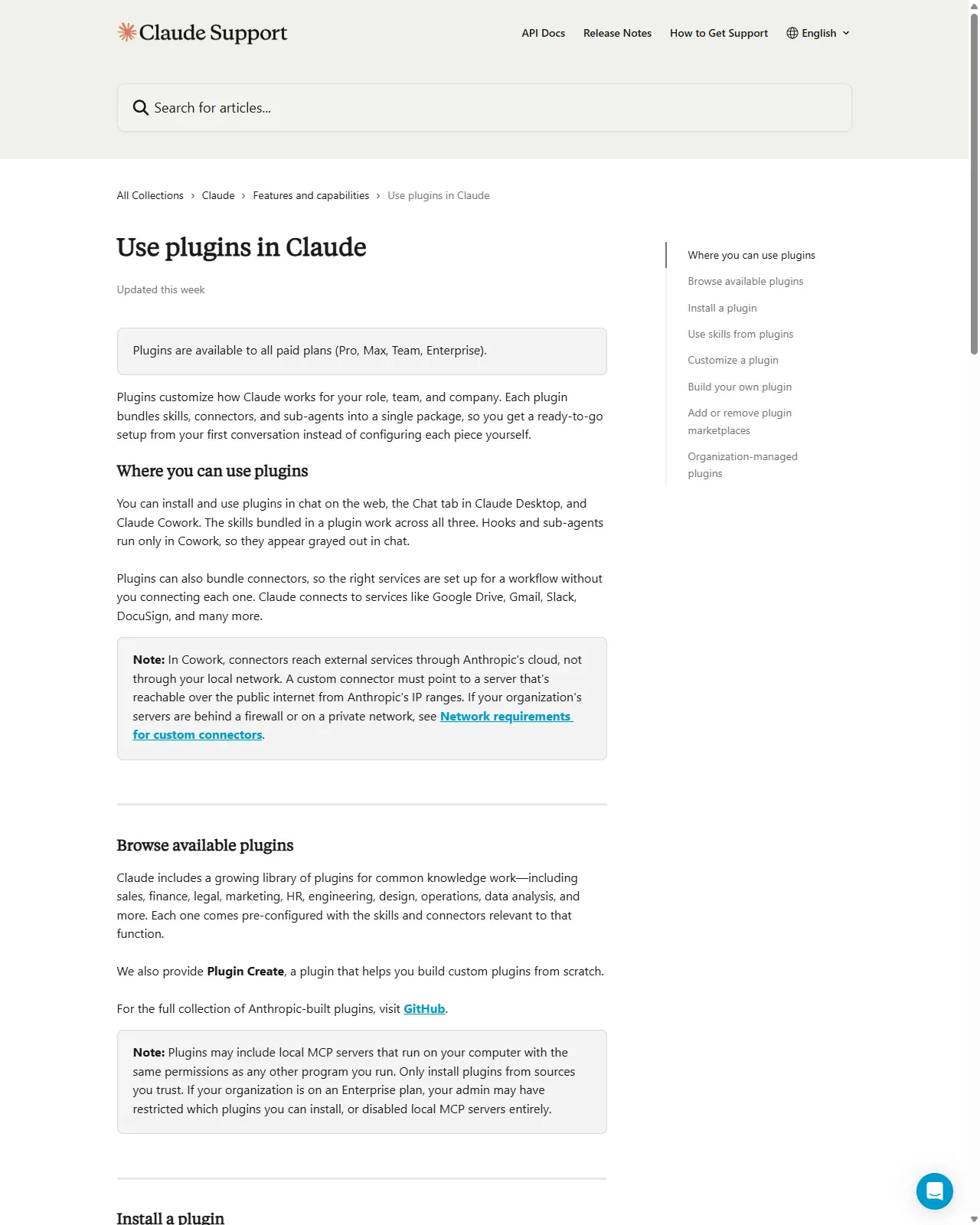
Review your two skills against the capability ladder (the comparison table in this lesson, from Lesson 15). For each, pick the lowest rung that meets the need. If a teammate keeps asking you to run one, sketch promoting it to a plugin with a least-privilege connector list and an installer trust note. If not, and this is the common case, deliberately leave it as a personal skill.
HintSharing is a decision, not a default. 'Stays a personal skill' is a perfectly good, common, correct outcome. Climbing the ladder adds reach but also a maintenance and trust burden you now own, climb only as far as the problem demands.
On this screen
- 1'Only install plugins from sources you trust' (boxed note). The burden you take on the moment you promote: if writing the trust note that answers this paragraph feels heavy for your skill, that is the signal to stay at the skill rung, the common, correct outcome.
- 2Trust is the constraint. A plugin can ship local MCP servers with program-level permissions (Lesson 15), only publish through trusted channels, only install from them.
Day 7. Set the review cadence (and consider automating it)
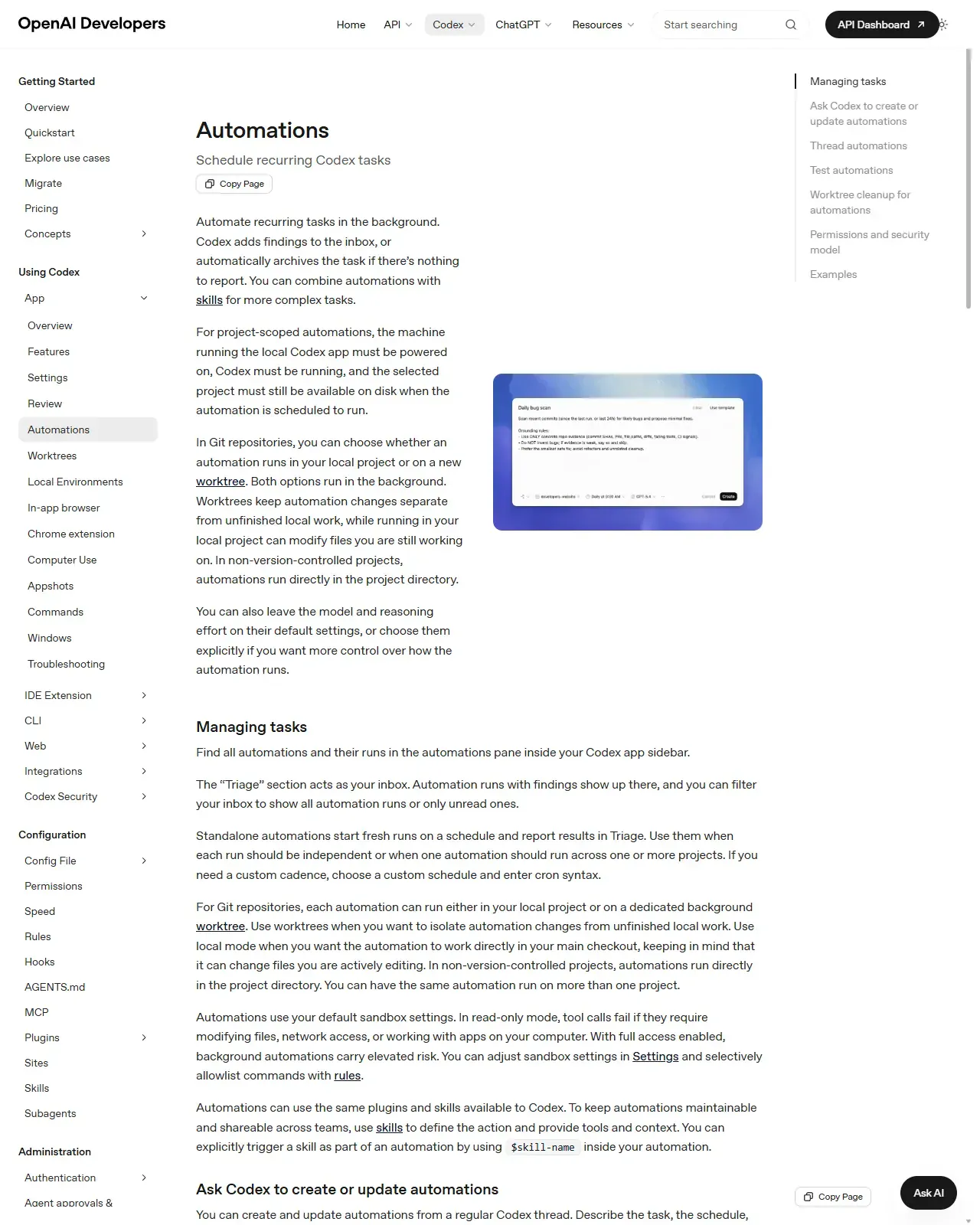
Put a recurring 15-minute workbench review in your calendar. In it you prune unused skills, tighten descriptions that misfire, re-check that connector permissions are still least-privilege, and confirm each success criterion still matches how you work. Consider running the second production prompt (the workbench auditor), and, since it's read-and-summarise, scheduling it as a Codex automation (Lesson 12) that delivers the review into your Triage inbox.
HintThe review's main job is removal, not addition, each idle skill carries context, maintenance, and trust cost for no return. A workbench you never prune slowly fills with stale skills, drifted descriptions, and over-broad permissions, and you won't notice until one silently fails. The workbench reviewing itself on a schedule is the system maturing.
On this screen
- 1Automations docs (Lesson 12). 'Managing tasks': scheduled runs land in Triage, where your auditor's report would arrive each cadence.
- 2Schedule recurring Codex tasks (page header). The auditor prompt is read-and-summarise, exactly the kind of task this page recommends scheduling.
Lock in the standards, write the one-page charter
Write a one-page take-home charter capturing: your LOOP (pick, brief, gate, verify, promote-if-needed); your STANDING RULES (human-on-irreversible, least privilege, runnable success criteria, one source of truth, trusted sources); your CURRENT WORKBENCH (each skill with its success criterion, human-gated step, and ladder rung); and your REVIEW CADENCE. The capstone brief's CHARTER STUB output gives you the per-workflow rows; assemble them into the page. This is the artefact you keep after the course.
HintState rules at the level of principle ('a human approves every irreversible step'), not mechanism ('press Shift+Tab'), principle survives version churn, mechanism doesn't. Acceptance test: if you could hand this page to a new teammate and they'd start working safely with agents, on whatever tools ship next year, from it alone, it's complete.
Execute the Day 1-7 plan as a real build, not a thought experiment. Day 1: inventory your repeated tasks and pick one reversible, read-and-summarise task; write its one-sentence success criterion. Day 2-3: run the capstone assembly brief to chain the course pieces (scope, brief, standing instructions, human gate, SKILL.md, schedule decision, ladder placement), then harden the skill and test it on three real, different inputs. Day 4-5: add a second skill with the same brief and write your standing-rules note. Day 6: place each skill on the capability ladder and decide what (if anything) to share. Day 7: schedule a recurring workbench review (optionally automate it with the auditor prompt). Then write the one-page take-home charter capturing your loop, rules, current workbench (skills + success criteria + human gates + ladder rungs), and review cadence.
A working personal AI workbench: at least one, ideally two, trusted, verified skills, each tested on three real inputs with a checkable success criterion and an explicit human gate on every irreversible step; a recurring workbench review on the calendar (optionally a scheduled auditor automation); and a one-page charter of portable standards you could hand to a teammate to get them working safely with agents on any tool.
Production prompt examples
ROLE: You are a senior operator helping me assemble ONE real, trustworthy workbench workflow from a task I already do by hand every week. Work in careful, propose-first mode. I am the human in the loop and I approve every irreversible step before it happens.

MY REPEATED TASK: <describe the one task in a sentence, e.g. 'every Monday I read last week's support tickets and write a 5-bullet themes digest for the team channel'>.
TOOLS THAT HOLD THE SOURCE DATA: <the apps/connectors involved, e.g. Zendesk export, the team wiki>.
WHO NEEDS THIS: <just me / me + my team>.

ASSEMBLE THE WORKFLOW BY CHAINING THE COURSE PIECES. For each numbered link, produce the artefact, do NOT skip any:
1. SCOPE (Lesson 8): State the single bounded outcome of one run, in one sentence. If it needs more than one sentence, propose how to split it.
2. SUCCESS CRITERION (Lessons 5, 8): Write a ONE-sentence, checkable definition of a good output. Prefer one I (or you) can run, a diff against an expected shape, a checklist, a test. State exactly how it gets checked.
3. BRIEF (Lesson 5): Draft the reusable task brief, role, context (which files/connectors), scope-IN, scope-OUT (what must NOT be touched), constraints, desired outcome, and the verification step from #2.
4. STANDING INSTRUCTIONS (Lesson 6): List the conventions this task assumes that belong in CLAUDE.md / AGENTS.md (so the brief stays lean), and flag any that are project-specific vs personal.
5. HUMAN GATE (Lessons 1, 7): Identify every send / pay / delete / write-to-record / external-message step and mark it HUMAN-APPROVED. Recommend the review-gate posture (propose-only / plan mode) and least-privilege tool list.
6. SKILL (Lesson 14): Draft the SKILL.md, a trigger-rich description (the trigger words a user would actually say), a concise body, and progressive-disclosure notes for anything long. If it has side effects, recommend disable-model-invocation and the minimal allowed-tools.
7. SCHEDULE? (Lesson 12): Say whether this should run on a cadence. If yes, propose the cadence (and cron if custom) and confirm it stays read-and-summarise / inside sandbox. If no, say why on-demand is right.
8. LADDER PLACEMENT (Lesson 15): Recommend the rung, prompt / template / skill / scheduled skill / plugin / MCP, with one line of justification. Default to the LOWEST rung that meets the need; only recommend a plugin if 'who needs this' includes others.

CONSTRAINTS: Keep it small, this is ONE workflow, not a platform. Do not invent tasks I didn't name. Do not propose climbing the ladder for its own sake. Reuse my existing brief template and standing-instruction file if I have them.

OUTPUT FORMAT: One numbered section per link above, each with its artefact. End with a 3-line CHARTER STUB I can paste into my one-page charter: (a) this workflow's success criterion, (b) its human-gated step(s), (c) its review cadence. Then list anything you could NOT determine and need from me.
- Each numbered link names its source lesson on purpose, the brief IS the assembly recipe, so producing it proves you can chain the course rather than recall it piecemeal.
- Link 2 (success criterion) is placed before the brief deliberately: deciding what 'good' means first is what stops every later link from drifting, it is the same verification-first discipline from Lessons 5 and 8.
- Link 5 forces the human gate to be named explicitly per step, not assumed, 'mark every send/pay/delete/write-to-record HUMAN-APPROVED' is Lesson 1's irreversibility rule turned into a checklist the agent fills in.
- Link 8 defaults to the LOWEST rung and only allows a plugin when others need it, this is Lesson 15's anti-over-engineering rule encoded so the agent can't talk you up the ladder.
- The CHARTER STUB output means one run of this brief also drafts the rows you'll paste into your one-page charter (Step 6), the brief feeds the artefact you keep.
- 'Keep it small. ONE workflow, not a platform' is the maintenance-economics guardrail from the deep dive: the prompt actively resists the build-everything instinct.
- Run this once per workflow. The first run is expensive (it sets up your shared scaffolding); the second workflow reuses the brief template and standing-instruction file, which is the compounding the deep dive describes.
ROLE: Act as a sceptical workbench auditor. Your job is to find what has rotted or drifted in my AI workbench since the last review, NOT to praise it. Report only, do not change or delete anything; I decide what to prune.

INPUT (I will paste or point you at these):
- My list of current workbench skills, each with its one-sentence success criterion.
- For each skill: roughly how often I've actually used it since the last review.
- The tools/connectors each skill is granted, and the permission scope of each.
- My standing-instruction file(s) (CLAUDE.md / AGENTS.md) and any scheduled automations + their last few Triage outcomes.

AUDIT, report findings grouped by severity (PRUNE / TIGHTEN / VERIFY / KEEP):
1. UNUSED: Flag any skill I have NOT run since the last review. Recommend prune unless I can name a near-future use.
2. MISFIRING DESCRIPTION: Flag any skill whose trigger description is vague or overlaps another skill (the agent could pick the wrong one). Propose a sharper, trigger-rich rewrite.
3. OVER-BROAD PERMISSION: Flag any skill/connector granted more tool access than its task needs. Recommend the least-privilege scope.
4. STALE SUCCESS CRITERION: Flag any criterion that no longer matches how I actually work, or any skill that has NO checkable criterion. Propose a runnable one.
5. DRIFTED / TRUNCATED STANDING INSTRUCTIONS: Flag rules that are now wrong, duplicated across the two files (Codex vs Claude drift), or that push the file past its size budget and risk silent truncation.
6. SILENT AUTOMATION: For any scheduled automation, flag runs that returned nothing useful repeatedly (candidate to pause) or that have widened scope beyond read-and-summarise.

OUTPUT: A table, skill/rule | finding | severity (PRUNE/TIGHTEN/VERIFY/KEEP) | recommended action. End with the ONE change that would most improve the workbench's trustworthiness, and a one-line note: 'workbench is healthy / needs attention'. Report only. I decide.
- Framing the reviewer as 'sceptical auditor, find what rotted' counters the natural drift toward keeping everything, the review only works if it actively hunts for things to remove (the maintenance economics from the deep dive).
- The four severity buckets (PRUNE / TIGHTEN / VERIFY / KEEP) map exactly onto the Day 7 review actions in the hands-on, so the audit output is directly actionable, not just commentary.
- Section 2 targets the trigger-rich description (Lesson 14) because that is the part most likely to drift as you add overlapping skills, two skills that both want to fire is a real, common failure.
- Section 5 catches the Codex/Claude one-source-of-truth problem (Lesson 6) and the silent-truncation risk of an over-stuffed instruction file, both are invisible until something quietly stops being followed.
- This prompt is itself a candidate scheduled automation (Lesson 12): point it at your workbench on a recurring cadence and it delivers the review into your Triage inbox, the workbench reviewing itself is the system maturing.
- 'Report only. I decide what to prune' keeps the human on the irreversible step (deletion) even during maintenance, consistent with the course's core safety rule.
Common mistakes to avoid
- Treating the capstone as a sixteenth new concept to learn instead of an assembly, re-inventing your safety posture, conventions, and verification for this workflow instead of chaining the pieces you already built (Lessons 1, 5, 6, 7, 8).
- Trying to build the whole workbench in one sitting instead of letting trust accrue across the week, big-bang builds skip the days of real use that earn reliability.
- Skipping the success criterion, so you can't distinguish a good run from a confident-sounding wrong one, the costliest silent failure (Lesson 8).
- Hoarding skills you don't actually use, inflating context cost (Lesson 3), maintenance burden, and your trust surface, a forgotten skill you later trust is worse than no skill.
- Re-deciding your standards per workflow instead of investing in the shared scaffolding (brief template, standing-instruction file) that makes the next skill cheaper, keeping the marginal cost flat and never reaching the compounding.
- Climbing the capability ladder for its own sake, promoting a personal skill to a plugin or MCP server when 'it stays a personal skill' was the correct, lower-cost answer (Lesson 15).
- Never scheduling a review, letting stale skills, drifted trigger descriptions, and over-broad connector permissions accumulate unnoticed until one quietly fails.
- Writing the charter in terms of mechanism ('press Shift+Tab') rather than principle ('a human approves every irreversible step'), so it goes out of date the moment a command name changes.
Source conflicts to review
- The capability ladder, the trust ladder, and the 'compounding' framing are teaching models, not vendor-defined taxonomies, they synthesise the course and the compound-engineering literature (Every, Jan 2026). Treat them as decision aids; the exact packaging boundaries between skill / automation / plugin differ between Codex and Claude and both ship fast.
- Tool specifics referenced from earlier lessons (plan-mode activation, Claude Code's six permission modes and v2.1.59+ auto-memory, Codex automation cadences and Triage, AGENTS.md size caps) were accurate as of June 2026 but change across point releases, verify against code.claude.com and developers.openai.com before relying on any command name or default.
- The compound-engineering time-allocation guidance (split effort between shipping and improving the system) is a recommended practice from one source, not a measured law, adopt the principle (invest in the shared layer) without treating any specific percentage as prescriptive.
Key terms
- Personal AI workbench
- Your curated, deliberately small set of trusted skills, connectors, and standing rules for working with agents, kept small because each skill is recurring context and maintenance cost.
- Assembly recipe
- The repeatable way you chain the course pieces, scope, brief, standing instructions, human gate, skill, schedule, ladder placement, into one shipped workflow.
- Take-home standards
- Portable rules (human-gates irreversible steps, least privilege, runnable success criteria, one source of truth, trusted sources) stated as principle so they survive tool churn.
- Success criterion
- A single checkable sentence defining a good output for a skill, ideally one the agent can run, that serves as your acceptance test (Lessons 5, 8).
- Least privilege
- Granting an agent, skill, or plugin only the tool and connector access a task genuinely requires, nothing more (Lessons 7, 13).
- Capability ladder
- Prompt -> template -> skill -> scheduled skill -> plugin -> MCP/internal app; each rung adds reach and maintenance cost, climb only as far as the problem demands (Lesson 15).
- Compounding
- The property that each shipped workflow makes the next one cheaper to build, because the brief template, standing instructions, and standards are already in place.
- Workbench review
- A recurring prune-and-audit of skills, trigger descriptions, permissions, and success criteria that keeps the toolkit trustworthy as work and tools change.
- One-page charter
- The durable artefact you keep after the course: your loop, standing rules, current workbench state, and review cadence, written so a new teammate could work safely from it alone.
- Operating system of workflows
- A workbench mature enough that adding the next trusted workflow is cheap, because the shared scaffolding and standards already exist.
Resources
- docClaude Code. Extend Claude with skills (build & maintain)
- docCodex. Skills (portable skill standard)
- docCodex. Automations (schedule the review / recurring workflows)
- docClaude Code. Plugins (when to bundle & share)
- docUse plugins in Claude (trusted sharing)
- docKnowledge-work plugins (role-based examples to borrow shapes from)
- articleEvery. Compound Engineering (each unit of work makes the next easier)
Checkpoint