
Lesson 30 of 38 · Core - 03:15-03:30
Create your first reusable skill
Turn your chosen micro-automation into a reusable, version-controlled SKILL.md that the agent loads on demand, and understand the deeper model behind it: what a skill actually is, how its three parts (name, description, instructions) each earn their place, exactly when a skill is the right tool versus a prompt or a standing instruction, and how to write the description so the skill fires when you want it and stays silent when you don't.
You've picked one micro-automation. Now you'll make it permanent, not by re-typing the prompt every time, but by packaging it as a skill the agent can load itself. A skill is a small folder whose entry point is a single SKILL.md file: a few lines of YAML frontmatter that say what the skill is and when to use it, followed by the markdown instructions the agent follows when it runs. This is the open Agent Skills standard, originally developed by Anthropic, released as an open format, and now adopted across more than thirty agents including Claude Code, OpenAI Codex, Cursor, Gemini CLI, Copilot, Goose, and others, so the same SKILL.md is portable: write it once, run it in either tool. The reason skills matter is not convenience, it's reliability and reuse. A prompt you paste lives and dies in one chat; a skill is a tested procedure that produces the same result on demand, costs almost nothing in tokens until it actually runs, and travels with your repo or your account. By the end of this lesson you'll have built one, understood why each part exists, and learned the single highest-leverage line in the whole file: the description.
Mastering agentic skills, the SKILL.md standard
Package recurring procedural workflows as portable skills that load only when they are needed.
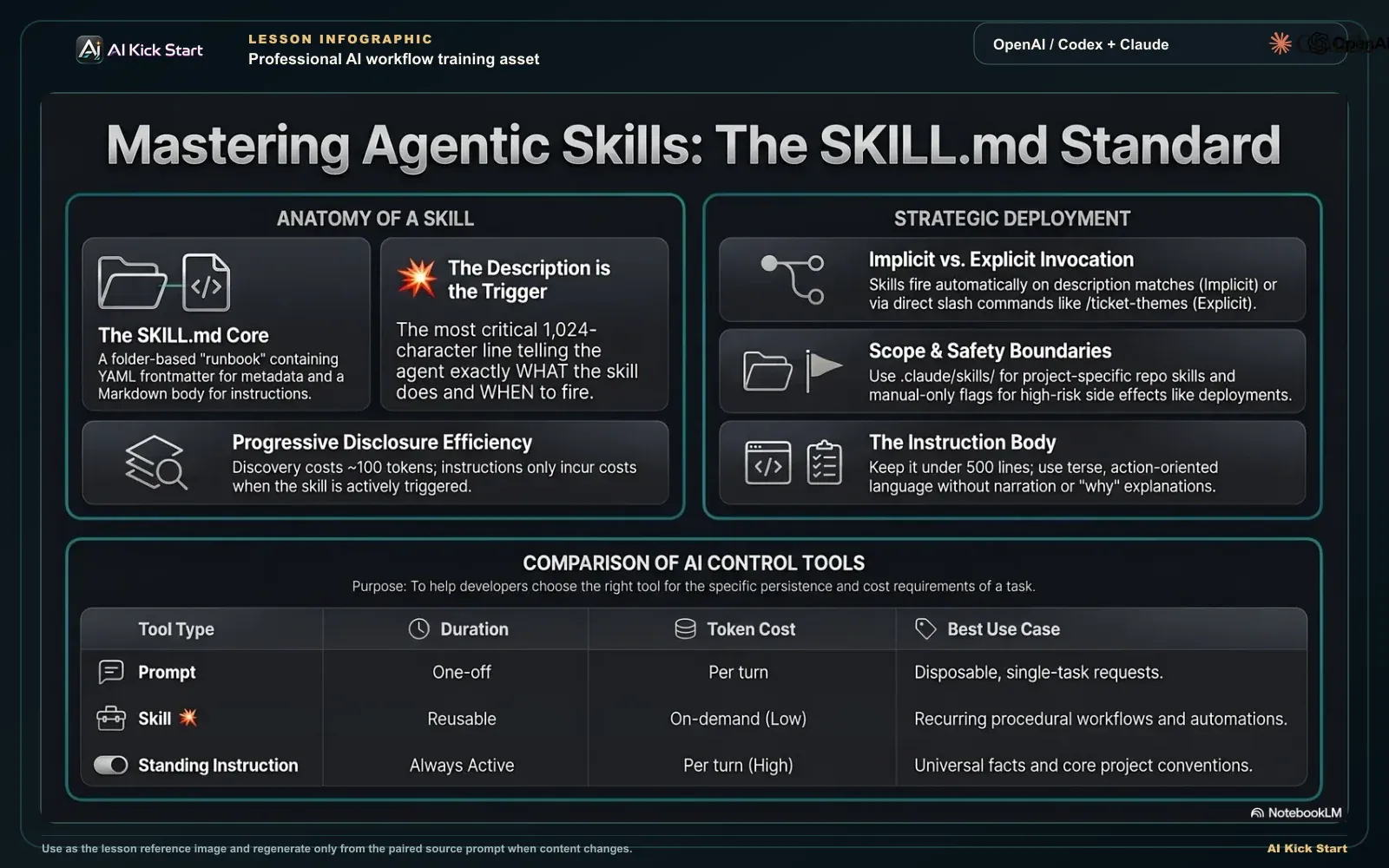
Build your first reusable agentic skill
A branded walkthrough: turn a repeated workflow into a packaged SKILL.md with a clear description trigger, progressive disclosure, and safety boundaries so it runs the same way every time.
What to understand
- A skill is procedural knowledge packaged as a folder. At minimum it is a directory containing one SKILL.md file; it can also bundle scripts/, references/, and assets/ the agent loads only when needed. The official framing is identical across tools: a skill packages instructions, resources, and optional scripts so the agent can follow a multi-step workflow reliably every time, the same way you'd write a runbook for a teammate rather than re-explaining the task each shift.
- SKILL.md has exactly two parts: frontmatter and body. The frontmatter is YAML between --- markers; the body is markdown instructions. The open standard requires two frontmatter fields, name and description, and treats everything else (license, compatibility, metadata, allowed-tools) as optional. In Claude Code only description is strictly needed (name defaults to the folder), but writing both keeps you portable across tools.
- name is the identity, and the standard constrains it tightly: 1-64 characters, lowercase letters, numbers and hyphens only, no leading/trailing or consecutive hyphens, and it must match the parent directory name. The folder name, not the frontmatter name, is what becomes your slash command in both tools, so ticket-themes becomes /ticket-themes. Name after the action, in kebab-case.
- description is the most important line you will write, and it has a hard budget. The standard caps it at 1,024 characters; Claude Code additionally truncates the combined description + when_to_use text at 1,536 characters in the skill listing and only keeps all descriptions in context up to a budget (~1% of the model's context window). The description is what the agent reads to decide whether to fire the skill, so it must say both what the skill does AND when to use it, in the exact words you'd naturally say. A vague description ('helps with tickets') is why a skill never fires; a concrete one with trigger phrases is why it fires at the right moment and stays quiet otherwise.
- The body is instructions, not narration. There are no format restrictions, but every line you write becomes a recurring token cost once the skill loads, so state what to do, not why, in the same terse register you'd use for CLAUDE.md. Keep the body well under the recommended ~5,000 tokens / 500 lines and push anything long (templates, reference tables, example outputs, scripts) into sibling files the agent reads only on demand. This is progressive disclosure, and it is the whole reason a skill is cheap.
- Skills load in three progressive stages, and understanding them explains every design rule. (1) Discovery: at startup the agent loads only each skill's name + description (~100 tokens each), just enough to know it exists. (2) Activation: when a task matches the description, the agent reads the full SKILL.md body into context. (3) Execution: it follows the instructions, loading referenced files or running scripts only as needed. So a hundred skills can sit on hand for the cost of a hundred one-line descriptions; the expensive body is paid only when the skill actually runs.
- Skills are invoked two ways, and the difference is about control. Implicitly, the agent loads the skill when your request matches its description, that's the discovery/activation flow above, and it's why the description has to be good. Explicitly, you name it yourself: Claude Code uses /skill-name; Codex uses $skill-name, the /skills picker, or a direct mention. Explicit invocation gives you control over timing, essential for anything with side effects, where you don't want the agent deciding when to act.
- Location decides scope, and both tools mirror the same idea at different paths. Claude Code: ~/.claude/skills/<name>/ is personal (all your projects).claude/skills/<name>/ is project-only (ships with one repo, committed to version control). Codex: $HOME/.agents/skills/<name>/ is user-level, and .agents/skills/<name>/ in a repo (or its root) is repository-scoped, with /etc/codex/skills for system/admin. Same concept, different folders, and the portable SKILL.md drops cleanly into either.
- Both tools let you make a skill manual-only, the safety control for side effects. Claude Code: set disable-model-invocation: true so only you can trigger it with /name and the agent never auto-fires it. Codex: set allow_implicit_invocation: false in agents/openai.yaml so it won't trigger implicitly while still working via $name. Anything that sends, posts, deploys, or writes to a system of record belongs behind one of these, don't let the agent decide when to touch the outside world.
- allowed-tools is convenience, not a security boundary, know the difference. It pre-approves a narrow set of tools (e.g. allowed-tools: Read Grep, or a scoped pattern like Bash(git status:*)) so the agent uses them without per-use prompts while the skill is active. The Agent Skills spec marks this field experimental, and Claude Code is explicit that it does not restrict what's available, it only waives the prompt for the listed tools, and for a project skill it takes effect only after you accept the workspace trust dialog. A skill in an untrusted repo can grant itself broad access, so review project skills before trusting them.
- Claude Code adds power beyond the open standard, worth knowing even if you don't use it yet: dynamic context injection with !`command` (and ```! fenced blocks), which runs a shell command and inlines its output into the skill before the agent ever reads it (e.g. !`git diff HEAD` to ground a review in your real working tree); $ARGUMENTS / $0 / $1 substitution for passing parameters; context: fork to run the skill in an isolated subagent; and paths: globs that auto-activate a skill only when you're working on matching files. These are the same SKILL.md, extended.
Deeper dive
Skill vs prompt vs standing instruction, three tools, three jobs (and why mixing them up is the most common mistake)
These three look interchangeable to a beginner and are not. A PROMPT is a one-off: you type it, the agent acts, the instruction dies with the chat. It's the right tool when the task is genuinely novel or so trivial ('format this file') that packaging it would cost more than re-typing it. A STANDING INSTRUCTION lives in CLAUDE.md / AGENTS.md: it is always in context, shaping every response in that project, automatically, before the agent starts, and you pay its token cost on every single turn. It's the right tool for facts and conventions that should colour all work: 'this repo uses British spelling', 'never touch the migrations folder', 'tests live next to source'. A SKILL sits between them: it is a saved, named procedure that loads only when invoked, so you pay almost nothing until it runs, then get a reliable multi-step workflow. It's the right tool for a repeatable PROCEDURE you run sometimes but not always: theme this week's tickets, draft a release note from the diff, run our PR checklist. The clean decision rule is two questions. First, is it a fact/convention (always relevant) or a procedure (sometimes run)? Facts go in CLAUDE.md; procedures become skills. Second, do you run it more than a couple of times? If yes, a skill earns its keep; if it's a one-off, a prompt is fine. The classic error is cramming a long procedure into CLAUDE.md, now every turn re-pays for instructions that only matter occasionally, and the file bloats past the point where the agent reliably reads all of it. The skill fixes exactly that: the official Claude Code guidance is to create one 'when a section of CLAUDE.md has grown into a procedure rather than a fact', because a skill's body loads only when used. The inverse error is making a skill for a project fact, but a fact has no procedure to follow and should just be a standing instruction. Get this mapping right and your CLAUDE.md stays small and factual, your skills stay sharp and procedural, and your prompts stay for the genuinely new.
The description is a retrieval problem, not a label, write it the way the agent reads it
Beginners write the description as a title ('Ticket themer'); operators write it as a trigger. The reason is mechanical: at Discovery the agent has loaded only names and descriptions for every available skill, and at Activation it must decide, from that text alone, whether your request matches THIS skill rather than the dozen others. So the description is doing retrieval, and it succeeds or fails on whether it contains the words you actually say and the boundaries that exclude the cases you don't mean. Three rules follow. First, put the key use case first and lead with both halves, what it does and when to use it, because the listing is truncated (1,024 chars in the standard; Claude Code caps the combined description + when_to_use at 1,536 and drops the least-used skills' descriptions first when the budget overflows). A buried trigger phrase may never reach the agent. Second, include concrete trigger phrases drawn from your real vocabulary: not 'use for ticket analysis' but 'Use when asked to digest, triage, or theme recent support tickets, or when the user pastes a batch of tickets and asks what the common issues are.' The spec's own good/poor contrast is exactly this, 'Extracts text and tables from PDFs... Use when working with PDF documents or when the user mentions PDFs, forms, or document extraction' versus the useless 'Helps with PDFs.' Third, state boundaries so it stays quiet when it shouldn't fire, 'Use for batches of three or more tickets; not for a single ticket reply.' The diagnostic loop in this lesson's hands-on is the test: read your description aloud as if you were asking for the task; if it doesn't contain the words you'd naturally use, the skill won't fire implicitly, and the fix is always to add those words, not to make the skill 'smarter'. Triggering too often is the same problem inverted: tighten the description or, for side-effect skills, make it manual-only. The description is the one line where five minutes of care buys reliable activation forever.
Why portability and progressive disclosure are the real payoff (not just 'less typing')
It's tempting to see a skill as a shortcut for not re-pasting a prompt. The deeper value is two structural properties. PORTABILITY: because SKILL.md is an open standard developed by Anthropic and adopted across the ecosystem (Claude Code, Codex, Cursor, Gemini CLI, Copilot, Goose, OpenCode, and more), the same file is an asset that outlives any one tool. The required core, name + description + markdown body, is identical everywhere; only the optional, tool-specific extras differ (Claude Code's disable-model-invocation, Codex's openai.yaml policy). Write to the common core and your library of procedures moves with you when you switch tools or work across a team that uses both. That is why this lesson has you write both name and description even though Claude Code only needs the latter. PROGRESSIVE DISCLOSURE: the three-stage load (metadata always, body on activation, resources on demand) is what makes a large personal toolkit free until used. A standing instruction in CLAUDE.md costs tokens on every turn forever; a skill costs ~100 tokens of description until the moment it's relevant, then loads its body, then loads a referenced template or runs a script only if the task reaches that step. This is also why the body must stay terse and long material must move to sibling files: a 600-line SKILL.md defeats the design by dumping everything into context the instant the skill activates, whereas a 60-line SKILL.md that points to reference.md keeps the activation cheap and pulls detail only when the procedure actually needs it. Operators design skills around this: SKILL.md carries the procedure and the navigation ('for the full template, see template.md'); the bulk lives one level down. The result is a toolkit where having a hundred skills on hand is nearly free, and the cost you pay tracks the work you actually do, the opposite of stuffing everything into always-on memory.
The skill format compared (open standard vs Claude Code vs Codex, June 2026)
The same SKILL.md is portable; the required core is identical and only the optional, tool-specific extras differ. Skills move fast, field names and defaults change between releases; verify against the official docs linked below before relying on specifics.
| Aspect | Agent Skills standard | Claude Code | OpenAI Codex |
|---|---|---|---|
| Entry file | SKILL.md (folder entrypoint, required) | SKILL.md in the skill folder | SKILL.md in the skill folder |
| Required frontmatter | name + description | description (name defaults to folder); write both for portability | name + description |
| name rules | 1-64 chars, lowercase a-z/0-9/hyphens, no leading/trailing/double hyphen, must match folder name | Folder name sets the command; frontmatter name is the display label | name identifies the skill |
| description cap | Max 1,024 characters; say what it does AND when to use it | Combined description + when_to_use truncated at 1,536 chars; listed within a ~1% context budget | Explain when the skill should and should NOT trigger |
| Personal / user scope | (tool-defined) | ~/.claude/skills/<name>/ | $HOME/.agents/skills/<name>/ |
| Project / repo scope | (tool-defined) | .claude/skills/<name>/ (commit to VCS) | .agents/skills/<name>/ (repo or root); /etc/codex/skills for system |
| Explicit invocation | (tool-defined) | /skill-name | $skill-name, the /skills picker, or direct mention |
| Make it manual-only | (not in core spec) | disable-model-invocation: true | allow_implicit_invocation: false in agents/openai.yaml |
| Pre-approve tools | allowed-tools (space-separated, experimental) | allowed-tools (string or YAML list; needs workspace trust for project skills) | dependencies.tools in agents/openai.yaml |
| Keep body small | Instructions < ~5,000 tokens; < 500 lines; push detail to references/ | Same: keep SKILL.md < 500 lines; supporting files load on demand | Initial skills listing capped ~2% of context for efficiency |
Sources (as of June 2026): Agent Skills. Specification (frontmatter, limits, progressive disclosure) · Claude Code. Skills (frontmatter reference, scopes, advanced) · OpenAI Codex. Skills (SKILL.md, locations, invocation)
Anatomy of a SKILL.md, read top to bottom
Each layer of the file, in the order it appears; the agent loads the top metadata always and the body only on activation.
- --- (frontmatter opens)YAML block between --- markers. The standard requires only name + description; everything below it is optional.
- name: ticket-themesIdentity: 1-64 chars, lowercase kebab-case, must match the folder. The folder name is what becomes the /ticket-themes command.
- description: what it does AND when to use itThe highest-leverage line. Capped at 1,024 chars; the agent reads ONLY this (plus name) at discovery to decide whether to fire. Lead with triggers, end with a boundary.
- allowed-tools: Read Grep (optional)Pre-approves a narrow tool set to waive per-use prompts. Convenience, not a security boundary, and experimental in the spec.
- disable-model-invocation: true (optional)Manual-only safety flag for side-effect skills, so only you trigger it with /name. Codex spells this allow_implicit_invocation: false.
- --- closes -> markdown bodyTask / Inputs / Steps / Output / Boundaries. Terse and procedural; loads into context only on activation, so keep it well under ~500 lines.
- Sibling files: reference.md, scripts/Bulk material lives one level down and loads on demand, progressive disclosure that keeps activation cheap.
Step by step
Decide scope, then create the folder
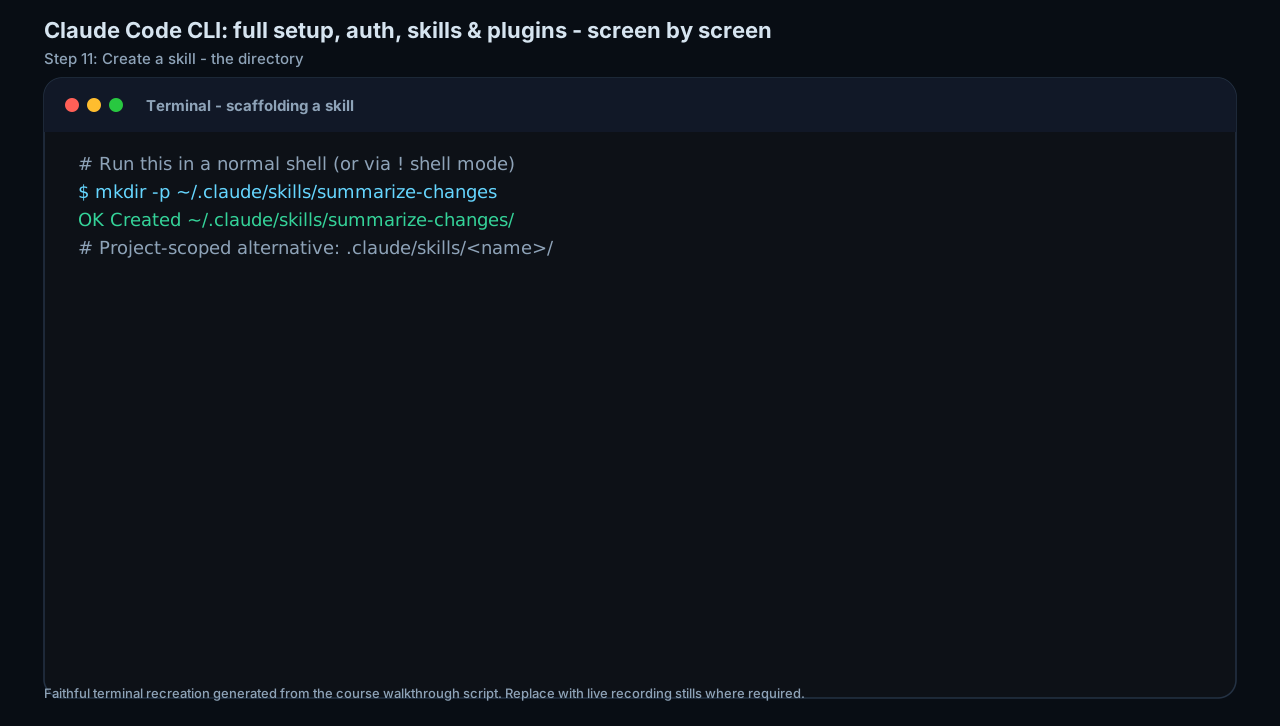
Choose personal or project scope. For a workflow you'll reuse everywhere, go personal; for one that belongs to a specific repo and should travel with it, go project (and commit it). In Claude Code: mkdir -p ~/.claude/skills/<your-skill-name> (personal) or .claude/skills/<your-skill-name> (project). In Codex: $HOME/.agents/skills/<your-skill-name> (user) or .agents/skills/<your-skill-name> in the repo. Name the folder after the ACTION in kebab-case (lowercase words joined by single hyphens), e.g. ticket-themes, and remember the folder name must match the skill name and becomes your slash command. You should see the new empty folder (ls ~/.claude/skills) before moving on.
HintThe folder name is the command and the identity. Pick it once, carefully: ticket-themes gives you /ticket-themes in Claude Code and $ticket-themes in Codex. (The terminal stills in this lesson use summarize-changes as their worked example, the shape is identical to your ticket-themes.)
On this screen
- 1Personal vs project. Personal (~/.claude/skills, $HOME/.agents/skills) works across all projects; project (.claude/skills.agents/skills) ships with one repo and is committed to version control.
- 2Folder = command = name. The directory name sets the slash command AND must equal the frontmatter name (standard rule), so ticket-themes -> /ticket-themes.
Write the frontmatter, name and a trigger-rich description
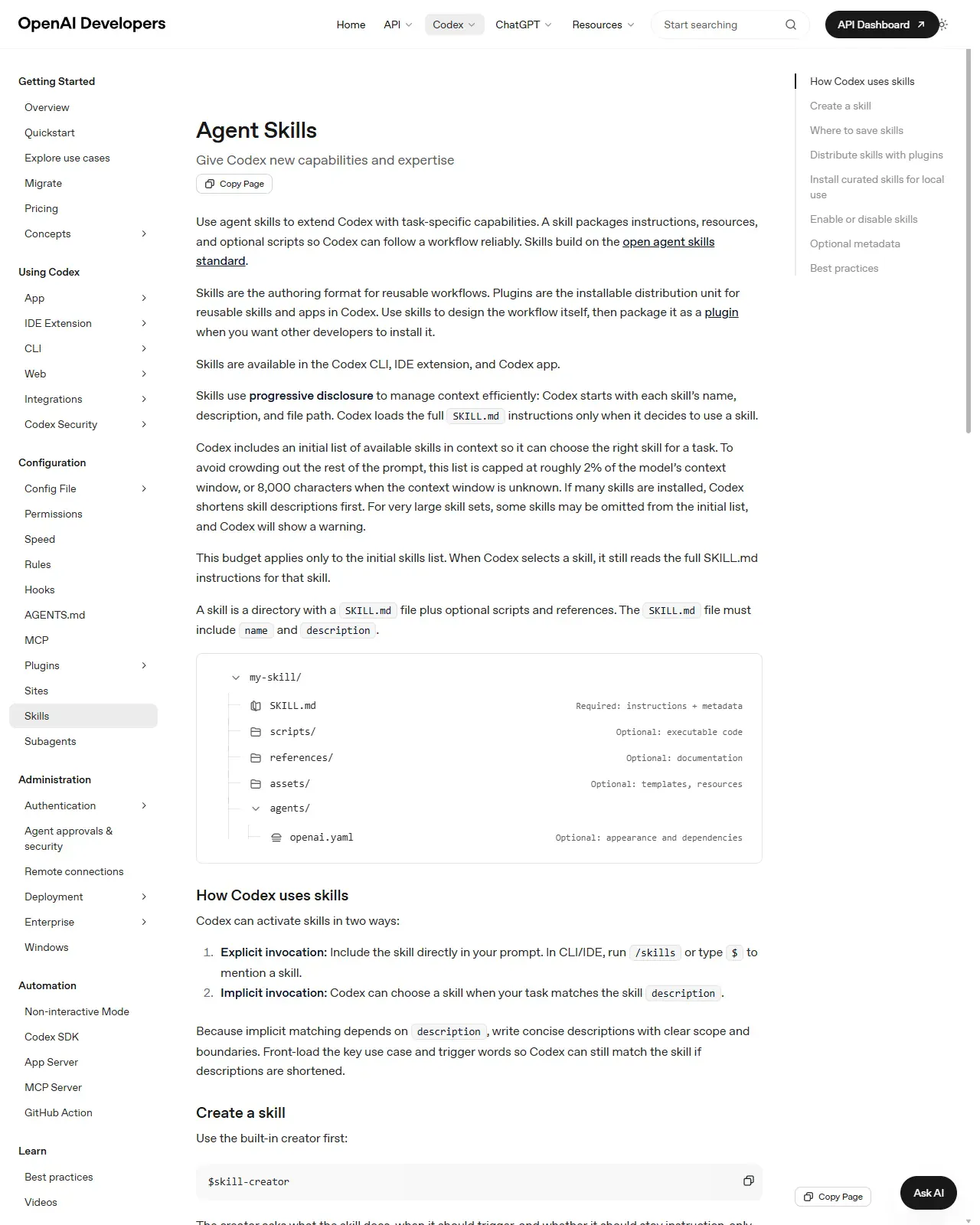
Create SKILL.md inside the folder. Open with ---, then name: <your-skill-name> (lowercase, hyphens, matches the folder), then description: a single line (<=1,024 chars) that says BOTH what the skill does AND when to use it, in the exact words you'd naturally say, with a boundary for when it should NOT fire. Close with ---. Lead with the key use case and concrete trigger phrases; the agent matches your request against this text at Discovery, so a vague description means the skill never fires. Done when the description, read aloud, sounds like the sentence you'd naturally type when asking for the task.
HintWrite the description as a trigger, not a title. 'Cluster support tickets into themes. Use when asked to digest, triage, or theme recent tickets' beats 'Ticket themer', the second never activates implicitly.
On this screen
- 1Same standard, Codex side. The Agent Skills page shows the identical SKILL.md format, name + description required, folder tree with SKILL.md as the entrypoint.
- 2How Codex uses skills. Explicit ($name or the /skills picker) vs implicit (your request matches the description), the visible reason your description must contain the words you actually say.
Write the body as a terse procedure
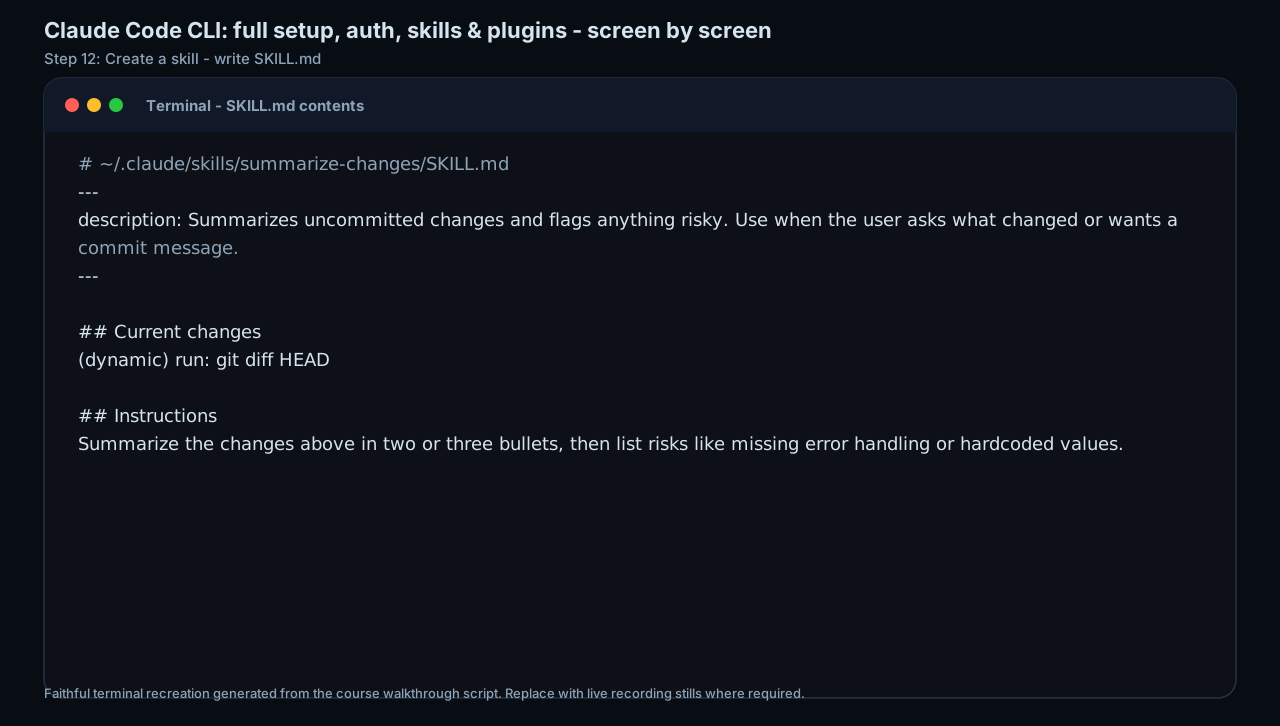
After the closing ---, write the instructions the agent follows when the skill runs. Use short labelled sections (Task / Inputs / Steps / Output format / Boundaries). State what to do, not why. Capture the one or two pieces of judgement you'd otherwise re-type every time (e.g. 'cluster by root cause, not symptom'). Include an explicit output-format block so results are deterministic. Keep it well under ~500 lines / ~5,000 tokens, once a skill loads, its whole body stays in context for the session, so every line is a recurring cost. Done when the body fits on one or two screens and contains an explicit output-format block.
HintPut the irreversible steps in a Boundaries section in writing ('read and summarise only; never send or close anything'). Stating the no-go keeps the dangerous action out of the procedure.
On this screen
- 1Description-only frontmatter. This minimal example omits name:, legal in Claude Code, where name defaults to the folder. Add name: in yours for portability.
- 2## Instructions. Two terse sentences, not an essay. Your version adds Task/Inputs/Steps/Output format/Boundaries, including the explicit output block this minimal example skips, which is what makes runs deterministic.
Decide who can invoke it
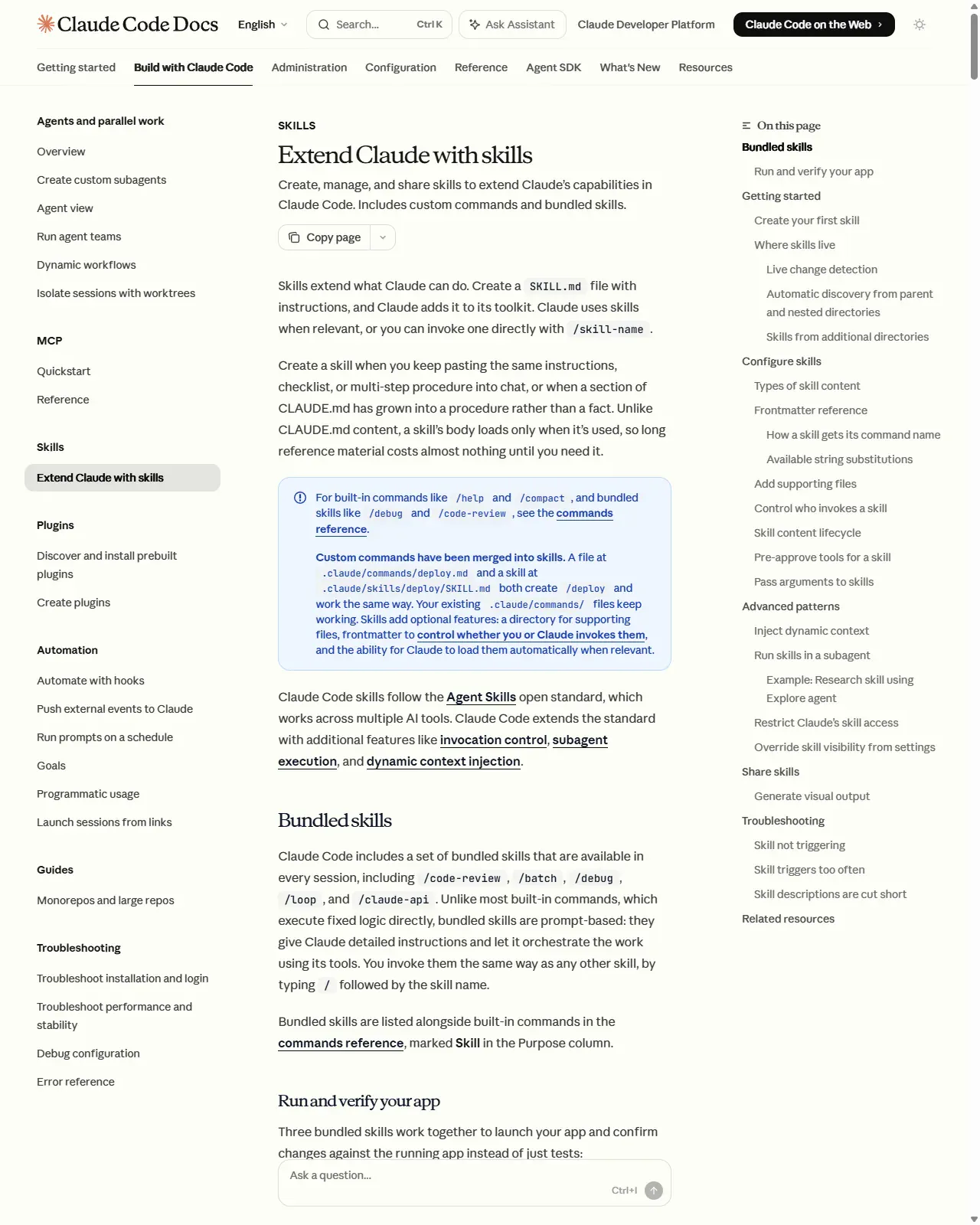
If the workflow has side effects or you want to control timing, make it manual-only: in Claude Code add disable-model-invocation: true so only you trigger it with /name; in Codex set allow_implicit_invocation: false in agents/openai.yaml so it won't fire implicitly but still works via $name. For pure read-and-summarise skills, leave the default so the agent can also load it automatically when relevant. Done when you can say which invocation mode the skill uses and why.
HintAnything that sends, posts, deploys, or writes to a system of record should be manual-only. Don't let the agent decide when to act on the outside world, that decision is yours.
On this screen
- 1Frontmatter reference (right-hand contents). Where disable-model-invocation is documented, check current field names here before relying on them.
- 2Troubleshooting entries (right-hand contents). 'Skill not triggering' / 'Skill triggers too often', the two failure modes this invocation decision controls; for side effects, manual-only ends the second one by design.
Pre-approve only the tools you need
If the skill must run tools, add allowed-tools listing only the narrow set required, e.g. allowed-tools: Read Grep, or a scoped pattern like Bash(git status:*). This waives the per-use prompt for those tools while the skill is active; everything else stays governed by your normal permissions. Be stingy, allowed-tools is convenience, not a security boundary, and for a project skill it only takes effect after you accept the workspace trust dialog. Done when every listed tool is one the procedure actually uses.
HintReview any project skill before trusting a repo: a skill can grant itself broad tool access via allowed-tools. Treat an unreviewed .claude/skills or .agents/skills folder like any other untrusted code. allowed-tools only waives prompts for the listed tools, deny rules in your permission settings are the real boundary.
Test both ways, then tighten
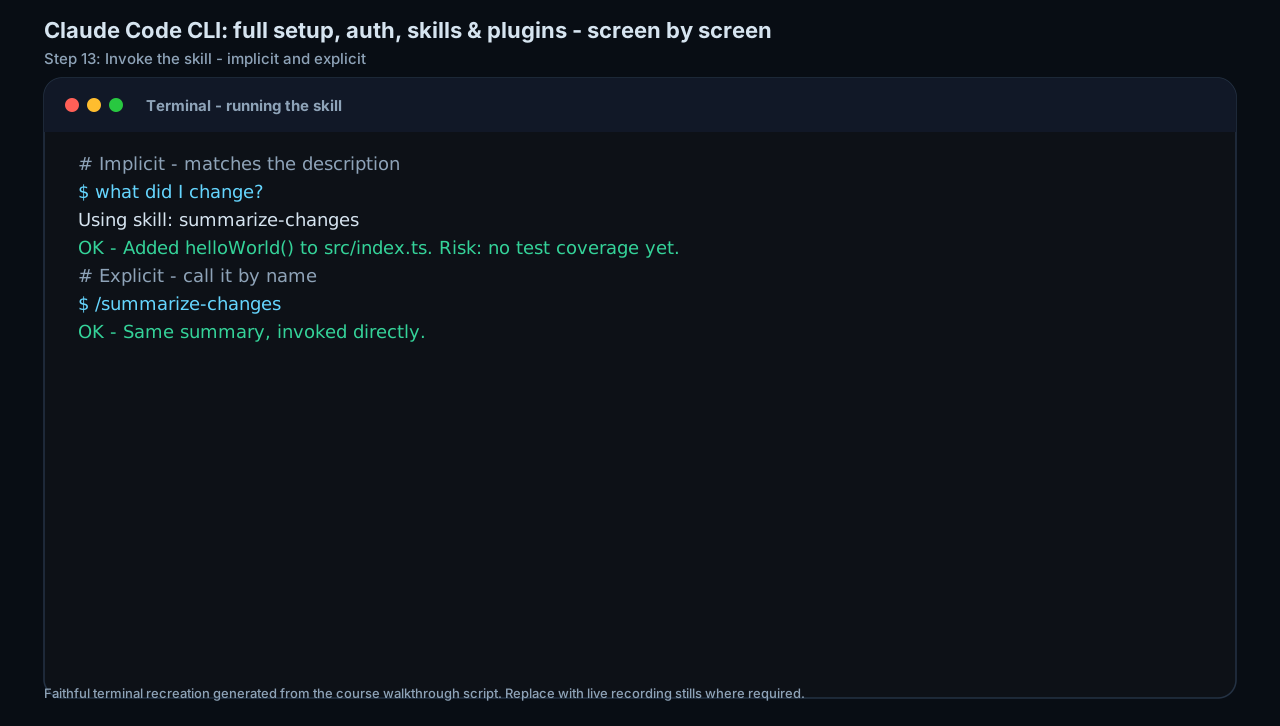
Trigger the skill explicitly first, /<your-skill-name> in Claude Code, $<your-skill-name> or the /skills picker in Codex, with real input, and check the output against the success criterion you wrote in lesson 13. Then start a FRESH request phrased the way you'd naturally ask and confirm the agent loads it implicitly. Finally trim: move any long reference material, templates, or examples into a sibling file (reference.md, template.md) referenced from SKILL.md, so it loads only when needed and the activation stays cheap.
HintIf it doesn't fire implicitly, the description is almost always the culprit. Read it aloud as if asking for the task, if it's missing the words you actually said, add them.
On this screen
- 1Both invocation paths on one screen. 'what did I change?' fires it implicitly via the description; '/summarize-changes' calls it by name. Run your own test explicit-first to confirm it works before testing retrieval.
- 2'Using skill: ...' line. The activation confirmation to look for. If a natural request doesn't produce it, the description is missing your real words, add them.
Create a skill folder for your lesson-13 micro-automation (personal or project scope; folder named after the action in kebab-case). Write a SKILL.md with name + a trigger-rich description (what it does AND when, in your real words, with a boundary) and a terse, procedural body with an explicit output format. Choose invocation control, make it manual-only (disable-model-invocation: true in Claude Code, or allow_implicit_invocation: false in Codex) if it has side effects. Pre-approve only the tools you need with allowed-tools. Then test it both explicitly via the slash command and implicitly via a natural request, verify the output meets your lesson-13 success criterion, and move any long material into a sibling reference file.
A working, portable, version-controlled SKILL.md (personal or project scope) that produces your chosen micro-automation's result on demand, with a trigger-rich description that fires implicitly, the right invocation control for its risk level, a minimal allowed-tools list, and any bulk material split into sibling files, validated against your lesson-13 success criterion.
Production prompt examples
---
name: ticket-themes
description: Cluster a batch of support tickets into 3-5 root-cause themes and produce a short, urgent-first markdown report. Use when asked to digest, triage, theme, or summarise recent support tickets, or when the user pastes three or more tickets and asks what the common issues are. Do NOT use for replying to a single ticket. This skill only reads and summarises, it never sends, posts, or closes anything.
allowed-tools: Read Grep
---

## Task
Group the provided support tickets into 3-5 themes by ROOT CAUSE (the underlying problem), not by SYMPTOM (the surface wording). Produce one short markdown report. Read-only: do not send, post, label, or close anything.

## Inputs
- A batch of tickets pasted into the conversation, OR a path/glob the user names (e.g. tickets/*.md). Use only what the user provides, do not go looking for other files.
- If fewer than 3 tickets are provided, say so and stop; this skill is for batches.

## Steps
1. Read every ticket in scope.
2. Cluster by root cause. Merge tickets that share an underlying problem even if their wording differs; split a cluster if it actually hides two distinct causes.
3. For each theme: a one-line name, a count of tickets, a one-sentence root-cause summary, and ONE representative ticket quote (<=15 words, verbatim).
4. Identify anything URGENT (outage, data loss, security, paying-customer blocker) and pull it to the very top, regardless of cluster size.
5. If something doesn't fit a theme, list it under "Unclustered" rather than forcing it.

## Output format
```
## Support themes - <date> (<N> tickets)

### ⚠️ Urgent (act first)
- <one line per urgent item, with ticket id>

### Themes
1. <Theme name> - <count> tickets
 Root cause: <one sentence>
 Example: "<verbatim quote>"
2. ...

### Unclustered
- <ticket id>: <one line> (only if any)
```

## Boundaries
- Read and summarise ONLY. Never send, reply, label, assign, or close a ticket; never call an external API.
- Do not invent tickets, counts, or quotes. Every quote must be verbatim from an input.
- Keep the whole report under ~250 words; detail belongs in the source tickets, not here.
- FRONTMATTER name 'ticket-themes' is kebab-case, <=64 chars, and must equal the folder name, so the folder ~/.claude/skills/ticket-themes/ (or .agents/skills/ticket-themes/ in Codex) is what becomes the /ticket-themes command. The frontmatter name is the label; the folder is the trigger.
- DESCRIPTION does the retrieval: it leads with what it does, then 'Use when... digest, triage, theme, summarise' (the words you'd actually say), then a boundary ('Do NOT use for a single ticket') so it stays quiet when it shouldn't fire, and it states the no-side-effects nature up front. This is the single line that decides whether the skill activates correctly.
- allowed-tools: Read Grep pre-approves only the two read-only tools the procedure needs, so the agent doesn't prompt for them, and grants nothing that could send or write. It is convenience, not a security boundary; everything else still goes through your normal permissions.
- BODY is terse and procedural (Task / Inputs / Steps / Output / Boundaries), because every line is a recurring token cost once the skill loads. It states what to do, not why, the same conciseness bar as CLAUDE.md.
- 'Cluster by ROOT CAUSE, not SYMPTOM' is the one piece of judgement that makes the output useful and is exactly what you'd otherwise re-type every time, capturing it here is the whole point of a skill over a prompt.
- The explicit OUTPUT FORMAT block makes the result deterministic across runs; a fixed shape is what makes a skill a reliable procedure rather than a fresh improvisation each time.
- The BOUNDARIES section keeps the irreversible actions OUT of the skill in writing ('never send, reply, label, assign, or close'); pair it with disable-model-invocation: true (Claude Code) or allow_implicit_invocation: false (Codex) if you ever add a send step, then the agent can never trigger the side effect on its own.
- PORTABILITY: this file uses only the standard core (name + description + body) plus the cross-tool allowed-tools, so it drops into Claude Code or Codex unchanged. Add tool-specific extras (Claude Code's !`command` injection, $ARGUMENTS, context: fork) only in the copy for that tool.
Common mistakes to avoid
- Writing the description as a title ('Ticket themer') instead of a trigger ('...Use when asked to digest, triage, or theme recent tickets'), so the skill never fires implicitly.
- Putting a procedure into CLAUDE.md (where it costs tokens every turn and bloats the file) when it should be a skill, or making a skill for a plain project fact that should just be a standing instruction.
- Letting a side-effect skill stay model-invocable instead of setting disable-model-invocation: true (Claude Code) / allow_implicit_invocation: false (Codex).
- Stuffing long reference material, templates, or examples into SKILL.md, inflating the recurring token cost on every activation instead of pushing it to sibling files.
- Naming the folder and the frontmatter name differently, or using uppercase/spaces/double-hyphens, the standard requires lowercase kebab-case that matches the folder.
- Granting broad allowed-tools (or trusting an unreviewed project skill) and treating it as a security boundary, when it only waives per-use prompts.
- Copying one tool's manual-only flag into the other (e.g. putting disable-model-invocation into a Codex skill, or allow_implicit_invocation into Claude Code), they're tool-specific.
Source conflicts to review
- The open standard requires both name and description; Claude Code treats name as optional (defaults to the folder) and only strongly recommends description. Writing both keeps you portable, verify the minimal requirement at the tool you actually use.
- Manual-only invocation is spelled differently per tool: Claude Code uses disable-model-invocation: true in frontmatter; Codex uses allow_implicit_invocation: false in agents/openai.yaml. Don't copy one into the other.
- Description/listing length limits differ by layer (open standard: 1,024 chars; Claude Code listing: 1,536 combined chars within a ~1% context budget that is configurable via skillListingBudgetFraction / maxSkillDescriptionChars). Treat the figures as accurate as of June 2026 and re-check the docs before relying on exact numbers.
- Skills ship fast in both tools; field names, defaults, and invocation syntax (e.g. Codex's $ mention vs /skills picker) shift across point releases. Confirm against agentskills.io, code.claude.com, and developers.openai.com before relying on specifics.
Key terms
- Skill
- Procedural knowledge packaged as a folder whose entrypoint is SKILL.md; loaded on demand so it costs almost nothing until it runs.
- SKILL.md
- The required entry-point file: YAML frontmatter (name, description, optional license/compatibility/metadata/allowed-tools) plus markdown instructions.
- Agent Skills standard
- The open SKILL.md format developed by Anthropic and adopted across 30+ agents (Claude Code, Codex, Cursor, Gemini CLI, Copilot, Goose...), making skills portable.
- Frontmatter
- The YAML block between --- markers at the top of SKILL.md; carries name + description (required by the standard) and optional fields.
- kebab-case
- Lowercase words joined by single hyphens (ticket-themes), the required format for skill names and the folders that hold them.
- description (as trigger)
- The line the agent reads to decide when to fire a skill; must say what it does AND when to use it, in your real words, with boundaries. Capped at 1,024 chars.
- Progressive disclosure
- The three-stage load, metadata always (~100 tokens), full body on activation, resources on demand, that keeps a large skill library cheap.
- Implicit invocation
- The agent loads a skill automatically because your request matches its description (Discovery -> Activation).
- Explicit invocation
- You name the skill yourself: /skill-name (Claude Code) or $skill-name / the /skills picker (Codex).
- disable-model-invocation
- Claude Code frontmatter flag making a skill manual-only, so the agent never triggers it on its own.
- allow_implicit_invocation
- Codex policy field (agents/openai.yaml); set to false for the same manual-only effect as disable-model-invocation.
- allowed-tools
- Optional, experimental frontmatter that pre-approves a narrow set of tools (waives per-use prompts) while the skill is active; not a security boundary.
- Standing instruction
- A fact/convention in CLAUDE.md / AGENTS.md that is always in context, costing tokens every turn, the right home for facts, not procedures.
- Dynamic context injection
- Claude Code's !`command` (and ```! blocks) that run a shell command and inline its output into the skill before the agent reads it.
Resources
- docAgent Skills. Specification (frontmatter fields, limits, progressive disclosure)
- docAgent Skills. Overview & client showcase (which tools support it)
- docClaude Code. Skills (frontmatter reference, scopes, manual-only, injection)
- docCodex. Skills (SKILL.md, locations, $ invocation, openai.yaml policy)
Checkpoint