
Lesson 29 of 38 · Core - 03:00-03:15
Micro-automation ideas by role
Pick one safe, high-leverage micro-automation that fits your actual job and tooling, and learn the operator's selection method: score candidates by frequency and annoyance, filter by reversibility, and rank your shortlist by return-on-investment so the first thing you build is the one most likely to stick.
Agentic tools earn their keep on the small, repeated jobs you already do by hand every week, not on the sweeping 'automate my whole role' fantasy that never ships. Before you build anything, it pays to see what good looks like for your specific role, because the shape of a proven workflow is the hardest part to invent and the easiest part to borrow. Anthropic open-sourced a set of knowledge-work plugins for Claude Cowork and Claude Code, organised by role, and we'll use them as a grounded catalogue of real examples: real slash commands, real tool connectors, real task boundaries. Your job in this lesson is not to install eleven plugins. It is to study the role closest to yours, steal the shape of one workflow, and run it through a disciplined selection method so the first automation you commit to is the one with the best payoff and the lowest risk. The operators who win here are not the ones who automate the most tasks, they're the ones who pick the right first task, prove it, trust it, and only then add the second.
The reversible micro-automation blueprint
Pick a small, frequent, reversible role workflow before automating anything with irreversible consequences.
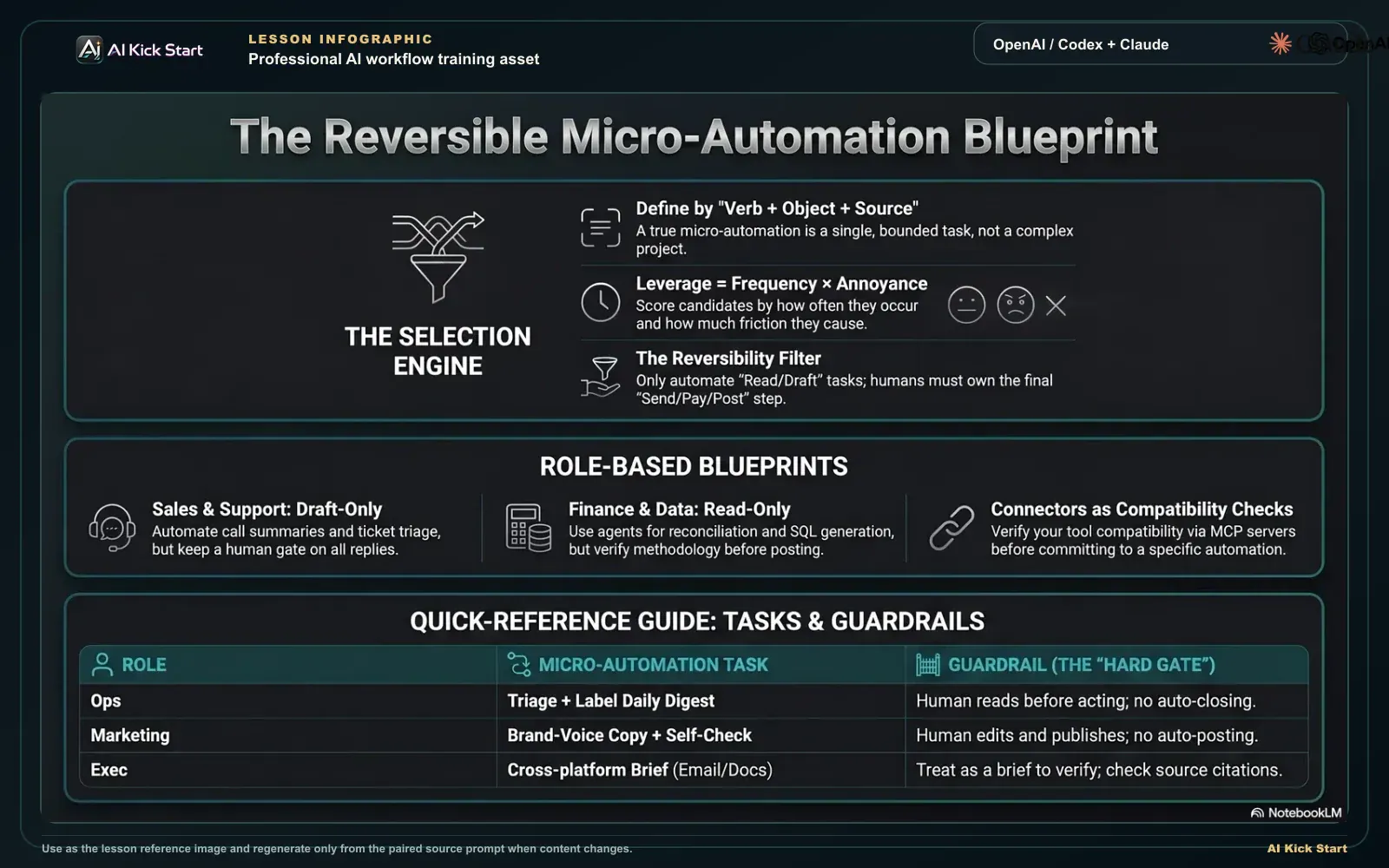
The reversible micro-automation blueprint
A branded walkthrough: pick a small, frequent, reversible role workflow by verb-object-source, score it, and keep humans in control of anything irreversible.
What to understand
- A micro-automation is a single, bounded, repeatable task an agent can do for you reliably, not a project. The defining test: you can state it as one sentence in verb + object + source form ('summarise this week's support tickets into themes'), and you can name the one thing that makes it 'done well'. The smaller and clearer the task, the more dependable the result and the easier it is to verify, which is exactly why beginners who pick big tasks get unreliable agents and conclude the tools don't work.
- Anthropic's knowledge-work-plugins repository ships role-based plugins, eleven at the June 2026 reading, and growing: Productivity, Sales, Marketing, Product Management, Customer Support, Finance, Data, Legal, HR, Enterprise Search, and Bio-Research, plus a plugin-management helper. Each one packages skills (domain expertise Claude draws on automatically), commands (explicit slash commands you invoke), and connectors (tool integrations declared via MCP servers in a .mcp.json). Treat the repo as a menu of validated workflow shapes, not a mandatory install list.
- Read the commands, not the marketing, the command list is the real catalogue of micro-automations. Sales ships /call-summary, /forecast, and /pipeline-review. Customer Support ships /triage, /research, /draft-response, /escalate, and /kb-article. Marketing ships /draft-content, /campaign-plan, /brand-review, /competitive-brief, /performance-report, /seo-audit, and /email-sequence. Finance ships /journal-entry, /reconciliation, /income-statement, /variance-analysis, and /sox-testing. Data ships /analyze, /explore-data, /write-query, /create-viz, /build-dashboard, and /validate. Productivity ships /start and /update. Each command name is a micro-automation someone at Anthropic already scoped and shipped, that's free design work you can borrow.
- Connectors tell you which real tools each role expects, and they're your compatibility check. Sales leans on HubSpot/Close (CRM), Fireflies/Gong/Chorus (transcripts), Clay/ZoomInfo/Apollo (enrichment), and Slack/Teams. Marketing leans on Canva/Figma, HubSpot, Amplitude, Ahrefs/Similarweb, and Klaviyo. Customer Support leans on Intercom, HubSpot, Guru/Notion, and Atlassian. Finance and Data lean on Snowflake/Databricks/BigQuery warehouses plus BI tools. If you don't run the tool a command depends on, that command is a poor first candidate, pick one that touches data you already have.
- There is no dedicated 'executive', 'ops', or 'founder' plugin, and that absence is itself the lesson for cross-functional roles. An exec borrows Enterprise Search (one query across email, chat, docs, wikis) plus Productivity for triage and Finance/Data for the numbers. An ops person borrows Productivity (triage and label inbound) plus whichever domain the request touches. A founder combines Productivity, Enterprise Search, and Sales or Finance depending on the day. The pattern travels across roles even when the plugin name doesn't match yours, steal the command shape, point it at your data.
- The safest first automations are read-and-summarise tasks, because they keep a human on the only step that can't be undone. Reading, researching, summarising, drafting (not sending), and charting are reversible: a bad output costs you the time to ignore it. Sending, posting, deleting, paying, and writing to a system of record are irreversible: a bad output costs you a wrong email to a customer, a wrong number in the ledger, or a deleted record. The first automation you trust should produce a reversible artefact you review before any irreversible step.
- Reading the catalogue is reconnaissance, not commitment. The goal is to borrow the shape of a proven workflow for your role, narrow it to the single task you'd most like back this week, and run it through a selection method, frequency × annoyance for leverage, reversibility for safety, ROI for sequencing, so your first build is the one most likely to earn trust. The next lesson turns that single chosen task into a reusable SKILL.md; this lesson's whole job is to make sure you choose the right one.
Deeper dive
Choosing the first automation by ROI: the math beginners skip
Everyone agrees you should 'start small'. Almost nobody applies a method to decide which small thing. The operator's method is a back-of-envelope ROI calculation, and it changes which candidate you pick. ROI here is (time saved per run × frequency × your trust in the output) minus (build cost + review cost + the cost of a bad run getting through). Walk it with a concrete example. Candidate A: a weekly themed summary of support tickets, saves you 30 minutes, runs once a week, fully reversible (you read it before forwarding), takes an hour to set up. Annual upside ≈ 30 min × 52 ≈ 26 hours saved, build cost ≈ 1 hour, risk ≈ near zero because nothing irreversible happens. Candidate B: auto-replying to inbound sales emails, saves 5 minutes, runs maybe 40 times a week, but the final step is irreversible and a single bad send can cost a deal. Raw time-saved looks bigger (≈ 170 hours), but the risk term is enormous and the review cost (you must read every draft before it sends, or you're gambling the relationship) eats most of the saving. The ROI-correct first pick is almost always Candidate A: high frequency, real time saved, and a reversible artefact that needs only a light skim, not the flashy candidate whose payoff depends on the agent acting unsupervised. Two corollaries fall out of the math. First, frequency dominates time-per-run: a five-minute task you do daily beats a two-hour task you do quarterly, because automation pays back per repetition. Second, the risk term can dwarf both: when a bad run is expensive and irreversible, even a high-frequency task is a bad first choice until you've shrunk its scope to a reversible draft. The discipline is to rank your shortlist by this ROI, not by which task sounds most impressive, and to deliberately bank an easy, reversible win first so you build the verification habit before you ever point an agent at something that can't be undone.
Reversibility is a design dial, not a yes/no gate
Beginners treat reversibility as a checkpoint, 'is this safe? yes/no', and discard any task whose end state is irreversible. Operators treat it as a dial they can turn. Almost any irreversible workflow can be split at the irreversibility boundary into a reversible part (which the agent does freely) and an irreversible part (which a human approves). 'Send the renewal email' is irreversible; 'draft the renewal email and leave it in my drafts' is fully reversible, captures most of the time saving, and keeps your finger on the one button that matters. 'Reconcile and post the journal entry' is irreversible; 'reconcile and produce the proposed entries with the supporting workpaper for my review' is reversible and is exactly where the agent adds the most value anyway, the tedious matching, not the legally-significant click. This reframing matters because the highest-frequency tasks are often the ones with an irreversible final step, and the naive rule ('avoid irreversible tasks') would make you skip your best leverage. The right move is to shrink the scope to the reversible artefact first, build trust over a few weeks of watching the drafts come back correct, and only then, if ever, consider letting the agent take the irreversible step under a tight guardrail (an allow-list of recipients, a value ceiling, a dry-run flag, a required human 'go'). Reversibility and the guardrail are two sides of one decision: the less reversible the action, the tighter the guardrail and the more human approval it requires. A summary needs no guardrail; a customer-facing send needs a hard human gate; a payment needs a human gate plus a value limit plus an audit log. Designing the guardrail to match the blast radius is what lets you safely automate tasks the naive rule would forbid.
Why the command list beats the README, borrowing validated scope
The most valuable thing in the knowledge-work-plugins repo is not the prose describing what each plugin does; it's the granularity of the command list. Notice that Anthropic didn't ship a single /sales:do-everything command, it shipped /call-summary, /forecast, and /pipeline-review as separate, bounded commands. That decomposition is the expensive, non-obvious design work, and it's a direct demonstration of the micro-automation principle: a role's work is broken into tasks small enough that an agent can do each one reliably and a human can verify each one quickly. When you study the command list, you're not just finding ideas, you're seeing where domain experts drew the boundaries, which is precisely the judgement beginners lack. Two practical reads come from this. First, the existence of a command is evidence the task is automatable and worth automating: someone scoped it, tested it, and decided it was a repeatable win. Second, the absence of a command is information too, there is no /sales:close-the-deal because closing isn't a bounded, repeatable, agent-safe task; the catalogue's omissions mark the boundary between what's ready to automate and what still needs a human in the driver's seat. So the borrowing move is concrete: find the command nearest your task, read how it bounds the work (what it reads, what it produces, where it stops), and copy that boundary even if you never install the plugin. You're importing a senior practitioner's scoping decision, which is worth far more than the eight lines of prompt behind the command.
High-value micro-automations by role: task -> trigger -> guardrail (June 2026)
A starting map of the strongest first automation per role, grounded in the exact commands shipped in Anthropic's knowledge-work-plugins. 'Trigger' is what kicks it off (a schedule, an inbound event, or a manual invoke); 'guardrail' is the control that matches the action's reversibility, heavier for anything that touches customers, money, or records. There is no dedicated exec/ops/founder plugin; those rows show the borrow-and-combine pattern. Command names and connectors change as the repo evolves, verify against the repository before relying on specifics.
| Role | High-value micro-automation (borrowed command) | Trigger | Reversibility | Guardrail |
|---|---|---|---|---|
| Ops | Triage, label, and route inbound requests into a themed daily digest (/update, Productivity) | Schedule: every morning, or on new inbound | Reversible (read + classify, no actions taken) | None needed beyond a human reading the digest before acting; never let it auto-close or auto-assign without review |
| Sales | Turn a call transcript into a structured summary + next steps + draft follow-up (/call-summary, Sales) | Manual after each call, or on new Fireflies/Gong transcript | Reversible (summary + draft; nothing sent) | Draft lands in your drafts, never auto-sent; you approve the send and the CRM write |
| Marketing | Draft net-new copy in the approved brand voice, then self-check it (/draft-content + /brand-review, Marketing) | Manual when a piece of copy is needed | Reversible (draft only; not published) | Human edits and publishes; /brand-review is a second pass, not a publish gate, never auto-post to channels |
| Support | Triage an inbound ticket and draft a response from KB context (/triage + /draft-response, Customer Support) | On new Intercom ticket, or manual per ticket | Reversible (priority + draft reply; not sent) | Agent drafts; human sends. Hard gate on any customer-facing send; escalations packaged via /escalate for a human |
| Finance | Reconcile an account and produce proposed journal entries + workpaper for review (/reconciliation + /journal-entry, Finance) | Schedule: month-end close, or manual | Reversible (proposed entries + evidence; not posted) | Human posts to the GL. Hard gate on any write to the system of record; keep the supporting workpaper for audit |
| Analyst / Data | Turn a plain-English question into validated SQL + a chart (/write-query + /create-viz + /validate, Data) | Manual per question | Reversible (read-only query + visualisation) | Run against read-only credentials; /validate checks methodology and bias before the result is shared as fact |
| Exec (no dedicated plugin) | One-query brief across email, chat, docs, wikis before a decision (Enterprise Search + Productivity) | Manual before a meeting or decision | Reversible (search + synthesis; no actions) | Treat the synthesis as a starting brief to verify, not ground truth; cite sources so claims are checkable |
Sources (as of June 2026): Anthropic, knowledge-work-plugins (role catalogue + commands) · knowledge-work-plugins, sales (/call-summary, /forecast, /pipeline-review) · knowledge-work-plugins, customer-support (/triage, /draft-response, /escalate, /kb-article) · knowledge-work-plugins, finance (/reconciliation, /journal-entry, /variance-analysis) · knowledge-work-plugins, data (/write-query, /create-viz, /validate)
Scoring candidate first-automations: the ROI math, made visible
Each row is a candidate micro-automation; columns are the operator's selection dimensions (higher = stronger, 0-100). The winner is the brightest row across Frequency, Reversibility-safety, and ROI-as-first-pick, not the one with the flashiest raw time-saved.
Step by step
Open the role catalogue
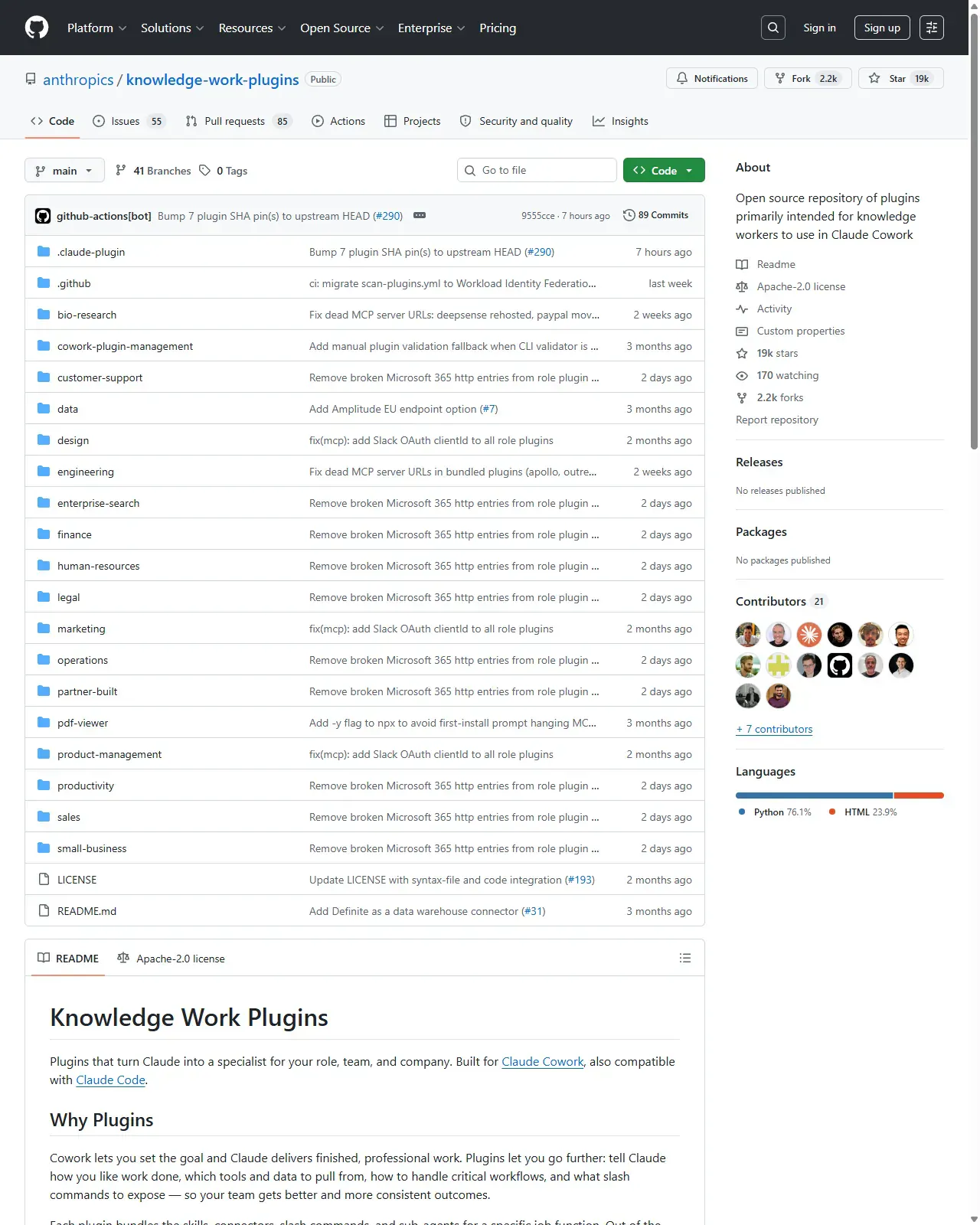
Open the anthropics/knowledge-work-plugins repository and read the README's plugin list. Find the plugin that matches your job, or the closest two if your role spans several (common for ops, exec, and founders). Note its commands and the connectors it expects. You're done when you can name the one or two plugins closest to your role and which of their connectors you already run.
HintDon't install anything yet. This step is reconnaissance: you're shopping for workflow shapes and checking which connectors you already have, not committing to tools.
On this screen
- 1Plugin folders. One directory per role (customer-support, data, finance, marketing, sales...). The set grows over time, treat it as a menu, not a fixed eleven. Note there is no exec/ops/founder folder.
- 2README below the file list. Scroll to your role's section; each plugin folder holds its commands/ and a CONNECTORS.md listing the tools it expects, your compatibility check.
Read the actual commands, and map them to your week
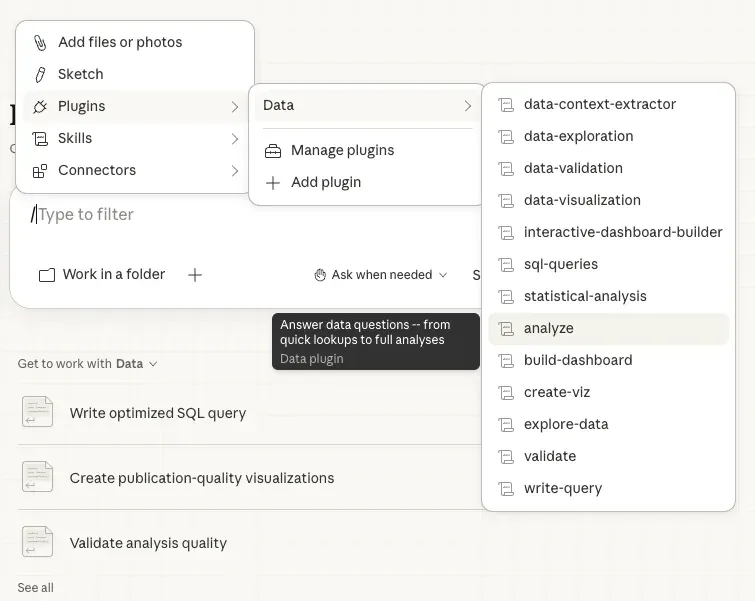
Open your role's plugin and read its command list, these are the real micro-automations, already scoped by domain experts. For example: Sales has /call-summary, /forecast, /pipeline-review; Support has /triage, /draft-response, /escalate, /kb-article; Marketing has /draft-content, /brand-review, /campaign-plan; Finance has /reconciliation, /journal-entry, /variance-analysis; Data has /write-query, /create-viz, /validate. Against each, jot down whether you do that task manually today and roughly how often. Frequency times annoyance is your leverage score. You're done when every command for your role has a yes/no (do I do this manually today?) and a rough weekly frequency written next to it.
HintA task you do five times a week badly beats a task you do once a quarter perfectly. Automation pays back per repetition, optimise for frequency first.
On this screen
- 1Commands = micro-automations. Each shipped command is a task someone scoped, tested, and decided was a repeatable win. The granularity (separate /triage and /draft-response) is the borrowable design work.
- 2Skills vs commands. Skills fire automatically when relevant; commands are deliberate. Start with commands so you stay in control of when the agent acts.
Pick role-specific candidates in verb+object+source form
Write down two or three candidate micro-automations grounded in the catalogue, each as verb + object + source. Examples: Ops -> 'triage and theme this week's inbound into a digest' (Productivity /update); Sales -> 'summarise this call transcript into next steps and a draft follow-up' (Sales /call-summary); Marketing -> 'draft this landing copy in our brand voice' (Marketing /draft-content); Support -> 'triage this ticket and draft a reply from our KB' (Support /triage + /draft-response); Analyst -> 'turn this question into validated SQL and a chart' (Data /write-query + /create-viz + /validate); Finance -> 'reconcile this account and propose journal entries for review' (Finance /reconciliation + /journal-entry).
HintPhrase each candidate as a verb plus an object plus a source. Vague candidates ('help with sales') make weak automations; concrete ones ('summarise this transcript into next steps') make verifiable ones.
On this screen
- 1Borrow across folders. Your candidates can mix commands from any plugin folder shown here (Productivity's /update, Sales' /call-summary), copy how each bounds the work: what it reads, what it produces, where it stops.
- 2No exec/ops/founder folder. Cross-functional roles combine Enterprise Search + Productivity + a domain plugin, the command shape travels even when the folder name doesn't match your title.
Apply the reversibility filter, and split where you can
For each candidate, mark whether the final step is reversible. Reading, researching, summarising, drafting and charting are reversible; sending, posting, deleting, paying and writing to a system of record are not. For any candidate whose payoff sits behind an irreversible step, split it at the boundary: keep the reversible part for the agent (draft the email, propose the entries) and leave the irreversible part (send, post) under your explicit approval. Note the matching guardrail for each. Green-light list: summaries, drafts, research, analysis, charts, a bad output only costs the time to ignore it. Gate list: customer-facing sends, financial entries, record changes, a human approves, with a guardrail sized to the blast radius (allow-list, value ceiling, audit log).
HintReversibility is a dial, not a gate. If an automation's payoff depends on it acting without you, shrink the scope to the reversible artefact, don't remove the human checkpoint.
Rank by ROI and commit to one
Rank your surviving candidates by ROI: (time saved per run x frequency x your trust in the output) minus (build cost + review cost + cost of a bad run). The winner is usually a high-frequency, reversible task with real time saved, not the flashiest one whose payoff needs the agent to act unsupervised. Choose that single candidate and write a one-sentence success criterion, e.g. 'A weekly themed summary of support tickets I'd be happy to forward to my team with light edits.' The lesson's heatmap shows this exact scoring for five candidates, notice the brightest row is the weekly digest (Candidate A), not the flashy auto-send (Candidate B); frequency dominates time-per-run, and the risk term can dwarf both.
HintBank an easy, reversible win first. One automation, done and trusted, beats five half-built ones, and it builds the verification habit before you ever point an agent at something irreversible. Your success criterion becomes the acceptance test when lesson 14 turns this exact choice into a SKILL.md.
Open the knowledge-work-plugins README, find your role's plugin (or the closest combination for ops/exec/founder), and read its actual command list. Produce a shortlist of three candidate micro-automations in verb+object+source form, each tied to a real command. Score each by frequency and annoyance, apply the reversibility filter (splitting any irreversible candidate into a reversible draft plus a gated final step with a matching guardrail), rank the survivors by ROI, and circle one winner with a one-sentence success criterion.
A written shortlist of three role-grounded micro-automation candidates (each tied to a real catalogue command), a reversibility + guardrail note per candidate, an ROI ranking, and one chosen winner with a clear, testable success criterion.
Production prompt examples
ROLE: You are a senior customer-support specialist. You draft and triage; you NEVER send anything to a customer. A human reviews and sends every customer-facing message.

INPUT: A single inbound support ticket (paste the customer message, plus any thread history and the account's plan/tier if known).

KNOWLEDGE: Use only our documented help content and known product behaviour. If you rely on a fact, name the source (KB article title, doc, or 'from the ticket'). If you don't know, say so plainly, do NOT invent policy, prices, refund terms, or timelines.

TASK, produce, in this order:
1. TRIAGE: category (bug / how-to / billing / outage / feature-request / abuse), priority (P1-P4 with a one-line reason), and whether it needs escalation (yes/no + to whom).
2. CUSTOMER CONTEXT: a 2-3 line summary of what the customer is actually asking and their apparent sentiment.
3. DRAFT REPLY: a customer-ready response in our voice, warm, concise, specific, no corporate filler. Include concrete next steps. Mark any placeholder I must fill with <LIKE_THIS>.
4. CONFIDENCE + GAPS: one line on how confident you are, and a bullet list of anything you could NOT verify that I should check before sending.

HARD CONSTRAINTS:
- Do NOT send, post, or take any action. Output text only, this lands in my drafts for review.
- Do NOT promise refunds, credits, SLAs, dates, or fixes unless they are explicitly in the provided knowledge. Flag any the customer is asking for instead.
- Keep the reply under ~150 words unless the issue genuinely needs more.
- ROLE 'you NEVER send' + 'lands in my drafts' encodes the reversibility design: the agent does the reversible work (triage + draft) and the human owns the one irreversible step (the send).
- Splitting TRIAGE from DRAFT REPLY mirrors the catalogue's /triage and /draft-response boundary, two bounded sub-tasks you can verify separately, not one blurry 'handle this ticket'.
- 'Name the source / if you don't know, say so / do NOT invent policy' is the guardrail that matters most in support: a confident wrong refund promise is the expensive failure, and this clause makes the agent surface gaps instead of fabricating.
- 'Mark placeholders with <LIKE_THIS>' keeps the human in the loop on specifics (order numbers, dates) the agent shouldn't guess, the draft is a scaffold, not a final word.
- CONFIDENCE + GAPS turns the agent's uncertainty into a pre-send checklist, so review is a 20-second skim of named risks rather than re-reading the whole reply from scratch.
ROLE: You are a sharp chief-of-staff. You read a week of noisy inputs and hand me a digest I can act on in five minutes. You summarise and flag; you take NO actions.

INPUT: A dump of this week's items (paste threads, messages, tickets, or notes, or, if connected, the relevant Slack channel / inbox label for the last 7 days).

TASK, produce a single digest with these sections:
1. THEMES: the 3-6 recurring themes this week, each as a one-line headline with a count (e.g. 'Billing confusion after the plan change - 7 mentions').
2. NEEDS ME: items that specifically require my decision or reply, as a checklist. For each: one line of context + the single decision needed + who's waiting.
3. TRENDING / EARLY SIGNAL: anything new this week vs. a normal week, a spike, a new complaint shape, a repeated request, even if small.
4. SAFE TO IGNORE: a one-line note on what I can skip and why, so I trust the filtering.

RULES:
- Group by theme, not by source or chronology. I want the pattern, not a transcript.
- Quote a short snippet (max one line) as evidence for each theme so I can spot-check without opening everything.
- If something is ambiguous or you're inferring, label it (inferred), do NOT present a guess as a fact.
- Take NO actions: do not reply, label, close, assign, or notify anyone. Output the digest text only.
- Be ruthless about length: the whole digest fits on one screen.
- ROLE 'chief-of-staff... take NO actions' makes the whole automation reversible by design, the output is a read-only artefact, so it needs no guardrail beyond you reading it before acting.
- Grouping by THEME not chronology is the value-add a human would do by hand; it's the 'turn noise into signal' step that justifies the automation existing at all.
- 'NEEDS ME' as a separate section is the ROI core: the highest-value minutes are the decisions only you can make, surfaced and separated from the noise you can skip.
- 'Quote one line of evidence per theme' lets you spot-check the agent's filtering cheaply, you trust the digest because it shows its work, not because you re-read everything.
- 'SAFE TO IGNORE' is a deliberate trust-builder: an agent that tells you what it dropped (and why) is one you'll keep using; one that silently filters is one you'll second-guess and abandon.
- 'Label inferences / TAKE NO actions' are the two guardrails: no hallucinated certainty, and no irreversible side effects, exactly right for a high-frequency, must-be-reliable digest.
Common mistakes to avoid
- Choosing an ambitious 'automate the whole role' project instead of a single bounded task you can state in one verb+object+source sentence.
- Picking a task with no clear source of truth, so the agent has nothing concrete to work from and quietly invents facts.
- Automating the irreversible final step (sending, paying, deleting) before you trust the workflow, instead of splitting it into a reversible draft plus a gated send.
- Selecting a once-a-quarter task over a weekly one and getting little real payoff, frequency, not time-per-run, drives the return.
- Picking the flashiest candidate (the one whose payoff needs the agent to act unsupervised) over the boring high-frequency reversible one that actually has the best ROI.
- Choosing a command whose connector you don't run, so the automation can't touch your real data and stays a demo.
- Trusting third-party blog command names (sometimes wrong or namespaced differently) instead of reading the actual commands in the repository.
Source conflicts to review
- There is no dedicated executive, ops, or founder plugin in the repository (verified June 2026). Guidance for those roles is a borrow-and-combine pattern across Enterprise Search, Productivity, and a domain plugin, not a single shipped command.
- Exact command names shift as the repo evolves, and third-party guides sometimes paraphrase them or cite namespaced forms (e.g. /sales:call-prep) that don't match the actual command files. The commands cited here were read from the plugin command directories in June 2026, re-verify against the repository, not blog summaries.
- Plugin counts are reported as 11 in the marketplace table but some write-ups cite 15+ as the repo adds plugins; treat the role list as a moving target and check the current README.
Key terms
- Micro-automation
- A single bounded, repeatable task an agent performs reliably, stateable as one verb+object+source sentence, with a human owning any irreversible step.
- Connector
- A tool integration exposed to the agent via an MCP server, declared in a plugin's .mcp.json, your compatibility check for whether a command can touch your real data.
- Slash command
- An explicit, deliberately invoked action like /call-summary or /triage, as opposed to a skill the agent triggers automatically. The command list is the real catalogue of micro-automations.
- Reversibility filter
- A check separating safe-to-attempt steps (summarise, draft, chart) from steps requiring human approval (send, pay, delete), treated as a dial you can turn, not just a yes/no gate.
- Reversibility boundary
- The point in a workflow where a reversible part (drafting, proposing) becomes irreversible (sending, posting), the place to split scope so the agent does the safe part and a human approves the rest.
- Guardrail
- The control that matches an action's blast radius: none for a summary, a hard human gate for a customer send, a gate plus value-ceiling plus audit log for a payment.
- Leverage score
- Frequency times annoyance, a quick proxy for how much a task is worth automating before you do the fuller ROI calculation.
- ROI of an automation
- (time saved per run x frequency x trust in output) minus (build cost + review cost + cost of a bad run), the ranking that decides which candidate to build first.
Resources
- docAnthropic, knowledge-work-plugins (role catalogue + commands)
- docknowledge-work-plugins, sales plugin (commands + connectors)
- docknowledge-work-plugins, customer-support plugin
- docknowledge-work-plugins, finance plugin
- docknowledge-work-plugins, data plugin
- docClaude plugins overview (how to install + use)
Checkpoint