
Lesson 28 of 38 · Core - 02:45-03:00
Scheduling recurring reports and briefings
Build a recurring agent automation that runs unattended on a schedule and delivers a scheduled briefing, and, just as importantly, learn the decision and guardrail discipline that makes unattended runs safe: when to schedule vs keep a human in the loop, why an automated task must be idempotent, and how to scope sandbox, network, and approvals so a background run can never do damage you don't see until later.
Much knowledge work is rhythmic, a Monday status digest, a nightly check on a long-running job, a weekly summary of what changed, an alert that needs triage the moment it fires. Scheduling lets an agent run those recurring tasks in the background, without you sitting at the keyboard, and drop the findings somewhere you'll read them. That is genuinely powerful: it converts work you'd otherwise forget or do reluctantly into something that just happens. But it also changes the risk profile fundamentally. Every prior lesson assumed a human in the loop, you proposed, reviewed, approved, verified (Lesson 8). The instant a task runs on a cron schedule at 3am while you're asleep, that loop is gone. There is no one to catch the silent failure, no one to revert the scope-creep edit, no one to notice the run quietly looped on a stale assumption a dozen times. So scheduling is two skills, not one: the mechanical skill of setting a cadence, and the far more important judgement skill of deciding what is safe to automate at all, and bounding it so tightly that even a misbehaving run stays harmless. This lesson teaches both, on both tools, with the production brief and guardrails you'd actually ship.
Architecting unattended AI workflows
Schedule only scoped, idempotent work, then keep sandbox, network, and triage guardrails tight.
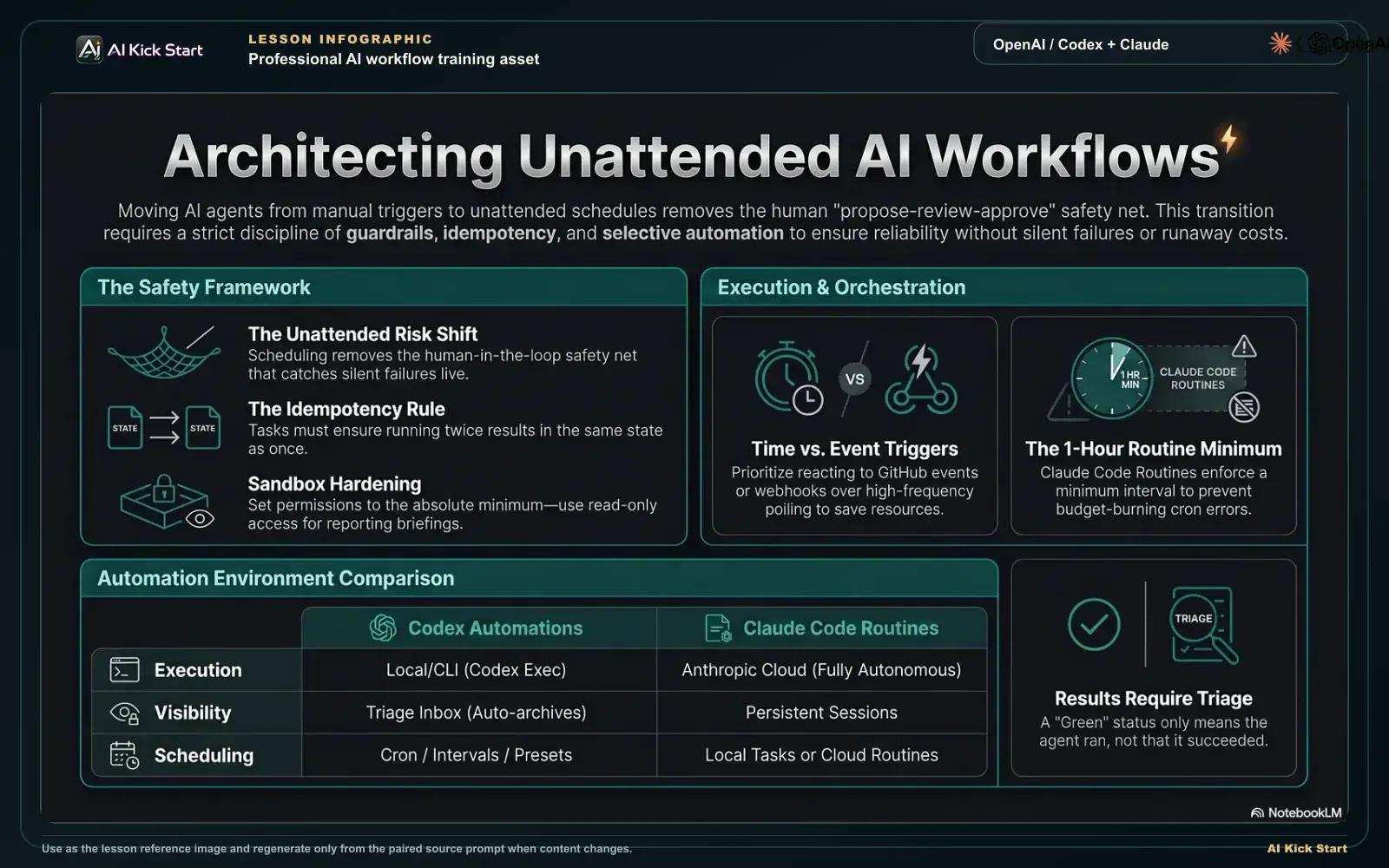
Architecting unattended AI workflows
A branded walkthrough: schedule only scoped, idempotent work, harden the sandbox, choose time versus event triggers, and keep a triage habit for every autonomous run.
What to understand
- Scheduling moves a task from 'I run it' to 'it runs itself', and that single change removes the human-in-the-loop safety net every earlier lesson depended on. Before you automate anything, internalise the trade: you gain reliability and your attention back; you lose the propose -> review -> approve -> verify gate (Lesson 8) that catches silent failures live. Everything else in this lesson is about earning that trade back through guardrails.
- Both tools now ship first-class scheduling, but with different architectures. OpenAI Codex has 'automations' in its desktop app, recurring tasks that run in the background and report into a Triage inbox, plus 'codex exec' on the CLI for cron jobs and CI. Anthropic's Claude Code offers three distinct tiers: '/loop' (in-session polling that dies when the session ends), 'Desktop scheduled tasks' (local, persistent), and 'Routines' (cloud-hosted, run with your laptop closed). Match the tier to where the work must run and whether your machine will be on.
- Codex has three automation types. Standalone automations start a fresh run on a schedule and report into Triage, ideal when each run is independent or spans multiple projects. Project automations attach to a Git repo and run either locally (on your main checkout) or on a dedicated worktree (isolating changes from unfinished work). Thread automations are heartbeat-style recurring wake-ups attached to a thread, keeping its context alive for polling a long-running command or maintaining a review loop.
- Cadence is flexible but presets are safer than cron. Codex offers daily/weekly presets, minute-based intervals (thread automations only), and a custom cron field. Claude Code's '/loop' and Desktop tasks accept down to 1-minute intervals; Routines (cloud) enforce a 1-hour minimum. Reach for raw cron only when a preset truly cannot express your cadence, a subtly wrong cron expression is one of the most common ways a 'weekly' job quietly runs hourly and burns your budget.
- Cron is a 5-field expression, 'minute hour day-of-month month day-of-week', and the gotchas matter. '0 9 * * *' is 9am, '0 9 * * 1-5' is weekdays at 9am, '*/15 * * * *' is every 15 minutes. Claude Code interprets times in your LOCAL timezone (not UTC), supports steps/ranges/lists but not extended syntax (L, W, ?, MON/JAN aliases), and adds deterministic jitter so an hourly :00 job may fire up to :30, pick a non-round minute like '3 9 * * *' if exact timing matters. When both day-of-month and day-of-week are set, a date matches if EITHER does (standard vixie-cron behaviour, the classic Unix cron most schedulers copy), a classic foot-gun.
- Sandbox, network, and approvals are your real guardrails, set them as tight as the task allows. Codex automations honour a sandbox mode: read-only (tool calls fail if they'd modify files, hit the network, or touch apps), workspace-write (edits inside the workspace only), or full access (elevated risk, runs without asking). Unattended Codex runs use approval_policy = "never" where org policy permits; Claude Code Routines run fully autonomously with NO permission prompts at all. A reporting briefing needs read-only and nothing more, grant the minimum, every time.
- Idempotency is the property that makes unattended scheduling safe: running the task twice produces the same end state as running it once. A read-only briefing is naturally idempotent (it observes, it doesn't change anything). A task that mutates state, opening a PR, posting to Slack, writing a file, is NOT idempotent unless you design it to be: it must check 'did I already do this for this period?' before acting, or you'll get duplicate PRs, double-posted messages, and replayed side effects every time a run retries, overlaps, or fires twice. Default unattended tasks to read-only; make any state-changing one explicitly idempotent before you schedule it.
- Triggers are not only time. Both tools can react to events, not just clocks: Claude Code Routines support a Schedule trigger, an API trigger (POST to a per-routine endpoint with a bearer token, wire it to your alerting or deploy pipeline), and a GitHub trigger (run on pull_request or release events with filters). Codex similarly exposes schedule, webhook, and manual triggers, and 'codex exec' slots into GitHub Actions on any CI event. Event triggers are often better than tight polling, react when something happens instead of waking every minute to ask 'anything yet?'.
- Results need a destination and a triage habit. Codex collects runs in Triage, an inbox you can filter (all vs unread) and where empty/no-finding runs archive themselves so signal isn't buried under noise. Claude Code Routine runs appear as sessions you open and review; a green status means the session exited cleanly, NOT that your task succeeded, you still open it to confirm what actually happened. Whatever the tool, an automation you never read is worse than no automation: it's a false sense of coverage.
- Automate the repeatable and observe-only; keep humans in the loop for the consequential and irreversible. Good automation candidates: status digests, drift detection, log scans, dependency-update PRs left as drafts for review, nightly checks on long jobs. Bad candidates to run unattended with write access: anything that deploys, deletes, merges, sends external communication, or touches production data without a human approving the specific action first. The test: if this run did exactly the wrong thing at 3am, how bad is it, and would I find out before it mattered? If the answer is 'bad' and 'no', don't fully automate it, schedule the detection, gate the action.
Deeper dive
Why unattended is a different risk class, and what 'idempotent' actually buys you
An interactive run and an unattended run can use the identical prompt and the identical model and still have completely different risk, because the difference isn't the agent, it's the absence of you. Interactively, you are a live circuit-breaker: you see the agent reach for a file it shouldn't, you read the diff before it lands, you notice 'all tests pass' is a claim and run the check yourself (Lesson 8). Schedule that same task and the circuit-breaker is gone for the entire window between runs. Three failure modes that are mild interactively become severe unattended. First, the silent failure compounds: a run that 'succeeds' while doing the wrong thing interactively costs you one review; on a daily schedule it costs you a week of wrong outputs before you happen to read Triage. Second, the retry/overlap problem appears: schedulers retry on failure, fire late, or occasionally double-fire; a run that's safe once but harmful when replayed will, eventually, replay. Third, drift: the world changes between runs (a branch moves, a dependency updates, an API deprecates) and a prompt that assumed yesterday's state acts on stale assumptions today. Idempotency is the single most effective defence against the second and third. A task is idempotent when running it N times leaves the same end state as running it once. Read-only tasks are idempotent for free, observing reality twice changes nothing, which is the deepest reason a briefing should be read-only: not just 'least privilege' but 'replay-safe by construction'. The moment a task mutates state, you must engineer idempotency in: a 'weekly summary' that posts to Slack must check 'have I already posted this week's summary?' before posting, keyed on the period, not the run; a routine that opens a fix PR must check 'is there already an open PR for this issue?' before opening another. The mechanism is a stable idempotency key (the ISO week, the issue ID, a content hash) plus a check-before-act guard. Skip it and the symptom is unmistakable: duplicate PRs, triple-posted messages, the same alert handled three times. Design it in and a double-fire is a no-op. The discipline: assume every unattended task WILL run more than you intended, and make that harmless rather than hoping it won't happen.
Guardrails as concentric rings: scope, sandbox, network, approvals, blast radius
Because you can't review an unattended run live, your protection has to be built into the environment before the run starts, defence in depth, configured once, enforced every time. Think of it as five concentric rings, tightest first. RING 1, scope: name the smallest set of inputs the task needs and nothing else. A briefing that reads one repo's recent commits should be pointed at exactly that repo, not handed your whole workspace. RING 2, sandbox: pick the least-powerful mode that still lets the task do its job. For reporting, that is read-only, in Codex, tool calls that would modify files, reach the network, or touch apps simply fail, so even a confused or prompt-injected run is mechanically incapable of mutation. Workspace-write and full-access exist for tasks that genuinely need them; a briefing never does. RING 3, network: cloud runs (Claude Code Routines) default to a 'Trusted' allowlist, package registries and common dev domains reachable, arbitrary hosts blocked with a 403, so a run can't quietly exfiltrate to or pull instructions from an unexpected domain. Widen it only to the specific hosts the task must reach, and prefer routing external service access through vetted connectors over opening raw network. RING 4, approvals: unattended means no human approval per action by definition (Codex uses approval_policy = "never"; Routines have no permission prompts), so this ring is about NOT removing the others, never pair 'no approvals' with 'full access' and 'full network' unless the run is in a disposable, isolated environment. RING 5, blast radius: bound what a worst-case run can affect. Claude Code Routines, by default, can only push to claude/-prefixed branches, never your protected main, unless you explicitly enable unrestricted pushes; Codex project automations can run on a worktree so changes stay off your live checkout. On the CLI, 'codex exec --sandbox danger-full-access' should live inside a container, never on your host. The unifying rule of least privilege: an unattended task should be granted exactly the power its job requires and not one ring more, so that the question 'what's the worst this run could do?' has a small, boring answer. When you can't make the answer small, that's your signal the task shouldn't run fully unattended, schedule the read-only detection and keep a human on the write.
When to automate vs keep a human in the loop, a decision you make per task, not per tool
The temptation, once scheduling works, is to automate everything; the operator's skill is knowing what NOT to. Run the task through three questions before you schedule it. (1) Is it repeatable and well-specified? Automation amplifies whatever you give it, a sharp, self-contained prompt with a clear definition of success amplifies into reliable value; a vague one amplifies into reliable noise (and reliable spend). Routines and automations are autonomous, so the prompt must stand entirely on its own with no chance for you to clarify mid-run. If you can't write the success criterion in one sentence, it's not ready to automate. (2) Is the output observe-only, or does it act? Observe-only work (digests, drift detection, log scans, long-job checks) is the sweet spot, naturally idempotent, low blast radius, high value. Acting work splits further: reversible, low-stakes actions (open a DRAFT PR, apply a label, post to a private channel) can be automated with idempotency and tight sandbox; irreversible or high-stakes actions (deploy, delete, merge to main, send external email, move money, change prod data) should almost never run unattended with the human removed from the specific action. (3) If it failed silently, how bad and how soon would I know? This is the decisive one. Cost of a wrong outcome times likelihood it goes unnoticed equals your real exposure. A wrong briefing is cheap and obvious; a wrong production deploy is catastrophic and may hide for hours. The mature pattern for consequential work is the split: automate the DETECTION and keep a human on the DECISION. Alert triage is the canonical example, let the routine catch the alert, pull the trace, correlate with recent commits, and open a DRAFT PR with a proposed fix; the on-call human reviews and decides whether to ship. The agent does the tedious gathering at 3am; the irreversible call still belongs to a person at 9am. That split lets you automate aggressively without ever automating away the judgement that the consequences demand.
Scheduling & automation surfaces compared (Claude Code vs Codex, June 2026)
How each tool lets you run agent work on a schedule or trigger, and where each run executes. Choose by where the work must run, whether your machine will be on, and how much power the task truly needs. Both tools ship fast and several of these features are in active preview, verify command names, minimum intervals, and defaults at the official docs linked below before relying on specifics.
| Capability | Claude Code | OpenAI Codex | Operator note |
|---|---|---|---|
| In-session / polling | /loop (e.g. `/loop 5m check the deploy`), runs while the session is open; session-scoped, dies on a new session, 7-day expiry | Thread automations, heartbeat wake-ups attached to a thread, minute-based intervals allowed | Use for live polling during a session, not durable automation, closing the session stops it |
| Local persistent | Desktop scheduled tasks, run on your machine, survive restarts, 1-minute minimum, access to local files | Project automation (local), runs on your main checkout; or on a worktree to isolate changes | Needs your machine on; worktree/Desktop avoids clobbering work you're actively editing |
| Unattended cloud | Routines (research preview). Anthropic-managed cloud, run with laptop closed, 1-hour minimum interval, fresh repo clone per run, pushes only to claude/-prefixed branches by default | Standalone automations, fresh run on a schedule, report into Triage; codex exec on cloud/CI for headless runs | The real 'runs itself' tier, strongest guardrails matter most here |
| Cron / cadence | Presets via /schedule; custom cron via `/schedule update` (cloud min 1h). /loop & cron tools (CronCreate/List/Delete) accept 5-field cron, LOCAL timezone, with jitter | Daily/weekly presets, minute intervals (thread only), or a custom cron field | Prefer presets; a wrong cron silently changes frequency. Mind local-tz + jitter on Claude Code |
| Non-time triggers | Routine triggers: Schedule, API (POST + bearer token), GitHub (pull_request / release events with filters) | Schedule, webhook, and manual triggers; codex exec slots into GitHub Actions on any CI event | React to events over tight polling, cheaper, faster, less drift |
| Sandbox / approvals | Routines run fully autonomously. NO permission prompts; scoped by repos, environment network policy, connectors | Sandbox modes: read-only / workspace-write / full access; unattended uses approval_policy = "never" where org policy allows | Default to read-only for briefings; never pair no-approvals with full access + full network outside isolation |
| Results / triage | Each run is a session you open and review; green status = ran cleanly, NOT task succeeded | Triage inbox, filter all vs unread, empty runs auto-archive so findings surface | An automation you never read is a false sense of coverage, build the triage habit |
| Admin guardrails | Team/Enterprise admins can disable Routines org-wide via the admin Routines toggle | Managed environments restrict behaviour via requirements.toml (e.g. disallow approval_policy="never", constrain sandbox) | In managed orgs, policy may already cap what an automation can do, check before designing |
Sources (as of June 2026): Codex. Automations (types, cadence, sandbox, Triage) · Claude Code. Run prompts on a schedule (/loop, cron tools, jitter) · Claude Code. Routines (cloud, triggers, autonomy, guardrails) · Codex. GitHub Action (codex exec in CI)
From recurring task to a safe scheduled run
Top to bottom: every unattended automation must pass through these gates in order, each one narrows what a 3am run can do until the worst case is small and boring.
- Recurring taskA rhythmic job you'd rather not do by hand, a Monday digest, a nightly check, an alert to triage.
- Automate-or-not gateRepeatable & one-sentence success? Observe-only or acting? Bad-and-hidden if it failed at 3am? Only safe work passes.
- Pick the surfaceMatch the tier to where it must run: cloud Routine / standalone (laptop closed), Desktop / project (machine on), /loop (in-session).
- Lock the guardrailsTighten the five rings: scope to one repo, read-only sandbox, Trusted network, no extra approvals, minimal blast radius.
- Confirm idempotencyRead-only is replay-safe for free; any state change needs a check-before-act guard keyed on a stable idempotency key.
- Schedule the cadencePrefer a daily/weekly preset; reach for cron only when needed (mind local tz, jitter, either-day matching).
- Triage & verifyRun once and READ it, green means it ran, not that it succeeded; check the 'could not verify' notes before trusting it.
Step by step
Decide if this task should be automated at all
Before touching any schedule UI, run the task through the three gates from the deep dive: (1) Is it repeatable and writable as a self-contained prompt with a one-sentence success criterion? (2) Is it observe-only, or does it act, and if it acts, is the action reversible and low-stakes? (3) If it failed silently at 3am, how bad is it and how soon would you know? Only fully automate observe-only, well-specified, low-blast-radius work. For consequential work, plan the split: automate the detection, keep a human on the decision.
HintIf you can't state the success criterion in one sentence, the task isn't ready to run unattended, sharpen it interactively first. Automation amplifies a vague prompt into reliable noise. The 3am test in one line: cost of a wrong run times likelihood it goes unnoticed equals your real exposure, high and hidden means don't fully automate.
Pick the right surface for where it must run
Choose the execution tier by where the work has to happen and whether your machine will be on. For a briefing that must run reliably without your laptop: Claude Code Routines (cloud) or a Codex standalone automation. For work needing local files with your machine on: Claude Code Desktop scheduled tasks, or a Codex project automation (prefer a worktree to isolate changes). For live polling inside an open session only: Claude Code /loop or a Codex thread automation. Note the floors and destinations as you choose: Routines run with the laptop closed but enforce a 1-hour minimum; Codex standalone automations report into Triage; Desktop tasks and project (worktree) runs need your machine on but reach local files.
HintCloud surfaces (Routines, standalone automations) are the true 'runs itself' tier, and exactly where tight guardrails matter most, because there's no local machine and no session to interrupt it.
Create the automation from a thread or the schedule command
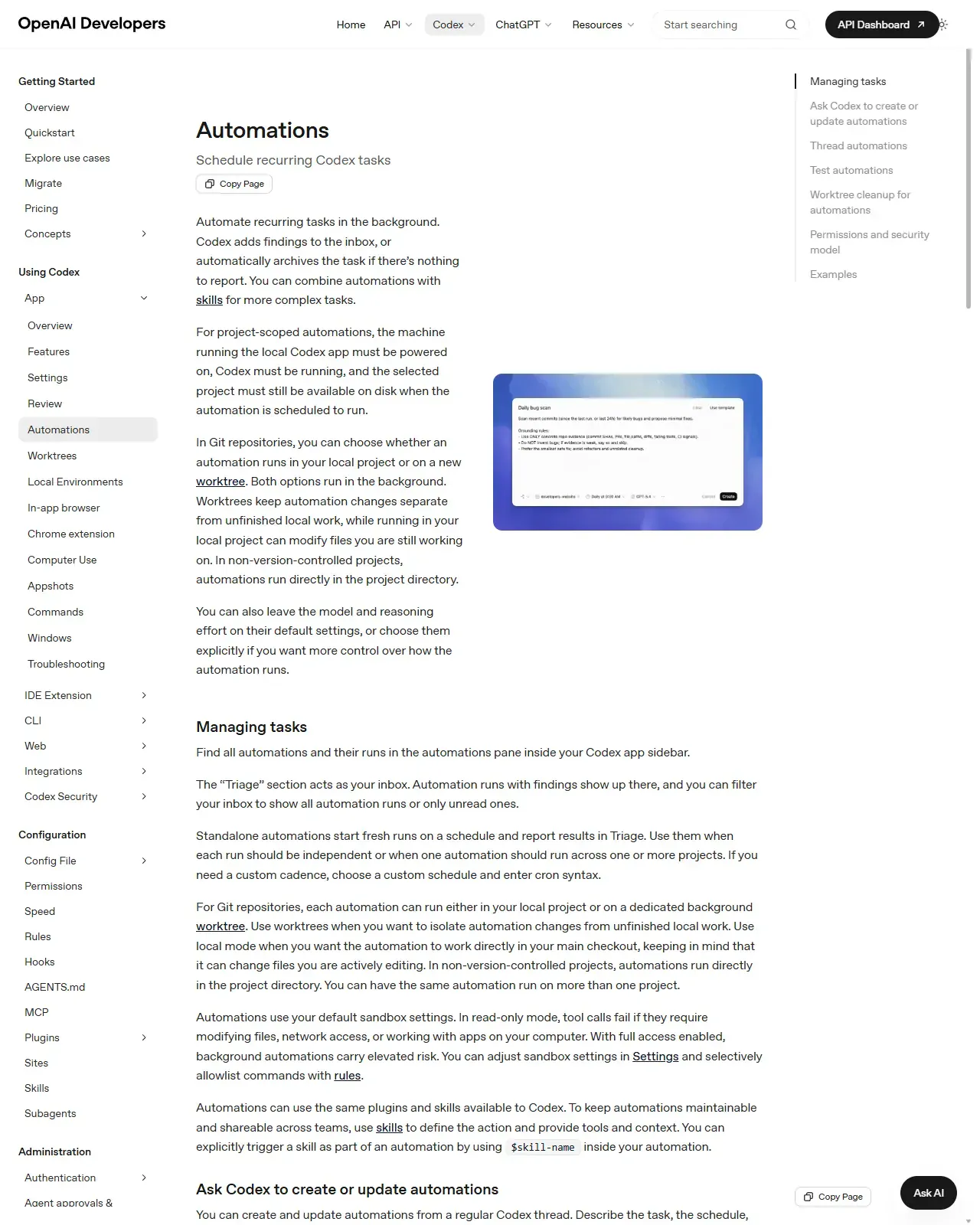
You don't need a special screen. In Codex, ask from a regular thread to create an automation, describing the task, schedule, and scope in plain language. In Claude Code, run /schedule (e.g. '/schedule weekly Monday 9am payments-service briefing') to create a routine conversationally, or describe a one-off ('/schedule tomorrow at 9am, summarize yesterday's merged PRs'). Paste in the production read-only briefing brief from this lesson as the prompt, its self-contained, guardrailed wording is exactly what an unattended run needs. You'll know it's created when the automation appears in the App's Automations list (Codex) or /schedule lists the routine with its next run time (Claude Code).
HintBe explicit about scope and timing, vague requests become vague automations. The prompt must stand entirely on its own; there's no chance to clarify mid-run.
On this screen
- 1Embedded creation UI. The automation form Codex opens when you ask from a thread, task, schedule, and scope captured in one place.
- 2'Ask Codex to create or update automations'. You describe the automation in plain language from a regular thread and Codex builds it. Claude Code's equivalent is /schedule.
Set the cadence, prefer a preset, use cron carefully
Pick a daily/weekly preset where one exists. Only enter cron when a preset can't express your cadence: a 5-field expression 'minute hour day-of-month month day-of-week' (e.g. '0 9 * * 1' = Mondays 9am). Remember Claude Code reads times in your LOCAL timezone, adds jitter (an hourly :00 job may fire by :30, use a non-round minute like '3 9 * * 1' for tighter timing), and, when both day-of-month and day-of-week are set, matches if EITHER one does. Note the floor: cloud Routines enforce a 1-hour minimum; /loop and Desktop accept 1 minute. Before you save, confirm the scheduler echoes the next-fire time you expect, that echo is your check that the expression means what you think it does.
HintA subtly wrong cron is how a 'weekly' job quietly runs hourly and burns your budget. Read the expression back in plain English before saving, and verify after the first fire.
Lock the guardrails: sandbox, network, and blast radius
Set the five concentric rings before the first run. Scope: point the task at exactly the one repo/inputs it needs. Sandbox: read-only for a briefing, in Codex, read-only mode makes any write/network/app tool call fail outright. Network: keep the cloud environment's default 'Trusted' allowlist; widen only to specific hosts the task must reach, and prefer connectors over raw network. Approvals: unattended means no per-action approval by design, so never combine that with full access plus full network outside an isolated container. Blast radius: leave Routines on claude/-prefixed branches only (don't enable unrestricted pushes), and keep Codex project runs on a worktree. Done when the settings show read-only, one repo, default network, and default branch limits, and 'what's the worst this run could do?' has a small, boring answer.
HintLeast privilege is the whole game for unattended runs: grant exactly the power the job needs and not one ring more, so 'what's the worst this run could do?' has a small, boring answer.
Confirm idempotency before you let it recur
Verify the task is safe to run more than once. A read-only briefing is idempotent for free, running it twice changes nothing. If your task does anything that mutates state (opens a PR, posts a message, writes a file), do NOT schedule it until you've added a check-before-act guard keyed on a stable idempotency key (the ISO week, an issue ID, a content hash): 'have I already done this for this period?' before acting. Assume the scheduler will retry, fire late, or occasionally double-fire, make that a no-op rather than a duplicate.
HintThe symptom of a non-idempotent unattended task is unmistakable: duplicate PRs, double-posted messages, the same alert handled three times. Design it out before the second run, not after.
Run once, then triage and verify the result
Trigger one run immediately ('Run now' on a Routine, or wait for the first Codex fire) and READ it. In Codex, open Triage, filter to unread, read the findings, and archive empty runs so signal stays clear. In Claude Code, open the run session, remember a green status only means it exited cleanly, not that the task succeeded, so read the transcript and confirm what actually happened. Check the output against your brief's format and, critically, read the 'COULD NOT VERIFY' section, that's where an unattended run tells you what it couldn't do.
HintAn automation you never read is worse than none, it's false coverage. Build the triage habit now: a scheduled briefing is only useful if it lands somewhere you reliably look.
Pick one genuinely observe-only task from your own work (a weekly repo briefing is ideal). Run it through the three automate-or-not gates and confirm it's safe to schedule unattended. Create it as a Claude Code Routine (or a Codex standalone automation) using the production read-only briefing brief from this lesson as the prompt. Set the cadence to a weekly preset (or '0 9 * * 1' if you need cron), lock the sandbox to read-only, scope it to a single repo, and keep network/branches at their minimal defaults. Confirm it's idempotent (read-only, so it is). Trigger one run, then read and triage the result, including its 'could not verify' section.
A live recurring automation delivering a scheduled, read-only, idempotent briefing into your triage surface, scoped to one repo, sandboxed read-only, on minimal network, with empty runs archived and findings (plus any 'could not verify' notes) surfaced for review. Plus a one-line written rule for yourself: which classes of task you will automate fully, and which you will only automate the detection of while keeping a human on the decision.
Production prompt examples
ROLE: You are a reporting agent running UNATTENDED on a schedule. There is NO human watching this run. You must behave as if every action is final and unreviewed, because it is.

TASK (runs every scheduled execution): Produce a concise Monday-morning engineering briefing covering changes in the `payments-service` repository since the previous Monday.

SCOPE, IN: Read only the `payments-service` repo: merged PRs, closed issues, and notable commits in the last 7 days. Summarise: (1) what shipped, (2) open risks or failing checks, (3) anything that needs a human decision this week.

SCOPE, OUT (HARD LIMITS, this run must never):
- Modify, create, or delete ANY file. This is a read-only observation task.
- Run any state-changing command (no git push, no merge, no deploy, no installs).
- Post to, message, or write to ANY external service or channel.
- Read or load any repo, file, or system outside `payments-service`.
- Reach any network host beyond what reading this repo requires.

IDEMPOTENCY: This task is observe-only and must remain so, running it twice for the same week must produce the same briefing and change nothing. If you ever find yourself about to take an action that would NOT be safe to repeat, STOP and report that you stopped instead.

UNATTENDED SAFETY RULES:
- If the task is ambiguous or the data needed is missing, DO NOT guess or act, produce a briefing that says exactly what you could not determine and why. A clear 'I could not verify X' is the correct output; a confident fabrication is the failure.
- If anything would require write access, network beyond the repo, or an external post to complete, DO NOT attempt a workaround. Report the blocker as a finding for a human.
- Keep the output tight: a human skims this in 60 seconds. Bullet points, no preamble.

OUTPUT FORMAT:
1. SHIPPED (last 7 days): 3-6 bullets, each PR/commit with a one-line what + why.
2. RISKS / FAILING CHECKS: bullets, or 'none observed'.
3. NEEDS A HUMAN THIS WEEK: explicit decisions or reviews to schedule, or 'none'.
4. COULD NOT VERIFY: anything blocked, missing, or uncertain, name it plainly.

If there is genuinely nothing to report this week, say so in one line so the run can be archived as empty.
- ROLE 'UNATTENDED ... NO human watching ... every action is final' resets the model's default assumption that a person will catch mistakes, the framing every scheduled prompt needs and interactive prompts don't.
- SCOPE, OUT is written as HARD LIMITS, not preferences, and enumerates the specific dangerous actions (write/push/deploy/post/cross-repo/network) so the prompt reinforces the sandbox rather than relying on it alone, defence in depth at the prompt layer.
- The IDEMPOTENCY block names the property explicitly and gives a stop rule ('if about to do something not safe to repeat, STOP'), turning an abstract concept into a concrete behaviour the run can follow.
- 'A clear I could not verify X is the correct output; a confident fabrication is the failure' is the single most important line for unattended runs, it converts the silent-failure risk (Lesson 8) into a visible, triageable finding instead of a believable wrong answer no one reviews.
- 'DO NOT attempt a workaround ... report the blocker' stops the classic unattended failure where a sandbox-blocked agent improvises a riskier path to 'succeed', you want it to fail loud and safe, not creatively.
- The COULD NOT VERIFY section and the 'nothing to report -> one line' instruction wire the prompt into the triage habit: empty runs self-archive, and uncertainty surfaces as unread signal rather than being buried.
- Pair this prompt with the environment guardrails, not instead of them: read-only sandbox (Codex) or a read-only-scoped Routine, Trusted/minimal network, only the one repo in scope. The prompt is ring 1; the sandbox is rings 2-5.
Common mistakes to avoid
- Automating a task without first asking 'should this run unattended at all?', scheduling a consequential, irreversible action with the human removed instead of automating only the detection and gating the decision.
- Granting a reporting automation write, workspace, or full-access permissions it never needs instead of locking it to read-only, the briefing that could, in principle, modify files is a guardrail you forgot to set.
- Scheduling a state-changing task (opens a PR, posts a message, writes a file) without making it idempotent, then getting duplicate PRs and double-posted messages every time a run retries, overlaps, or double-fires.
- Reaching for raw cron when a daily/weekly preset would do, and shipping a subtly wrong expression so a 'weekly' job quietly runs hourly and burns budget (and forgetting Claude Code's local timezone, jitter, and either-day matching).
- Pairing 'no approvals' (the default for unattended runs) with full access and full network access outside an isolated container, removing every ring of protection at once.
- Treating a green run status as success, a clean exit only means the session ran, not that your task did the right thing; you still have to open the run and read it.
- Setting up the automation and never building the triage habit, so empty and failed runs pile up unread and a real finding (or a 'could not verify' blocker) sits buried for a week.
- Running a Codex project automation locally on your main checkout, or enabling unrestricted branch pushes on a Routine, when a worktree or claude/-prefixed branches would have kept the blast radius small.
Source conflicts to review
- Claude Code Routines are explicitly in 'research preview', behaviour, the 1-hour minimum interval, the daily run cap, and the /fire API surface (under the experimental-cc-routine beta header) may change. Treat the mechanics here as accurate as of June 2026 and re-check code.claude.com/docs/en/routines.
- Minimum schedule intervals differ by surface and shift across releases: /loop and Desktop scheduled tasks accept 1-minute; cloud Routines enforce 1-hour; Codex thread automations allow minute intervals while standalone/project automations lean on presets. Confirm the floor for the exact surface you use.
- CLI version gates move: scheduled tasks require Claude Code v2.1.72+, and the /schedule routines command has required as recent as v2.1.81, run `claude --version` / `claude update` rather than trusting a fixed number.
- Codex exec flags and sandbox naming (e.g. --full-auto vs --sandbox danger-full-access, --ephemeral, resume --last, --json/--output-schema) and the approval_policy="never" default have varied across point releases; verify against the current Codex CLI help and the official automations / GitHub Action docs before scripting them.
Key terms
- Automation (Codex)
- A recurring Codex task that runs in the background on a schedule and reports findings into the Triage inbox.
- Routine (Claude Code)
- A saved Claude Code config (prompt + repos + connectors) that runs autonomously on Anthropic-managed cloud infrastructure, on a schedule, API call, or GitHub event, in research preview as of June 2026.
- Standalone automation
- A fresh, independent Codex run on a schedule, often spanning multiple projects, reporting into Triage.
- Project automation
- A Codex automation tied to a Git repo, running on your local checkout or on an isolated worktree.
- Thread automation
- A heartbeat-style recurring wake-up attached to an ongoing Codex thread, keeping its context alive for polling or a review loop.
- /loop
- Claude Code's session-scoped scheduler for running a prompt on repeat while the session is open; dies on a new session and expires after 7 days.
- Desktop scheduled task
- A Claude Code task that runs locally on your machine, persists across restarts, and can reach local files (machine must be on).
- Unattended run
- An agent run that executes with no human watching and no per-action approval, the defining risk shift of scheduling.
- Idempotency
- The property that running a task N times leaves the same end state as running it once; read-only tasks have it for free, state-changing ones must engineer it with a check-before-act guard.
- Idempotency key
- A stable identifier for a unit of work (an ISO week, an issue ID, a content hash) used to check 'did I already do this?' before acting, so retries and double-fires become no-ops.
- Sandbox mode
- The permission level a run executes under. Codex: read-only / workspace-write / full access, bounding what tool calls can succeed.
- approval_policy = "never"
- Codex's setting for unattended runs that skips per-action approval; org policy via requirements.toml can disallow it in managed environments.
- Trigger
- What starts a run, a schedule (cron/preset), an API call (POST + bearer token), a GitHub event, a webhook, or a manual fire.
- Cron expression
- A 5-field schedule string 'minute hour day-of-month month day-of-week'; Claude Code uses local timezone, supports steps/ranges/lists, and, when both day-of-month and day-of-week are restricted, matches a date if either one does.
- Jitter
- A deterministic offset Claude Code adds to fire times so jobs don't all hit the API at once, an hourly :00 task may fire by :30.
- Blast radius
- How much a worst-case run can affect, minimised by worktrees, claude/-prefixed-only branch pushes, read-only sandbox, and minimal network scope.
- Triage
- Codex's inbox where automation runs collect, filterable by all vs unread, with empty runs auto-archiving so findings surface.
Resources
- docCodex. Automations (types, cadence, sandbox, Triage)
- docCodex. GitHub Action (codex exec in CI / cron)
- docClaude Code. Run prompts on a schedule (/loop, cron tools, jitter)
- docClaude Code. Routines (cloud, triggers, autonomy, guardrails)
- docClaude Code. Desktop scheduled tasks (local, persistent)
- docCodex App overview
Checkpoint