
Lesson 27 of 38 · Core - 02:30-02:45
Mobile-to-desktop workflows
Master session portability: kick off agentic work from your phone or a browser, let it run on a trusted host, and finish it at your desk, using Codex remote connections, Claude Code Remote Control, and teleport. Learn the async-delegation pattern that turns idle minutes (a commute, a queue, a meeting break) into finished work, and the security habits that keep a phone-to-host link safe.
Most agentic work assumes you are sitting at the machine. But the agent does not need you there to run, it needs you to decide. That split is the whole opportunity of mobile-to-desktop workflows: the slow, valuable part (the agent reading code, running tests, drafting a change) can happen on a powerful, trusted host while you are nowhere near it, and the fast, human part (steering, approving, reviewing) can happen from a phone in a queue or a browser on a borrowed laptop. In 2026 both major coding agents shipped this as a first-class capability, but they built it differently, and the difference matters. OpenAI's Codex lets your phone act as a remote control for a paired desktop host. Anthropic's Claude Code went further, separating three distinct ideas, running a local session you can drive from any device (Remote Control), pulling a cloud session down to your terminal (teleport), and pushing work up to the cloud to run without your machine at all. This lesson teaches you to think in terms of where the work runs, where the decisions happen, and how to move a single task cleanly across devices without losing context, so that 'I started it on the train and approved the PR from my desk' becomes a normal Tuesday, not a party trick.
Agentic portability, mobile-to-desktop workflows
Start or steer work from mobile while the real agent loop runs on a trusted host or cloud session.
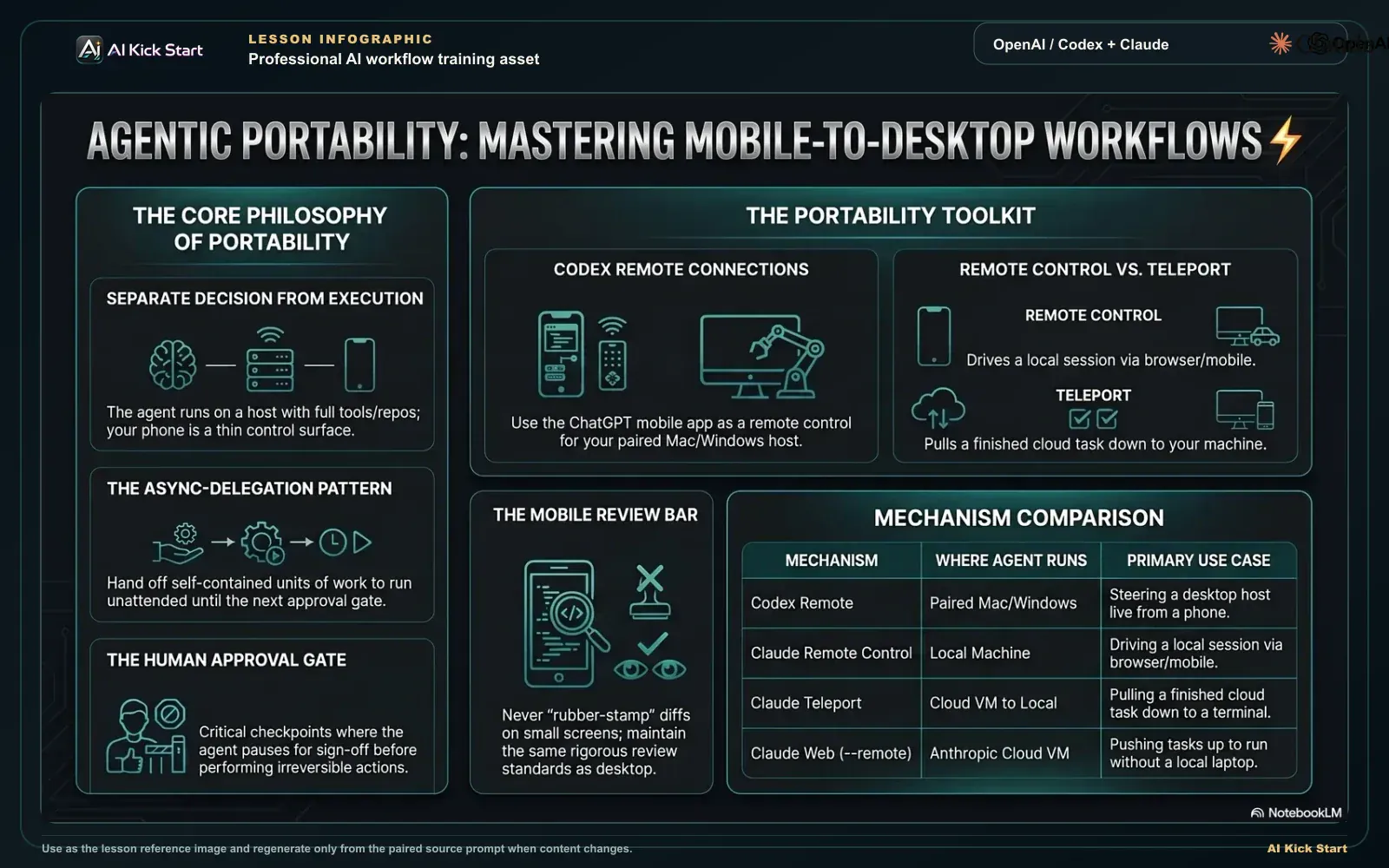
Mobile-to-desktop session portability
A branded walkthrough: separate the decision from the execution, start or steer work from mobile while the real agent loop runs on a trusted host, with approval gates intact.
What to understand
- The core insight: separate where work RUNS from where you DECIDE. The agent's loop (read, propose, act, observe) runs on a host with your repo, tools, and credentials. Your phone or browser is a thin control surface that sends prompts and approvals and shows diffs. Nothing executes on the phone, it is a window into a session running somewhere with real compute. Get this distinction and every mobile feature below stops being magic and becomes obvious.
- Codex remote connections (shipped mid-May 2026) make your phone a remote control for a paired desktop host. From the ChatGPT mobile app you start or continue threads on a connected Mac or Windows machine, answer the agent's questions, approve commands, and review diffs, test output, terminal output, and screenshots. The host supplies everything real, repositories, shells, plugins, Chrome, and Computer Use (the agent driving a GUI by looking at the screen), while the phone only steers. You can also continue the same thread later from another signed-in Codex App device.
- Claude Code splits portability into three distinct mechanisms, and conflating them is the most common beginner error. Remote Control drives a session running on YOUR machine from a phone or browser. Teleport PULLS a CLOUD session down into your local terminal. Claude Code on the web (via --remote) PUSHES a task UP to an Anthropic-managed cloud VM that runs without your laptop. They answer different questions: 'control my local run remotely', 'bring a cloud run home', and 'run it in the cloud while I'm offline'.
- Claude Code Remote Control keeps the session LOCAL the entire time. When you run claude remote-control (or --remote-control, or /remote-control from inside a session), your machine keeps running the agent and makes only outbound HTTPS calls, it never opens an inbound port. claude.ai/code and the Claude mobile app are just windows into that local session, so your filesystem, MCP servers, and project config all stay available, and the conversation stays in sync across terminal, browser, and phone simultaneously. Requires v2.1.51+.
- Teleport is a one-way cloud-to-local handoff that moves the WHOLE task. Run claude --teleport for an interactive picker, or claude --teleport <session-id> to resume a specific cloud session in your terminal. It verifies you're in the right repository, fetches and checks out the cloud session's branch, and loads the full conversation history, so you continue exactly where the cloud left off. You cannot push a terminal session up the same way; for that you start a fresh cloud session with --remote.
- Mobile makes sense when the human decision is cheap but the work is slow, and rarely otherwise. The classic shapes: kick off a long task before you leave the desk and approve milestones from your phone; triage and unblock a stuck agent during a commute; review and merge a finished diff while away; or delegate a self-contained task from your phone (Claude's Dispatch can message a task from mobile that spawns a Desktop session to handle it). Mobile is for steering and approving, not for authoring large changes on a 6-inch screen.
- Both products gate this behind account, plan, and admin controls. Codex requires the phone and host on the same ChatGPT account and workspace, and a managed workspace needs an admin to enable Remote Control access before pairing works. Claude Code Remote Control needs a Pro/Max/Team/Enterprise plan with claude.ai OAuth login (API keys are NOT supported), and on Team/Enterprise an admin must turn on the Remote Control toggle in admin settings. Plan the access path before you rely on it mid-commute.
- Security is enforced end-to-end, but the host is your responsibility. Codex routes through a secure relay so trusted machines stay reachable without being exposed to the public internet; the guidance is to keep the host awake and online, use a VPN or mesh network (a private overlay network such as Tailscale) for off-network access rather than exposing the host's local app server, and use trusted SSH keys and least-privilege accounts for SSH hosts. Claude Code's local session times out after roughly 10 minutes offline and ends entirely if the process is killed, so the host staying awake and connected is a hard requirement, not a nicety.
- Convenience does not lower the review bar. Approving from a phone surfaces the same diff, test output, and terminal output you'd see at the desk, read it before you tap approve. The danger of mobile is not technical; it's psychological: a small screen and a spare moment make it tempting to rubber-stamp an irreversible action. Carry the same red lines (no silent deletes, pushes, sends, or spend) onto the phone, and demand the same evidence before approving.
Deeper dive
Async delegation: the real pattern behind mobile-to-desktop
Mobile-to-desktop is one instance of a deeper pattern: async delegation. A synchronous workflow is you-and-the-agent locked in a back-and-forth, both present, both blocked on each other. An async workflow decouples them, you hand off a well-specified unit of work, the agent runs it on a host, and you re-engage only at decision points. The payoff is leverage over wall-clock time: a 40-minute test-and-fix loop that used to pin you to the desk now runs while you're in a meeting, and you spend 90 seconds approving the result afterward. The discipline that makes async delegation work is the same that makes any delegation work, the brief has to be self-contained, because you won't be there to clarify. A vague mobile prompt is far more expensive than a vague desktop one: at the desk you correct it in seconds; from a phone the agent may run for ten minutes down the wrong path before you even see it. So async delegation rewards front-loaded specificity (clear goal, explicit scope, named stop conditions, a definition of done) and punishes the lazy one-liner. Think of it as the difference between supervising an intern over your shoulder and emailing them a task before you board a flight, the second only works if the task is unambiguous and the stop conditions are written down.
Where the work runs is the question that organises everything
Beginners ask 'can I use it on my phone?' The better question is 'where does the agent's loop execute, and what does it have access to there?' Three answers exist, and each has a different blast radius and a different set of capabilities. (1) On your own machine, driven remotely (Codex remote connections, Claude Code Remote Control): full access to your real filesystem, local tools, MCP servers, and credentials, maximum capability, but the host must stay awake and the work touches your actual environment. (2) In the cloud (Claude Code on the web via --remote): an isolated, Anthropic-managed VM with a fresh clone of your repo, pre-installed runtimes, and a scoped GitHub proxy that restricts pushes to the working branch, runs without your laptop and survives you closing it, but only sees what's committed to the repo and what the environment allows. (3) On a separate dev box over SSH (Codex SSH hosts): the agent runs on the remote filesystem while you steer from mobile. The capability/safety trade-off flips across these: the cloud VM is the safest place to run something autonomous and unattended precisely because it's isolated and its git proxy can't force-push over main; your own machine is the most capable but the least contained. Choosing the right 'where' for a given task is the senior skill, autonomous, unattended, potentially-risky work belongs in the cloud sandbox; work that needs your real local tools and live credentials belongs on your host with you watching the approvals.
Plan locally, execute remotely, the highest-leverage handoff
The single most valuable mobile-to-desktop pattern is not 'do everything on the phone', it's splitting a task by phase across surfaces. The strategy phase (deciding the approach, the files, the order of operations) is where human judgement is dense and the agent is most likely to go wrong, so do it where review is cheap: at the desk, in a look-only mode (Claude Code's plan mode, or Codex read-only), collaborating turn by turn. Once the plan is solid, the execution phase is mechanical and slow, perfect to delegate. Anthropic's docs make this concrete: develop the plan in plan mode, commit it to the repo, then start a cloud session with claude --remote "Execute the plan in docs/plan.md" and walk away; monitor from /tasks or the mobile app, and when it's done either create the PR from the web or teleport the session back to your terminal to finish locally. The same shape works on Codex: think and approve the plan at the desk, then steer the long execution from your phone. The reason this beats both 'all desktop' and 'all mobile' is that it puts each phase on the surface where its cost is lowest, judgement where review is free, execution where your presence is optional, and a clean teleport or PR at the end means you never lose the thread between phases.
Session portability mechanisms compared
The four ways to move agentic work between phone, browser, cloud, and desktop in 2026. They are NOT interchangeable, each answers a different question about where work runs and which direction the session moves. Names, version requirements, and defaults change fast; verify at the official docs below before relying on them.
| Mechanism | Where the agent runs | Direction / what moves | Start it with | Best for |
|---|---|---|---|---|
| Codex remote connections | Your paired Mac/Windows host (or SSH box) | Phone steers a host session live | Codex App: 'Set up Codex mobile' -> scan QR on phone | Driving a desktop run from your phone; approving on the go |
| Claude Code Remote Control | Your local machine (CLI or VS Code) | Phone/browser drives a LOCAL session live | claude remote-control (or --remote-control, or /remote-control) | Steering in-progress local work from another device |
| Claude Code teleport | Anthropic cloud VM, then your terminal | Pulls a CLOUD session DOWN to local (one-way) | claude --teleport [session-id] (or /teleport) | Bringing a finished/long cloud run home to finish locally |
| Claude Code on the web (--remote) | Anthropic-managed cloud VM | Pushes a task UP to the cloud (runs without your laptop) | claude --remote "<task>" (monitor via /tasks or mobile) | Kicking off autonomous work with no local setup; parallel tasks |
Sources (as of June 2026): Codex. Remote connections · Claude Code. Remote Control · Claude Code on the web (teleport / --remote)
One task, six stages: the mobile-to-desktop handoff
Read top to bottom, each stage runs the task on the surface where its cost is lowest, from desk planning to phone steering back to desk git.
- Plan at the desk (look-only)Strategy is dense in human judgement, so settle the approach, files, and order in plan mode or read-only where review is cheap, then commit the plan.
- Pick where it RUNSClassify against the comparison table: your host (real tools + credentials), a cloud VM (--remote, isolated, runs without your laptop), or an SSH box.
- Pair phone to hostPairing always starts on the trusted host (Codex QR or claude remote-control QR); the phone only completes the link and never initiates execution.
- Kick off with an async briefSend a self-contained brief: tight scope, pre-authorised autonomy for cheap reversible work, explicit GATES, definition of done, then leave the desk.
- Steer + approve from the phoneAt each gate a notification surfaces the diff, tests, and terminal output; read it before you tap, and decline anything that crosses a red line.
- Finish at the deskTeleport the cloud session home or continue the host thread, then do the deliberate irreversible git, review, commit, push, open the PR, with full context.
Step by step
Decide which mechanism the task actually needs
Before pairing anything, classify the task against the comparison table. Does the work need your REAL local tools, credentials, or MCP servers (then run it on your host and drive it remotely)? Can it run autonomously and unattended on just what's committed to the repo (then push it to the cloud with claude --remote and monitor from mobile, the isolated VM only sees committed code and an allowlisted network)? Is there already a cloud session you want to finish locally (then teleport it down)? Write the one you'll use and why.
HintThe wrong reflex is 'put it on my phone'. The right question is 'where should this run?', capability and safety both follow from that, not from the screen you happen to be holding.
Confirm your access path (account, plan, admin)
For Codex: make sure the ChatGPT mobile app and the Codex App host are signed in to the SAME account and workspace, or the host never appears on your phone; on a managed workspace, have an admin enable Remote Control access first. For Claude Code: confirm you're on Pro/Max/Team/Enterprise and logged in via claude.ai (run /login. API keys do NOT work for Remote Control; setup-token and API-key logins are inference-only and are rejected), CLI v2.1.51+; on Team/Enterprise have an admin turn on the Remote Control toggle in admin settings. You've confirmed the path when you can name your plan and workspace and, on a managed account, you've seen the admin toggle on.
HintMismatched workspaces (Codex) and API-key logins (Claude) are the two most common reasons pairing silently fails, fix these before you're standing on a platform trying to unblock an agent.
Pair the phone to the host
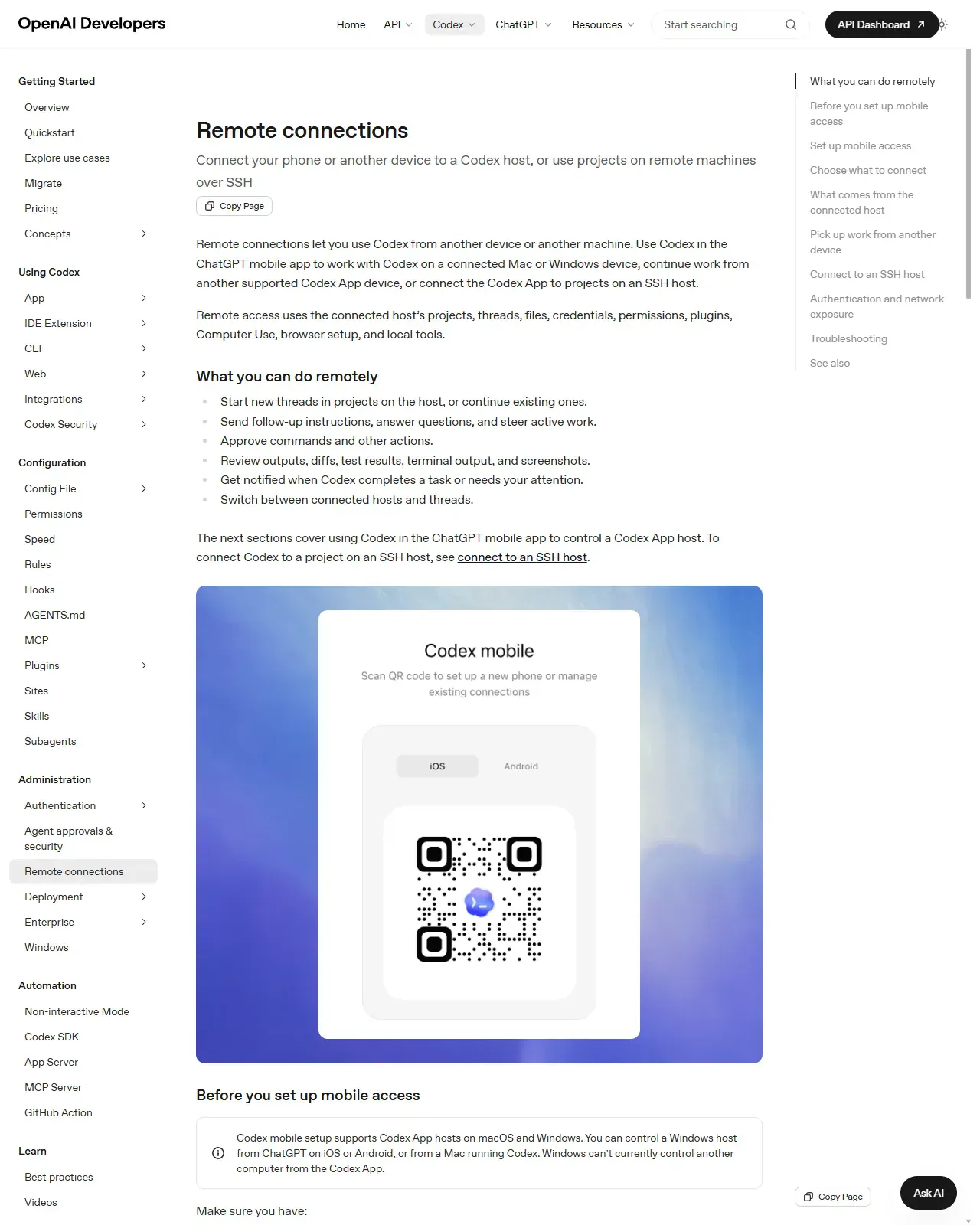
Codex: on the Codex App select 'Set up Codex mobile' in the sidebar to show a QR code (pairing always starts on the trusted host), scan it with your phone, and complete any SSO/MFA/passkey prompts, the host then appears in your mobile Codex projects. Claude Code: run `claude remote-control` in your project (press spacebar to show a QR code), scan it to open the session in the Claude app, or open claude.ai/code and pick the session by name. Either way, pairing has worked when the session opens in the app showing the computer icon with a green status dot.
HintIf you don't have the Claude app yet, run /mobile inside Claude Code to show a download QR; for Codex, ensure both the ChatGPT app and Codex App are on current versions.
On this screen
- 1Pairing starts on the host. Both tools display the QR from the trusted desktop; the phone only completes the link, it never initiates execution.
- 2'Before you set up mobile access'. The requirements note on this page, current app versions on both devices, same account and workspace, is where most pairing failures start.
Kick off the task with an async-delegation brief
Use the production prompt from this lesson. Send a self-contained brief with a tight scope, pre-authorised autonomy for the cheap reversible work (read, edit, run tests), and explicit GATES where the agent must stop for your phone approval. State the definition of done. For bigger tasks, settle the plan at the desk first (plan mode or read-only), commit it, and make the brief 'execute the plan in docs/plan.md', judgement where review is cheap, execution where your presence is optional. Then leave the desk, the host keeps running the agent's loop while you're away. You'll know the brief worked when the first notification you see is 'GATE 1. PLAN READY', not a clarifying question.
HintFront-load specificity: a vague mobile prompt can burn ten minutes down the wrong path before you even see it. The brief is your stand-in while you're gone. And check the host's power/sleep settings before you walk away (step 7).
Steer and approve from your phone, but keep the review bar
When the agent hits a gate, a notification surfaces (Claude can push when it needs a decision or a task finishes; ask 'notify me when the tests finish' to request one). Open the diff, test output, terminal output, or screenshots it surfaces and actually read them before approving. Answer questions, approve in-scope steps, and decline anything that crosses a red line. A good gate review ends with evidence you actually read, you should be able to name one specific thing in the diff or test output you checked before tapping approve.
HintA spare moment and a small screen make rubber-stamping tempting, that's exactly when an irreversible mistake slips through. Demand the same evidence you would at the desk.
Finish on the desktop, teleport or continue, then do the git steps
Back at your desk, bring the task home. If it ran in the cloud, run `claude --teleport` (or /teleport) to pull the session and its branch into your terminal with full history; if it ran on your host, continue the same thread locally. Now do the deliberate, irreversible steps, review the final diff, commit, push, open the PR, with full context and a real keyboard. Teleport has worked when your terminal shows the cloud session's branch checked out and the full conversation history loaded.
HintDefer commit/push/PR to the desk on purpose: state-changing git is the textbook 'don't approve this from a phone' action. The clean handoff (teleport pulls the branch + history) is what lets you finish without re-explaining anything.
Keep the link safe and the host alive
Keep the host awake and online for the duration. Codex drops the link if the host sleeps, and Claude Code Remote Control times out after ~10 minutes offline and ends entirely if the process is killed. For off-network access use a VPN or mesh network rather than exposing the host's local app server (the process the relay talks to) to the internet; for Codex SSH hosts use trusted keys and least-privilege accounts. Sandbox and approval settings stay enforced on remote sessions, don't loosen them just because you're mobile.
HintAdjust power/sleep settings before you walk away. The most common 'it stopped working on the train' cause is the laptop lid closing, not the network.
Pick one real task and run it mobile-to-desktop end to end: (1) classify which portability mechanism it needs and confirm your access path; (2) pair your phone to a host (Codex 'Set up Codex mobile' QR, or Claude Code `claude remote-control` QR); (3) kick it off with the async-delegation brief, including pre-authorised autonomy and explicit phone-approval GATES; (4) approve at least one gate from your phone after reading the surfaced diff/test output; (5) finish at your desk, teleport or continue the session, then review and do the git steps locally.
A completed mobile-to-desktop run: a task you started and approved from your phone and finished at your desk, plus a one-line note on which mechanism you used (Codex remote connection / Claude Remote Control / teleport / --remote cloud) and why it fit the task.
Production prompt examples
STANDING INSTRUCTIONS apply (read-only first, ask before anything irreversible). This is an ASYNC DELEGATION: I am sending this from my phone and will be away from the desk for ~45 minutes, so you must be self-sufficient within the boundaries below and NOT block waiting on me except at the named gates.

ROLE: You are a careful senior engineer running unattended on a trusted host. I will review and approve from my phone at the gates, and finish at my desk.

CONTEXT: Repo is already open on this host on branch `main`. In scope ONLY: src/payments/refund.ts and its test file src/payments/refund.test.ts. Do not read or modify anything else without telling me which file and why first.

TASK: Add idempotency to the refund handler so a duplicate refund request with the same idempotency-key is a no-op that returns the original result. Add tests for: first call, duplicate call, and a different-key call.

AUTONOMY (what you MAY do without asking, since I'm away):
- Read the two in-scope files and run the existing test suite for them.
- Make the edit and write the new tests.
- Run the tests for those files as many times as needed to get them green.

GATES (STOP and wait for my phone approval at each):
- GATE 1 (plan): Before editing, post a 3-5 line plan: the approach, the exact files you'll touch, and how you'll test. Then STOP.
- GATE 2 (diff): After tests pass locally, post the full diff and the test output. Then STOP. Do NOT commit, push, or open a PR, I will do the git steps at my desk.

HARD STOPS (never, even though I'm away): no commit, push, force-push, branch changes, package installs, deploys, deletes outside the two files, network calls, or spend.

NOTIFY: When you reach each gate, make it obvious in your first line ('GATE 1. PLAN READY' / 'GATE 2. DIFF READY') so I see it in the notification. If you get stuck or the task is ambiguous, STOP at once with 'BLOCKED:' and one tight question rather than guessing.

OUTPUT STYLE: Terse. Plans as short bullets, changes as diffs, test results as the raw pass/fail summary. Don't restate files back to me.

Confirm you understand in one line, then begin and stop at GATE 1.- 'This is an ASYNC DELEGATION… I will be away ~45 minutes' sets the operating mode explicitly, the agent must be self-sufficient between gates instead of blocking on every micro-decision, which is the whole point of running it while you're mobile.
- The explicit in-scope file allow-list is even more important on mobile than at the desk: you can't catch an over-broad read in real time, so the scope has to be airtight before you walk away.
- AUTONOMY vs GATES vs HARD STOPS is the core structure, it pre-authorises the cheap, reversible, slow work (read, edit, run tests) so the agent isn't idle waiting for you, while pinning every irreversible or judgement-heavy step to a phone-approval gate.
- GATE 2 deliberately stops BEFORE git: state-changing git is the classic 'don't approve this from a phone in a hurry' action, so the brief defers all commit/push/PR steps to the desk where you can review history properly. This is the 'finish on desktop' half made concrete.
- The 'GATE 1. PLAN READY' / 'GATE 2. DIFF READY' labels are written so they surface cleanly in a push notification, async delegation only works if you can tell at a glance whether the agent needs you.
- 'If stuck, STOP with BLOCKED: and one tight question' prevents the worst async failure mode: the agent quietly running ten minutes down the wrong path because no one was watching. A self-imposed stop condition is your stand-in while you're away.
- Pair this with teleport (claude --teleport) or the host thread: kick off and approve gates from the phone, then pull the session to your terminal at the desk to do the git steps with full context intact.
Common mistakes to avoid
- Conflating Claude Code's three mechanisms. Remote Control (drives a LOCAL session), teleport (pulls a CLOUD session DOWN), and --remote (pushes a task UP to the cloud). They run in different places and move in different directions.
- Trying to author large changes on a phone instead of using mobile for what it's good at, steering, approving, and unblocking. The phone is a control surface, not a workstation.
- Sending a vague one-liner before walking away: at the desk you'd correct it in seconds, but async there's no one watching, so the agent can run far down the wrong path before you see it.
- Pairing while the phone and desktop are on different ChatGPT workspaces (Codex), or logging into Claude Code with an API key instead of claude.ai (Remote Control rejects API-key auth).
- Letting the host sleep or closing the laptop lid, which silently drops the Codex link or times out the Claude Code Remote Control session after ~10 minutes offline.
- Approving irreversible actions, especially commit/push/PR, from a phone in a spare moment without reading the surfaced diff and test output. Defer git to the desk on purpose.
- Exposing the host's local app server directly on a shared network instead of using a VPN or private mesh network for off-network access.
- Loosening sandbox or approval settings because you're on mobile, remote convenience is not a reason to lower the safety dial.
Source conflicts to review
- Both tools shipped mobile/portability features in 2026 and iterate weekly: Codex mobile remote access landed ~mid-May 2026, with Windows-host control added in Codex App v26.527.1 on 29 May 2026; Claude Code Remote Control requires CLI v2.1.51+ and push notifications v2.1.110+. Treat versions as a floor and re-verify at the official docs, distrust tutorials older than a few weeks.
- Secondary write-ups routinely blur Claude Code's three distinct mechanisms (Remote Control runs locally, --remote/web runs in the cloud, teleport pulls cloud -> local). Prefer the official remote-control and claude-code-on-the-web docs over blogs that present them as a single 'mobile mode'.
- Platform pairing rules differ and changed mid-2026 (which device can control which host). As of June 2026 you can control a Windows or Mac host from ChatGPT iOS/Android or from a Mac, but Windows cannot act as a controller, confirm current support on the Codex remote-connections page.
Key terms
- Session portability
- Moving a single agent task across surfaces, phone, browser, cloud, desktop, without losing context, branch, or conversation history.
- Async delegation
- Handing the agent a self-contained unit of work to run unattended on a host, re-engaging only at named decision/approval gates.
- Host
- The machine that actually runs the agent loop, your Mac/Windows desktop, an SSH dev box, or a cloud VM, providing repos, tools, and credentials.
- Codex remote connections
- OpenAI's feature (mid-2026) letting the ChatGPT mobile app steer, approve, and review work on a paired Mac/Windows host or SSH box.
- Remote Control (Claude Code)
- Drives a session running on YOUR machine from phone or browser via claude remote-control; the session stays local and makes only outbound HTTPS calls.
- Teleport (Claude Code)
- A one-way pull of a CLOUD session into your local terminal (claude --teleport / /teleport) that fetches the branch and full history.
- Claude Code on the web (--remote)
- Pushes a task UP to an isolated Anthropic-managed cloud VM that runs without your laptop and survives you closing it.
- Dispatch
- Messaging a task from the Claude mobile app that can spawn a Desktop session to handle it, delegate-while-away with minimal setup.
- Secure relay
- The layer (Codex) that keeps trusted hosts reachable across your authorised devices and syncs session state without exposing them to the public internet.
- Approval gate
- A pre-defined point where the agent stops and waits for your sign-off, the human checkpoint that makes unattended async work safe.
Resources
Checkpoint