
Lesson 26 of 38 · Core - 02:15-02:30
Claude Cowork: chat, local work, connectors, skills, plugins
Understand what Claude Cowork actually is, a desktop agent that turns a goal into a finished document deliverable inside a sandboxed VM, and learn to run its plan-then-approve loop, scope its folders and connectors, and decide correctly when a task belongs in Cowork (a deliverable) versus Claude Code (a diff).
Claude Code is built for people who live in a terminal; Claude Cowork is built for everyone else who still has agentic work to do. Cowork is a desktop application feature, macOS and Windows only, no web, no mobile front door, where you describe an outcome in plain language and Claude works on your real files, folders, and apps to hand back a finished deliverable: an Excel sheet with live formulas, a formatted PowerPoint, a branded report, an organised folder of renamed files. Under the hood it is the same agentic engine as Claude Code wrapped in a different envelope: the shell commands and code it writes run inside an isolated virtual machine, it can only touch the folders you explicitly connect, and it shows you a plan and waits for your approval before doing anything significant. This lesson is about getting the model right, what Cowork is and isn't, how its safety boundaries are drawn, how to install plugins and wire connectors without over-granting access, and, most importantly, the routing instinct that tells you whether a given task should produce a document (Cowork) or a code change (Claude Code). Get the routing right and you stop forcing spreadsheet work through a terminal and stop forcing refactors through a chat box.
Claude Cowork, mastering the agentic desktop
Daniel presents how to route document deliverables to Cowork and codebase diffs to Claude Code, with folder and connector scope kept tight.
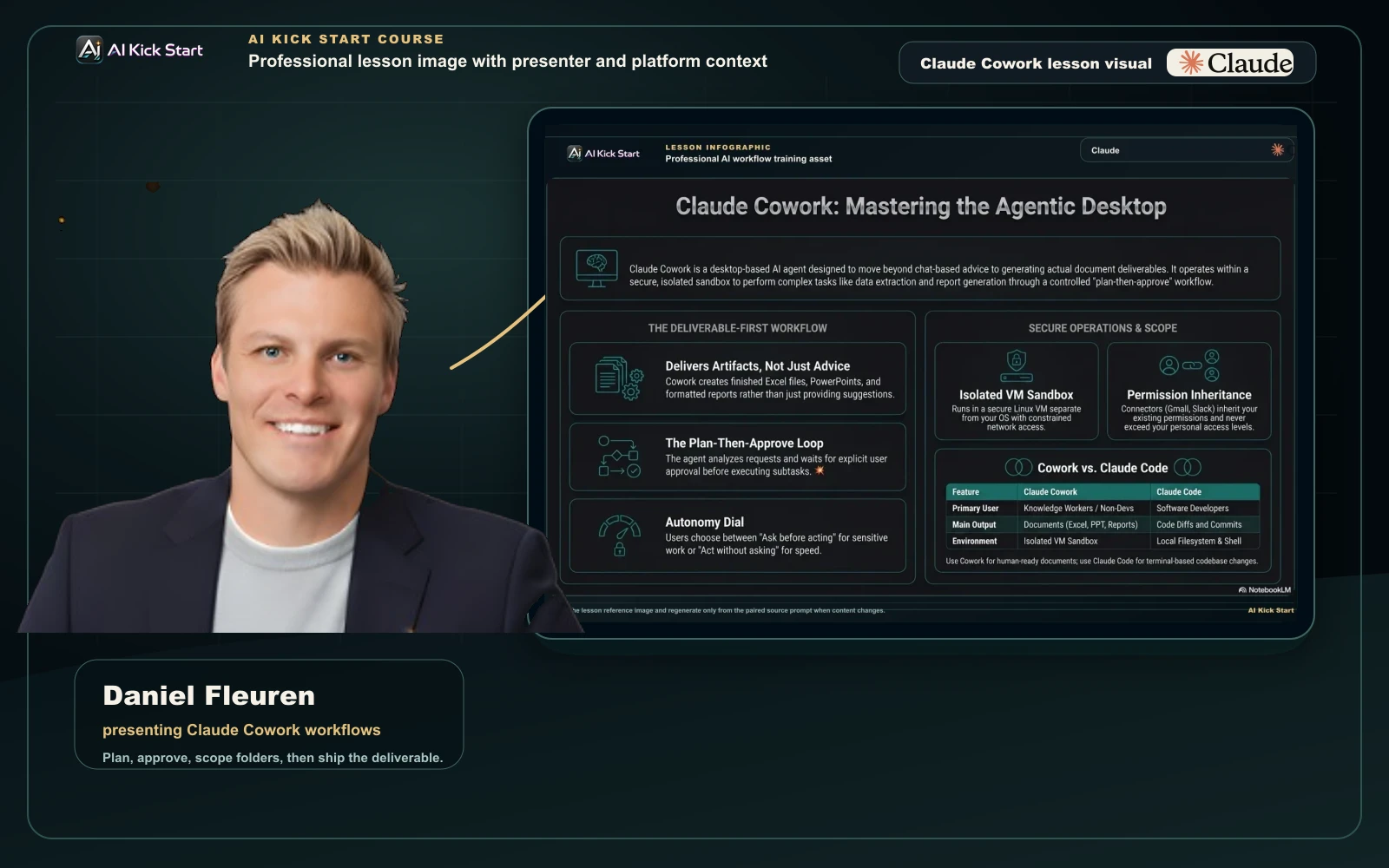
Claude Cowork, mastering the agentic desktop
A branded walkthrough: route document deliverables to Cowork's plan-then-approve workflow in an isolated VM, with autonomy and connector scope kept tight.
What to understand
- Cowork is a desktop agent that returns deliverables, not advice. You give it a goal, 'turn these twelve PDFs into a quarterly summary deck', and it works autonomously on your computer, reading and writing your local files, and hands back the finished artefact. This is the key mental shift from chat: Chat tells you how to do the work step by step; Cowork does the work and gives you the output.
- It is desktop-only, on paid plans only. Cowork runs inside the Claude Desktop app for macOS and Windows, there is no web or mobile version of Cowork itself (though Pro/Max users can message a running task from their phone and get results back in the same conversation). It is gated to paid plans: Pro, Max, Team, and Enterprise. There is no free path.
- The deliverables are real office artefacts. Cowork produces Excel spreadsheets with working formulas (VLOOKUP, conditional formatting), PowerPoint presentations, formatted Word-style documents and reports, organised/renamed file structures, and data extracted from PDFs or screenshots into structured tables, the kind of output a knowledge worker would otherwise build by hand.
- It runs on a plan-then-approve loop. Cowork analyses your request, creates a plan, breaks complex work into subtasks, shows you the plan, and waits for your approval before proceeding, looping you in before anything significant. You can watch it work in real time or step away and review the finished deliverable. This is the same read-propose-act-observe discipline from Lesson 1, surfaced as an explicit approval gate.
- Code and shell commands run inside an isolated virtual machine, not on your bare OS. Anything Claude executes runs in a sandboxed VM separate from your main operating system; on macOS this is a real Linux VM. The agent can only see the folders you explicitly mount/connect, hard isolation, and outbound network traffic is constrained by an egress proxy with domain allowlisting, with arbitrary URLs blocked by default. This is why Cowork is often the safer first agent for non-technical users.
- Folders are how you grant file access, and you grant the minimum. You connect specific folders for a task; Claude reads and writes only inside them. Pair this with custom instructions. Global instructions that apply everywhere and Folder instructions scoped to a particular directory, so the agent carries the right context and constraints without you re-typing them each session.
- Connectors, MCPs, plugins, and skills extend what Cowork can reach. Connectors (Google Drive, Gmail, Slack, Linear, and more from the Connectors Directory) let Claude access your apps and take actions in them; you control which MCPs are connected and how often they ask permission. Plugins bundle skills, connectors, and sub-agents into one installable package from a marketplace (Knowledge Work is the default, plus Life Sciences, Financial Services, Legal, or your own GitHub-hosted marketplace). Skills are reusable instruction sets invoked with '/'.
- Connectors inherit your permissions and never exceed them. A connector can only reach what you can already reach in the source system, if you can't open a file, channel, or record there, Claude can't either through the connector. Custom connectors use remote MCP (Claude reaches your server from Anthropic's cloud, so it must be publicly reachable), and some plugins ship a local MCP server that runs on your machine, which is exactly why you install only from sources you trust.
- Two permission modes set the autonomy dial. 'Ask before acting' pauses for your approval at each significant step (recommended for sensitive work); 'Act without asking' runs faster with fewer pauses. Either way Claude still asks before permanently deleting files. This is Cowork's version of the Codex approval-policy / Claude Code permission-mode dial you met earlier.
- Projects, memory, and scheduled tasks make it a recurring workhorse. Projects group related tasks into workspaces with their own files, context, instructions, and memory; memory persists inside a Project but not across standalone Cowork sessions. You can also save tasks and have Claude run them on demand or automatically on a cadence, turning a one-off brief into a recurring report.
Deeper dive
Document vs diff: the routing decision that defines which tool you reach for
The single most useful instinct in this lesson is knowing whether a task wants a document or a diff. Ask one question: what is the finished output, and where does it live? If the deliverable is an artefact a person consumes, a spreadsheet, a deck, a report, a cleaned-up folder, a research synthesis, that's a document, and Cowork is built for it. If the deliverable is a change to a codebase, an edited function, a new test, a refactor across files, a commit on a branch, that's a diff, and Claude Code is built for it. They share the same underlying agentic engine and the same plan-then-approve discipline, so this isn't about capability snobbery; it's about fit. Cowork wraps the engine in a GUI with a sandboxed VM, folder mounts, and office-document output, so a non-developer can produce a polished deliverable with zero terminal setup. Claude Code wraps the same engine in a terminal/IDE surface with git, scripts, and per-step visibility, so a developer gets precision, speed, and real-time control over every model step. The failure modes of mis-routing are concrete: force a quarterly-deck build through Claude Code and you fight a terminal to do something a GUI does natively; force a multi-file refactor through Cowork and you lose the per-step diff review and git integration that make code changes safe and reversible. Route by the shape of the output, not by which tool you happen to have open.
Why the VM sandbox changes the safety calculus (and where it doesn't help)
Claude Code's safety model leans heavily on you, permission modes, protected paths, your own review gates, because it runs directly against your filesystem and shell. Cowork moves a large part of that protection into infrastructure: shell commands and the code Claude writes execute inside an isolated VM, the agent can only touch folders you've explicitly mounted, and outbound traffic passes through an egress proxy that blocks arbitrary URLs by default. The practical upshot is that a confused or prompt-injected agent has a much smaller blast radius, it cannot wander your whole disk or quietly exfiltrate data to an unknown domain, because the boundary is enforced by the VM and the proxy, not by the model's good behaviour. That is a genuine reason Cowork is the safer starting point for non-technical users. But the sandbox is not absolution. It does not protect data inside the folders and connectors you did grant: a connector still inherits your real permissions, so a misled agent can still email the wrong person via a connected Gmail or write a bad file into a mounted folder. The discipline therefore shifts rather than disappears, instead of guarding every shell command, you guard what you mount and what you connect. Scope folders tightly, enable only the connectors a task needs, keep 'Ask before acting' on for anything that sends, deletes, or spends, and remember that 'isolated VM' means 'can't reach what you didn't grant,' not 'can't misuse what you did.'
Plugins and connectors are a supply-chain decision, not just a convenience
It is tempting to treat installing a plugin like adding a browser extension, a quick click for a quick feature. Treat it instead as importing executable trust into your environment. A plugin bundles skills, connectors, and sub-agents, and some plugins carry a local MCP server that runs on your computer with ordinary application permissions; a custom connector points Claude at an MCP server reached from Anthropic's cloud. In both cases you are wiring a third party into the loop that decides what your agent can do and see. The right habit mirrors how a careful engineer treats a dependency: prefer first-party and curated-marketplace sources (Knowledge Work and the vertical marketplaces are Anthropic-curated for a reason), read what a plugin bundles before installing, and add GitHub-hosted marketplaces only when you'd trust that repo with the access it implies. Then apply least privilege at use time, not just install time: connectors inherit your permissions, so the question isn't only 'do I trust this connector to exist' but 'does this specific conversation need it switched on.' Enable connectors per task, switch to 'Ask before acting' once you have several active, and remember the easiest connector to secure is the one you didn't enable for a task that didn't need it.
Claude Cowork vs Claude Code, when to reach for which
Same underlying agentic engine, two envelopes. Route by the shape of the deliverable: a document/artefact a person consumes (Cowork) vs a code change/diff in a repo (Claude Code). Surfaces, defaults, and availability change fast as both ship rapidly, verify at the official docs linked below before relying on specifics.
| Dimension | Claude Cowork | Claude Code |
|---|---|---|
| Built for | Knowledge workers / non-developers | Developers and technical power users |
| Primary output | Documents & artefacts (Excel, PowerPoint, reports, organised files, data tables) | Code changes, edits, new files, tests, refactors, diffs, commits |
| Where it runs | Desktop app only (macOS + Windows); no web/mobile Cowork | Terminal, IDE/VS Code, desktop app, and more surfaces |
| Setup | None, built into Claude Desktop, just describe a task | Installed and configured locally (CLI / IDE extension) |
| Execution environment | Isolated VM; egress proxy with domain allowlist; folders you mount | Runs against your real filesystem + shell directly |
| Control granularity | Plan-then-approve; 'Ask before acting' vs 'Act without asking'; deletes always confirmed | Per-step visibility; permission modes (plan/default/acceptEdits/…); protected paths |
| Git & scripts | Not the focus, produces files, not commits | First-class: git, shell scripts, command-line tools |
| Token efficiency | Burns quota faster (more behind-the-scenes orchestration) | More token-efficient, more direct control per step |
| Reach into apps | Connectors, MCPs, plugins, skills, scheduled tasks, Projects + memory | MCP, tools, hooks, sub-agents, slash-commands |
| Reach for it when | The output is a deliverable to hand a human | The output is a change to a codebase |
Sources (as of June 2026): Anthropic. Claude Cowork product page · Claude Help. Get started with Claude Cowork · Forte Labs. The difference between Claude Code and Cowork · Claude Code overview
Document or diff? The Cowork vs Claude Code routing call
Same agentic engine, two envelopes. Read across each row to see how the same dimension differs, then route by the shape of your deliverable, not by which tool is open.
Step by step
Confirm Cowork eligibility and the surface
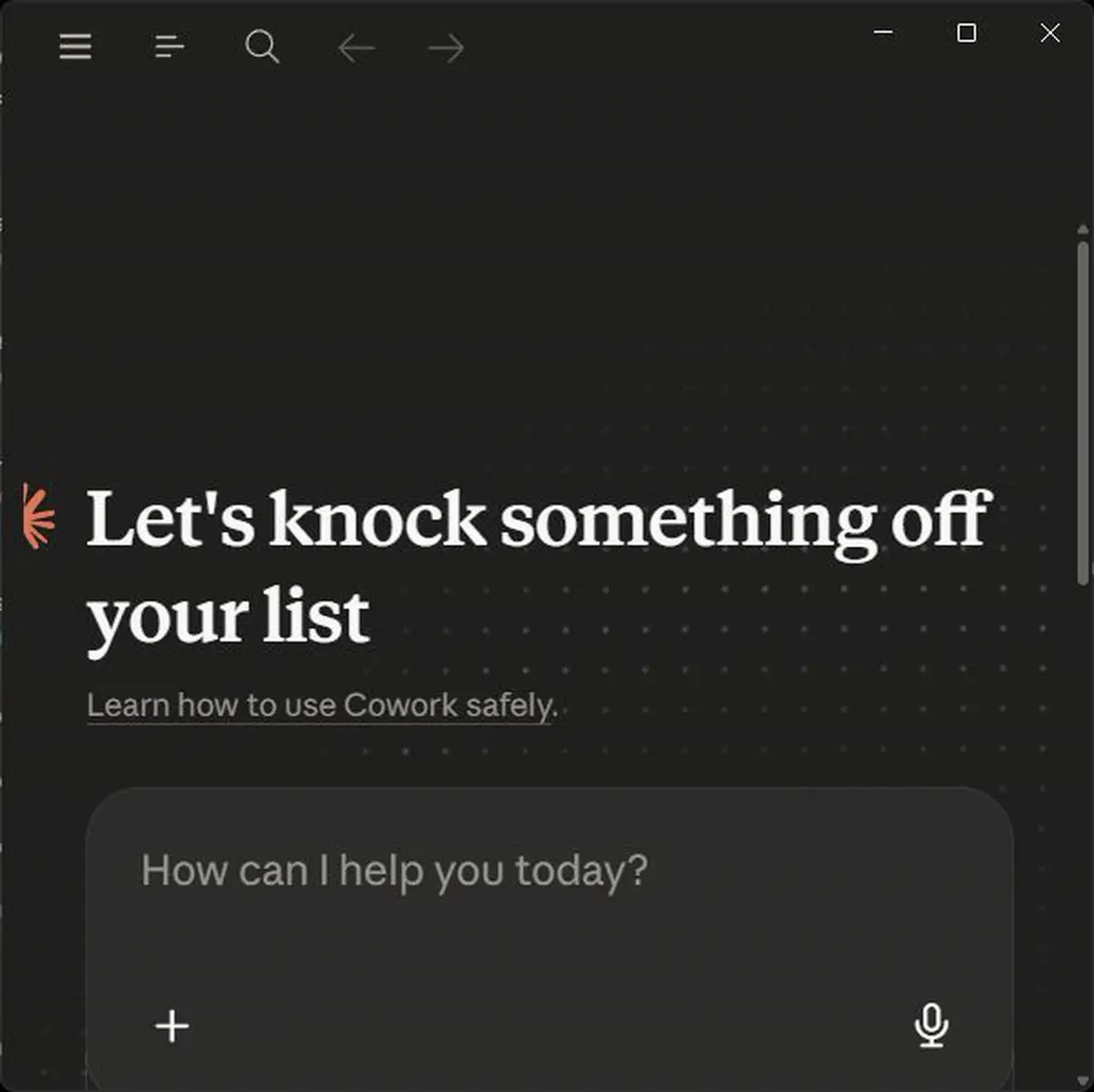
Open the Claude Desktop app on macOS or Windows and find Cowork. Confirm two facts before you plan any work: (a) Cowork is desktop-only, there is no web or mobile Cowork (Pro/Max can message a running task from a phone, but the work runs on the desktop), and (b) it requires a paid plan (Pro, Max, Team, or Enterprise). If you only have web/mobile access or a free plan, that's your blocker to resolve first. You're in the right place when you see the home screen shown here, 'Let's knock something off your list', with a task composer.
HintIf you're trying to do this in a browser, you're in the wrong place. Cowork lives in the desktop app, not claude.com.
On this screen
- 1Desktop-only surface. Cowork is a Claude Desktop feature, verify you're in the app, not the web client.
- 2'Learn how to use Cowork safely' link. Anthropic's own safety primer, linked right on the Cowork home screen, read it once; it covers the same folder and connector boundaries this lesson drills.
Decide: document or diff?
Before opening Cowork for a task, name the finished output in one line and ask where it lives. If it's an artefact a person consumes (a spreadsheet, deck, report, or organised folder) it's a document. Cowork. If it's a change to a codebase (an edit, test, refactor, or commit) it's a diff. Claude Code. Write down the task you're about to run and which side of the line it falls on, and why.
HintRoute by the shape of the output, not by which tool is already open. Forcing a deck through a terminal, or a refactor through a chat box, is the most common mis-route. The shorthand: document → Cowork (GUI, VM sandbox, office output); diff → Claude Code (terminal/IDE, git, per-step review).
Scope a folder and set instructions

Connect ONLY the folder this task needs, in Cowork the mounted folder is the security boundary, so a tight folder is a tight blast radius. Then set custom instructions: a short Global instruction for how you always want Claude to behave, and a Folder instruction scoped to this directory for task-specific context (audience, tone, naming conventions). This carries your standing safety preamble from Lesson 1 into Cowork without re-typing it. Once connected, the folder shows as the task's workspace in the composer, if you can't see which folder is attached, stop and reconnect before sending anything.
HintDon't mount your whole home directory 'to be safe', that's the opposite of safe. Mount the one folder the deliverable lives in.
On this screen
- 1'Choose a different folder'. Claude Desktop's folder picker, the same menu Cowork uses to connect a folder. Pick the one folder the deliverable lives in, nothing broader.
Add only the connectors and plugins the task needs
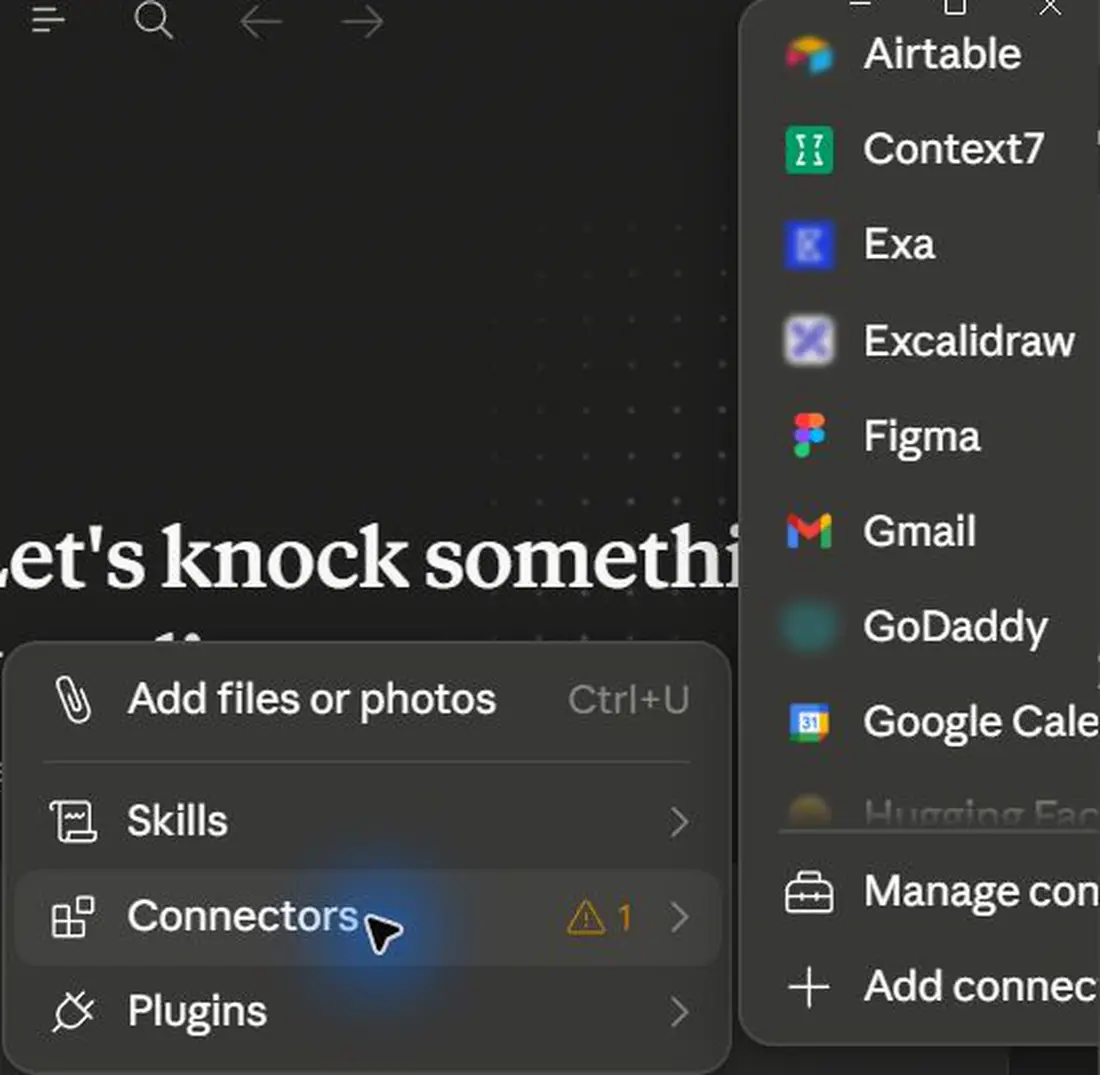
If the task needs an app (Drive, Gmail, Slack, Linear, etc.), add that connector from the Connectors Directory and authenticate; for a bundled capability, install a plugin from a trusted marketplace (Knowledge Work is the default). Read what a plugin bundles before installing, some carry a local MCP server that runs on your machine. Then, per conversation, toggle on only the connectors this task requires and leave the rest off. Done when only the connectors this task needs show enabled for the conversation and the rest stay off.
HintA connector never grants more than your own access, but the safest connector is the one you didn't enable for a task that didn't need it.
On this screen
- 1Plugins row. Plugins can ship a local MCP server, install from curated/known marketplaces you trust.
- 2Connectors submenu. Enable only the connectors the current conversation needs; turn off the rest. The warning badge beside Connectors flags one needing attention, check it before running.
Run the plan-then-approve loop

Give Cowork the task using the production brief pattern from this lesson: a clear deliverable, the in-scope folder, 'plan first then stop for approval,' and 'don't invent missing data.' Keep the permission mode on 'Ask before acting' so Claude pauses at significant steps; switch to 'Act without asking' only for low-stakes, well-understood tasks. Review the plan it proposes before you approve, then watch or step away. Success at this step is a posted plan and a paused agent. Cowork should be waiting on you, not building.
HintRead the plan, not just the result. The plan is cheap to inspect and free to reject; a wrong-but-finished deliverable costs you the rebuild.
On this screen
- 1'Ask mode' chip. 'Ask before acting' pauses at each significant step, keep it on for sensitive work; deletes are always confirmed either way.
- 2'Project scoped' chip. The task runs against the one folder you connected, confirm both chips before you hit Start task.
Verify the deliverable before you ship it

Open the finished artefact and verify it the way Lesson 8 taught for code: spot-check three to five figures against the source PDFs, click into spreadsheet cells to confirm real formulas rather than pasted numbers, and read the deck against the brief's slide spec. If anything is wrong, ask Cowork to revise in the same task so it keeps full context. You've verified properly when you can name the exact cells or figures you checked and what they matched against.
HintA polished deck with one fabricated figure is worse than no deck, the formatting hides the error. Verify the numbers, not the formatting.
On this screen
- 1'Source facts checked'. Verification is a step, not a vibe, confirm figures against the inputs before accepting.
- 2Accept / Ask to revise. Refine in the same task so Cowork keeps the context of what it built and why.
Save it as a recurring task or Project
If this is work you'll repeat (a weekly report, a monthly board pack, a recurring data pull), save the task so Claude can run it on demand or on a cadence, and consider grouping related tasks into a Project, its own files, context, instructions, and memory. Note that memory persists inside a Project but not across standalone Cowork sessions, so put anything that must carry over into the Project. You'll know it worked when the saved task appears in your task list, or the Project shows the grouped files and instructions.
HintTurn a good one-off brief into a scheduled task once it's proven, that's where Cowork stops being a chat and starts being an operations layer. What's safe to run unattended, and how to bound it, is Lesson 12's whole subject.
Pick one real deliverable (e.g. turn a folder of PDFs or notes into a summary spreadsheet or short deck). Confirm it's a 'document' task that belongs in Cowork, connect only the one folder it needs, set a Folder instruction with audience/tone, enable only the connectors required, then run it with the production brief: plan-first, 'Ask before acting,' and 'don't invent missing data.' Review the plan before approving, verify the finished artefact (real formulas, spot-checked figures), then save it as a recurring task if you'd repeat it.
A finished, verified Cowork deliverable (spreadsheet, deck, report, or organised folder, figures spot-checked against sources, formulas confirmed real) produced from a tightly scoped folder, with least-privilege connectors, an approved plan, and, if repeatable, a saved/scheduled task or a Project to run it again.
Production prompt examples
ROLE: You are a meticulous analyst producing a finished, client-ready deliverable. I review your plan before you build anything.

CONTEXT:
- Surface: Claude Cowork (desktop). The only folder in scope is the connected folder "Q2-board-pack". Read and write ONLY inside it.
- Inputs in that folder: ~12 monthly PDF exports (revenue, churn, headcount) named like "2026-04-metrics.pdf".
- Audience: the board. Tone: concise, factual, no hype.

TASK: Produce two deliverables in the same folder:
1. "Q2-summary.xlsx", one row per month, columns for revenue, MoM growth %, churn %, headcount. Use real working formulas for the growth and any totals (not pasted numbers).
2. "Q2-board-summary.pptx", 6 slides max: title, the quarter in one chart, three highlight slides (one metric each), and a one-slide outlook. Pull every number from the xlsx.

CONSTRAINTS:
- PLAN FIRST: show me your step-by-step plan and which files you'll read/create, then STOP and wait for my approval before doing anything.
- Keep "Ask before acting" behaviour: pause before overwriting any existing file, and never delete anything without asking.
- Do not reach any network domain or connector you weren't given; everything you need is in the folder.
- If a PDF is unreadable or a number is missing, list it and ask, do not invent or estimate figures.

OUTPUT FORMAT:
1. Your plan as a short numbered list (then stop for approval).
2. After I approve: the two files in the folder, plus a 3-line note on what you built and any data you flagged.
- ROLE + 'finished, client-ready deliverable' tells Cowork the output is a document/artefact (its lane), not advice, this is the document-vs-diff routing made explicit in the prompt.
- CONTEXT names the single in-scope folder; in Cowork the mounted folder IS the security boundary, so stating 'read and write ONLY inside it' aligns the prompt with the VM/folder sandbox.
- TASK specifies the exact artefacts (xlsx + pptx), file names, and that formulas must be real, this is what makes Cowork's deliverable genuinely editable later rather than a screenshot of numbers.
- 'PLAN FIRST … then STOP and wait for my approval' is the plan-then-approve loop turned into an instruction, your review gate before any significant action.
- 'Pause before overwriting / never delete without asking' matches Cowork's 'Ask before acting' mode and its always-confirm-deletes rule, so the prompt reinforces the safe defaults rather than fighting them.
- 'Do not reach any network domain or connector you weren't given' keeps the task inside the egress allowlist and stops connector over-reach.
- 'List missing numbers and ask, do not invent' prevents the most damaging failure for a board deck: a confidently fabricated figure.
Common mistakes to avoid
- Mis-routing the task: forcing a code refactor through Cowork (losing per-step diff review and git) or forcing a document/deck through Claude Code (fighting a terminal to do GUI work).
- Looking for Cowork on the web or mobile, it's a desktop-app-only feature on paid plans; there is no free or browser Cowork.
- Mounting your whole home directory 'to be safe', in Cowork the connected folder is the blast radius, so a broad mount is a broad risk.
- Trusting the VM sandbox to cover everything, it limits what Claude can reach, but a connector still inherits your real permissions, so a misled agent can still email the wrong person or write a bad file into a mounted folder.
- Installing plugins from untrusted sources without realising they can bundle a local MCP server that runs on your machine.
- Leaving every connector toggled on in every conversation instead of enabling only what the task needs.
- Running 'Act without asking' on sensitive work to save time, then being surprised by an action you'd have stopped at the plan stage.
- Expecting memory to carry across standalone Cowork sessions, it persists inside a Project, not between one-off chats.
Source conflicts to review
- Cowork's general-availability date is reported inconsistently across sources (e.g. macOS+Windows via Claude Desktop on 9 April 2026 vs an earlier macOS launch on 12 Jan 2026 with Windows on 10 Feb 2026). Treat exact dates as uncertain and confirm on Anthropic's own pages.
- Comparative claims about Cowork burning quota faster and Claude Code being more 'reliable on complex tasks' come mostly from third-party blogs, not a published Anthropic benchmark, directionally useful, not authoritative.
- Feature names and permission-mode labels (e.g. 'Ask before acting'/'Act without asking', Global/Folder instructions) ship and rename quickly, verify in the in-app UI and the official help article before relying on exact wording.
Key terms
- Cowork
- A desktop-app (macOS/Windows, paid plans) agent feature that executes multi-step knowledge work and returns finished deliverables.
- Deliverable
- The artefact Cowork hands back, an Excel sheet, PowerPoint, report, organised folder, or extracted data table.
- Plan-then-approve
- Cowork's loop: it analyses the request, proposes a plan, and waits for your approval before doing anything significant.
- Isolated VM
- The sandbox where Cowork runs shell commands and code, separate from your OS; it can only reach folders you mount.
- Egress proxy / allowlist
- Network control that routes Cowork's outbound traffic and blocks arbitrary URLs by default to prevent exfiltration.
- Folder mount
- Granting Cowork access to a specific folder; the mounted folder is the read/write boundary for the task.
- Global vs Folder instructions
- Custom instructions that apply everywhere (Global) or only within a specific directory (Folder).
- Ask before acting
- Cowork permission mode that pauses for approval at significant steps; 'Act without asking' runs faster. Deletes are always confirmed.
- Connector
- An integration that lets Claude access an app/service and act in it; inherits your own permissions, never more.
- Plugin / Skill
- A plugin bundles skills, connectors, and sub-agents into one installable package; a skill is a reusable instruction set invoked with '/'; sub-agents are helper agents a plugin can spawn to handle sub-tasks.
- Remote MCP
- Custom connectors where Claude reaches your MCP server from Anthropic's cloud, so the server must be publicly reachable.
- Project (Cowork)
- A workspace grouping related tasks with shared files, context, instructions, and memory that persists within the Project.
Resources
Checkpoint