
Lesson 25 of 38 · Core - 02:00-02:15
Codex App: projects, threads, worktrees, plugins, automations
Master Codex as one agent with many front doors. Set up the desktop App and run isolated, parallel work on a real project folder, but also understand the full surface map. App, IDE, CLI, Cloud/Web, GitHub, and Chrome, the cloud task lifecycle, environments and the internet toggle, and the decision of when to delegate to the cloud versus keep work local. You will leave with a working App setup, a reviewed commit on an isolated worktree, and a clear rule for which surface to reach for next time.
By 2026 Codex is not a single app, it is one agent reachable from six front doors that share your account, your model choice, and your repos. The desktop App is the home base most professionals settle into: a dedicated workspace, separate from the browser, built to run several Codex threads at once against folders on your own machine. But the App is also the launchpad for the rest of the surface map. From it you can delegate long jobs to the cloud, hand a browser task to the Chrome extension, or wake a thread on a schedule. The skill this lesson builds is two-layered. First, the mechanics: install the App, point it at a Git-backed project, set a conservative sandbox, run a thread on its own worktree, and review the diff before anything lands. Second, and this is what separates an operator from a tourist, the judgement of which surface fits which job: when to keep work local and interactive (App/IDE/CLI), when to fire it into a cloud environment and walk away (Cloud/GitHub), and when the task actually needs a signed-in browser (Chrome). Get the mechanics and you can use Codex. Get the surface map and you stop fighting the tool, you put each kind of work where it runs cheapest, safest, and fastest.
Codex architecture, one agent, six surfaces
Choose the Codex surface by where the work should run, then keep review and internet gates explicit.
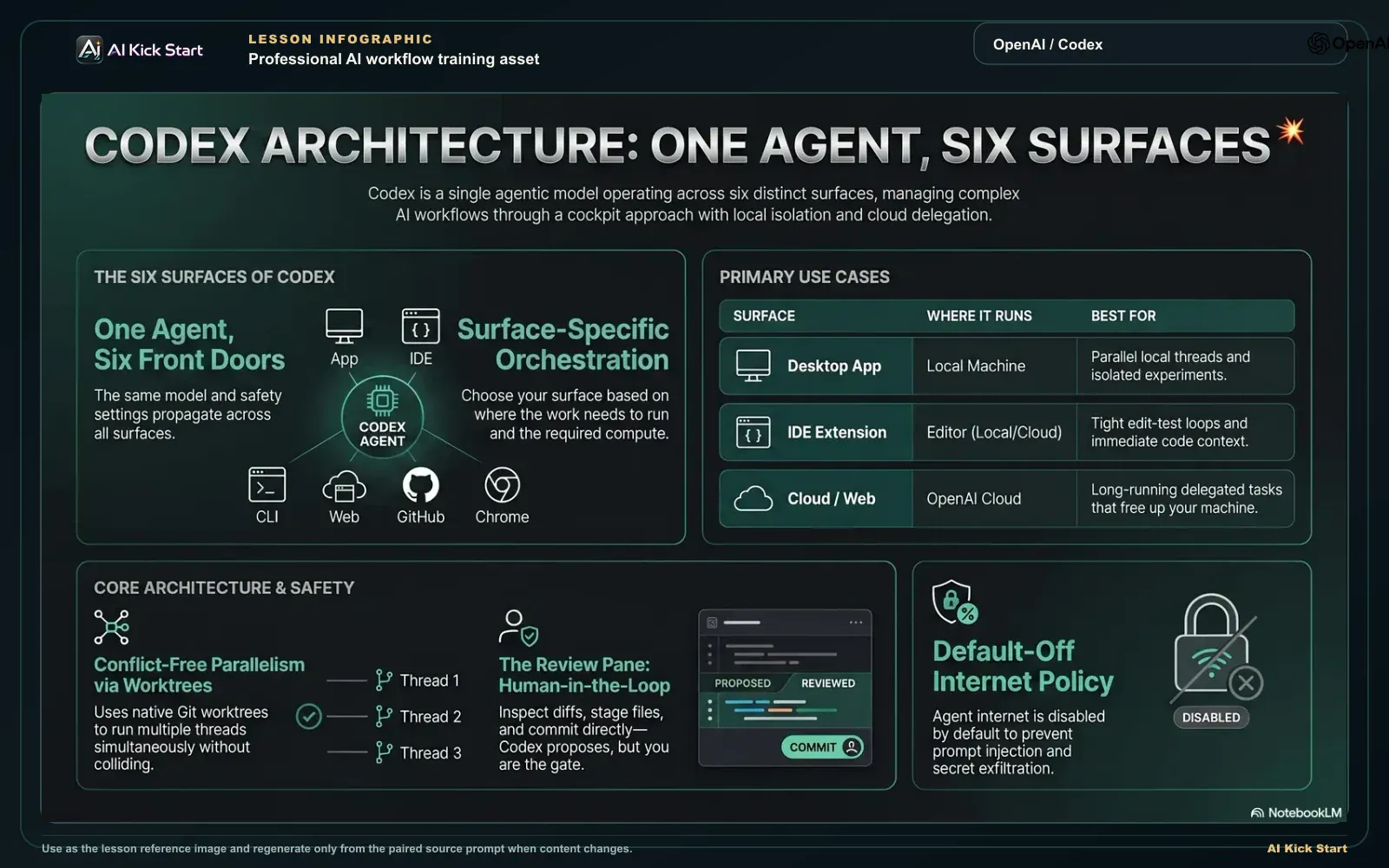
Codex architecture, one agent, six surfaces
A cinematic walkthrough in the AI Kick Start brand style: how Codex works as one agent across App, IDE, CLI, Web, GitHub, and Chrome, with worktrees, the review pane, and cloud delegation.
What to understand
- Codex is one agent behind six surfaces, not six products. The same model, account context, and approval/sandbox concepts show up in the desktop App, the IDE extension (VS Code, Cursor, Windsurf, and JetBrains IDEs), the open-source CLI, the Cloud/Web surface at chatgpt.com/codex, the GitHub integration (@codex on issues and PRs), and the Chrome extension. Learning the App teaches you most of what transfers everywhere else, the differences are about WHERE the work runs, not a different agent.
- The desktop App is a focused workspace for running Codex threads in parallel, with built-in Git worktree support, an integrated terminal, an in-app browser, a Review pane, an Artifacts panel, automations, and plugins/MCP. It runs natively on macOS (Apple Silicon and Intel) and Windows (PowerShell + native sandbox); Linux is on a waitlist as of June 2026.
- A 'project' is simply a folder you grant Codex access to, usually a Git repository, but it can be any working directory. Projects live in the left sidebar so you can keep several open and switch between them; the folder name is how the App labels the project.
- A 'thread' is a single conversation-plus-task against a project. Because the App is built for multitasking, you run several threads side-by-side, each doing independent work, instead of waiting for one to finish before starting the next. Parallelism is the App's core advantage over a single chat window.
- Worktrees use Git's native worktree feature so parallel threads never collide. Each thread can operate on its own checkout, so unfinished or experimental work in one thread cannot contaminate another thread or your main branch, and a failed experiment is discarded by deleting the worktree, not by unpicking commits on main.
- The Review pane is where safety lives on the local surfaces: you inspect diffs line-by-line, address PR feedback, stage individual files, write a commit message, and commit and push from inside the App. Codex proposes; you remain the gate that decides what enters your repository.
- Supporting panels make the App a self-contained cockpit: the integrated terminal runs commands per thread and can launch repeatable project actions; the in-app browser renders local dev servers and lets Codex operate local browser flows; the Artifacts panel surfaces plans, sources, task summaries, and generated-file previews; and Appshots send your frontmost macOS window to Codex as a screenshot for visual context.
- Sandbox and approval settings are two independent dials that govern a thread's autonomy. The sandbox decides WHAT a thread can technically do (read-only, workspace-write, or danger-full-access); the approval policy decides WHEN it must ask you before escalating. These settings carry through to worktrees, automations, and the App's IDE-extension integration, so set a conservative default once and let it propagate.
- Cloud delegation is the App's force multiplier. From the App, the IDE, or chatgpt.com/codex you can hand a longer or independent job to a cloud environment that runs in OpenAI's infrastructure, then come back to review the diff or open a pull request, your machine stays free and you can fire off several cloud tasks in parallel. The local surfaces (App/IDE/CLI) and the cloud surface share the same agent; the choice is about where the compute and the working copy live.
- Cloud tasks run inside an 'environment' you configure per repository: the container image, setup scripts that install dependencies and tools (linters, formatters), environment variables, and crucially the internet-access policy. The environment is the reproducible box your delegated task runs in, get it right once and every cloud task on that repo inherits it.
- Agent internet access is OFF by default during the agent phase, on purpose. Setup scripts still run with internet so you can install dependencies, but the agent itself cannot reach the public internet unless you opt in, and when you do, you choose between an empty allowlist, a 'common dependencies' preset, or unrestricted, optionally capped to safe HTTP methods (GET/HEAD/OPTIONS). This default is your main defence against prompt-injection and secret exfiltration.
- GitHub and Chrome are the two 'reach beyond the repo' surfaces. The GitHub integration lets you kick off work or request a review by mentioning @codex on an issue or PR, and can auto-review every new PR (flagging only P0/P1 issues, guided by your AGENTS.md review guidelines). The Chrome extension lets Codex act inside your signed-in browser session, across task-specific tab groups, in parallel, without taking over your active browsing, for work that genuinely needs authenticated web state.
- Automations and plugins turn the App from a tool into a system. Automations schedule recurring tasks or wake the same thread for ongoing checks; plugins are installable bundles that combine skills, integrations, and MCP server configuration into reusable workflows (for example a Sites plugin to create, deploy, and inspect websites). Both inherit the same sandbox/approval guardrails, automation does not mean un-gated.
Deeper dive
Cloud delegation vs local: where the work should actually run
The single most consequential choice on Codex is not which model, it is whether a task runs locally (App/IDE/CLI) or in a cloud environment (Web/GitHub). They are the same agent, so the decision is about the working copy and the compute, not the intelligence. Run LOCAL when the loop is tight and interactive: you want to watch each step, the change is exploratory, you need your local toolchain or uncommitted state, or the task is short enough that babysitting it is cheaper than configuring an environment. The App's worktrees make this safe even with several experiments at once. Run CLOUD when the job is long, independent, or parallelisable: a multi-file refactor across a clean checkout, a 'fix all the failing tests' sweep, a batch of issues you want turned into PRs overnight. Cloud frees your machine, runs many tasks at once, and produces a reviewable diff or pull request, but it pays a fixed setup cost (you must define an environment) and runs against the repo's committed state, not your local working copy. The trap beginners fall into is delegating tiny tweaks to the cloud (where the environment setup dwarfs the task) or grinding huge independent refactors locally (where they tie up the machine and block parallelism). The operator heuristic: if you'd be comfortable handing the task to a competent contractor with only the repo and a written brief, it's a cloud task; if you need to be in the room pointing at things, keep it local.
Why agent internet is off by default, and the real cost of turning it on
Codex cloud environments draw a hard line between the SETUP phase and the AGENT phase. Setup scripts run WITH internet so you can install dependencies; then the agent runs with internet OFF by default. This is not a limitation to route around, it is the primary security boundary for delegated work. Turning agent internet on opens four concrete risks the docs name explicitly: prompt injection (the agent fetches a page that contains instructions and follows them), code or secret exfiltration (the agent POSTs your source or a token somewhere), pulling malware or vulnerable dependencies at runtime, and tripping license restrictions. The mitigation ladder is the whole point of the design: prefer OFF; if you must enable it, start from an empty allowlist and add only the exact domains the task needs, or use the 'common dependencies' preset rather than 'all (unrestricted)'; and cap the agent to safe HTTP methods (GET/HEAD/OPTIONS) so it can read but not push. The discipline mirrors Lesson 1's red lines: 'reach the public internet' is an irreversible-ish action (you cannot un-send an exfiltrated secret), so it gets the tightest gate. Point Codex only at trusted resources, and treat 'unrestricted internet for a cloud agent' the way you'd treat handing someone your laptop with all your sessions logged in, occasionally necessary, never the default.
Why worktrees and parallel threads change how you work, not just where
Most people arrive from a single-chat mental model: one conversation, one change, finish it, start the next. The App's worktrees-plus-parallel-threads design rewards a different shape of work. Because each thread can run on its own Git worktree, a real, separate checkout on disk that shares the repo's history, three threads editing the same repo never see each other's uncommitted changes. That means you can run a speculative refactor, a bug fix, and a docs pass simultaneously, each fully isolated, and merge only the ones that work. The payoff is not just speed; it changes your risk posture. A worktree is disposable: if the experiment goes sideways you delete the worktree and main is untouched, no revert, no force-push, no 'how do I undo this'. This is the local mirror of cloud delegation's parallelism, and it's why the App is built around threads rather than a single session. The cost to internalise: worktrees only exist under Git, so a non-Git folder gives you a degraded App (no isolation, no clean diffs, a Review pane with nothing to stage). The first habit to build is therefore boringly mechanical, point the App at version-controlled folders, because that one prerequisite is what unlocks the App's entire safety and parallelism story.
Codex surfaces compared, where each kind of work belongs
The six front doors to the same Codex agent, what each is best at, where the code actually runs, and the default safety posture. Use this as a routing table: pick the surface by where the work should execute, not by habit. Codex ships rapidly, feature names and defaults change; verify at developers.openai.com/codex before relying on specifics.
| Surface | Where it runs | Best for | Internet / autonomy default | Reach for it when |
|---|---|---|---|---|
| Desktop App | Your machine (local files + worktrees) | Parallel local threads, worktree-isolated experiments, integrated review/terminal/browser | Sandbox you set (read-only / workspace-write); approvals on-request | You want a dedicated multi-thread cockpit on a real local repo, the default home base |
| IDE extension | Your machine (inside the editor) or delegated to cloud | Tight edit-test loops with @file context; previewing cloud diffs and applying them locally | Chat / Agent / Agent (Full Access) modes you choose | You live in VS Code / Cursor / Windsurf / JetBrains and want the agent beside your code |
| CLI | Your machine (terminal, in the chosen directory) | Scriptable, headless, CI-friendly runs; piping into other tools; SSH hosts | Sandbox: read-only / workspace-write (default) / danger-full-access | You want automation, reproducible scripts, or to drive Codex from the command line |
| Cloud / Web (chatgpt.com/codex) | OpenAI cloud environment | Long or independent jobs you delegate and walk away from; many tasks in parallel | Agent internet OFF by default; setup scripts get internet | The job is long-running or independent and you don't want it tying up your machine |
| GitHub integration | OpenAI cloud, triggered from GitHub | Kicking off tasks from issues/PRs (@codex) and automatic PR code review (P0/P1, AGENTS.md-guided) | Inherits the repo's cloud environment + internet policy | Work starts from a GitHub issue/PR or you want every PR auto-reviewed |
| Chrome extension | Your signed-in Chrome session (macOS/Windows) | Tasks needing authenticated web state. LinkedIn, Gmail, Salesforce, internal tools; multi-tab | Per-site approvals; works in task-specific tab groups, not your active tabs | The task genuinely needs your logged-in browser, not a repo or an API |
Sources (as of June 2026): Codex. App · Codex. IDE extension · Codex. CLI · Codex. Web/Cloud · Codex. Code review in GitHub · Codex. Chrome extension
One Codex agent, six front doors
Same model and account everywhere, the difference is WHERE the work runs. Read each card as: pick this surface when your work matches its job.
The home-base cockpit: parallel local threads, worktree-isolated experiments, and an integrated terminal / browser / Review pane. Reach for it as your default for real local repos.
Codex beside your code in VS Code, Cursor, Windsurf, or JetBrains: tight edit-test loops with @file context, plus previewing and applying cloud diffs locally.
Scriptable, headless, CI-friendly runs you can pipe into other tools or drive over SSH. Reach for it when you want automation and reproducible scripts.
Delegate long or independent jobs and walk away; run many in parallel without tying up your machine. Agent internet is OFF by default, setup scripts still get it.
Kick off work by mentioning @codex, and auto-review every new PR (P0/P1 only, guided by AGENTS.md). Inherits the repo's cloud environment and internet policy.
Acts inside your authenticated session across task-specific tab groups, for work that genuinely needs logged-in web state, not a repo or an API.
Step by step
Install the App and sign in
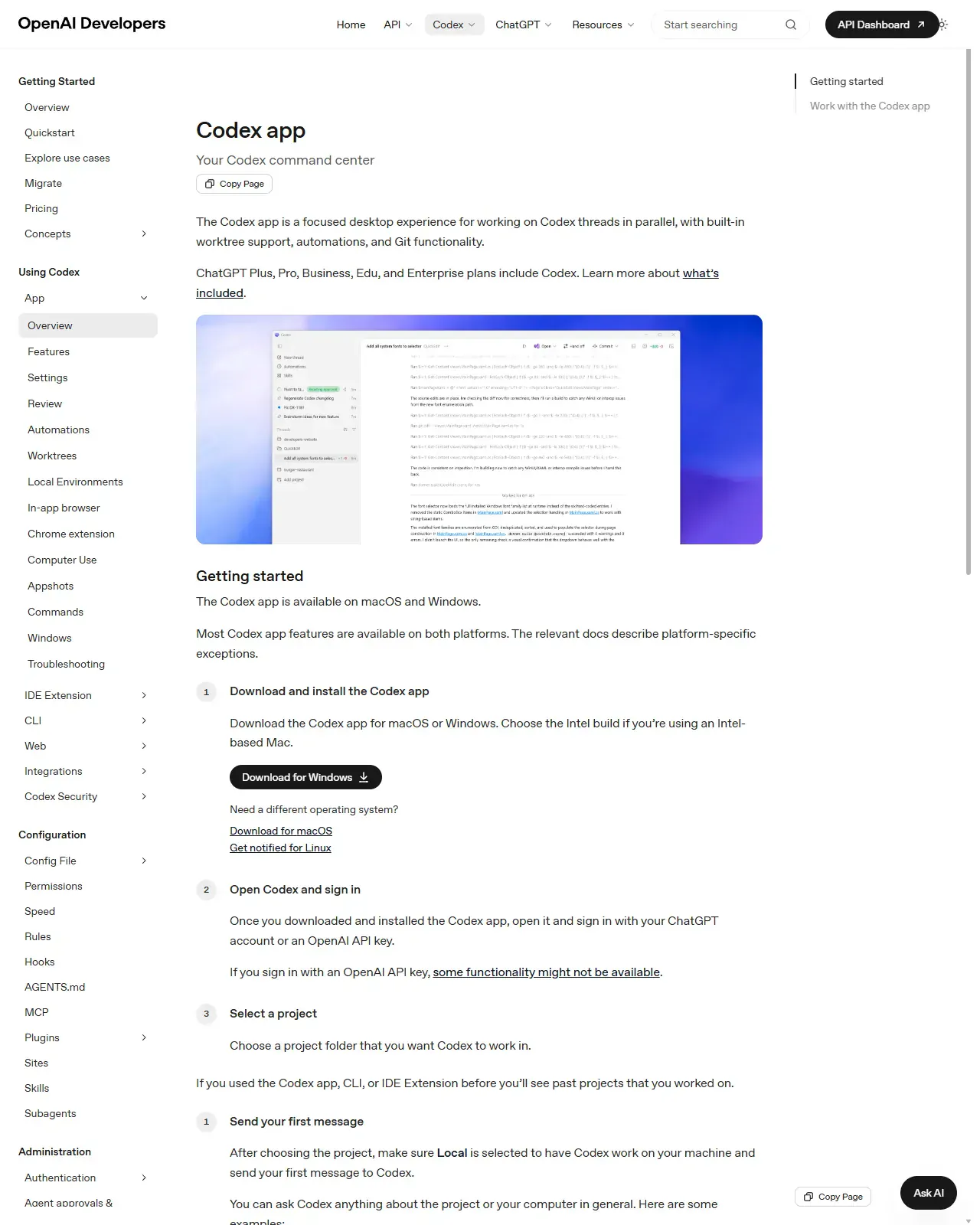
Download the Codex App from the official Codex app page (the page shown), macOS (Apple Silicon/Intel) or Windows build. Launch it and sign in with your ChatGPT credentials for subscription billing, or paste an OpenAI API key if you prefer metered key-based usage. Note your model options (e.g. the GPT-5.x-codex family) but don't change anything yet. You're done when the App opens, your account shows in Settings, and the composer's model picker lists the GPT-5.x-codex family.
HintSign in with the same ChatGPT account you'll use on mobile, that's what later (Lesson 11) lets you steer a Mac host from your phone via Remote Connections.
On this screen
- 1Getting-started checklist. The docs page's numbered steps, download, sign in, select a project, send a message, are exactly steps 1, 2 and 4 of this lesson.
- 2Download buttons. Pick your platform here. The Linux desktop App is waitlisted as of June 2026, the CLI and IDE extension already run on Linux.
Add a Git-backed project
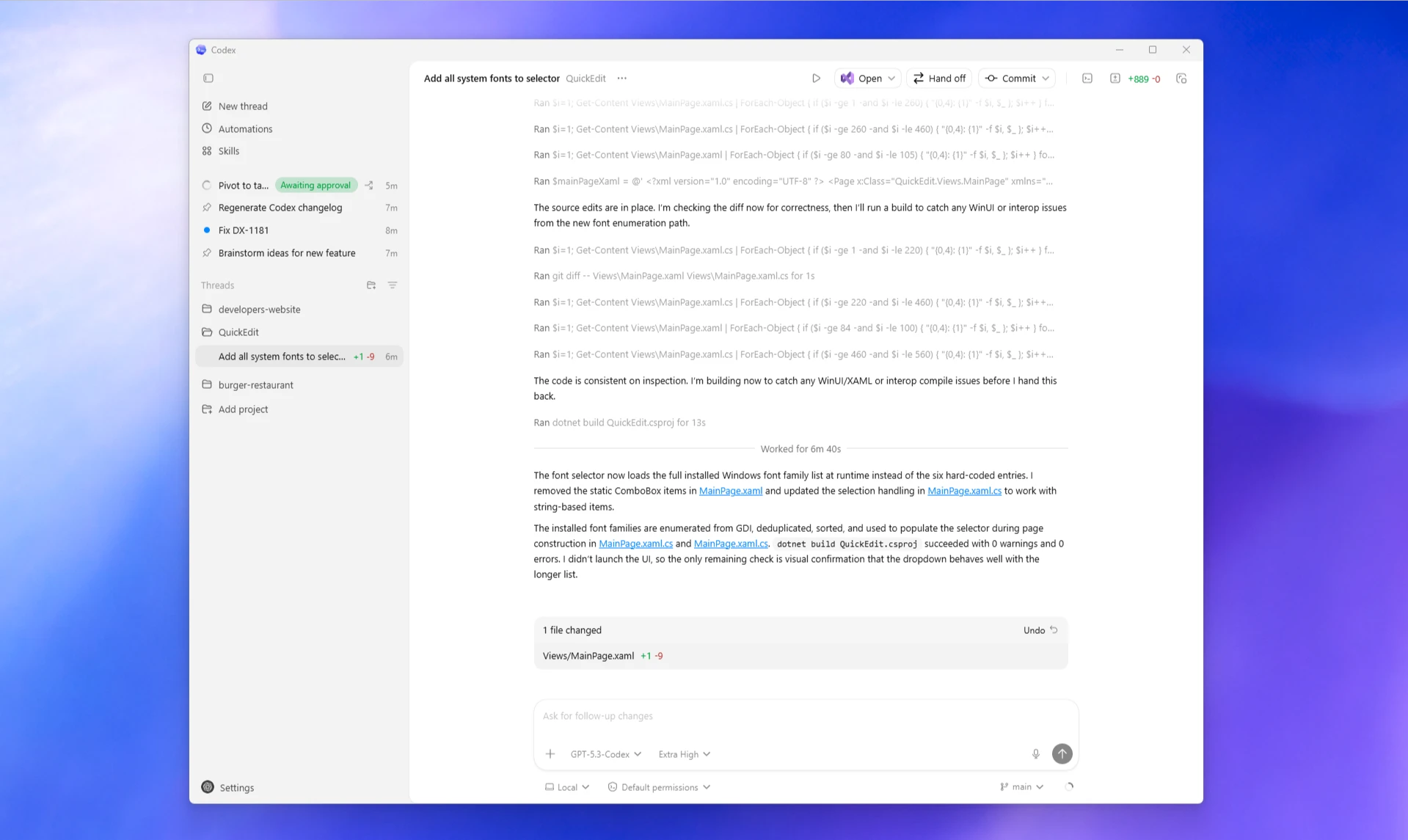
From the project sidebar on the left, add a project and select a folder on your machine. Codex now treats that folder as a project you can open threads against; its name appears in the sidebar. Choose a folder that is already under Git, this is the prerequisite that unlocks worktrees, clean diffs, and a working Review pane.
HintIf `git status` doesn't run cleanly in the folder, fix that first. A non-Git folder gives you a degraded App with no isolation and nothing to stage.
On this screen
- 1Project sidebar. Holds every folder you've granted access to; click a project to make it active. Keep several open and switch between them.
- 2Branch control (bottom right). The main branch selector in the composer bar confirms the folder is Git-backed, no Git, no worktrees, no clean diffs, nothing to stage in Review.
Set a conservative sandbox and confirm the approval policy
Before sending any message, open the thread's settings and set two independent dials: the SANDBOX (what it can do, choose read-only or workspace-write for a first run, not danger-full-access) and the APPROVAL policy (when it must ask, keep it on-request so it asks before escalating). Remember these propagate to worktrees and automations, so the default you set here travels. You'll know it took when the permissions control in the thread composer shows your chosen mode instead of Default permissions.
HintSandbox = capability (read-only / workspace-write / danger-full-access); approval = friction (when it stops to ask). Lesson 1 introduced the dials; here you set them for real, start tight on both, loosen deliberately per task.
Start a thread and watch the Artifacts panel
With the project active, type a small plain-language task into the active thread, e.g. 'summarise this repository's structure and the entry points' or 'draft a one-line change to the README'. Watch the Artifacts panel populate with its plan, sources, and any file previews as it works. Keep this first task read-only-ish and verifiable: you're testing the loop, not shipping a feature. Success looks like this screenshot, a transcript of commands and reasoning ending in a small change summary you have not yet approved.
HintRead the plan in Artifacts before you approve any edit, it's the cheapest place to catch a misunderstanding, exactly the read-only-first habit from Lesson 1.
On this screen
- 1Active thread workspace. Where you converse with Codex and watch it reason and act, one thread among several you can run in parallel.
- 2Change summary card. The '1 file changed +1 -9' card with Undo is the App surfacing proposed work for review, the same +/- numbers appear beside the thread in the sidebar.
Isolate a change on its own worktree
For any change you're not certain about, run the thread on its own Git worktree so its edits live on a separate checkout. This keeps experimental work isolated from your main branch and from other threads running in parallel. Now start a SECOND thread on the same project to prove parallelism, the two cannot see each other's uncommitted changes. Proof of isolation: ask the second thread to read the file the first thread edited, it sees the committed version, not the uncommitted change.
HintTreat a worktree as a disposable sandbox branch: if the experiment fails you delete the worktree and main is untouched, no revert, no force-push, no cleanup. A worktree is a real separate checkout sharing the repo's history, deleting it discards the experiment cleanly.
Review, stage, and commit, you are the gate
Open the Review pane to inspect the diff line-by-line. Stage only the files you approve, write a commit message, then commit and push from inside the App. Nothing reaches your remote until you take this step, treat it like a pull-request review of your own work. When the commit lands, the Review pane empties and the thread's +/- counters reset.
HintIf the diff includes anything outside the stated scope (reformatted lines, touched config), don't stage it, un-scoped changes are the #1 sign the prompt was too loose. Stage individual files, not all-or-nothing, the Review pane is your final human gate before code leaves your machine.
Decide local vs cloud for your NEXT task
Pick a second, real task and route it deliberately using the surface comparison table and the cloud-vs-local deep dive. If it's tight and interactive, keep it in an App/IDE/CLI thread. If it's long or independent, set up (or reuse) a cloud environment: confirm internet access is OFF by default, define setup scripts for dependencies, and only then delegate. Write down WHY you chose that surface, that reasoning is the skill. If you route to the cloud, carry the two posture facts with you: agent internet is OFF by default (enable narrowly, allowlist plus safe HTTP methods, only if truly needed), and the environment, image, setup scripts, env vars, internet policy, is configured once per repo and inherited by every cloud task on it.
HintThe contractor test: if you could hand the task to a competent stranger with only the repo and a written brief, it's a cloud task; if you'd need to be in the room pointing, keep it local.
Find Automations, Skills and Plugins, then park them
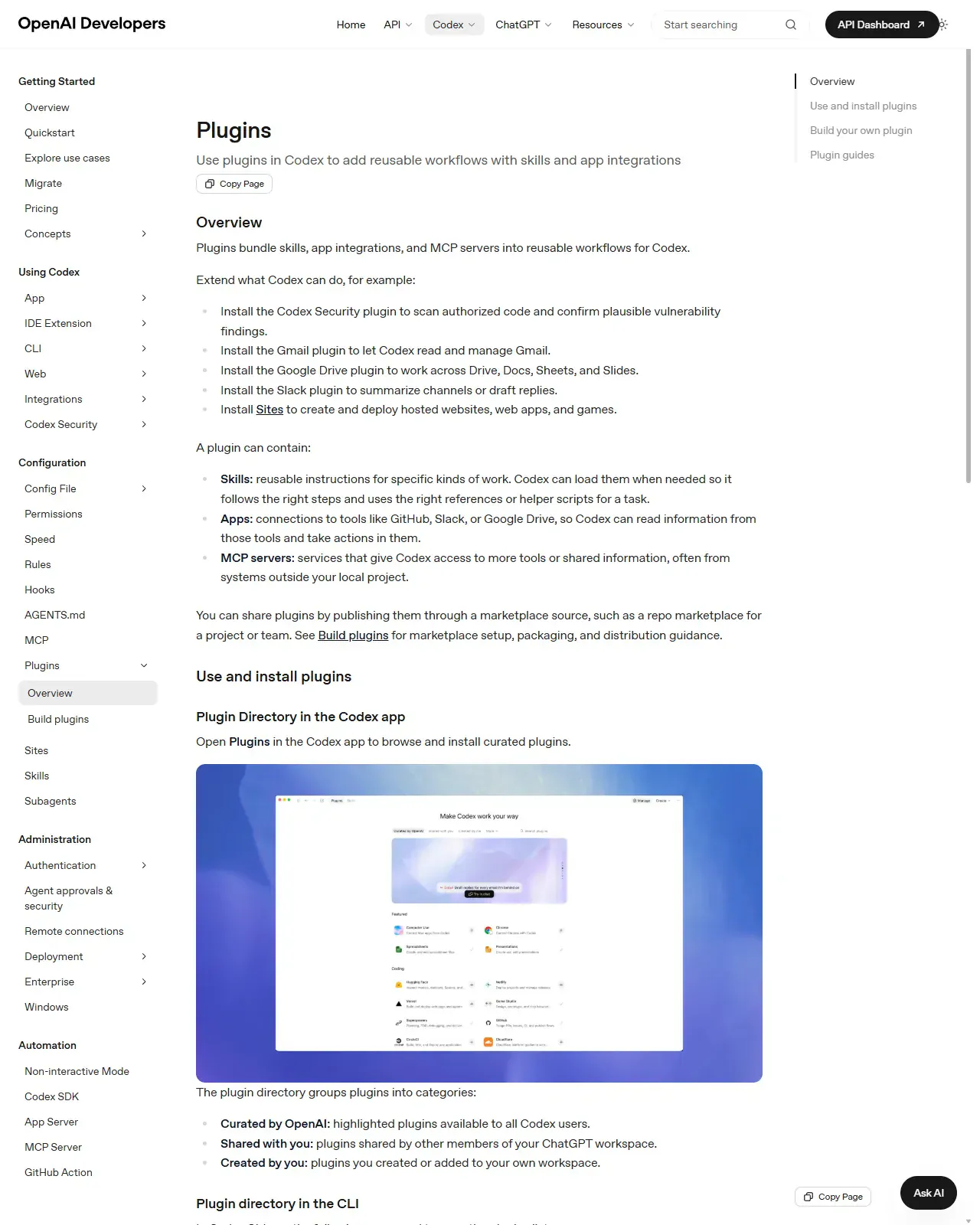
Locate Automations and Skills at the top of the App sidebar (you saw them in step 2's screenshot), then open the plugin directory shown here and read what a plugin bundles, skills, app integrations, and MCP server config in one installable package. Install nothing yet. You're done when you can point at where automations and plugins live and say what each is for.
HintAutomations get a full lesson of their own (Lesson 12), today's job is only to know where the doors are. Treat installing a plugin as a trust decision, not a click.
On this screen
- 1Plugin directory. Plugins are curated by OpenAI, shared from your workspace, or created by you, read what one bundles before installing.
- 2What a plugin extends. Skills, integrations, and MCP servers combined into a reusable workflow, e.g. a Sites plugin to create, deploy, and inspect websites.
Install the Codex App, add a Git-backed folder as a project, set the sandbox to workspace-write with on-request approvals, start a thread that makes one small documented change on a worktree, start a second thread in parallel to prove isolation, then open the Review pane and commit only the files you approve. Finally, take one real upcoming task, decide local-vs-cloud using the surface table, and write one sentence justifying the choice (and, if cloud, confirm internet is off and what setup the environment needs), and, before you finish, find where Automations and the plugin directory live (step 8) without installing anything.
A committed change on an isolated worktree that you reviewed and staged yourself; a second parallel thread proving isolation; and a one-line routing decision for your next task (which surface, and why), with the cloud internet/environment posture noted if you chose to delegate.
Production prompt examples
ROLE: You are a senior engineer running this as an autonomous CLOUD task against a fresh checkout of the repo. I am NOT watching live, assume you must finish and produce a reviewable PR with no further questions unless you are truly blocked.

CONTEXT:
- Repo: this environment's default branch.
- The environment's setup script has already installed dependencies. Do NOT change tooling, lockfiles, or CI config.
- Agent internet access is OFF for this task. If you believe you need a network call, STOP and report it in the PR description instead of attempting it.

GOAL (single, verifiable):
Migrate every call site of the deprecated `getUserById(id)` helper to the new `users.findById(id)` API, then delete the deprecated helper. Behaviour must not change.

SCOPE / GUARDRAILS:
- In scope: src/** call sites and the helper's own file. Out of scope: tests' intent (you may update test imports, not test assertions), public API shape, formatting of unrelated lines.
- Make the smallest diff that achieves the goal. Do not opportunistically refactor or reformat untouched code.
- Keep each logical change reviewable; do not squash unrelated edits together.

DEFINITION OF DONE (you must verify before opening the PR):
1. `getUserById` no longer exists in the codebase (grep returns nothing).
2. The project builds and the existing test suite passes locally in the environment.
3. No new dependencies, no network calls, no changes outside the stated scope.

OUTPUT:
Open a pull request with: a one-paragraph summary of what changed and why, the exact verification commands you ran and their results, and an explicit 'Risks / things to double-check' list for the human reviewer. If you hit a blocker, open the PR as a draft and put the blocker at the top of the description.
- ROLE frames this as a CLOUD, un-watched task, so the agent optimises for a self-contained, reviewable PR rather than a back-and-forth chat (the opposite of a local interactive prompt).
- CONTEXT pins the environment assumptions (deps installed, don't touch tooling) so the agent doesn't waste the run reconfiguring the box or fighting the setup phase.
- 'Agent internet access is OFF … STOP and report instead of attempting' makes the security default explicit and turns a would-be silent network call into a visible line in the PR, the deepDive's mitigation, operationalised.
- A SINGLE verifiable GOAL is what makes a task safe to delegate: a cloud agent with no human in the room needs an unambiguous finish line, not an open-ended 'improve things'.
- SCOPE / GUARDRAILS cap the blast radius, the most common cloud-task failure is an agent 'helpfully' reformatting or refactoring far beyond the ask, which makes the diff unreviewable.
- DEFINITION OF DONE gives the agent its own acceptance tests (grep clean, build green, suite passes) so it self-verifies before producing the PR, instead of handing you unverified work.
- OUTPUT demands the PR carry its own audit trail (what ran, results, risks), because in cloud delegation the PR description IS your review surface; a draft-with-blocker rule prevents a stuck agent from silently doing the wrong thing.
Common mistakes to avoid
- Pointing Codex at a folder with no Git history, then wondering why worktrees, clean diffs, and the Review pane don't work. Git is the prerequisite, not an optional extra.
- Treating the App as the whole of Codex and never learning the other surfaces, so long independent jobs tie up your machine instead of running in the cloud, and browser tasks get hacked together instead of using the Chrome extension.
- Leaving the sandbox on danger-full-access (or the IDE on 'Agent (Full Access)') for a first run instead of starting read-only or workspace-write with on-request approvals.
- Committing straight from a thread without opening the Review pane, so un-scoped changes (reformatted lines, touched config) slip into the repo.
- Running everything in one thread instead of using parallel threads and worktrees to keep experiments isolated and disposable.
- Enabling unrestricted agent internet on a cloud task 'to be safe', inverting the actual safety default, internet is OFF for a reason; turn it on narrowly, with an allowlist and safe HTTP methods, only when the task needs it.
- Delegating a trivial tweak to a cloud environment (where setup cost dwarfs the task) or grinding a huge independent refactor locally (blocking your machine and losing parallelism), the local-vs-cloud choice is a real cost decision.
Source conflicts to review
- Surface naming drifts across OpenAI's own docs and third-party guides: the cloud surface is labelled 'Web' in the App nav but documented under /codex/cloud, and the Chrome integration is sometimes called a 'plugin'. Names here are accurate as of June 2026, re-verify and distrust tutorials more than a few weeks old.
- Autonomy controls use different vocabulary per surface (IDE: Chat / Agent / Agent (Full Access); CLI & App sandbox: read-only / workspace-write / danger-full-access) for the same underlying idea, don't assume a setting name on one surface exists verbatim on another.
- Capabilities are moving fast (computer use, Goal mode, Appshots, the Chrome extension, the Sites plugin and auto-review all shipped between March and June 2026). A given feature may have changed defaults or names since this snapshot, confirm on the changelog at developers.openai.com/codex/changelog.
- Desktop App Linux support is waitlisted as of June 2026 while the CLI and IDE extension already run on Linux; some write-ups blur 'App availability' with 'Codex availability'.
Key terms
- Surface
- One of Codex's six front doors to the same agent, desktop App, IDE extension, CLI, Cloud/Web, GitHub integration, Chrome extension. Same agent, different place the work runs.
- Project
- A folder you grant Codex access to, shown in the App's project sidebar; usually a Git repository.
- Thread
- A single conversation-plus-task against a project; multiple run in parallel in the App.
- Worktree
- A separate Git checkout that isolates a thread's changes from main and from other threads; disposable, so failed experiments are deleted, not reverted.
- Review pane
- The App panel for inspecting diffs, staging individual files, committing, and pushing, your human gate before code leaves the machine.
- Artifacts panel
- Surfaces Codex's plan, sources, task summaries, and previews of generated or edited files.
- Sandbox mode
- WHAT a thread can technically do: read-only, workspace-write, or danger-full-access.
- Approval policy
- WHEN a thread must ask before acting (e.g. on-request); independent of the sandbox dial.
- Cloud delegation
- Handing a job to a Codex cloud environment (from App/IDE/Web) so it runs on OpenAI infrastructure, freeing your machine and enabling many parallel tasks.
- Environment (cloud)
- The reproducible box a cloud task runs in, container image, setup scripts, environment variables, and internet policy, configured per repository.
- Agent internet access
- Whether a cloud agent can reach the public internet; OFF by default in the agent phase (setup scripts still get internet), with allowlist and safe-HTTP-method options when enabled.
- Automation
- A scheduled or recurring Codex task, or waking the same thread for ongoing checks; inherits the same sandbox/approval guardrails.
- Plugin
- An installable bundle combining skills, integrations, and MCP server configuration into a reusable workflow.
- Appshot
- Sending your frontmost macOS app window to Codex as a screenshot for visual context.
Resources
Checkpoint