





Briefing
Here is the thing nobody tells you when an AI agent first does something useful: the impressive demo and the reliable system are almost unrelated problems. An agent that fires one correct tool call, reads your calendar, drafts an email, looks great in a screen recording. An agent that strings together fifty correct tool calls to actually finish a migration or close out a workflow is a different animal entirely.
The reason is uncomfortable and a bit mathematical. Mistakes don't stay small. A slightly off result from the third step quietly becomes a badly wrong input by the twelfth, and by the twenty-fifth the agent is confidently producing nonsense. For a business team weighing whether to trust an agent with real work, that is the whole ballgame.
The good news is that this is an engineering problem, not a magic problem. The teams getting long agent chains to behave aren't waiting for a smarter model. They're borrowing patterns that database and distributed-systems people have used for decades: checkpoints, rollbacks, validation, and a human in the loop when the stakes are high. Below is how that actually works.
An agent that makes one correct tool call is a demo. An agent that makes fifty correct tool calls in sequence is a production system. The gap between the two is large. Long tool chains fail because errors compound: a slightly wrong output from call 3 becomes a significantly wrong input to call 12, and by call 25 the agent is generating nonsense. Building reliable long chains takes architectural patterns, not just better models.
Why Long Chains Fail
Three failure modes dominate long tool chains.
Error accumulation: Each tool call has some error rate. With 50 calls and a 2% per-call error rate, the probability of at least one error is 64% (opens in a new tab) (the maths is straightforward: 1 minus 0.98 to the power of 50). With 100 calls it climbs to 87% (opens in a new tab). Small per-call errors compound into chain-wide failure.
Context drift: As the chain runs on, the agent's context window fills up with intermediate results. Early context gets pushed out, and the agent loses the thread on the original goal. By call 40 it may have forgotten why call 1 happened at all.
Dependency blindness: Tool call N depends on the output of tool call N-1, but the agent never explicitly checks that dependency. If call N-1 returns an empty result, call N can proceed with invalid input and produce garbage.
Pattern 1: Checkpoint and Verify
Put verification steps between tool calls. After every 5 to 10 calls, a verification sub-agent checks that intermediate results are correct and consistent.
# Checkpoint pattern
for i, tool_call in enumerate(chain):
 result = execute(tool_call)

 # Every 5 calls, verify
 if i % 5 == 0:
 verification = verify_checkpoint(
 goal=original_goal,
 progress=results_so_far,
 next_step=tool_call
 )
 if not verification.is_consistent:
 # Backtrack to last good checkpoint
 results = rollback_to_last_checkpoint()
 # Adjust strategy based on verification findings
 chain = replan_from_checkpoint(results, verification.issues)
Claude Code has a real checkpointing and rewind system (opens in a new tab): it saves state before each edit, and you can restore code, the conversation, or both. Applying that as a per-tool-call verification mechanism is a bit of an editorial stretch, since the documented feature is closer to file and edit rewind plus subagents. Hermes Agent (NousResearch/hermes-agent (opens in a new tab)) reportedly uses its self-improving learning loop to surface which verification checks work best for different task types, though the loop's documented job is broader skill and memory extraction rather than tuning verification specifically.
Pattern 2: Dependency Graph Execution
Instead of a linear chain, model tool calls as a dependency graph. Independent calls run in parallel. Dependent calls wait for their prerequisites. The graph makes dependencies explicit and lets you parallelise.
from dataclasses import dataclass
from typing import List, Set

@dataclass
class ToolNode:
 id: str
 tool: str
 params: dict
 dependencies: Set[str] # Node IDs that must complete first
 verification: callable # Function to verify output

# Build dependency graph
graph = [
 ToolNode("1", "read_schema", {}, set(), verify_schema),
 ToolNode("2", "read_models", {}, set(), verify_models),
 ToolNode("3", "generate_migration", {}, {"1", "2"}, verify_migration),
 ToolNode("4", "write_tests", {}, {"2"}, verify_tests),
 ToolNode("5", "apply_migration", {}, {"3", "4"}, verify_applied),
]

# Execute in dependency order with parallelisation
execute_graph(graph, max_parallel=4)
Pattern 3: Semantic Output Validation
Validate every tool call output before it becomes input to the next call. Make the checks semantic, not just syntactic:
# Semantic validation examples
def validate_schema_migration(output):
 assert output.contains("up"), "Migration must have up direction"
 assert output.contains("down"), "Migration must have rollback"
 assert len(output.tables_affected) > 0, "Migration must affect at least one table"
 # Verify no destructive operations without explicit flag
 assert not (output.has_drop_table and not output.force_flag), "DROP TABLE requires --force flag"

def validate_api_response(output):
 assert output.status in [200, 201, 204], f"Unexpected status: {output.status}"
 assert output.content_type == "application/json", "Expected JSON response"
 assert output.body is not None, "Empty response body"
Hermes stores its skills in the agentskills.io (opens in a new tab) format, an open standard where a skill is just a folder with a SKILL.md. The article's claim that the spec includes output schemas enforcing these validations automatically goes further than the public spec, which describes the standard as deliberately tiny (metadata plus instructions). OpenClaw, a self-hosted agent framework with its own AgentSkill system, reportedly carries a comparable validation layer, though that specific capability isn't corroborated by available write-ups (opens in a new tab) and reads as an editorial assertion.
Pattern 4: Compensating Transactions
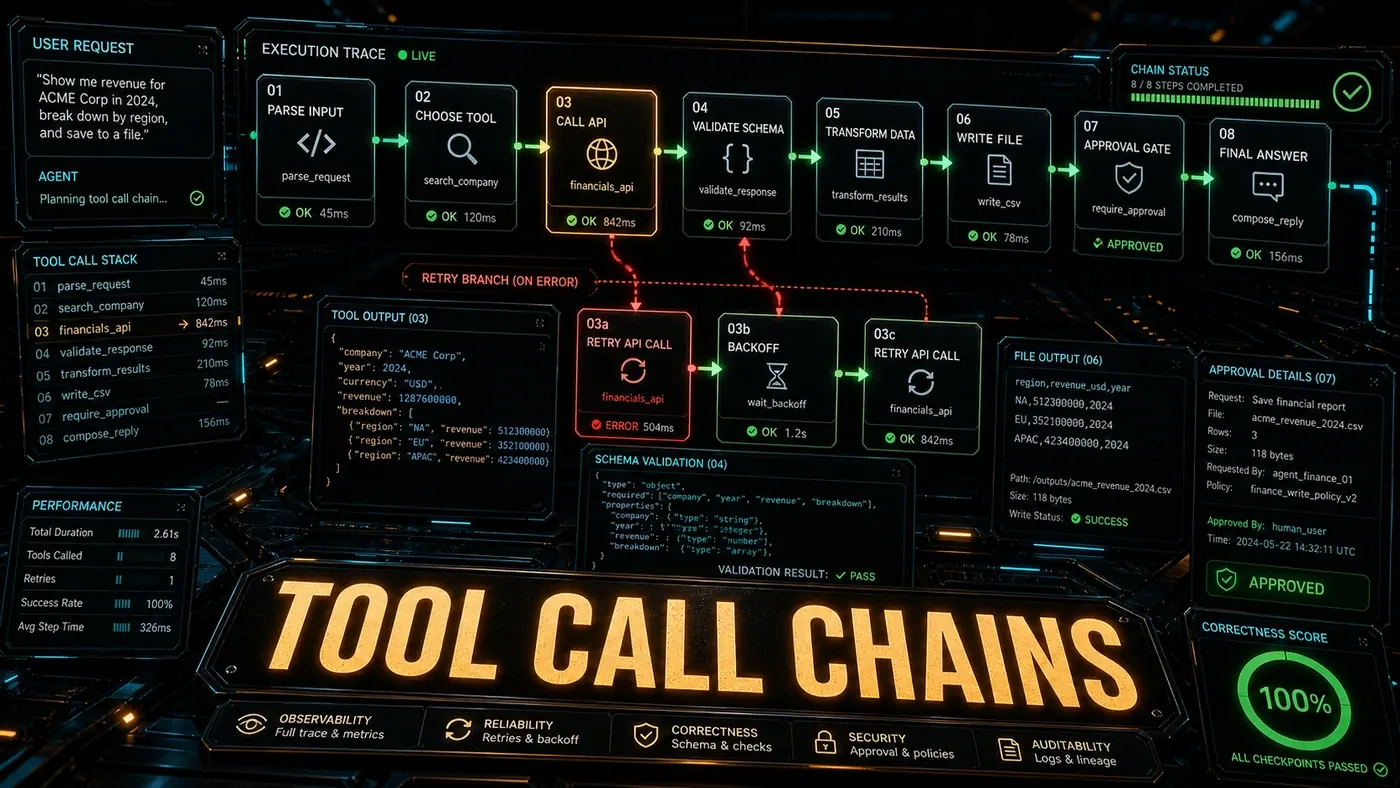
For destructive operations, build compensating transactions: undo steps that reverse a tool call if the chain fails later.
# Migration chain with compensating transactions
chain = [
 ToolCall("create_backup", rollback="restore_backup"),
 ToolCall("create_new_table", rollback="drop_new_table"),
 ToolCall("dual_write", rollback="disable_dual_write"),
 ToolCall("backfill", rollback="clear_backfill"),
 ToolCall("switch_read", rollback="switch_read_back"),
]

try:
 execute_with_rollback(chain)
except ChainFailure as e:
 # Rollback all completed steps in reverse order
 for completed in reversed(e.completed_steps):
 if completed.rollback:
 execute(compensated.rollback)
Pattern 5: Human-in-the-Loop Gates
For critical or irreversible operations, add a human approval gate. The agent shows what it plans to do, a person approves or changes it, and the chain continues. It costs you some latency and it prevents the kind of failure you can't walk back.
# Human approval gate
if tool_call.risk_level == "high":
 approval = request_human_approval(
 action=tool_call.description,
 impact=tool_call.impact_analysis,
 rollback=tool_call.rollback_description
 )
 if not approval.granted:
 chain.skip_or_alternative(tool_call, approval.suggestion)
Building Reliable Chains: Rules of Thumb
- Never chain more than 10 calls without a checkpoint. Error accumulation makes longer chains unreliable once you drop verification.
- Always validate outputs semantically. Checking that the JSON parses is not enough. Confirming that values sit in expected ranges and required fields are present is what catches the real errors.
- Make dependencies explicit. Implicit dependencies through shared state are the most common way chains break.
- Implement rollbacks for destructive operations. Assume the chain will fail and plan the recovery up front.
- Parallelise where you can. Dependency graph execution cuts total latency and isolates failures.
Long chains of correct tool calls are what separate agent demos from agent production systems. The patterns above aren't theoretical. They show up, by various accounts, in the agent deployments that hold up best under real load.
Tool Calling Mastery: answer-first summary
Tool Calling Mastery matters because it can change how Australian business teams plan, build, or govern an agent workflow. Elite agentic engineers build tool chains that stay correct across dozens of sequential calls.
The direct answer is this: do not treat the topic as a standalone trend. Treat it as a decision about inputs, outputs, review ownership, data exposure, and whether the workflow produces a result that is faster, safer, or more useful than the current process.
Tool Calling Mastery: implementation checklist
- Define the user, job to be done, and success metric for the agent workflow.
- Collect real examples, policies, source files, customer questions, or search queries before writing prompts or choosing tools.
- Separate low-risk drafts from decisions that need approval, privacy checks, or senior review.
- Document what the AI is allowed to access, what it must not access, and who signs off before production use.
- Review successful task completion, review time, fallback rate, operator corrections after a small pilot rather than judging the idea from a demo.
This keeps the work practical. It also gives search engines and AI answer engines a clean factual structure: what the topic is, who it helps, what to do next, and which risks matter before implementation.
Decision criteria for Tool Calling Mastery
| Decision area | What to check | Production signal |
|---|---|---|
| Intent | Does Tool Calling Mastery solve a real workflow problem? | The use case has a named owner and measurable outcome. |
| Data | Can the required data be used safely? | Sensitive data is classified and access is controlled. |
| Quality | Can a reviewer judge the output consistently? | Examples, rubrics, or acceptance criteria exist. |
| Scale | Can the workflow be repeated without hero effort? | The process is documented and can be handed to another team member. |
Practical example for Tool Calling Mastery
A small business could use this article to choose one practical test. For example, a manager might take one customer-facing process, one internal document workflow, or one recurring content task and redesign only that step with AI support. The goal is not to automate the whole business at once; it is to learn where Code creates reliable leverage.
The useful deliverable is a short operating note: the trigger, the source material, the prompt or tool, the review checklist, the escalation rule, and the metric. That note becomes the handover asset for staff training, SEO/GEO content, service delivery, or future agent work.
Risks and controls for Tool Calling Mastery
The common failure pattern is moving too quickly from a promising idea into an unmanaged workflow. For Tool Calling Mastery, the risk is not only bad output. It can also be unclear data permission, staff confusion, duplicate content, unreviewed customer advice, or a tool that quietly changes cost or capability.
- Control unclear tool permissions with a named owner, a review step, and written acceptance criteria.
- Control silent failures with a named owner, a review step, and written acceptance criteria.
- Control prompt drift with a named owner, a review step, and written acceptance criteria.
- Control weak audit trails with a named owner, a review step, and written acceptance criteria.
Measurement plan for Tool Calling Mastery
A useful AI or SEO initiative should leave evidence. Track successful task completion, review time, fallback rate, operator corrections and compare the pilot against the current process. If the measure does not improve, keep the learning but avoid scaling the workflow.
For GEO readiness, the page should also answer the core question directly, define the entities involved, include implementation steps, explain tradeoffs, and link readers to the next relevant AI Kick Start service, guide, tool, or article.
Definitions and entities for Tool Calling Mastery
For search, GEO, and staff handover, define the core entities in plain language. In this article the important entities are the workflow owner, the AI tool or model, the source material, the review process, the risk boundary, and the measurable business outcome. Clear definitions make the page easier for people to scan and easier for AI answer engines to quote accurately.
- Workflow owner: the person accountable for deciding whether Tool Calling Mastery belongs in the business process.
- Source material: the documents, examples, policies, URLs, prompts, videos, or customer questions that ground the output.
- Review boundary: the point where a human checks accuracy, privacy, brand voice, or customer impact before the result is used.
- Success metric: the measure that proves whether the agent workflow is worth repeating.
Tool Calling Mastery versus doing nothing
Doing nothing is also a decision. The cost may be slow manual work, weaker search visibility, inconsistent advice, duplicated effort, or staff using unmanaged AI tools without a shared process. The practical question is whether a controlled pilot can reduce that cost without creating a larger governance problem.
| Option | When it makes sense | What to watch |
|---|---|---|
| Do nothing | The workflow is rare, low value, or already reliable. | Competitors may improve speed, content depth, or service consistency first. |
| Run a small pilot | The task repeats often and has clear review criteria. | Keep scope tight and measure the result against the current process. |
| Build a production workflow | The pilot is repeatable and risk controls are documented. | Assign ownership, monitoring, training, and a rollback path. |
AI Kick Start handover package for Tool Calling Mastery
A production handover should be concrete enough that another person can run it. For Tool Calling Mastery, that means a short brief, a workflow map, approved prompts or tool settings, source material, a review checklist, internal links to supporting resources, and a simple measurement sheet. This is the difference between reading about AI and turning it into operational capability.
That packaging also strengthens E-E-A-T. It shows experience through implementation notes, expertise through decision criteria, authoritativeness through source-aware structure, and trust through risks, controls, and review steps. The article becomes useful even if the reader never buys a tool because it helps them make a better operational decision.