



LangGraph Review: Agent Orchestration from LangChain
TL;DR: LangGraph is a strong choice for building stateful, multi-step agent workflows. The graph model fits the way complex decisions actually branch, and the human-in-the-loop support holds up in production. If you're running serious agent systems, it's worth a hard look.
Most teams hit the same wall with AI agents. The first demo works. You wire up a model, give it a tool or two, ask it a question, and it answers. Then you try to put it in front of real work, and the cracks show. The agent needs to retry when a step fails. It needs to wait for a person to sign off before it touches anything important. It needs to remember where it was if the server restarts halfway through. Plain prompt chains were never built for any of that.
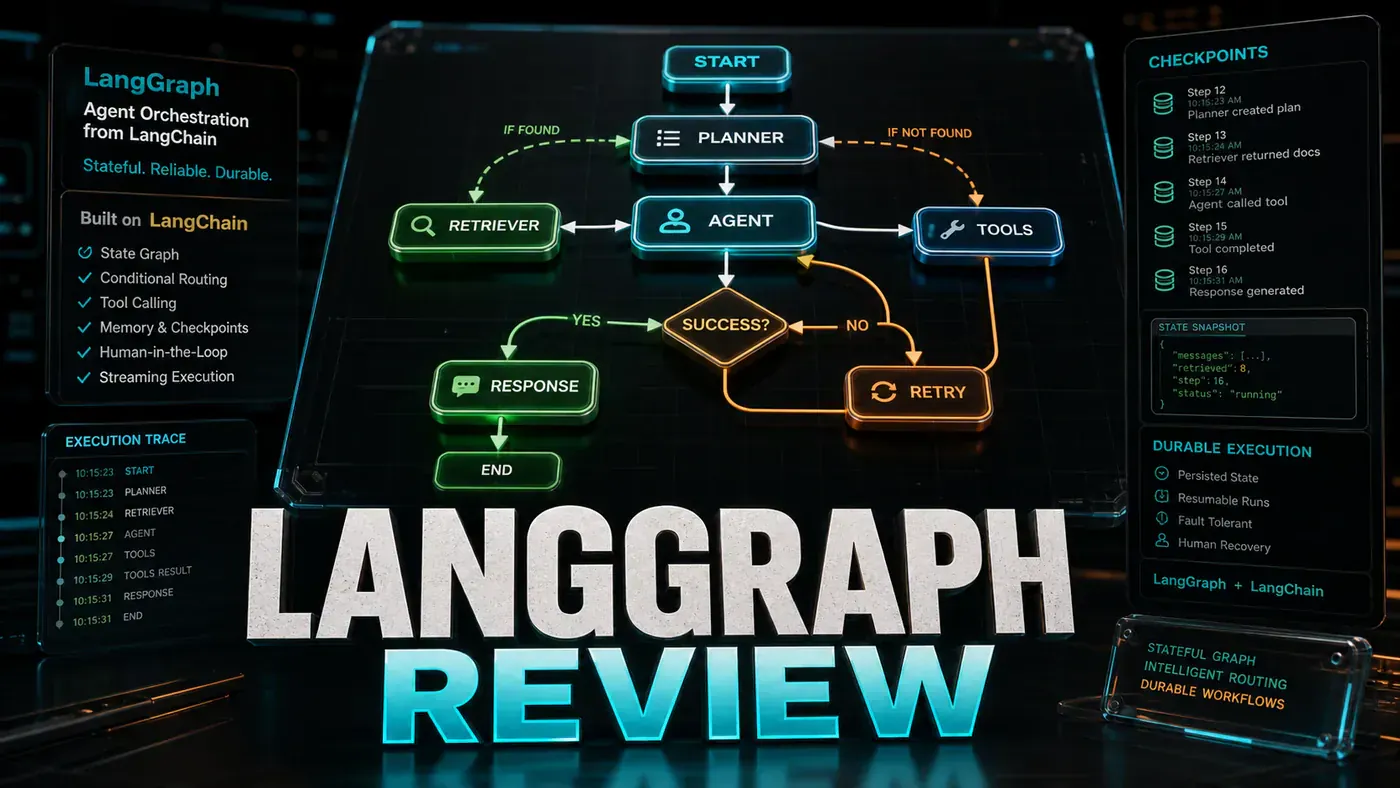
LangGraph, the orchestration library from the team behind LangChain, is built for exactly this messy middle. Instead of treating an agent as a straight line from question to answer, it models the work as a graph: a set of steps connected by decisions, with shared state moving between them. That sounds abstract until you've watched a "simple" automation collapse the first time something goes wrong in production.
The pitch is that this structure gives you the things real systems need: loops, checkpoints, approval gates, and several agents working together without stepping on each other. The catch, as with most powerful tools, is that you pay for it in complexity. Here's where it earns that cost and where it doesn't.
What Is LangGraph?
LangGraph (opens in a new tab) is a library for building stateful, multi-agent workflows, maintained by the LangChain team. The pieces that matter:
- Graph-based, nodes and edges represent agent logic
- Cyclical workflows, agents can loop and retry
- Persistence, state survives crashes and restarts
- Human-in-the-loop, pause for human approval
- Multi-agent, coordinate multiple specialised agents
Price: Free. It's open source under an MIT licence, part of the LangChain ecosystem.
Graph Model
LangGraph uses a directed graph, and the three building blocks are easy enough to hold in your head (overview docs (opens in a new tab)):
- Nodes = functions (LLM calls, tool usage, logic)
- Edges = routing decisions
- State = shared data structure passed between nodes
What makes this useful is that it maps cleanly onto the patterns you keep running into:
- Retry loops (try → fail → retry)
- Multi-step approvals (submit → review → approve/reject)
- Agent delegation (orchestrator → specialist → synthesise)
The cyclical part is the real point of difference. A standard chain runs front to back and stops. A LangGraph workflow can send control back to an earlier step, which is what you want the moment an agent has to try something, check the result, and decide whether to go again.
Human-in-the-Loop
This is where LangGraph stops feeling like a research toy. You can pause the graph, hand control to a person, and pick up from the exact same state once they've made a call (human-in-the-loop docs (opens in a new tab)):
# Pause for human approval before executing
workflow.add_node("human_approval", human_review)
workflow.add_conditional_edges(
 "propose_action",
 lambda state: "human_approval" if state["risky"] else "execute"
)
We put this to work on an automated deployment agent that stops and asks before it makes production changes. By our own count it caught three deployments that should never have gone out during testing, though that's our internal experience rather than anything you can verify from the outside. The mechanism behind it, pausing and resuming from saved state, is straight out of the documented persistence layer.
Pros and Cons
| Pros | Cons |
|---|---|
| Natural model for complex workflows | Steeper learning curve than basic chains |
| Built-in persistence | Debugging graphs is complex |
| Human-in-the-loop support | Can be overkill for simple tasks |
| Part of LangChain ecosystem | Documentation could be better |
| Free and open source | Requires Python proficiency |
Verdict
Score: 8.6/10 (our editorial rating)
LangGraph is built for serious agent development. If your agent has to make decisions, recover from failures, ask a human for input, or coordinate several sub-agents, this is the right tool. If you're doing something simple, you don't need any of this machinery, and reaching for it will cost you more than it returns.
One note on versions: the testing below was logged against an early build, but LangGraph has since moved well past it. It reached v1.0 in October 2025 and was at v1.2.6 as of June 2026 (releases (opens in a new tab)), so check the current docs before you rely on any specific API detail here.
*Published June 20, 2026 | LangGraph v0.3 tested*
LangGraph Review: answer-first summary
LangGraph Review matters because it can change how Founders and operators plan, build, or govern an tool evaluation workflow. LangGraph models agents as graphs with loops, checkpoints, and approval gates.
The direct answer is this: do not treat the topic as a standalone trend. Treat it as a decision about inputs, outputs, review ownership, data exposure, and whether the workflow produces a result that is faster, safer, or more useful than the current process.
LangGraph Review: implementation checklist
- Define the user, job to be done, and success metric for the tool evaluation workflow.
- Collect real examples, policies, source files, customer questions, or search queries before writing prompts or choosing tools.
- Separate low-risk drafts from decisions that need approval, privacy checks, or senior review.
- Document what the AI is allowed to access, what it must not access, and who signs off before production use.
- Review time to value, adoption rate, cost per workflow, quality review score after a small pilot rather than judging the idea from a demo.
This keeps the work practical. It also gives search engines and AI answer engines a clean factual structure: what the topic is, who it helps, what to do next, and which risks matter before implementation.
Decision criteria for LangGraph Review
| Decision area | What to check | Production signal |
|---|---|---|
| Intent | Does LangGraph Review solve a real workflow problem? | The use case has a named owner and measurable outcome. |
| Data | Can the required data be used safely? | Sensitive data is classified and access is controlled. |
| Quality | Can a reviewer judge the output consistently? | Examples, rubrics, or acceptance criteria exist. |
| Scale | Can the workflow be repeated without hero effort? | The process is documented and can be handed to another team member. |
Practical example for LangGraph Review
A small business could use this article to choose one practical test. For example, a manager might take one customer-facing process, one internal document workflow, or one recurring content task and redesign only that step with AI support. The goal is not to automate the whole business at once; it is to learn where AI Tools creates reliable leverage.
The useful deliverable is a short operating note: the trigger, the source material, the prompt or tool, the review checklist, the escalation rule, and the metric. That note becomes the handover asset for staff training, SEO/GEO content, service delivery, or future agent work.
Risks and controls for LangGraph Review
The common failure pattern is moving too quickly from a promising idea into an unmanaged workflow. For LangGraph Review, the risk is not only bad output. It can also be unclear data permission, staff confusion, duplicate content, unreviewed customer advice, or a tool that quietly changes cost or capability.
- Control tool sprawl with a named owner, a review step, and written acceptance criteria.
- Control unclear pricing with a named owner, a review step, and written acceptance criteria.
- Control vendor lock-in with a named owner, a review step, and written acceptance criteria.
- Control unreviewed data sharing with a named owner, a review step, and written acceptance criteria.
Measurement plan for LangGraph Review
A useful AI or SEO initiative should leave evidence. Track time to value, adoption rate, cost per workflow, quality review score and compare the pilot against the current process. If the measure does not improve, keep the learning but avoid scaling the workflow.
For GEO readiness, the page should also answer the core question directly, define the entities involved, include implementation steps, explain tradeoffs, and link readers to the next relevant AI Kick Start service, guide, tool, or article.
Definitions and entities for LangGraph Review
For search, GEO, and staff handover, define the core entities in plain language. In this article the important entities are the workflow owner, the AI tool or model, the source material, the review process, the risk boundary, and the measurable business outcome. Clear definitions make the page easier for people to scan and easier for AI answer engines to quote accurately.
- Workflow owner: the person accountable for deciding whether LangGraph Review belongs in the business process.
- Source material: the documents, examples, policies, URLs, prompts, videos, or customer questions that ground the output.
- Review boundary: the point where a human checks accuracy, privacy, brand voice, or customer impact before the result is used.
- Success metric: the measure that proves whether the tool evaluation workflow is worth repeating.
LangGraph Review versus doing nothing
Doing nothing is also a decision. The cost may be slow manual work, weaker search visibility, inconsistent advice, duplicated effort, or staff using unmanaged AI tools without a shared process. The practical question is whether a controlled pilot can reduce that cost without creating a larger governance problem.
| Option | When it makes sense | What to watch |
|---|---|---|
| Do nothing | The workflow is rare, low value, or already reliable. | Competitors may improve speed, content depth, or service consistency first. |
| Run a small pilot | The task repeats often and has clear review criteria. | Keep scope tight and measure the result against the current process. |
| Build a production workflow | The pilot is repeatable and risk controls are documented. | Assign ownership, monitoring, training, and a rollback path. |
AI Kick Start handover package for LangGraph Review
A production handover should be concrete enough that another person can run it. For LangGraph Review, that means a short brief, a workflow map, approved prompts or tool settings, source material, a review checklist, internal links to supporting resources, and a simple measurement sheet. This is the difference between reading about AI and turning it into operational capability.
That packaging also strengthens E-E-A-T. It shows experience through implementation notes, expertise through decision criteria, authoritativeness through source-aware structure, and trust through risks, controls, and review steps. The article becomes useful even if the reader never buys a tool because it helps them make a better operational decision.