
Lesson 17 of 38 · Core - 00:00-00:15
Welcome: what agentic work actually means
Internalise the difference between a chatbot and an agent, learn the read-propose-act-observe loop that powers every coding agent, and adopt a read-only-first, ask-before-acting safety stance, captured as a reusable standing-instruction preamble you will paste into every later lesson.
Most knowledge workers meet AI as a chat box: you ask, it answers, nothing in the real world changes. Agentic tools are a different species. They take actions on your behalf, reading your files, running shell commands, editing documents, opening pull requests, calling external services, and that jump in capability is also a jump in responsibility. A chatbot that hallucinates wastes a minute of your time; an agent that acts on a bad assumption can delete a file, push to a shared branch, or send something it shouldn't. This first lesson is deliberately hands-off: no installs, no sign-ups, no running anything. Instead you build the two things every later lesson depends on, an accurate mental model of how an agent thinks (the loop), and a safety posture you can actually hold in your head and paste into any session. Get these right and the rest of the course is about leverage. Get them wrong and you spend the course cleaning up after a fast, literal-minded colleague who never asked permission.
Mastering the agentic loop, at a glance
The whole lesson in one view, in the AI Kick Start brand style.
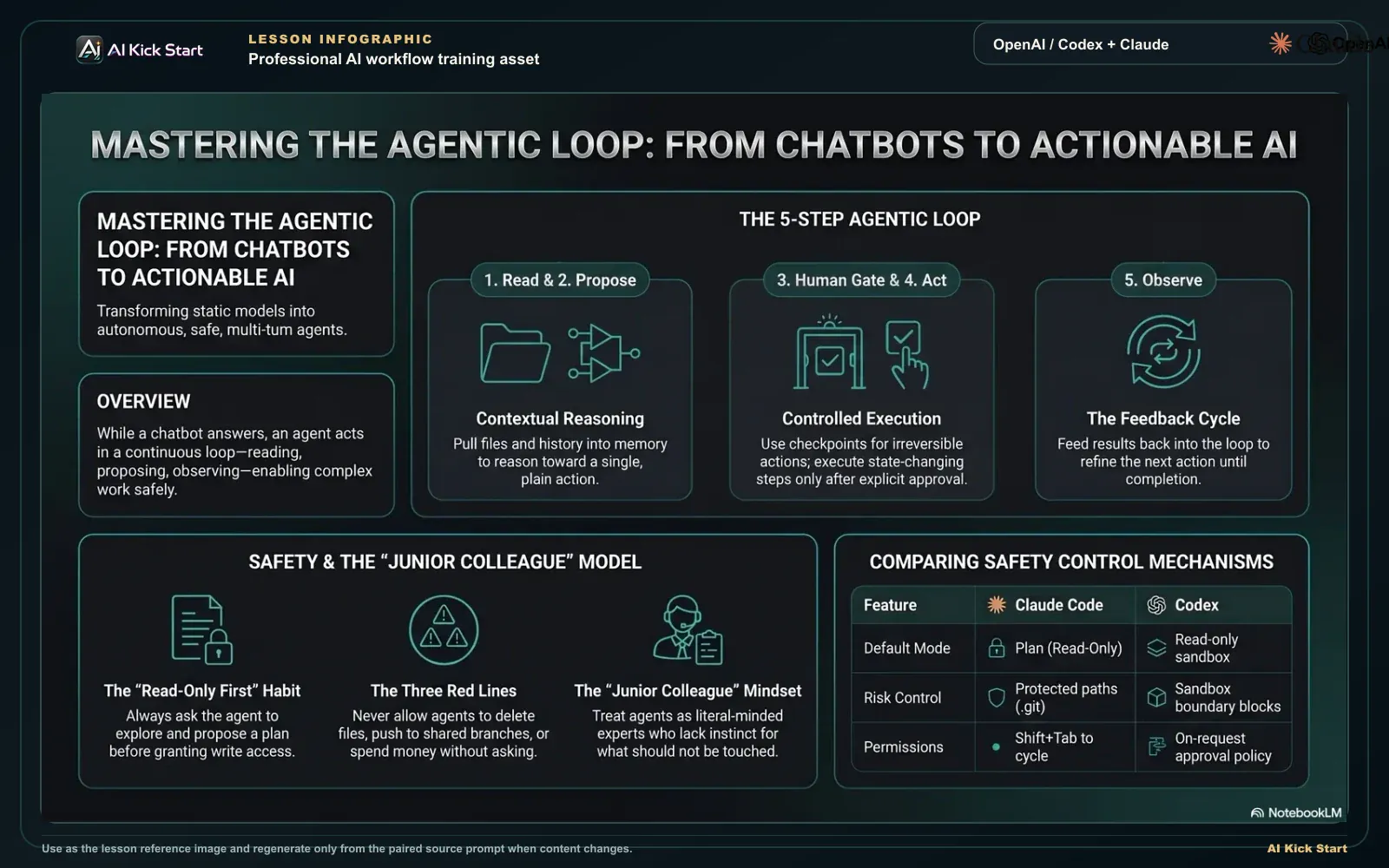
Mastering the agentic loop
A branded walkthrough: think of AI coding agents as junior colleagues with tools, keep the read-propose-act-observe loop explicit, and protect every run with a human gate.
What to understand
- An agent is a model wrapped in a loop. It reads context (your prompt, files, prior turns, tool output), proposes an action, takes that action (often only after your approval), observes the result, and repeats, until the goal is met or it stops to ask you. The model is the brain; the loop and its tools are what turn thinking into doing. This loop is the single idea the whole course is built on.
- The loop, not the model, is what makes it 'agentic'. The same underlying model can power a chatbot (one turn, no tools, no actions) or an agent (many turns, real tools, real side effects). What you are adopting in this course is not a smarter chatbot, it is a colleague that can reach into your environment and change it.
- OpenAI Codex and Claude Code are both agentic coding tools, and both are one engine reachable from many surfaces. Codex shows up as an App, IDE extension, CLI, Web/Cloud, GitHub integration, and a Chrome extension; Claude Code lives in the terminal, IDE, desktop app, and browser. Same agent, many front doors, you'll map this properly in Lesson 2.
- The single most important habit for a new user is read-only first. Ask the agent to explore, summarise, and propose a plan before you ever let it write, run, or push anything. A plan is cheap to inspect and free to throw away; a wrong action may be irreversible. Reviewing the plan first is where almost all of your safety leverage lives.
- Both products build the safety stance into explicit, named control surfaces, this is not folklore. Codex exposes approval policies and sandbox modes (its default for a version-controlled folder is the 'workspace-write' sandbox with 'on-request' approvals, so it can edit inside your workspace but must ask before leaving it or touching the network). Claude Code exposes permission modes you cycle with Shift+Tab, default (reads freely, asks before edits/commands), acceptEdits, plan (research and propose, no edits), auto, dontAsk, and bypassPermissions, and a set of 'protected paths' it will not write to without asking. You steer how much autonomy the agent has; it is a dial, not a switch.
- Agents are powerful precisely because they chain many small actions together, which is also their danger. A single vague instruction can fan out into a long sequence of edits, commands, and commits. The cost of an unclear prompt is therefore far higher than with a chatbot: you are not risking one bad paragraph, you are risking a cascade.
- Good agentic work is defined by stop conditions (also called red lines): situations you decide in advance must make the agent pause and check with you. Common picks are touching production, deleting files, spending money, pushing to a shared branch, and reaching the public internet. Naming these before you start is what separates a controlled session from a hopeful one.
- A reusable safety preamble turns your red lines into a habit. Instead of remembering to be careful each time, you paste a short standing instruction at the start of every session, work read-only first, explain the plan before acting, ask before anything irreversible. The agent treats a clearly stated boundary as a hard limit; making it a copy-paste artefact means you never forget it under time pressure.
- Treat the agent like a fast, capable, literal-minded junior colleague. Brilliant at execution and tirelessly thorough, but it has no instinct for what 'obviously' shouldn't be touched, no memory of last week's incident, and it will do exactly what you said rather than what you meant. Clear goals, explicit guardrails, and a review step before anything irreversible are how you get the upside without the blast radius.
Deeper dive
The read-propose-act-observe loop, and why each stage exists
Picture four stages running on repeat. READ: the agent pulls the relevant context into its working memory, your instruction, the files it thinks it needs, the output of any tool it just ran. PROPOSE: it reasons toward a next action and states it (an edit, a command, a search). ACT: it executes, but in a well-designed tool this is gated by your approval policy, so 'act' may mean 'ask first, then act'. OBSERVE: it reads the result of that action (a test passed, a file changed, an error returned) and feeds it back into the next READ. The loop matters because intelligence alone doesn't change the world, feedback does. A chatbot guesses once and stops; an agent acts, sees what happened, and corrects, which is why it can finish multi-step work a chatbot can only describe. It is also why the loop is your control point: every gate you care about (approve this edit? allow this command? reach the network?) lives at the ACT stage, and every place the agent can go wrong (it loaded the wrong file, misread an error) lives at READ and OBSERVE. Understanding the loop is understanding exactly where you can insert a human.
Why human review gates are non-negotiable for irreversible actions
Agents are probabilistic. They are right far more often than a beginner expects and wrong far more often than is safe to ignore, and they are confidently wrong in the same tone as confidently right, so you cannot tell the two apart from the prose. That is tolerable when the action is reversible (an edit you can revert, a branch you can delete) and intolerable when it is not (a force-push over someone else's work, a deleted file with no backup, an email sent to a client, a charge to a card). A review gate is simply a human checkpoint placed between PROPOSE and ACT for the class of actions where 'undo' doesn't exist. The discipline is to set the gate by consequence, not by confidence: it does not matter how sure the agent sounds, irreversible actions get reviewed. This is exactly why both tools make 'propose first' a first-class mode. Claude Code's plan mode researches and proposes without editing, and Codex's read-only and on-request approval settings make the agent ask before it escalates. The gate is not friction for its own sake; it is the difference between a mistake that costs a minute and one that costs a week. As you grow more trusting you can loosen gates for low-stakes work, but the rule that earns the trust is: tighten the gate as the cost of being wrong rises.
Why a stated boundary beats hoping the agent behaves
Beginners assume safety comes from the agent being careful. It doesn't, it comes from you constraining the loop. A standing-instruction preamble works because modern agents treat a boundary you state in plain language as a real limit on what they'll do: tell Claude Code 'don't push until I review' and its safety layer will block a matching push even when its default rules would have allowed it; tell Codex to work read-only first and it won't escalate out of the sandbox without asking. The corollary is that boundaries are only as durable as the agent's memory of them, in a very long session a boundary can be lost when old context is trimmed, which is one more reason to keep sessions scoped and to re-state critical red lines rather than assume they persist forever. The practical upshot for this lesson: your preamble is not a polite suggestion the agent might honour, it is the most reliable safety mechanism you have, and writing it down once is worth more than good intentions repeated daily.
Plans & pricing compared
How the two coding agents expose the same safety idea, 'don't take irreversible actions without asking', through their own named controls. These are the dials you'll set in later lessons; the defaults below are for a normal version-controlled project folder. Control names and defaults change as both tools ship rapidly, verify at the official docs linked below before relying on them.
| Safety idea | Claude Code control | OpenAI Codex control | Safe default to start with |
|---|---|---|---|
| Look before it touches anything | plan mode (researches and proposes, makes no edits) | read-only sandbox + on-request approvals | Start in the look-only mode every session |
| Edit, but ask before risky steps | default mode reads freely but asks before any edit or command; acceptEdits auto-approves in-scope edits | workspace-write sandbox (default), edits inside the workspace, asks to leave it or reach the network | default / on-request, review actions as they come |
| Switch how much autonomy it has | Shift+Tab cycles default -> acceptEdits -> plan (auto / dontAsk / bypassPermissions are opt-in) | approval policy: on-request (default), untrusted, never, auto_review | Stay near the cautious end until you trust the task |
| Protect things that must not change | 'protected paths' (.git.claude, shell configs) never auto-written outside bypass mode | sandbox boundary blocks writes outside the workspace without approval | Never run the fully-bypassed mode on your real machine |
| Full autonomy (use only when isolated) | bypassPermissions / --dangerously-skip-permissions (containers/VMs only) | danger-full-access sandbox / never approvals | Avoid until you have an isolated, throwaway environment |
Sources (as of June 2026): Claude Code. Choose a permission mode · Codex. Agent approvals & security · Codex. Sandboxing
The agent loop, and where the human gate goes
Read the four loop stages clockwise, the fifth box is the human gate, inserted between PROPOSE and ACT; an agent repeats the loop until the goal is met. That one insertion is almost all of your safety leverage.
- 1READ
Pull context into working memory: your prompt, the files it thinks it needs, prior turns, and the output of the last tool it ran. Loading the wrong file is one of two places the agent goes wrong.
- 2PROPOSE
Reason toward one next action and state it plainly, an edit, a command, a search. Cheap to inspect, free to throw away. This is what plan mode / read-only first forces it to do.
- 3HUMAN GATE
Your checkpoint for irreversible actions (delete, push, spend, send, install). Set the gate by consequence, not by how confident the agent sounds, confident-wrong reads exactly like confident-right.
- 4ACT
Execute, but only after approval for state-changing steps. Every control you care about (approve this edit? allow this command? reach the network?) lives here, gated by Codex approval policy / Claude Code permission mode.
- 5OBSERVE
Read the result, test passed, file changed, error returned, then feed it back into the next READ. Feedback, not raw intelligence, is what lets an agent finish work a chatbot can only describe.
Step by step
Frame the loop in your head
Before opening any tool, write one sentence describing a real task you'd hand an agent this week (e.g. "summarise last month's support tickets into themes" or "rename a config field across this small repo and update its tests"). Underneath it, jot the four loop stages, read, propose, act, observe, and one concrete line of what each stage would look like for YOUR task. You're rehearsing how the agent will think, and finding the stage where a human review gate belongs. You are done when each of the four stages has one concrete line for your task and you can point at the exact stage where your review gate belongs.
HintIf you can't state the task in one sentence, the agent won't be able to either, tighten it before you tighten anything else. The fuzzier the goal, the wider the agent's action fan-out.
Open the Codex overview and find the safety controls
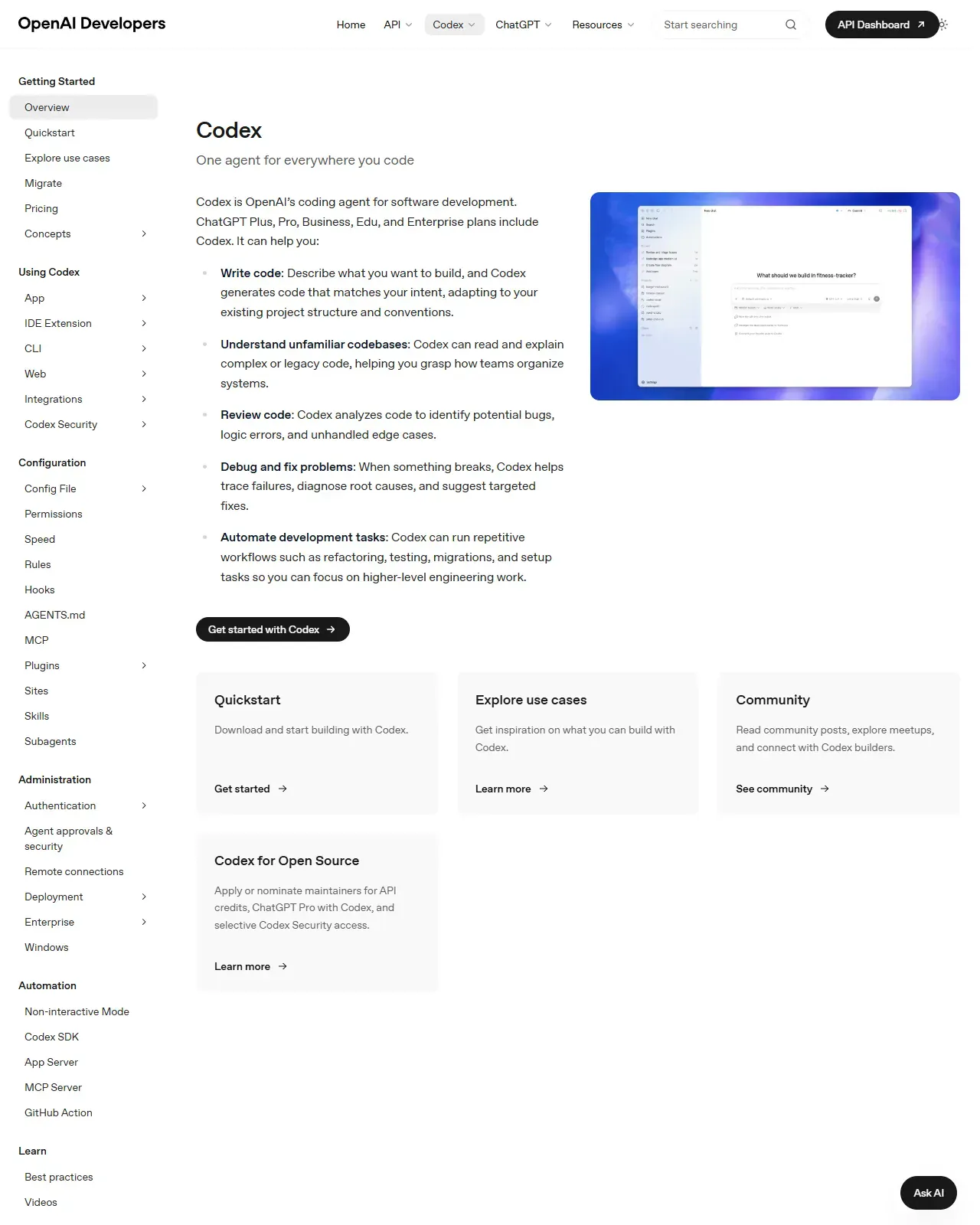
Go to developers.openai.com/codex and read the top of the page, then glance at the 'Agent approvals & security' and 'Sandbox' pages. Confirm three things: (a) Codex is one agentic tool reachable across App, IDE, CLI, Web/Cloud, GitHub, and Chrome; (b) it has named approval policies (on-request is the default, it asks before escalating); and (c) it has sandbox modes (workspace-write is the default, it can edit inside your workspace but must ask to leave it or reach the network). You're confirming that 'ask before irreversible' is a built-in dial, not something you bolt on.
HintDon't sign up or install anything yet, this lesson is deliberately read-only, which is also exactly the posture you're learning.
On this screen
- 1Many front doors, one agent. The interface list (App, IDE, CLI, Web, GitHub, Chrome) is the same engine reachable from wherever you already work, not six separate products.
- 2Safety is named, not implied. Approval policies and sandbox modes are explicit controls, the default 'workspace-write + on-request' means it edits in your workspace but asks before leaving it or going online.
- 3You steer with goals. The phrasing about writing code from descriptions signals you direct it with plain-language intent and guardrails, not low-level commands.
Name your three red lines
In the same note, write three actions you never want an agent to take without explicitly asking you first. Strong picks are the irreversible ones: pushing to a shared branch, deleting or overwriting files, and sending anything to an external service or the public internet. For each, add one line on what the damage would be if it happened silently, that consequence is why it's a red line. You are done when each red line reads as a sentence you could paste to an agent verbatim, with its consequence written next to it.
HintPhrase each red line as something you'd actually type to the agent, e.g. "always ask before deleting or pushing". Set the gate by consequence, not by how confident the agent sounds.
Adopt the reusable safety preamble
Take the production safety preamble from this lesson, paste it into your note, and edit two things to make it yours: fold in the three red lines you just named, and trim any rule that doesn't apply to your work. Keep it tight enough that you (and the agent) can actually hold it in mind. This becomes the standing instruction you paste at the start of every session in every later lesson. Check it by reading it aloud: if you cannot summarise your own preamble in three lines, trim it, you are done when it fits on half a page.
HintA boundary the agent can re-read and act on beats a wall of rules it (or you) will skim. If a session runs very long, re-paste the critical red lines, old context can get trimmed.
Produce a one-page "agent operating note" containing: (1) your one-sentence task with the four loop stages spelled out for it, (2) your three red lines each with its consequence, and (3) your personalised version of the reusable safety preamble. You will paste the preamble at the start of every later lesson.
A personal agent operating note (one page), your task framing, the read-propose-act-observe loop, your red lines, and a ready-to-paste safety preamble, that you reuse in every later lesson.
Production prompt examples
STANDING INSTRUCTIONS, apply these to everything you do in this session, and keep applying them until I explicitly lift a specific rule.

ROLE: You are a careful senior engineer pairing with me. I am the human in the loop and I make the final call on anything that changes the outside world.

WORKING MODE:
1. Read-only first. Before writing, running, or changing anything, explore what you need and tell me, in 3-6 lines: what you understand the goal to be, the files/areas you looked at, and the plan you propose. Then STOP and wait for my go-ahead.
2. One step at a time for anything that changes state. After I approve the plan, make the smallest reasonable change, show me the diff or the exact command, and wait for approval before the next state-changing step.
3. Narrate before you act, not after. I should never be surprised by something you already did.

HARD RED LINES, never do any of these without first asking me in plain language and getting an explicit 'yes':
- Delete or overwrite files, or remove anything that isn't trivially recoverable.
- Run shell commands that install, build, deploy, migrate, or modify the system.
- Touch git history beyond local commits: no push, no force-push, no rebasing shared branches, no changing remotes.
- Send anything to an external service, an API, an email, or the public internet.
- Spend money or consume a paid quota in a way I haven't approved.
- Write to protected/config locations (e.g. .git, CI config, shell profiles, secrets).

WHEN IN DOUBT:
- If the task is ambiguous, ask ONE tight clarifying question instead of guessing.
- If you think a red line genuinely needs crossing to finish the task, stop and explain why, the risk, and the safest alternative, then let me decide.
- If you realise you've made a mistake, say so immediately and propose how to undo it.

OUTPUT STYLE: Be concise. Show plans as short bullet lists and changes as diffs or exact commands. Don't restate large files back to me.

Confirm you understand these standing instructions in one line, then ask me for the task.
- STANDING INSTRUCTIONS + 'until I explicitly lift a specific rule' makes this a persistent boundary, not a one-off request, agents treat a clearly stated, in-force boundary as a hard limit on their actions.
- ROLE = 'I am the human in the loop' frames every irreversible action as needing a human decision, which is the core of the review-gate discipline from the deep dive.
- WORKING MODE step 1 ('read-only first… then STOP') is the literal read-propose-act-observe loop with a human review gate inserted between PROPOSE and ACT.
- HARD RED LINES are phrased as actions you'd actually approve/deny, and grouped by irreversibility (delete, system commands, shared git, external sends, money, protected paths) so nothing high-consequence is left implicit.
- 'WHEN IN DOUBT: ask ONE tight question instead of guessing' kills the expensive, risky vague-retry loop and keeps the agent from inventing scope.
- 'If you think a red line needs crossing, stop and explain' converts a silent override into a visible decision you control, the boundary bends only with your explicit consent.
- OUTPUT STYLE keeps the agent terse so plans and diffs stay reviewable (and, as Lesson 3 shows, output tokens cost money too).
- The closing 'confirm in one line, then ask for the task' verifies the agent actually parsed the rules before any work begins, a cheap acknowledgement gate.
Common mistakes to avoid
- Treating the agent like a search box and giving it a vague one-liner, then being surprised by the scope of changes it makes, vague goals fan out into long action chains.
- Letting the agent write or run things on first contact instead of asking it to explore and propose a plan you can inspect first.
- Trusting the agent's tone: it sounds equally confident when right and when wrong, so confidence is never a reason to skip a review gate on an irreversible action.
- Skipping stop conditions, so there's no agreed point where the agent must pause before doing something it can't undo.
- Assuming "undo" exists everywhere, pushes, deletions, external sends, and spend often can't be cleanly reversed.
- Running one of the fully-autonomous modes (Claude Code bypassPermissions / Codex danger-full-access) on your real machine to avoid prompts, instead of reserving it for an isolated container or VM.
- Relying on remembering to be careful each time, rather than pasting a written safety preamble that states the boundaries explicitly.
Source conflicts to review
- Control names and defaults for both tools change quickly (Codex separates approval policy from sandbox mode; Claude Code recently added auto and dontAsk modes). Names here are accurate as of June 2026, re-verify at the official docs and distrust tutorials more than a few weeks old.
- Secondary sources sometimes blur Codex's 'approval policy' (when it asks) with its 'sandbox mode' (what it can do); they are two independent dials. Prefer the official agent-approvals and sandboxing pages.
Key terms
- Agent
- A model running in a read-propose-act-observe loop that can take real actions (edit files, run commands, push code), not just produce text.
- Agent loop
- The repeating cycle of read context -> propose action -> act (often after approval) -> observe result, that turns a model's thinking into real-world changes.
- Hallucination
- When a model confidently states something that is not true. Harmless in a chatbot answer; dangerous when an agent acts on it.
- Blast radius
- How much can be damaged if an action goes wrong, the reason red lines are set by consequence, not confidence.
- Surface
- A front door to the same agent engine, terminal, IDE, desktop, web, or GitHub. One agent, many surfaces.
- Approval policy (Codex)
- Codex's setting for WHEN it must ask you before acting, e.g. on-request (default), untrusted, never, auto_review.
- Sandbox mode (Codex)
- Codex's setting for WHAT it can technically do, e.g. read-only, workspace-write (default), danger-full-access.
- Permission mode (Claude Code)
- Claude Code's autonomy dial, cycled with Shift+Tab, default, acceptEdits, plan, auto, dontAsk, bypassPermissions.
- Plan mode
- A look-only mode (Claude Code) where the agent researches and proposes changes but makes no edits, read-only-first, built in.
- Read-only first
- The habit of letting the agent explore and propose before granting any write, run, or push permission.
- Red line / stop condition
- A pre-agreed irreversible situation in which the agent must pause and ask you rather than proceed.
- Review gate
- A human checkpoint placed between propose and act for actions that can't be undone.
- Safety preamble
- A reusable standing instruction you paste at the start of a session to state your working mode and red lines as hard boundaries.
Resources
Checkpoint