
Lesson 18 of 38 · Core - 00:15-00:30
System map: Codex vs Claude Cowork vs Claude Code
Build an accurate, current mental map of the three tools, and the surfaces each one runs on, so you can route any task to the front door that fits its risk, latency, and deliverable, instead of defaulting to whichever app you opened first.
Codex, Claude Code, and Claude Cowork overlap enough to confuse newcomers and differ enough that picking the wrong one quietly wastes a morning. The trap is thinking of them as three rival apps you must choose between. They are better understood as agent engines reachable from many surfaces, your terminal, your IDE, a desktop app, a cloud VM, a GitHub issue, where the real decision is not 'which product' but 'which surface keeps a human review step closest to the irreversible action.' This lesson maps each tool to the kind of work it is best at, to where that work physically happens, to how the work ends (an edit on your disk, a pull request, a finished document), and to the default safety setting you inherit on each. Get this map right and routing becomes a five-second decision; get it wrong and you will babysit a cloud job that wanted a local loop, or hand a code surface a task that wanted a document.
Mapping agentic workflows, the routing rule
Route any task to the right surface, at a glance.
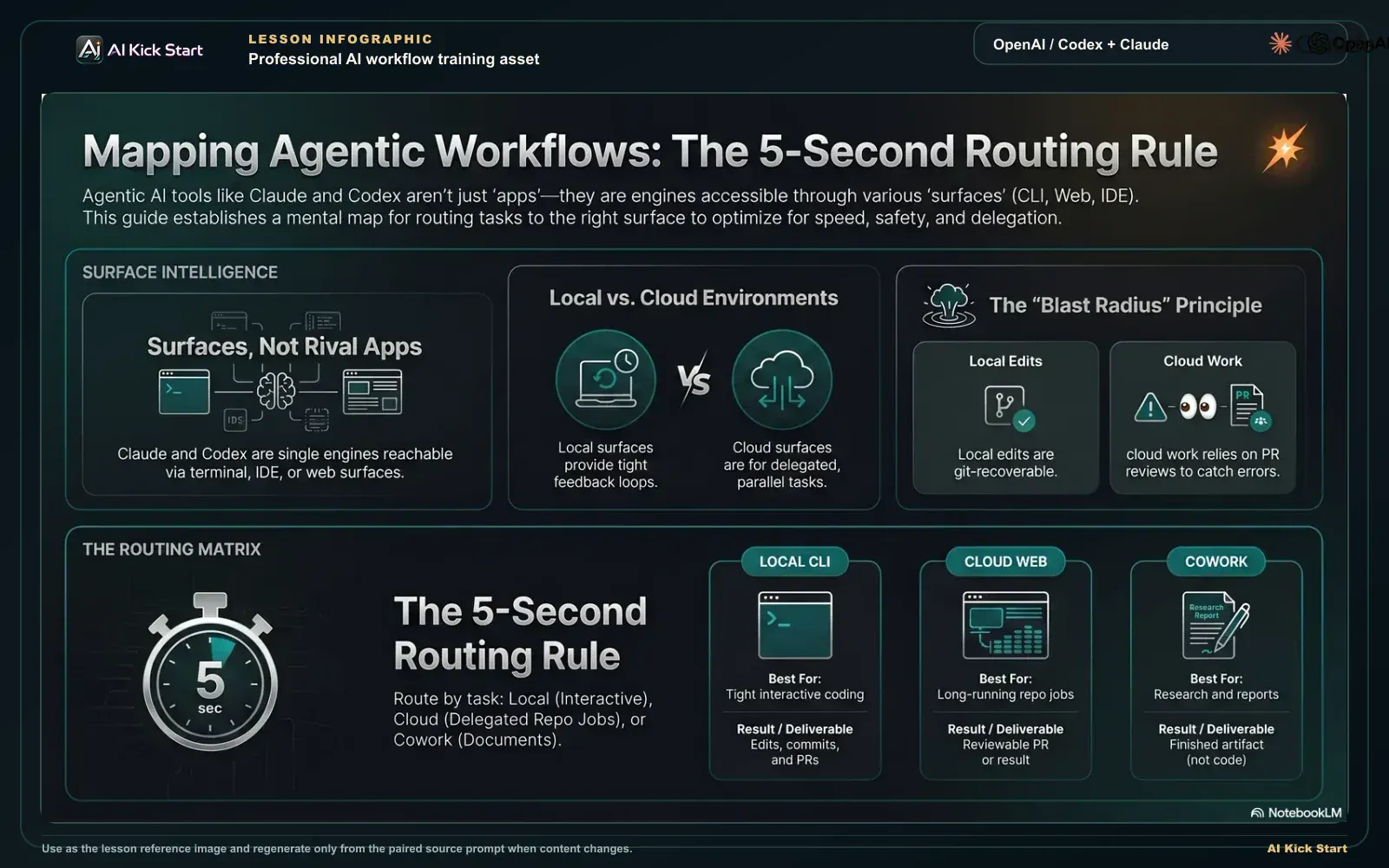
Mapping agentic workflows, route every task
A branded walkthrough: treat Codex and Claude Code as one engine across local and cloud surfaces, and route each task by feedback speed, risk, and whether the output is a diff or a document.
What to understand
- Think 'surfaces of one engine', not 'rival apps'. Claude Code is a single agentic engine reachable from a Terminal CLI, VS Code, JetBrains, a Desktop app, and the Web, and the same CLAUDE.md files, settings, and MCP servers work across all of them (the docs say so explicitly). The choice is which front door fits this task, because your configuration travels with you.
- Codex is the same idea on OpenAI's side: one agent across a web/cloud surface, IDE extensions, a CLI, and GitHub. So 'Codex vs Claude Code' is rarely the real question; the real question is local-vs-cloud and interactive-vs-delegated, which cuts across both vendors.
- Local surfaces are for tight feedback loops. A local CLI (Claude Code or Codex) runs against your working directory: it reads the files it needs, proposes edits, and, by default, asks before changing things or running commands, so you stay in the loop on every irreversible step. This is the fastest, safest place for exploratory or interactive work where you want to steer live.
- Cloud surfaces are for delegation. Codex Cloud runs tasks in isolated environments you configure (target repo, setup steps, available tools) and can run several in parallel; Claude Code on the Web runs sessions on Anthropic-managed cloud VMs for long-running or parallel jobs. You launch, walk away, and check back, these are delegation boards, not live conversations.
- Cloud work ends as a reviewable bundle. A Codex cloud task is designed to finish by opening a pull request from its work; Claude Code on the Web produces a result you review and can pull into your terminal (`claude --teleport`). The 'end state' of cloud work is a diff a human approves, that review gate is the whole point of delegating.
- Internet access in the cloud is a deliberate choice, not a default. In Codex cloud environments, agent internet access is OFF by default and the environment runs behind an HTTP(S) proxy; you enable network access per-environment, only when a task genuinely needs it. Treat turning it on as a decision with consequences (prompt injection, secret exfiltration, unvetted dependencies).
- Claude Cowork is the knowledge-work counterpart, and it lives where you already work. Cowork uses the same agentic architecture that powers Claude Code, but inside the Claude desktop app, alongside Chat and Code, with no terminal. It reads, edits, and creates files in folders you specify and finishes with a deliverable (a memo, a briefing, a spreadsheet with working formulas), not a code diff. Reach for it when the artefact is a document or analysis rather than a code change.
- The default safety setting differs by surface, and you should know yours cold. Claude Code CLI asks before edits/commands (normal mode); Codex's local Auto preset for git repos is workspace-write with on-request approval; Codex Cloud defaults internet OFF; Cowork shows you a plan and waits for approval before acting. Knowing the default tells you exactly which gate you are relying on, and which one you'd be removing if you flip a setting.
- The five-second routing rule: local interactive work and tight loops -> a CLI/IDE surface; long-running or parallel jobs against a repo -> cloud delegation (Codex Cloud or Claude Code Web), ending in a PR; knowledge-work deliverables -> Cowork. When two surfaces seem equally valid, pick the one that keeps the human review step closest to the irreversible action.
Deeper dive
The routing decision, in the order a professional actually asks it
Don't start from the brand. Ask, in sequence: (1) Is the deliverable a code change or a document? Documents go to Cowork; code stays in the coding surfaces. (2) Do I want to steer this live, or hand it off? Live steering means a local CLI or IDE; hand-off means a cloud surface. (3) If hand-off, does it touch a repo I want a PR against? Then Codex Cloud or Claude Code on the Web, both of which end in a reviewable diff. (4) What is the blast radius if it goes wrong, and which default gate catches that? A schema migration on a production repo wants the surface with the tightest review gate closest to the action; a throwaway script wants speed. This order matters because the most expensive routing mistakes are not 'wrong vendor', they are 'delegated something that needed live steering' or 'ran a document task on a code surface.' The vendor is almost never the variable that hurts you; the surface and its default gate are.
Local vs cloud is a trade between latency, blast radius, and parallelism
Local surfaces win on latency and control: the agent sees your real working tree, every change is in front of you, and the default is to ask before acting, you catch a bad edit in the second it's proposed, not after a PR is open. The cost is that you are the bottleneck: one session, your attention, your machine. Cloud surfaces invert this. You trade tight feedback for throughput, several isolated environments running in parallel, work continuing while your laptop is closed, and you trade live control for a batch review at the end. The blast radius also moves: locally, a mistake touches your working directory (recoverable with git); in the cloud, the isolation is stronger (sandboxed env, internet off by default) but you are reviewing the result after the fact, so the quality of your PR review becomes the only gate. The practical heuristic: if you'd want to interrupt and correct the agent mid-task, you wanted local. If you'd be comfortable reviewing a finished diff cold, you wanted cloud, and you should scope its environment (repo, tools, internet) deliberately before launching.
Why Cowork exists as a separate surface, and when 'document vs diff' is the wrong line
Cowork is not 'Claude Code for non-coders'; it is the same engine pointed at knowledge work, packaged so the deliverable is a finished artefact a knowledge worker can use directly, a formatted report, a populated spreadsheet, an organised folder. Its safety model fits that audience: it shows you a plan and waits for approval before touching files, and you grant it specific folders and connectors rather than a whole machine. The clean line is 'is the output a code change?', but watch two edges. First, plenty of analyst work is technically file edits (renaming, restructuring, extracting data into a sheet) and still belongs in Cowork, because the value is the document outcome, not the code. Second, some 'document' tasks that live inside a code repo (generating release notes from a diff, writing docs alongside code) are better served by a coding surface that already has the repo context. Route on where the value and the context live, not on the file extension.
Routing: which surface for which task
Routing decision table, match the work to the surface, not the brand. The same agent engine is reachable from many front doors; the real choice is which surface keeps a human review step closest to the irreversible action. Figures are accurate as of June 2026, defaults (especially internet/approval settings) change; verify at the cited sources before relying on them.
| Tool / surface | Best for | Where it runs | How work ends | Default safety setting |
|---|---|---|---|---|
| Claude Code (CLI) | Tight, interactive coding loops in a repo you have locally, explore, edit, test, commit | Locally, against your working directory (your machine, your files, your shell) | Edits on disk + conversational git: commits, branches, and PRs you drive | Asks permission before editing files or running commands (normal mode; auto-accept is opt-in) |
| Claude Code (Web) | Long-running or parallel coding tasks, or repos you don't have checked out locally | Anthropic-managed cloud VMs (claude.ai/code), reachable from any browser or the iOS app | A reviewable result you check back on; pull it into your terminal with --teleport | Runs in an isolated managed VM; you review the diff before it lands in your repo |
| Codex Cloud | Delegated, fire-and-forget jobs against a GitHub repo, including several in parallel | Isolated cloud environments you configure (repo + setup steps + tools), behind an HTTP(S) proxy | Opens a pull request from its work for you to review and merge | Agent internet access is OFF by default; enable deliberately, per-environment |
| Codex (CLI, local) | Local interactive coding when you prefer Codex and want changes applied on your machine | Locally, in your working directory, inside a sandbox | Edits applied locally; you commit/PR as normal | Auto preset for git repos: workspace-write + on-request approval (asks before leaving the workspace or using the network) |
| Claude Cowork | Knowledge-work deliverables, research synthesis, reports, spreadsheets, file organisation | The Claude desktop app, alongside Chat and Code; reads/edits/creates files in folders you grant | A finished artefact: a formatted doc, briefing, or spreadsheet, not a code diff | Shows you the plan and waits for approval before acting; you scope which folders/connectors it can touch |
Sources (as of June 2026): OpenAI, Codex on the web (cloud tasks) · OpenAI, Codex cloud environments (internet off by default) · OpenAI, Codex agent approvals & security · Anthropic. Claude Code overview (one engine, many surfaces) · Anthropic. Configure Claude Code permissions · Anthropic. Cowork (knowledge work in the desktop app)
One engine, five surfaces, read across to route
Each row is a front door to the same agent. Read across: where it runs and how work ends tell you which default gate stands between the agent and the irreversible action. This is the condensed read-across of the full routing table above; use the table when you need the Best-for column.
Step by step
Open the Codex Cloud page and read it as a delegation board
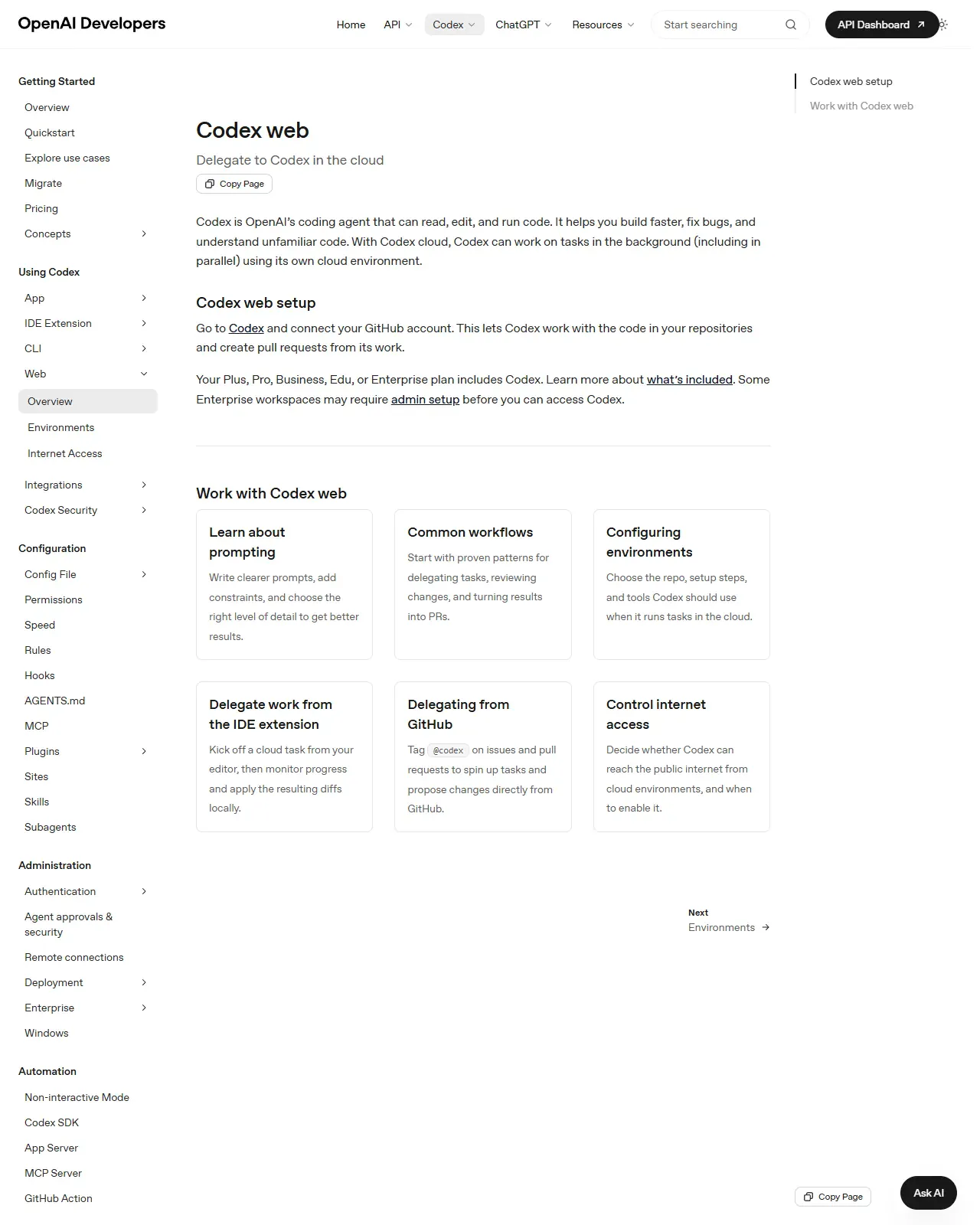
Visit developers.openai.com/codex/cloud and read how tasks are launched. Note the three entry points, the web interface at chatgpt.com/codex, the IDE extensions (which let you kick off a cloud task and apply the resulting diffs locally), and @codex mentions on GitHub issues/PRs, and that tasks run in background environments that can execute in parallel. Write down that a cloud task ends by opening a pull request.
HintInternalise the phrase "delegate to Codex in the cloud", cloud is for handing off work and checking back on a PR, not for babysitting a live edit loop.
On this screen
- 1Delegation, not chat. The page is framed as 'Delegate to Codex in the cloud', tasks run in the background while you check back on results, not a conversation you steer turn by turn.
- 2Parallel by design. One prompt is not one conversation; several isolated environments can run at once, which is the whole reason to delegate to the cloud.
- 3Ends in a PR. The pull-request output is the point: cloud tasks are designed to finish as a reviewable diff a human approves, so your PR review becomes the safety gate.
Find the environment and confirm internet is OFF by default
On the Cloud page (and developers.openai.com/codex/cloud/environments), find the Environments concept: each cloud task needs a target repository, initialisation/setup steps, and a defined set of tools, and the environment runs behind an HTTP(S) proxy. Confirm the exact wording that agent internet access is OFF by default, and that you enable it per-environment, only when a task needs it. Note the risks the docs flag for enabling it (prompt injection, secret exfiltration, unvetted dependencies).
HintDefault to internet OFF. Treat enabling it as a named decision with consequences, write the reason next to the environment so future-you remembers why it's on.
On this screen
- 1Environment = repo + setup + tools. The Environments UI is where the target repo, setup steps, and tool access are declared before any task runs, this is the sandbox you're handing the agent.
- 2Internet OFF by default. The docs state agent internet access is off by default; enabling it is per-environment and deliberate, not a global default you inherit.
- 3Internet is a switch, not a given. The 'Control internet access' card on this page is where you decide whether a cloud environment can reach the public internet at all, the proxy and isolation details live one click deeper, on the Environments page.
Open the Claude Code docs and confirm one engine, many surfaces
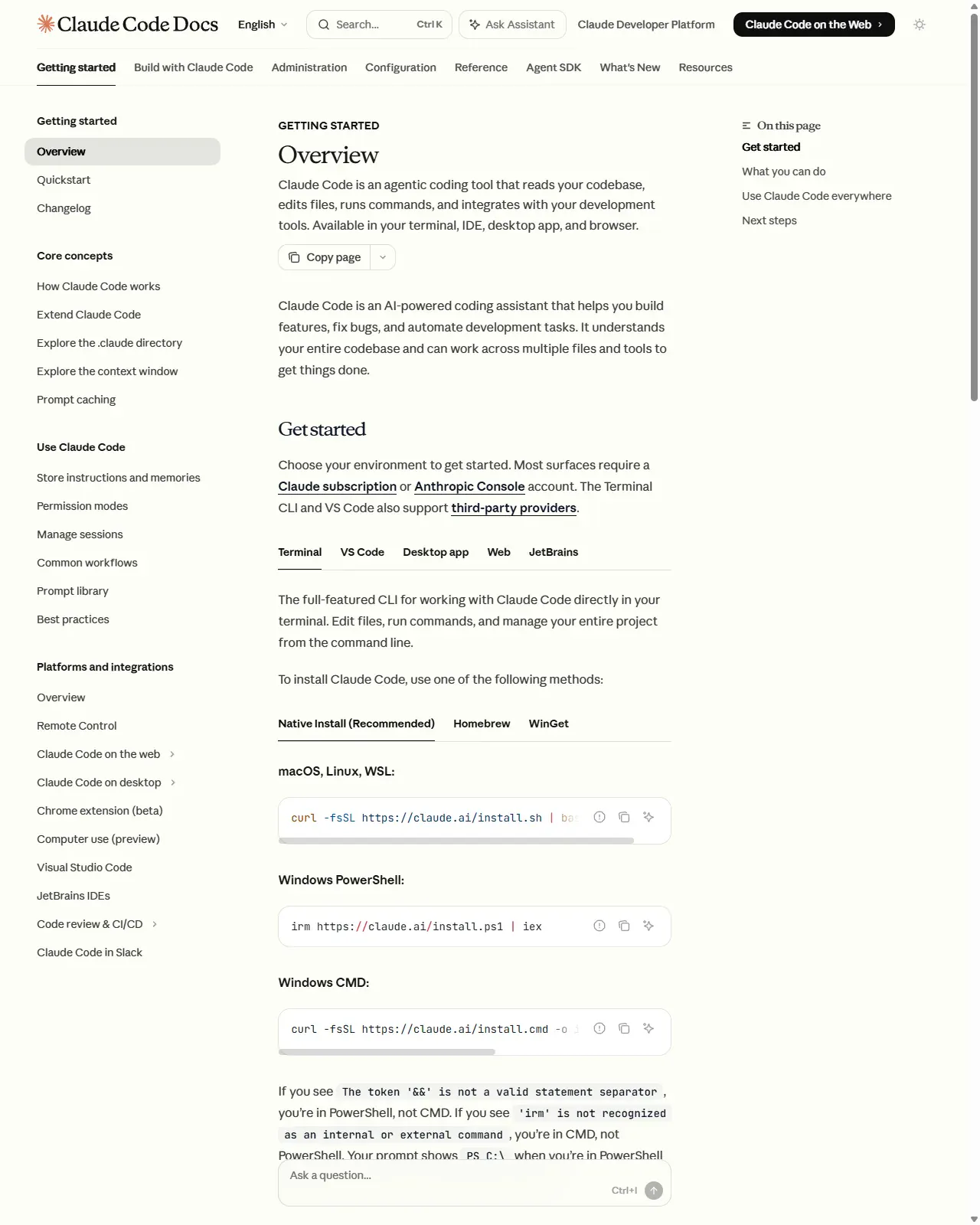
Go to code.claude.com/docs and read the overview. Confirm Claude Code is "available in your terminal, IDE, desktop app, and browser" and that each surface connects to the same engine, so your CLAUDE.md files, settings, and MCP servers work across all of them. Note that the Web surface runs on Anthropic-managed cloud VMs for long-running/parallel work, and that sessions are portable (e.g. start on the web, pull into the terminal with --teleport). Contrast this with Codex Cloud: Claude Code's default home is local and interactive.
HintSame engine, many surfaces, set up your CLAUDE.md and settings once and they travel with you across CLI, IDE, desktop, and web.
On this screen
- 1Terminal is home base. The Terminal CLI is the full-featured surface and the default home for tight, interactive loops, edit, run, commit, all locally.
- 2Web is the delegate surface. Claude Code on the Web (claude.ai/code) runs on managed cloud VMs for long-running or parallel tasks, the rough peer of Codex Cloud.
- 3One get-started flow per surface. The Terminal / VS Code / Desktop App / Web / JetBrains tabs each set up the SAME engine, which is why the docs can promise your CLAUDE.md, settings, and connected tools behave identically wherever you open it.
Pin down the default safety setting on each surface
For each surface you'll use, write its out-of-the-box gate: Claude Code CLI asks before edits/commands (normal mode; auto-accept is opt-in via Shift+Tab); Codex's local Auto preset for git repos is workspace-write + on-request approval (asks before leaving the workspace or using the network); Codex Cloud defaults internet OFF; Claude Cowork shows a plan and waits for approval before acting and only touches folders/connectors you grant. Knowing the default tells you which gate you'd be removing if you flip a setting. You are done when every surface you plan to use has a one-line gate written next to it, no blanks, no "probably asks first".
HintBefore you ever enable auto-accept or cloud internet, write the one sentence answer to "what gate am I removing, and what's the worst thing it was catching?"
Open Cowork's page and place the document/diff line
Visit claude.com/product/cowork. Confirm Cowork lives in the Claude desktop app alongside Chat and Code, uses the same agentic architecture as Claude Code, reads/edits/creates files in folders you specify, and finishes with a deliverable (a memo, briefing, or spreadsheet) rather than a code diff. Write your own one-line rule for the document-vs-diff split, and note the two edge cases from this lesson where the file extension lies (analyst file edits that are really documents; release notes generated inside a code repo).
HintRoute on where the value and the context live, not on the file type, a spreadsheet of extracted data is a Cowork job even though it's 'editing files'.
Route three real tasks, then draft your cheat-sheet
Take three real tasks from your week and assign each to a surface with a one-line reason using the four factors (deliverable type, live-steer vs delegate, blast radius, default gate), e.g. "tidy a local script -> Claude Code CLI (code diff, live-steer, tiny blast radius, asks-before-edit gate)"; "refactor across a repo overnight -> Codex Cloud (code diff, delegate, ends in a PR, internet-off gate)"; "draft a stakeholder brief from notes -> Claude Cowork (document deliverable, plan-then-approve gate)". Then condense the logic into a table: Tool/surface, Best for, Where it runs, How work ends, Default safety setting, using Codex Cloud, Codex CLI, Claude Code CLI, Claude Code Web, and Claude Cowork as rows. Save it next to your operating note from Lesson 1.
HintIf two surfaces seem equally valid, pick the one that keeps a human review step closest to the irreversible action, that single rule resolves most ties.
Route three of your own real tasks to a specific surface. Claude Code CLI, Claude Code Web, Codex Cloud, Codex CLI, or Claude Cowork, each justified with the four routing factors (deliverable type, live-steer vs delegate, blast radius, default safety gate). Then condense the logic into a routing cheat-sheet and note, for each surface, the one default gate you'd be removing if you flipped a setting.
A personal routing cheat-sheet mapping tool/surface to task, where it runs, how the work ends, and the default safety setting, plus a one-line document-vs-diff rule and a written 'what gate am I removing' check for any setting you plan to change.
Production prompt examples
ROLE: You are a senior staff engineer who triages incoming work onto the right agent surface. You are deliberately conservative about delegation and about removing default safety gates.

CONTEXT: The available surfaces are: Claude Code CLI (local, interactive, asks before edits), Claude Code Web (managed cloud VM, ends in a reviewable result), Codex Cloud (isolated cloud env, internet OFF by default, ends in a PR), Codex CLI (local, sandboxed, workspace-write + on-request), and Claude Cowork (desktop app, knowledge-work deliverables, plan-then-approve). I will paste one real task per line.

TASK: For each task, choose exactly ONE surface and explain the routing in terms of: (a) deliverable type (code diff vs document), (b) live-steer vs delegate, (c) blast radius, and (d) which default safety gate I am relying on.

CONSTRAINTS:
- If a task genuinely fits two surfaces, name both, then pick the one that keeps a human review step closest to the irreversible action, and say why.
- Flag any task where you'd want to CHANGE a default (e.g. enable cloud internet, turn on auto-accept) and state the specific risk that change introduces.
- Do not invent capabilities; if a surface can't do something, say so.
- Keep each answer to four lines max. No preamble.

OUTPUT FORMAT (one block per task):
Task: <restate in <=10 words>
Surface: <one surface>
Why: <deliverable + steer/delegate + blast radius + default gate>
Watch-out: <only if a default would need changing, else 'none'>

TASKS:
1. <paste task>
2. <paste task>
3. <paste task>
- ROLE pins the model to a triage mindset and primes it to be conservative about delegation and about removing gates, the two routing mistakes that actually cost time.
- Listing the surfaces WITH their default safety settings in CONTEXT stops the model from hallucinating capabilities and forces the answer onto the real decision axes.
- The four explicit decision factors (deliverable / steer-vs-delegate / blast radius / default gate) make the routing reproducible instead of vibes-based, the same task always lands the same way.
- 'Keep a human review step closest to the irreversible action' is the tie-breaker rule from this lesson, written into the prompt so the model applies it instead of guessing.
- The 'Watch-out' line surfaces exactly when you'd be trading away a default safety gate (cloud internet, auto-accept) and names the risk, turning a silent setting change into a conscious decision.
- The strict OUTPUT FORMAT and four-line cap keep it scannable and cheap; a routing answer is a decision, not an essay.
Common mistakes to avoid
- Treating Codex and Claude Code as rival apps to choose between, when each is a multi-surface engine and the real choice is local-vs-cloud and interactive-vs-delegated.
- Reaching for cloud delegation for quick, interactive edits that a local CLI loop would handle faster and more safely, and where you'd actually want to steer mid-task.
- Assuming cloud internet is on (or leaving it on by default). Codex cloud environments default internet OFF for good reasons; enabling it is a per-environment decision with real risk.
- Using a code-focused surface for a document deliverable that Claude Cowork is built for, or routing on file extension instead of where the value and context live.
- Flipping off a default gate (auto-accept on the CLI, internet on in the cloud) without writing down which safety check you just removed and what it was catching.
- Forgetting that cloud work is reviewed after the fact, so a sloppy PR review is the single point of failure when you delegate, the review gate is the whole reason delegation is safe.
Source conflicts to review
- Codex's local default is preset-driven: for version-controlled folders Codex recommends the Auto preset (workspace-write + on-request approvals); for non-git folders or different presets the default differs. Don't generalise one preset as 'the' Codex default, confirm the preset the docs recommend for your folder type.
- Claude Code now ships auto-accept and an 'auto mode' that can skip prompts; these are available by default unless an org disables them via managed policy. The interactive-prompt default described here is normal mode, verify your org's managed settings before assuming prompts will fire.
- Cowork's exact plan availability is described as 'all paid plans' on the product page but mobile messaging is in beta; confirm current plan/beta status on the Cowork help article before promising a capability to a learner.
Key terms
- Surface
- A front door to the same agent engine, terminal, IDE, desktop app, web/cloud, or GitHub, sharing one configuration (CLAUDE.md, settings, MCP).
- CLAUDE.md
- A standing-instructions file Claude Code reads at the start of every session in a project, you will write one in Lesson 6. For now: it is configuration that travels across surfaces.
- MCP server
- A plug-in connection that gives the agent extra tools (databases, browsers, services). Covered properly later in the course, here it just means your tool connections follow you across surfaces.
- HTTP(S) proxy
- A checkpoint all of an environment's web traffic must pass through, so what the agent reaches can be observed and restricted.
- Local surface
- An agent running against your working directory on your machine; default behaviour is to ask before edits/commands, so you steer live.
- Cloud environment
- An isolated, configured workspace (repo, setup steps, tools) where a delegated cloud task runs, sandboxed and, in Codex, internet-off by default.
- Delegation
- Handing a task to a background/cloud agent and reviewing the result later (typically a PR), rather than steering it turn by turn.
- Pull request (PR)
- A reviewable bundle of proposed changes a cloud task opens automatically when it finishes; your review of it is the safety gate.
- Default safety setting
- The gate a surface enforces out of the box, e.g. ask-before-edit (Claude Code CLI), internet-off (Codex Cloud), plan-then-approve (Cowork).
- Blast radius
- How much can be affected if the agent goes wrong, local edits (recoverable via git) vs a cloud PR you only catch at review time.
- Cowork deliverable
- A finished knowledge-work artefact, a memo, briefing, or working spreadsheet, produced in the Claude desktop app rather than a code diff.
Resources
- docOpenAI, Codex on the web (cloud tasks)
- docOpenAI, Codex cloud environments (internet OFF by default)
- docOpenAI, Codex agent approvals & security
- docAnthropic. Claude Code overview (one engine, many surfaces)
- toolAnthropic. Claude Code on the web
- docAnthropic. Configure Claude Code permissions
- docAnthropic. Cowork (knowledge work in the desktop app)
Checkpoint