
Lesson 21 of 38 · Core - 01:00-01:15
The universal agent task brief
Master the anatomy of a reusable task brief, role, context, scope, constraints, output format, and a review gate, so any coding agent (Codex, Claude Code, Claude Cowork) can act correctly on the first pass without follow-up questions, and so the brief itself becomes a low-cost, low-error contract you reuse across every job.
Most disappointing agent runs trace back to a vague request, not a weak model. The frontier models in 2026 are extraordinary reasoners, but they cannot read your intent, they can only read your words plus whatever context they can find. A good brief tells the agent what 'done' looks like, where to look, what not to touch, and how to prove the work before it hands it back. This lesson gives you one repeatable structure, grounded in OpenAI's and Anthropic's own current guidance, that you paste into Codex or Claude Code/Cowork every time. The payoff is not just better results, it is dramatically cheaper and safer ones: a precise brief stops the agent from loading the whole repo, guessing wrong, and refactoring files you never mentioned. Specificity is the single highest-leverage habit in agentic work, and the brief is where you practise it.
The universal agentic task brief
A reusable task brief structure for clear scope, lower token burn, and reviewable agent work.
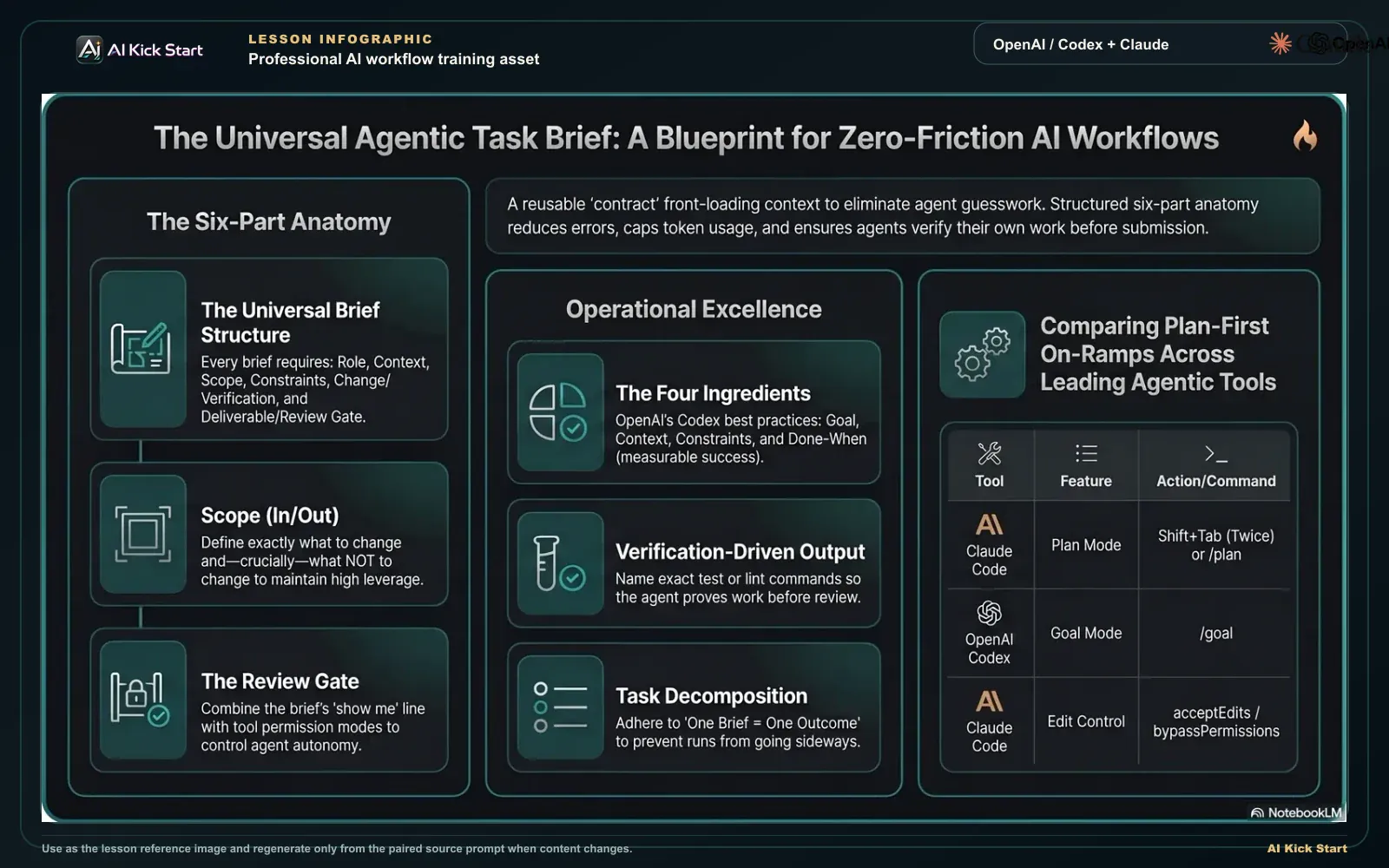
The universal agentic task brief
A branded walkthrough: front-load role, context, and constraints, set measurable success criteria, decompose work, and keep review gates so agent output stays in scope.
What to understand
- A task brief is a structured prompt that front-loads the context an agent would otherwise have to guess at, then states a measurable outcome. OpenAI's own Codex best-practices page (prompting guide released 25 Feb 2026) reduces a non-trivial task to four ingredients: Goal ('what are you trying to change or build?'), Context ('which files, folders, docs, examples, or errors matter?'), Constraints ('what standards, architecture, safety requirements, or conventions should Codex follow?'), and 'Done when' ('what should be true before the task is complete, tests passing, behaviour changing, a bug no longer reproducing?'). Every field in this lesson maps onto those four.
- Specificity is not a nicety, it is the mechanism. OpenAI states plainly that clear prompting 'helps Codex stay scoped, make fewer assumptions, and produce work that's easier to review.' Each of those three is a direct lever on cost and error: staying scoped caps tokens, fewer assumptions cuts wrong-direction reruns, and review-friendly output saves your time. A vague brief outsources all three decisions to the model, and you pay (in tokens and in mistakes) for every guess.
- Codex calls the philosophy verification-driven: 'Codex produces higher-quality outputs when it can verify its work. Include steps to reproduce an issue, validate a feature, and run linting and pre-commit checks.' A brief that names the exact test or lint command turns the agent from something that hands you untested code into something that proves the work before you ever look at it. The verification field is what converts a hopeful diff into a checked one.
- Task decomposition is the partner rule. Codex notes it 'handles complex work better when you break it into smaller, focused steps. Smaller tasks are easier for Codex to test and for you to review.' So when a request feels large, the brief should either narrow the scope or end with 'propose a plan first.' One brief should describe one outcome, bundling three changes is the most common reason a run goes sideways.
- Context is the other half of the contract, and the agent fills it in two ways. You point it at the right starting place, file references, screenshots, error text, constraints, and the agent then gathers the rest from file contents, tool output, and an ongoing record, automatically compacting (summarising and discarding) less-relevant detail on long runs. Your job is to aim the agent, not to paste the whole repository: the brief is a targeting instruction, not a data dump.
- Every brief needs a review gate, the line that says 'show me before you act.' In 2026 both tools build this in. Codex has configurable approval and sandbox modes and advises you to 'start tight by default, then loosen permissions only for trusted repos.' Claude Code (v2.1) ships six permission modes, default, acceptEdits, plan, auto, dontAsk, bypassPermissions, and Shift+Tab cycles default → acceptEdits → plan; in every mode except bypassPermissions, writes to protected paths are never auto-approved. The brief's review-gate line and the tool's permission mode are two halves of the same safety control.
- For multi-step work, both tools give you a 'plan-first' on-ramp. Codex has Goal mode (the /goal command): an effective goal states 'a specific outcome, measurable target, or test criteria' written 'so Codex can tell whether it has succeeded', e.g. 'Reduce the time to interactive of the home page to below 1 second.' If the goal is hard to define, you 'start with /plan and ask Codex to shape it.' Claude Code has Plan Mode (Shift+Tab twice or /plan, added January 2026), a read-only mode that proposes a step-by-step plan without changing anything and reads your CLAUDE.md for conventions first.
- The same brief works across tools because all capable agents need the same six things: a role/posture, context, scope (in and out), constraints, the change itself with its verification, and the hand-back format. The fields below are tool-agnostic, paste them into Codex, Claude Code, or Cowork unchanged. The anatomy is portable even as version numbers and command names churn.
- Treat the brief as a reusable contract, not a one-off message. Once a filled-in template produces a clean run, keep the empty skeleton; tweaking a known-good structure beats writing from a blank box every time. Standing instructions files (Codex's AGENTS.md, Claude Code's CLAUDE.md. Lesson 6) carry the parts that never change, so each brief only has to carry what is specific to this task.
Deeper dive
Why specificity directly reduces cost and error
Picture the two paths from a single request. Path A is a one-liner: 'fix the double-email bug.' The agent has no file references, so it scans the repo to find candidates, that scan is real tokens, re-paid on every turn it stays in context (Lesson 3). It has no scope line, so to be 'helpful' it may also tidy adjacent code, widening the diff you must review and risking a regression you didn't ask for. It has no acceptance criterion, so it cannot self-check and hands you something you have to test by hand; if it guessed the wrong file, that whole run is wasted and you pay again for the retry. Path B is a brief that names the two files, the in/out scope, and the test command. The agent loads only what it needs (small context), changes only what you sanctioned (small diff), and runs the named test before handing back (no manual verification, no wrong-direction rerun). The cost difference is not marginal, vague-retry loops and bloated context are the two largest silent overspends in agentic work, and the brief eliminates both at the source. This is why OpenAI frames specificity as the thing that keeps the agent 'scoped' and makes work 'easier to review': scope is a token control and review-ease is a time control.
Scope-out is the highest-leverage line in the whole brief
Beginners obsess over the change they want and forget to fence off everything else. But an agent's failure mode is rarely 'did nothing', it is 'did more than you asked.' A modern agent reasons about the broader codebase and will, unprompted, rename a variable, 'modernise' a pattern, or refactor a neighbouring function because it looks improvable. Each of those is an unrequested change you now have to notice, evaluate, and often revert. A single 'Scope out: do not touch payment capture, the public API, or the email template' line converts that risk into a hard boundary. It is the cheapest insurance in the brief: one sentence prevents the class of mistake, silent collateral edits, that does the most damage in production code. Pair it with a review gate ('show me the diff before writing') and you have both a stated boundary and a checkpoint to enforce it.
Acceptance criteria turn 'done' from opinion into a check
The difference between 'make it faster' and 'reduce time-to-interactive below 1 second' is the difference between a wish and a contract. A measurable criterion does three jobs at once: it tells the agent when to stop (no over-engineering), it gives the agent something to verify against (the heart of the verification-driven approach), and it gives you a one-line review instead of a judgement call. The strongest acceptance criterion is one the agent can run, a test that reproduces the bug (RED) and then passes (GREEN), or a lint/typecheck command that must come back clean. When acceptance is a runnable check, the agent self-corrects in its own loop before you ever see the result, which is the entire point of an agent: it closes the verify step itself instead of returning unproven work for you to babysit.
Anatomy of a task brief, built top to bottom
Read each layer as a field you write before the agent acts, drop any one and that layer's failure mode (a wrong guess, a bloated diff, unverified output) reappears.
- 1 · Role / posture'Senior engineer; read before you write, ask before you assume', sets caution over eager autonomy, the human half of the tool's permission mode.
- 2 · Context + filesOne or two lines on the system plus the exact paths (e.g. src/billing/webhooks.ts), aims the agent so it never scans the whole repo to find them.
- 3 · Scope, in / outThe single outcome to achieve AND the highest-leverage line: what MUST NOT change (schema, deps, public API), converting 'be helpful' into a hard boundary.
- 4 · ConstraintsStyle, locale, logging, no new deps, smallest diff, the conventions a standing-instructions file carries, plus a brake on over-engineering.
- 5 · Outcome + verificationOne measurable 'Done when' sentence, proven by a runnable check, a RED-then-GREEN test or lint command the agent self-corrects against before hand-back.
- 6 · Review gate + deliverable'Read-only first; show plan + diff before writing' plus the exact format back (diff + root-cause + test output), the checkpoint, then a one-pass review.
Step by step
Open a fresh task and resist the one-liner
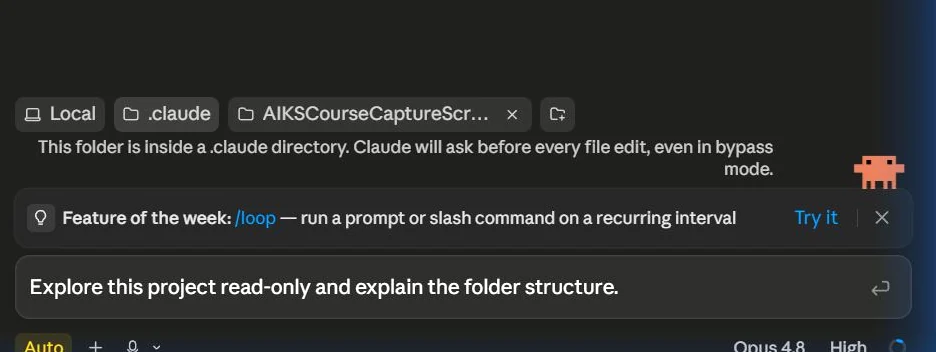
In Codex or Claude Code, start a new task or conversation rather than continuing a cluttered one, a polluted context window leaks an unrelated previous run into this brief and re-pays for it in tokens every turn (Lesson 3). Before typing anything, decide the single outcome you want. If you cannot state it in one sentence, the task is too big and needs splitting into separate briefs. You know this step worked when you can state the task's single outcome in one sentence before touching the prompt box.
HintA blank prompt box invites a vague ask. Open a scratch note and draft the brief there first, then paste the whole thing in at once.
On this screen
- 1Fresh session. A clean home screen means no leftover context from a previous run leaks into this brief, start every brief from a new task or conversation.
- 2Prompt input. The example shown is a deliberately tiny read-only ask. Your brief is far longer, draft it in a scratch note and paste the whole thing here in one go.
Lay out the six-part anatomy (as ten concrete fields)
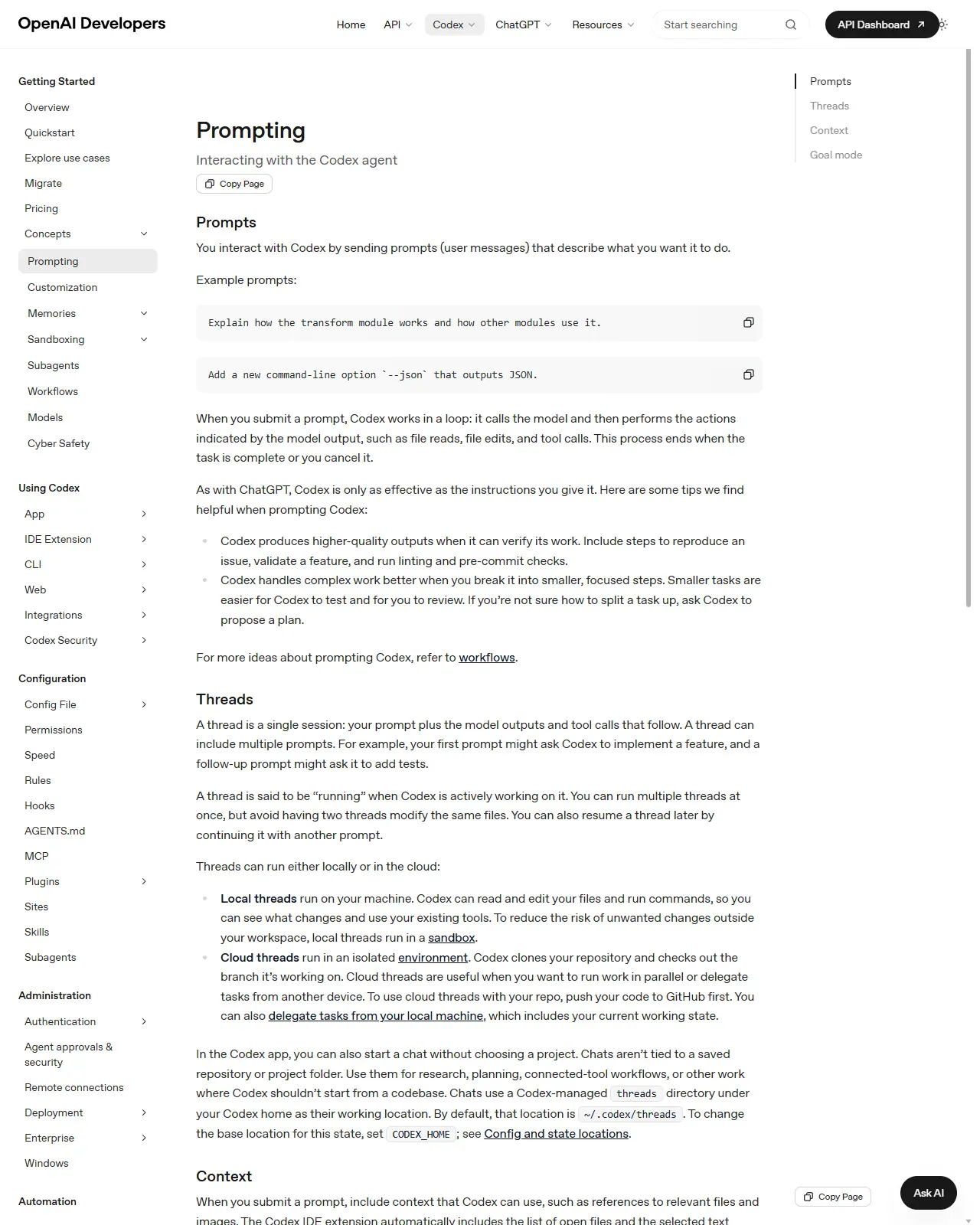
Structure every brief around the six parts. Role/posture, Context, Scope (in/out), Constraints, the change + how to verify it, and the Deliverable + review gate. In practice, write them as ten explicit markdown headings so nothing stays implicit: Title, Context, Files to look at, Scope (in/out), Constraints, Desired outcome, Acceptance criteria, Verification commands, Review gate / out-of-bounds, Deliverable. These map directly onto OpenAI's four official ingredients (Goal, Context, Constraints, 'Done when') with scope, verification, and the review gate broken out for safety. Done when all ten headings exist in your draft and none is empty.
HintHeaders beat paragraphs. An agent skims for the field it needs the way you skim a form, and so do you when you reuse the brief later.
On this screen
- 1Official prompting guide. OpenAI's Codex prompting page, the source of the four ingredients (Goal, Context, Constraints, Done when) that this step expands into ten headings.
- 2Example prompts. Note how short the documented examples are, they rely on the agent guessing context. Your ten headings exist to remove every one of those guesses.
Fill it in concretely, real paths, real commands, real numbers
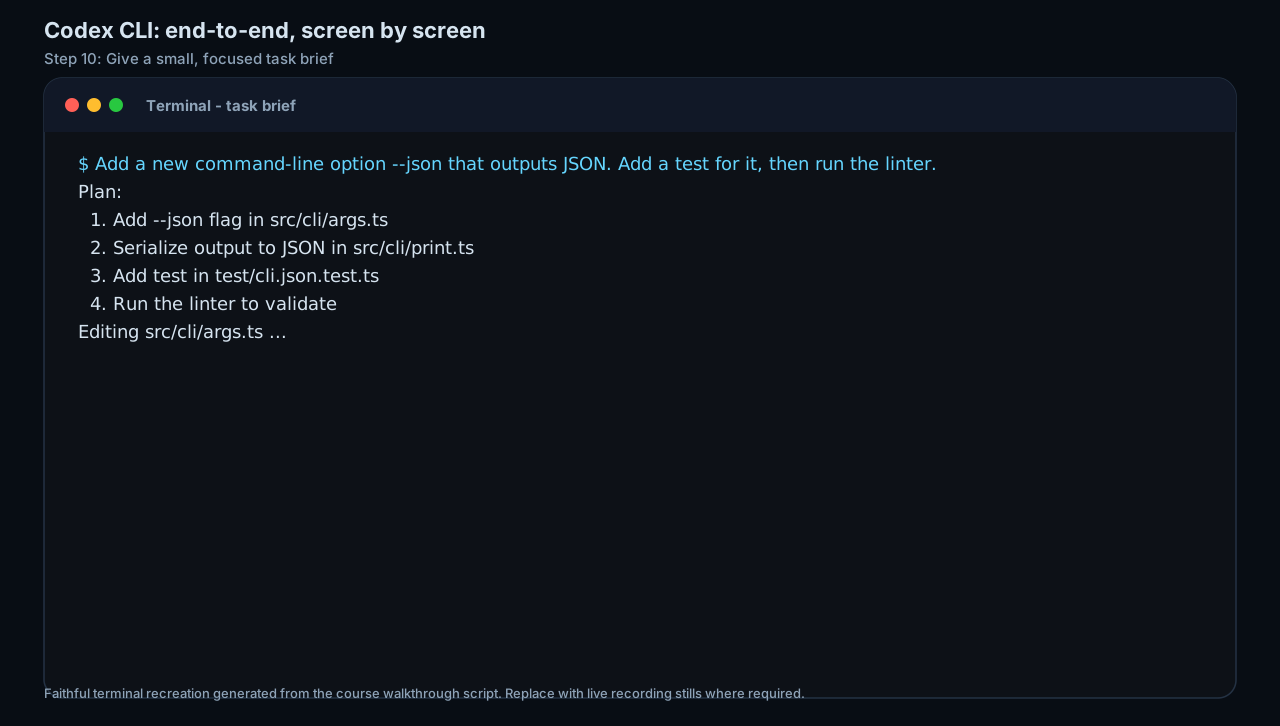
Replace every placeholder with a concrete value. A compact filled-in brief: 1) Title: Fix duplicate invoice emails on webhook retry. 2) Context: Billing resends invoices when a Stripe webhook retries; users get two emails, the retry is expected, the duplicate email is the bug. 3) Files: src/billing/webhooks.ts, src/email/send.ts, tests/billing/. 4) Scope IN: de-duplicate sends keyed on invoice id within 10 minutes. Scope OUT: no schema changes, no new deps, don't touch payment capture, the public API, or the email template. 5) Constraints: preserve logging; AU English; smallest diff. 6) Outcome: a retried webhook for one invoice sends at most one email; first-time webhooks unaffected. 7) Acceptance: a new test reproduces the double-send (RED) then passes (GREEN). 8) Verify: npm test billing && npm run lint. 9) Review gate: read-only first, show plan + diff, wait for 'go'. 10) Deliverable: diff + one-paragraph root-cause + test output. Done when every angle-bracket placeholder is replaced with a real path, command, or number.
HintAcceptance criteria that name a test you can run are worth more than three sentences of prose intent, a runnable check is something the agent self-corrects against; prose is something you have to adjudicate.
On this screen
- 1Single-outcome ask. The screen shows the floor, not the ceiling: even this compact ask names the change, the test, and the lint run. Your ten-field brief gives the agent strictly more to verify against.
- 2Plan echoes the brief. The agent's numbered plan names exact files (src/cli/args.ts). When your brief names files first, the plan should echo them back, if it names files you didn't, ask why before approving.
Set the review gate and decide: plan first or run now
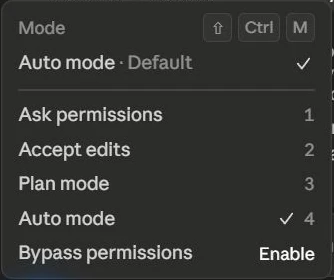
Add the explicit gate line, 'work read-only first, show me a one-line plan and the diff before writing anything', and back it with the tool's permission mode. In Claude Code, Shift+Tab cycles default → acceptEdits → plan; Shift+Tab twice (or /plan) enters Plan Mode, a read-only proposal pass. In Codex, start with /plan or /goal when the path is murky, and keep approval/sandbox 'tight by default, loosen only for trusted repos.' If the brief is small and crisp, run it directly; if you're unsure how to split it, end with 'propose a short plan before editing.' You know the gate is set when the run stops at a plan instead of an edit.
HintPlanning first is the cheapest place to catch a misread requirement. Approve the plan, then let it run, the review gate is where a 30-second check prevents a 30-minute wrong-direction run. In the selector shown, note the app defaults to Auto, choosing Plan deliberately is the point.
On this screen
- 1Plan mode option. Selecting Plan mode (or ending the brief with a plan request) converts a risky big task into a checkpoint you control, it routes ambiguity into a review, not a guess.
- 2Permission mode. The brief's gate line and the tool's mode (Claude Code default/plan, Codex tight approval) are two halves of one control, state it AND enforce it.
Set the deliverable format
State exactly what you want back: a diff, a root-cause summary, a list of files changed, the verification output, or all of them. An agent that knows the hand-back format produces something you can review in one pass instead of a wall of unexplained changes. Diff + a short 'what changed and why' note + the test/lint result is the default that reviews fastest. Done when the brief names the exact artefacts you expect back, so you can tick them off on delivery.
HintAsk for a short 'what changed and why' note alongside the diff, it makes your review minutes faster and surfaces any assumption the agent made.
Save the brief as a reusable template
Once a brief produces a clean run, copy the empty skeleton (the second prompt example in this lesson) into a notes file or snippet manager. Next time, you start from a proven structure and only fill in the specifics rather than reinventing the framing. Move the parts that never change, your conventions, locale, logging rules, into a standing-instructions file (AGENTS.md / CLAUDE.md, Lesson 6) so each brief only carries what is specific to this task. Done when you can open a new chat and paste the skeleton without retyping any heading.
HintA team that shares one brief template gets consistent agent results across people, not just across one person's tasks, the template is how brief-writing scales beyond you.
Take a real, small task from your own work and write it out using the full six-part anatomy as the ten concrete fields, real paths, a real verification command, an explicit scope-out line, and a review gate. Run it through Codex or Claude Code with the tool in plan/default mode so the gate is enforced. Then strip the values and keep the empty headings as your personal reusable template.
One completed task brief for a real task (all six anatomy parts present, with a runnable acceptance check and an explicit scope-out + review gate), plus a blank reusable skeleton saved somewhere you can paste from.
Production prompt examples
ROLE: You are a senior engineer working in a careful, scope-disciplined mode. Read before you write; ask before you assume.

CONTEXT: Our billing service resends invoices when a Stripe webhook retries, so customers occasionally receive two identical invoice emails for one invoice. The retry behaviour is expected; the duplicate email is the bug. Relevant files: src/billing/webhooks.ts (webhook handler), src/email/send.ts (email dispatch), tests/billing/ (existing billing tests). The repo's conventions live in CLAUDE.md / AGENTS.md, follow them.

SCOPE, IN: De-duplicate invoice emails, keyed on invoice id, within a 10-minute window, so a retried webhook for one invoice sends at most one email.
SCOPE, OUT: Do NOT change the database schema, add new dependencies, alter payment capture, or modify the public API. Do NOT touch the email template copy.

CONSTRAINTS: Preserve existing structured logging. Use Australian English in any user-facing string. Match the existing code style in the touched files. Keep the change minimal, smallest diff that satisfies acceptance.

DESIRED OUTCOME (Done when): A retried webhook for a single invoice results in exactly one email; first-time webhooks are unaffected.

ACCEPTANCE / VERIFICATION: Add a test in tests/billing/ that reproduces the double-send (must fail first. RED), then make it pass (GREEN). Before handing back, run: `npm test billing && npm run lint` and report the result.

REVIEW GATE: Work read-only first. Show me (1) a one-line plan and (2) the proposed unified diff. Do NOT write files, run migrations, install packages, or touch git until I reply 'go'.

DELIVERABLE: The approved diff, plus a one-paragraph root-cause summary and the final test/lint output.
- ROLE sets posture ('read before you write; ask before you assume') so the agent defaults to caution, not eager autonomy, this is the human-readable half of the tool's permission mode.
- CONTEXT names the exact files and frames what is expected vs what is the bug, so the agent doesn't 'fix' the intended retry behaviour and doesn't scan the repo to find the files (token saver).
- SCOPE, OUT is the single highest-leverage block: it fences off schema, deps, payment capture, the public API, and the template, pre-empting the collateral-edit failure mode.
- CONSTRAINTS encode the conventions a standing-instructions file would otherwise carry, plus 'smallest diff' to stop over-engineering.
- DESIRED OUTCOME + ACCEPTANCE are the measurable 'Done when' from OpenAI's four ingredients, the RED-then-GREEN test makes 'done' a check the agent runs itself, not an opinion you adjudicate.
- REVIEW GATE ('read-only first, show the plan and diff, wait for go') is the explicit checkpoint; it pairs with starting the tool in plan/default mode so the boundary is enforced, not just stated.
- DELIVERABLE names diff + root-cause + test output so you review in one pass instead of decoding a wall of raw changes.
ROLE: You are a senior engineer. Read before you write; ask one tight question rather than guessing.

CONTEXT: <one or two sentences on the system and the problem> Relevant files: <paths>. Conventions: see CLAUDE.md / AGENTS.md.

SCOPE, IN: <the one outcome this task should achieve>
SCOPE, OUT: <files, systems, and behaviours that MUST NOT change>

CONSTRAINTS: <style, language/locale, logging, no new deps, keep diff minimal, any architecture rules>

DESIRED OUTCOME (Done when): <one measurable sentence describing the verifiable end state>

ACCEPTANCE / VERIFICATION: <the exact test/lint/typecheck command(s) that prove it; prefer a RED-then-GREEN test>

REVIEW GATE: Work read-only first. Show me a one-line plan and the proposed diff before writing anything. If scope is unclear, propose a short plan instead of editing.

DELIVERABLE: <diff / summary / list of files changed / all three> plus the final verification output.
- Keep this skeleton in a snippet manager or notes file, you start from a proven structure and only fill the angle-bracket specifics, never a blank box.
- The headings double as a checklist: an empty SCOPE, OUT or ACCEPTANCE line is a visible reminder of the field most likely to be missing.
- The closing 'if scope is unclear, propose a short plan instead of editing' is the cheap fallback, it routes ambiguity into Codex /plan or Claude Code Plan Mode rather than into a wrong guess.
- A team that shares ONE skeleton gets consistent agent results across people, not just across a single person's tasks.
Common mistakes to avoid
- Writing a one-line ask and then complaining the agent guessed wrong, the missing context was yours to supply, and every guess cost tokens and risked the wrong file.
- Leaving scope open-ended (no scope-out line), so the agent 'helpfully' refactors files you never wanted touched, the most damaging and most preventable failure.
- Stating intent ('make it faster') with no measurable success criterion or verification command, so the agent can't self-check and you can't review in one pass.
- Bundling three unrelated changes into one brief instead of splitting them into smaller, testable tasks. Codex itself advises smaller tasks are easier to test and review.
- Omitting the review gate and running in an auto-accept/loose permission mode on unfamiliar code, the brief said nothing about checking before acting, so nothing did.
- Dumping the whole repository into the prompt instead of naming the few files that matter, context the agent re-pays for on every turn, for no benefit.
- Rewriting the brief from a blank box every time instead of reusing a known-good skeleton and a standing-instructions file for the unchanging parts.
Source conflicts to review
- Command and mode names move fast: Codex Goal mode (/goal) may require enabling features.goals in config, and Claude Code's permission-mode set (six as of v2.1: default/acceptEdits/plan/auto/dontAsk/bypassPermissions) changes between versions, verify the current commands in each tool's own docs before teaching specifics.
- Third-party guides describe Claude Code Plan Mode activation inconsistently (Shift+Tab twice vs typing /plan vs setting defaultMode in settings.json); all are reported valid as of June 2026, confirm against code.claude.com rather than blogs.
- OpenAI presents the brief as four ingredients (Goal/Context/Constraints/Done when); this lesson expands them to a six-part anatomy / ten fields by breaking out scope, verification, and the review gate for safety. The expansion is editorial, not an official OpenAI schema, treat the four ingredients as the canonical minimum.
Key terms
- Task brief
- A structured prompt that front-loads role, context, scope, constraints, and success criteria so an agent can act without follow-up questions.
- Six-part anatomy
- The portable shape of a good brief: role/posture, context, scope (in/out), constraints, the change + its verification, and the deliverable + review gate.
- OpenAI's four ingredients
- Codex's official non-trivial-task recipe: Goal, Context, Constraints, and 'Done when' (the verifiable end state).
- Success / acceptance criteria
- A measurable definition of done, ideally a test or check (RED then GREEN) the agent runs to prove the work itself.
- Verification-driven
- Codex's principle that an agent produces better output when it can verify its own work via reproduction steps, tests, and lint/pre-commit checks.
- Scope (in/out)
- Explicit statements of what the task should and, crucially, should NOT change, the highest-leverage line for preventing collateral edits.
- Review gate
- The brief line ('read-only first; show the plan and diff before writing') plus the tool's permission mode that enforces a checkpoint before any change.
- Goal mode
- Codex's /goal command for multi-step work, where the goal states a specific, measurable outcome with clear completion indicators.
- Plan Mode
- Claude Code's read-only mode (Shift+Tab twice or /plan, added Jan 2026) that proposes a step-by-step plan, reading CLAUDE.md, without making changes.
- Task decomposition
- Breaking a large request into smaller tasks that are easier for the agent to test and for you to review.
- Context compaction
- The agent automatically summarising and discarding less-relevant context to keep long, multi-step runs coherent and affordable.
- Unified diff
- The standard line-by-line format for showing changes, added (+) and removed (−) lines grouped by file. The artefact you review and approve; 'show me the diff' means show changes in this form.
- RED-then-GREEN
- Acceptance pattern where a new test first FAILS on the unfixed code (RED), proving it reproduces the problem, then PASSES after the change (GREEN), proving the fix. A test green both before and after proves nothing.
Resources
Checkpoint