




Briefing

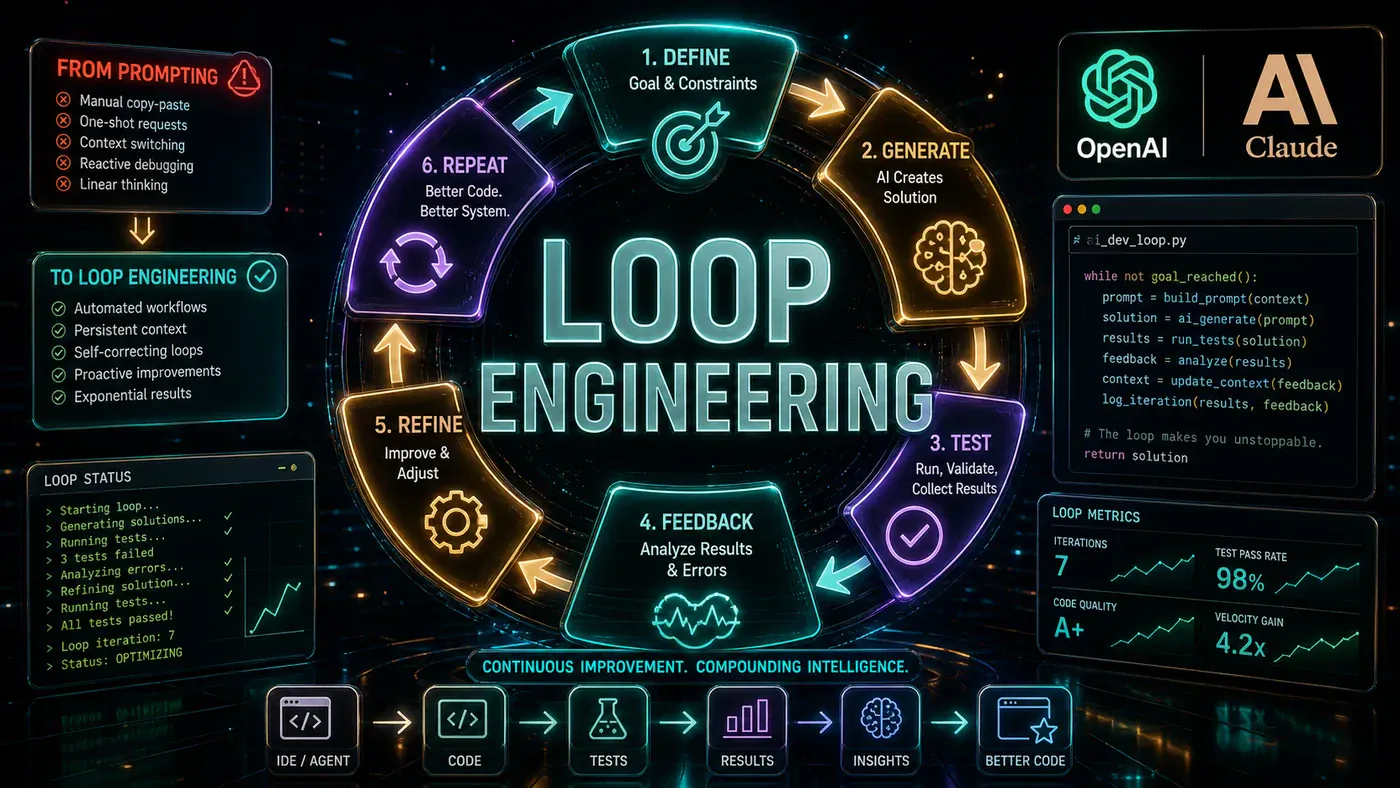
If you are still copy-pasting error messages into Claude Code, you are already behind. The way developers interact with AI coding agents is undergoing a fundamental shift - and the people building the very tools you use every day are leading the charge away from traditional prompting toward something far more powerful: loop engineering.
Peter Steinberger, creator of OpenClaw, put it bluntly: you should not be prompting coding agents anymore. You should be designing loops that prompt your agents for you. Boris Cherny, who leads Claude Code at Anthropic, said the exact same thing - he does not prompt Claude anymore. In his own words, his "job is to write loops." When the architects of both Codex and Claude Code independently converge on the same paradigm, it is not a coincidence. It is a signal that the ground beneath us has shifted.
Louis-François Bouchard of the "Build In Public" channel has been at the forefront of explaining this transformation. His video argues that loop engineering is not merely a trendy new term - it represents a genuine paradigm shift in how we harness AI agents in 2026, one that could save you hours of tedious babysitting every week. In this article, we will unpack exactly what loop engineering is, how it works, the tools that enable it, and the pitfalls you need to avoid.
The Problem with Traditional AI Prompting
Let us paint an honest picture of what most developers' AI coding workflows look like today. You write a prompt. You grant your agent file access. The agent edits some files. You accept all the permission prompts that pop up. You run your tests. Something breaks. You paste the error back into the chat. The agent tries again. Sometimes it works on the first retry. Sometimes you need to take a screenshot, explain the context, clarify your intent, and try yet again.
Twenty minutes later, you have a sinking realisation: you are babysitting the exact process you wanted to offload. You are not doing the thinking work - the architecture, the design decisions, the creative problem-solving. You are doing the mechanical work of nudging an agent through a series of discrete steps, one prompt at a time. It is the digital equivalent of hand-cranking a machine that was supposed to run itself.
The irony is painful - these agents can write complex functions, refactor entire modules, and set up testing pipelines. And yet we interact with them as if they were interns who need constant supervision. We micro-prompt them through every task because we have not yet built the systems that would let them operate autonomously. That is where loop engineering enters the picture.
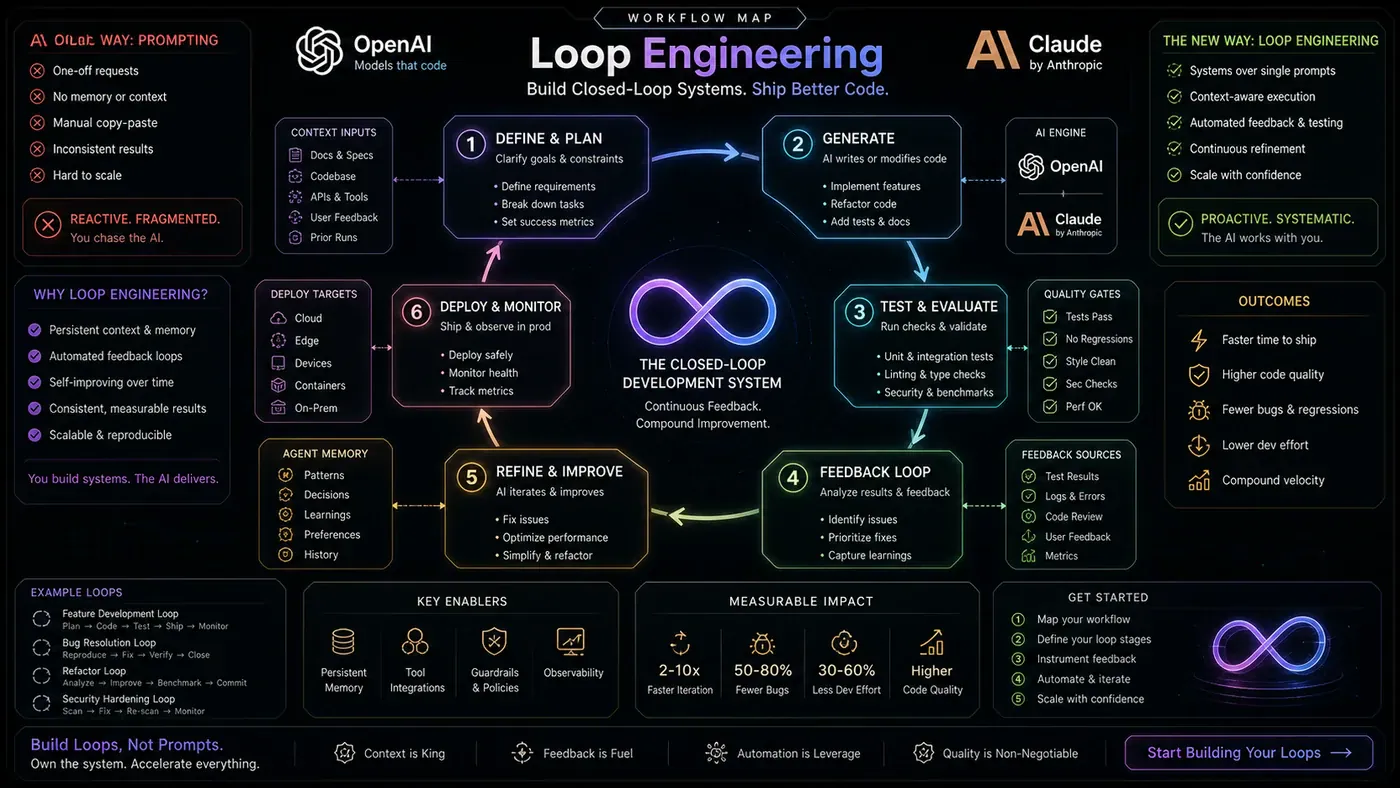
What Is Loop Engineering?
The terminology around AI development has evolved rapidly. We moved from prompt engineering to context engineering to harnesses, and now to loop engineering. Bouchard is refreshingly honest about this progression: at their core, they are all fundamentally about the same thing - steering large language models as effectively as possible through the context and instructions we provide them.
So what makes loop engineering distinct? The clue is in the feedback mechanism. The sceptical developer might retort: if a loop just means running the same prompt every hour, we already have that. It is called a cron job, and it predates most of us in this industry. That objection misses the point entirely.
With loop engineering, the critical difference is the decision-maker inside the loop. A cron job executes a fixed script blindly, regardless of whether the conditions are right, whether the previous run succeeded, or whether circumstances have changed. A loop, in the loop engineering sense, runs an agent that actively looks at the current state, chooses the next appropriate action, executes it, checks the result, and then makes an informed decision about what to do next. Continue? Retry with adjusted parameters? Roll back? Stop entirely? The agent controls the loop, not the other way around.
This works because large language models have reached a level of capability where they can now understand proper goals and interpret reward signals. They are no longer just pattern-matching text generators - they can function as genuine decision nodes within a larger autonomous system. Prompt engineering optimises a single interaction. Loop engineering turns that interaction into a repeatable, self-regulating process spanning many cycles. The prompt becomes just one component within a larger, intelligent system.
How a Loop Works: The Anatomy of an Autonomous AI System
For a loop to function at all, it needs two foundational elements before anything else: a trigger and a verifiable goal.
The trigger is the event that initiates the loop. This could be almost anything: a pull request opening on your repository, a failing continuous integration run, a daily scheduled job, a message in a Slack channel, or simply you manually typing a command or sending that first initial prompt. The trigger is the starting gun - it tells the system that conditions are right to begin autonomous operation.
The verifiable goal is what tells the loop it can stop. This stopping condition can be deterministic and objective - all tests pass, continuous integration is green, code coverage meets a threshold. Or it can be somewhat softer - a reviewer model checks whether the user interface matches a specification document, or a human provides sign-off at a checkpoint. But there must be some verifiable check. Without one, as Bouchard colourfully puts it, you have not built a loop. You have built "a very confident token furnace" that will happily burn through your API budget until someone manually kills it.
This distinction between hard and soft stopping conditions matters in practice. Hard conditions - test suites passing, linting checks succeeding - are ideal for fully autonomous loops. Soft conditions - aesthetic judgements, user experience assessments - are better suited for loops that include human-in-the-loop checkpoints. Some tools already implement this behaviour automatically: Codex, for instance, will continue working until the requested objective is complete. You can also build these loops yourself through automations in tools like Cursor.
A Real-World Example in Practice
What does a loop engineering system actually look like in the wild? Bouchard offers a compelling scenario.
Imagine a loop that runs every morning. It reads yesterday's CI failures, open issues, and recent commits, then synthesises this into a short state file - a briefing on what looks worth doing. For one selected issue, it opens a separate git worktree and dispatches an agent to draft a fix. A second agent reviews the draft against your coding standards and test suite. If tests pass, it opens a pull request and updates the ticket automatically.
But here is where the intelligence comes in. If tests fail, the loop feeds the error context back into the agent for one or two additional attempts. Only if the agent gets genuinely stuck does it stop and escalate to a human inbox with a detailed status report.
That is loop engineering in action. You did not ask the agent seven separate times. You designed the system once - the triggers, the steps, the verification checks, the escalation conditions. This illustrates the crucial distinction between automation and loop engineering: traditional automation says do step one, then step two, rigidly and regardless of outcome. A loop says: look at the state, decide the next step, execute it, verify the result, and decide whether to continue. It is closer to a miniature engineering process than a static script.
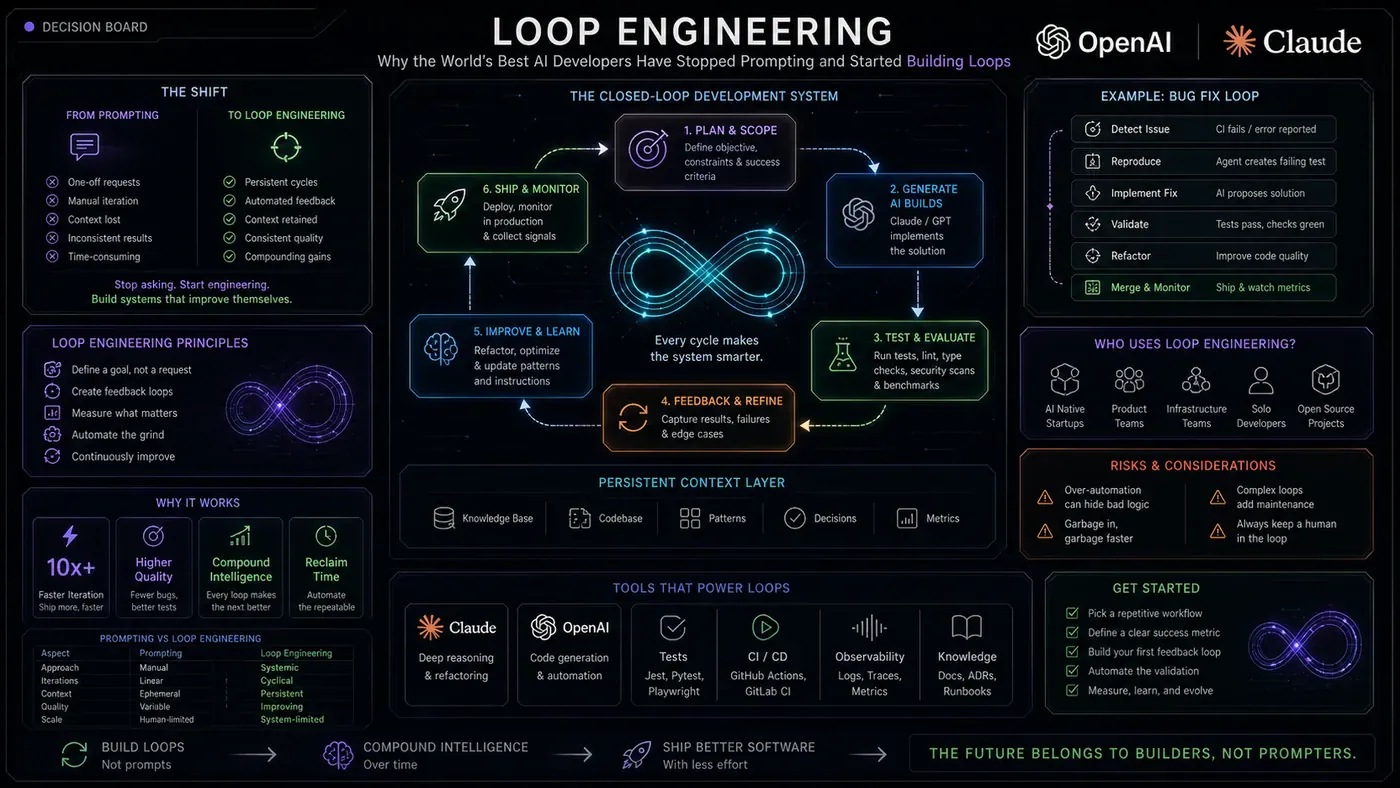
Tools That Support Loop Engineering
Several tools in the current AI coding ecosystem already support loop engineering patterns:
Claude Code offers the /goal command, which lets you set a specific goal and have the agent run autonomously until achieved. It also provides /loop for interval-based execution.
OpenClaw, created by Peter Steinberger, is built around the loop concept from the ground up with /loop and /goal commands for recursive, self-referential goals.
Codex from OpenAI incorporates built-in looping behaviour, continuing to work until it determines the objective is complete - the most "hands-off" implementation.
Cursor provides automations configurable to run on triggers like file saves, git events, scheduled intervals, or custom conditions - offering the most flexibility for custom loop architectures.
What these tools share is a recognition that the future of AI-assisted development is not better single-shot prompting, but better orchestration of multi-step, feedback-driven processes.
The Five Building Blocks of Loop Engineering
Google engineer Addy Osmani, whose comprehensive article on loop engineering has become a key reference in the community, identified five essential building blocks for designing effective loops:
1. Establish a clear goal. The loop must have a well-defined, unambiguous objective. Critically, you should verify that the AI agent can accurately echo back what the goal is before you allow it to run autonomously. If the agent cannot articulate the goal clearly, it certainly cannot pursue it effectively.
2. Provide a loop assessment mechanism. The AI needs a way to evaluate its own progress through the loop. It must be able to ascertain when looping should continue and, more importantly, when it should stop. This is your termination logic - the difference between a useful tool and an expensive runaway process.
3. Include human feedback checkpoints. For any loop running autonomously, there should be mechanisms for the AI to inform a human about what is happening. Transparency is essential. You need visibility into the agent's decisions, not just its outputs.
4. Establish clear stoppage rules. There must be explicit, unambiguous rules for when the loop ought to terminate. These should cover both success conditions (the goal has been achieved) and failure conditions (the agent is stuck, resources are exhausted, or an anomaly has been detected).
5. Test the loop and iterate. No matter how clever your loop design appears to be, you need to test it thoroughly and build confidence before letting it run unsupervised. Loops that work perfectly in isolation can behave unpredictably when exposed to the messy reality of production codebases.
These five blocks form a practical framework for moving from the theoretical idea of loop engineering to implemented systems that actually work reliably.
The Dangers and Caveats
Bouchard is admirably clear-eyed about the risks. There are two particularly significant problems to reckon with.
First, defining the goal is genuinely hard. A loop's goal needs to be both precise and verifiable. But software development is often fundamentally exploratory - you do not always know the final shape of a feature when you begin. If the end state is fuzzy, the loop will optimise toward whatever vague sentence you gave it, producing results worse than a single careful manual pass. The loop does not know what you meant; it only knows what you said.
Coding tasks are the easier domain for loop engineering. Venture into subjective or creative territory - asking a loop to write a script and make it "good" - and you may find the agent rewriting indefinitely, never reaching a stopping condition because "good" is not verifiable. The reward function is where you need significant thought and experimentation.
Second, token costs are a real concern. Running loops means your agents are consuming tokens continuously. A poorly designed loop - without proper termination, stuck in cycles - can burn through an API budget with alarming speed. You need monitoring dashboards, spending caps, and kill switches.
The economics deserve careful thought. A loop running for ten minutes on premium models might cost several dollars per execution. If it runs every hour, that is potentially hundreds of dollars per week. The value it delivers must justify that cost.
When to Use Loops - And When Not To
Loop engineering is not the right approach for every situation. Bouchard offers a practical framework:
Use loops when: the task is well-defined and verifiable; the task is genuinely repetitive; the cost of running the loop is less than your time doing it manually; you can set clear stopping conditions; and you have monitoring to intervene if things go wrong.
Do not use loops when: the task is exploratory or creative with no predetermined end state; the goal is fuzzy or subjective; the potential cost of a runaway loop exceeds the value; you cannot easily verify the output; or you are still learning a codebase and need the understanding that comes from manual work.
This last point deserves emphasis. There is a real danger in automating tasks before you truly understand them. If you never write a certain configuration manually, you may never develop the intuition for when your automation is producing subtly wrong results. Loops should augment expertise, not replace the process of acquiring it.
Conclusion
Loop engineering is not just another entry in the ever-growing glossary of AI buzzwords. It is the natural and perhaps inevitable evolution of how we work with AI agents. We have progressed from writing every line of code ourselves, to using autocomplete for completions, to prompting AI for every change we wanted, to now designing the systems that prompt the AI on our behalf.
The leverage point for developers has shifted. It is no longer about crafting the perfect individual prompt - though prompt quality still matters. It is about designing the control systems that orchestrate agents over time: the triggers that start them, the goals that direct them, the verification mechanisms that check their work, and the safeguards that prevent them from running amok.
As Bouchard makes clear, the people building the tools we use - Steinberger at OpenClaw, Cherny at Anthropic - have already made this shift in their own workflows. The question for the rest of us is not whether loop engineering will become standard practice, but how quickly we can adapt our own approaches to take advantage of it.
The age of the babysitter developer is ending. The age of the systems designer is beginning.
Helpful Resources
- Loop Engineering Blog Post (Louis-François Bouchard) - https://www.louisbouchard.ai/loop-engineering/
Bouchard's own deep-dive article on the topic, with additional examples and context.
- Loop Engineering Article (Addy Osmani) - https://addyosmani.com/blog/loop-engineering/
A comprehensive technical breakdown from a Google engineer, including the five building blocks framework.
- Loop Engineering GitHub Repository - https://github.com/cobusgreyling/loop-engineering
Practical patterns, starter kits, and example loop implementations you can adapt for your own projects.
- Forbes: "Loop Engineering Is Fully Making the Rounds" - https://www.forbes.com/sites/lanceeliot/2026/06/17/loop-engineering-is-fully-making-the-rounds-for-boosting-generative-ai-and-agentic-ai/
Mainstream technology press coverage of the loop engineering trend and its implications for the industry.
- Claude Code - Anthropic's CLI coding assistant with
/goaland/loopcommands: https://docs.anthropic.com/en/docs/claude-code
- OpenClaw - Peter Steinberger's loop-first coding tool: Referenced in community discussions; search "OpenClaw Peter Steinberger" for latest links.
- OpenAI Codex - https://openai.com/codex
OpenAI's coding agent with built-in autonomous looping behaviour.
- Cursor - https://www.cursor.com
AI-powered code editor with configurable automations and loop-like trigger support.