

Briefing
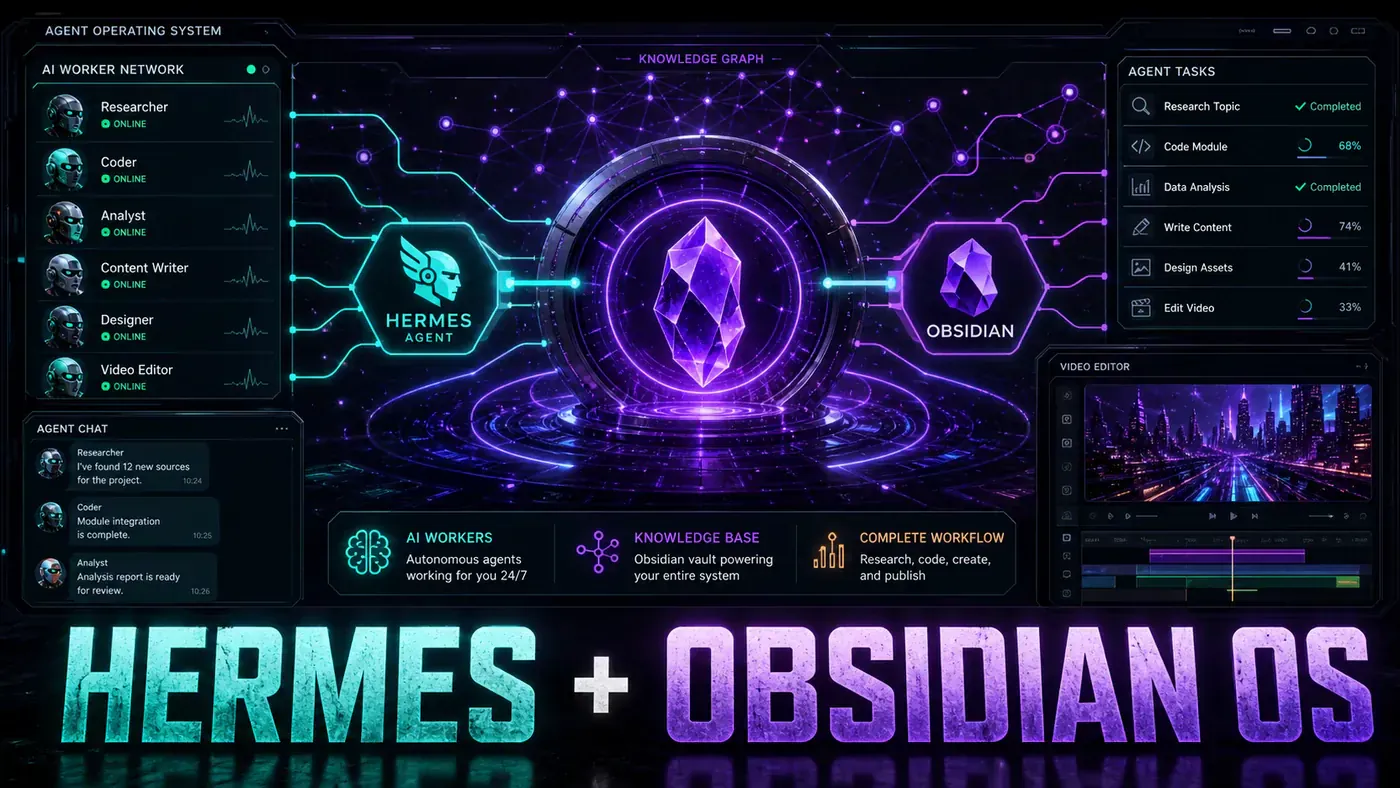
Banner Image Prompt: A futuristic command centre dashboard on a dark interface showing multiple AI agent profiles connected to a glowing central brain node, with Obsidian's purple crystal logo at the centre, surrounded by flowing data streams, chat interfaces, and video editing panels, rendered in a sleek cyberpunk aesthetic with deep purples and electric blues.
Picture this: a full team of AI workers that never sleep, never take breaks, and never ask for a pay rise. One agent writes your content. Another edits it. A third judges the quality and sends it back for improvements until it is genuinely good. All of them share the same memory, work in the same environment, and can be controlled with your voice. It sounds like science fiction - but it is a system you can build today using Hermes Agent and Obsidian.
In a recent walkthrough from Julian Goldie SEO, the concept of an "agent operating system" was laid out in practical detail. This is not theoretical research - it is a real-world setup combining multiple large language models, local note-taking infrastructure, and multi-agent workflows into a single command centre you actually own. If you have been juggling ten browser tabs, copy-pasting between ChatGPT and Claude, this approach could change how you work.
This article breaks down exactly how the system works, why it matters, and how you can start building your own agent operating system.
What Is an Agent Operating System?
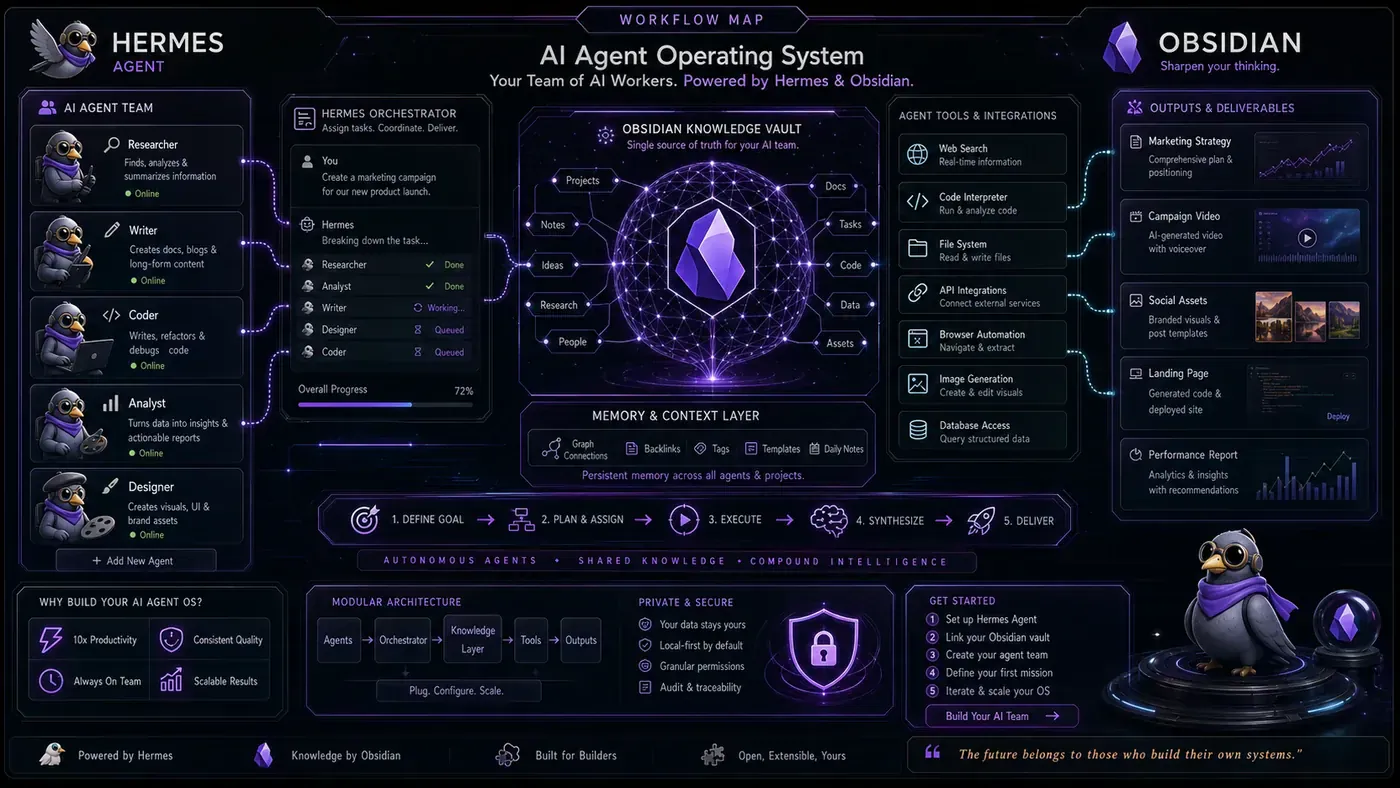
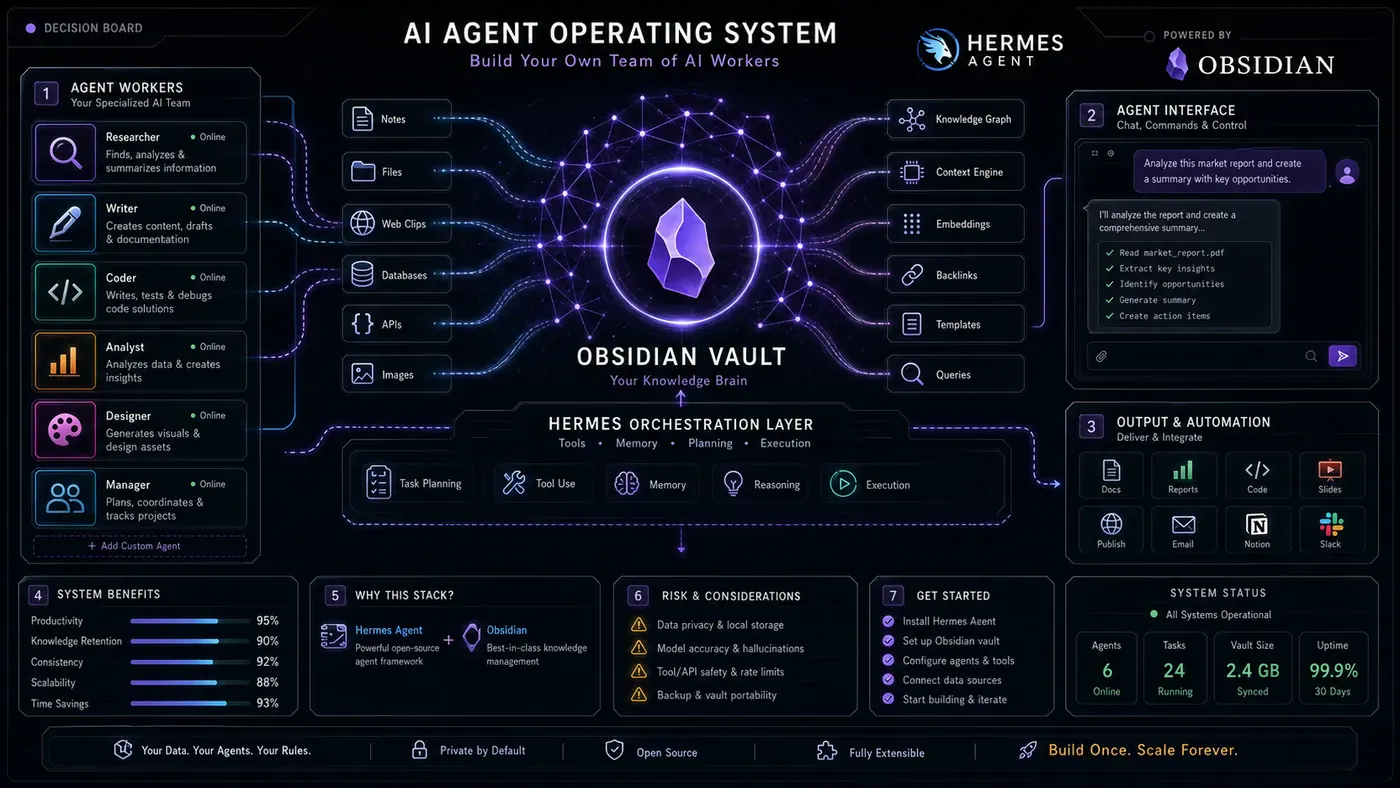
An agent operating system is a centralised home for all your AI workers. Instead of one chatbot in one browser tab, you have an entire crew in a single place. Hermes is there. Claude is there. Any new model you want to add is there too. The key insight: the system persists independently of the models running inside it.
Think of it like your computer's operating system. Windows or macOS does not change when you install a new app. The OS stays. The apps swap in and out. An agent operating system works the same way - the infrastructure, memory, skills, and workflows remain constant while the AI models swap out at will. This eliminates one of the most frustrating problems in AI tooling: vendor lock-in and constant migration.
Model Freedom: Swap Models Without Starting Over
The Plug-and-Play Advantage
The most powerful feature of this architecture is model freedom. When a new model drops, you do not rebuild - you just plug it in. GLM 5.2, Kimi K 2.7, Miniax M3 - all connected without changing the underlying system. The system stays. The models swap. It only gets stronger.
This is a fundamentally different mindset. Most users visit a vendor's website, start a fresh chat, and lose all context. With an agent operating system, your context, memory, and workflows live in the system - not in any individual model. The model becomes a replaceable engine.
Hermes Desktop vs. an Agent Operating System
You might reasonably ask: why not just use Hermes Desktop on its own? The answer is flexibility. Hermes Desktop is a solid tool, but it only runs Hermes models. If you have Claude working on a coding task, or you want to compare outputs across multiple models, you cannot manage that within a single-model interface.
With an agent operating system, you can have one group chat with Hermes, Claude, and any other model all participating together. When a new model comes out, you simply open a new chat for it. That freedom to mix, match, and compare is the whole point. You are not limited to one vendor's roadmap or pricing structure. You are building on open infrastructure that bends to your needs.
Why Not N8N?
N8N - the popular open-source automation platform - is another option, but it is technical. You drag boxes around a canvas, connect nodes, and debug when things break. At scale, those visual workflows become unwieldy.
With an agent operating system, you simply tell Claude what you want, and it builds the workflow in minutes. It is easier to fix when things go wrong, and far more enjoyable to use. The interface becomes a command centre you look forward to opening.
Keeping Costs Down: Three Tricks to Run Agents Cheaply
Running multiple AI agents continuously can get expensive if you are not careful. Here are three practical strategies to keep costs manageable.
Use Coding Plans Instead of Per-Call API Access
The most effective cost-saving approach is using subscription-based coding plans rather than metered API access. Providers like Kimi, GLM, and Miniax offer flat-rate plans, meaning you are not charged for every request your agents make. For a system running 24/7, this can mean the difference between a manageable subscription and an astronomical bill.
Free Models via OpenRouter
The second trick is leveraging free models through OpenRouter. Searching "free" on the platform reveals a constantly updating list of models that plug directly into your system. New ones appear regularly as providers compete for users. For non-critical tasks, background processing, or initial drafts, these free models handle a surprising amount of work.
Token Efficiency with Mark It Down and Headroom
The third trick is token efficiency. Microsoft's open-source Mark It Down tool converts files into clean markdown, which is naturally token-efficient - it strips formatting bloat and presents information in a structure language models process cleanly. An open-source skill called Headroom trims tokens even further. When your agents process hundreds of documents daily, reducing token usage by even 10–20% compounds into meaningful savings.
Memory: How Obsidian Becomes Your Agents' Shared Brain
What Is Obsidian?
Obsidian is a note-taking app built on a brilliantly simple premise: your notes are stored as plain markdown files directly on your own computer. You can open them offline anytime. You actually own them. No locked-up cloud, no proprietary format - just simple files you control.
This local-first architecture makes Obsidian uniquely suited as the memory layer for an agent operating system. Your agents read from and write to your vault automatically, continuously, and collaboratively.
The MCP Connection
Here is how the integration works in practice. Your agents take notes from every conversation and drop them into your Obsidian vault. Then you connect that vault back to your agents using a Model Context Protocol (MCP) server. The result is a shared brain: Claude and Hermes remember the same things. They have the same context. When one agent learns something, all agents benefit.
This shared memory is what makes the system feel "almost alive," as the original walkthrough described. The agents are not stateless chatbots starting fresh every time. They are persistent workers with institutional memory, building up knowledge about your projects, preferences, and workflows over time.
Shared Memory in Practice
The practical applications are extensive. You can use shared memory to map out complete onboarding flows for new team members or clients. Welcome notes, first steps, resources to point people towards - it all lives in one vault. When you jump between projects, nothing gets lost, and you are not re-explaining everything every single time. That alone can save a significant chunk of your working day.
For content creators and community builders, this means your agents can maintain a living knowledge base about your audience, your products, and your content strategy. Every insight, every question, every piece of feedback gets captured and becomes available to every agent in the system.
Building a Video Production Team with AI Agents
One of the most impressive demonstrations of this system in action is automated video production. By giving agents a video skill, they can script, generate, and edit a complete video without human intervention. The agent writes the script, creates the clips, generates the voiceover, and even handles camera angles. If you want a talking avatar layered on top, you can connect HeyGen for that final touch.
The Multi-Agent Workflow: Writer, Editor, and Judge
The critical insight here is that this is not a single agent doing everything. It is a team of specialised agents working together. One agent writes the initial script. A second agent edits and refines it. A third agent plays the role of judge - scoring the output against quality criteria and sending it back for revision until it meets the standard.
This writer-editor-judge loop runs autonomously, with agents passing work back and forth on a virtual board until the judge approves the final output. It is a self-correcting system that produces genuinely good work because it has built-in quality control.
This exact workflow can be applied to turn topics into finished videos that drive traffic and engagement. The writer drafts the content based on your topic list, the editor cleans it up and optimises it, and the judge keeps pushing until the output is sharp. The result is a content production pipeline that scales without requiring more of your time.
Safety and Permissions: Locking Down Your Agents the Smart Way
A local agent system that can write, edit, post, and create content is powerful - but power requires guardrails. The last thing you want is an agent running unsupervised with unrestricted access to your files, accounts, and data. The solution is granular permission control.
Each skill in the system gets its own permissions. The video skill can write and edit video files, but it cannot touch your Obsidian vault. The memory skill can read and update your notes, but it cannot post anything online. You decide what each agent is allowed to do, and you can change those permissions at any time.
It is like giving each agent a key card that only opens certain doors. This approach keeps the system fast, safe, and trustworthy. Even when agents are running overnight - which is one of the major advantages of an autonomous system - you know exactly what they are allowed to touch. Your data stays local. Nothing gets sent to servers you do not control. That peace of mind is what makes the setup sustainable for long-term use.
Voice Control: Hands-Free Agent Management
For the final layer of convenience, the system can be controlled entirely by voice using a tool called Jarvis. You can say "start my morning workflow" and the entire system kicks into gear - agents check your calendar, pull up your notes, and start drafting the day's content. All of it happens hands-free.
Or you can say "run the video team" and the whole crew starts working on the next video. Writer, editor, and judge all spin up simultaneously and begin their collaborative workflow. It is the closest thing to having a production studio that responds to verbal commands.
Voice control transforms the system from something you actively manage into something you simply direct. You become the conductor of an orchestra, not the musician playing every instrument.
How to Start: The Incremental Approach That Actually Works
If everything described so far sounds overwhelming, here is the most important advice in this article: you do not need to build the whole system on day one. In fact, trying to do so is the fastest route to failure. Most people who attempt to construct a full agent operating system in one go burn out before they get anything useful running.
The practitioners who actually succeed start small. One workflow. One agent. One skill. Get that working reliably, then add the next piece. Most successful builds follow a natural progression: start with a single workflow that actually sticks, then layer in the memory system, then add the team of specialised agents, then integrate voice control. Each piece makes the next one easier to implement.
Before you know it, you have a full AI operating system running in the background while you focus on the high-level work that actually requires your judgment and creativity. The system handles the execution. You handle the direction.
Why This Matters: The Bigger Picture
The agent operating system concept represents a meaningful evolution in how individuals and small teams leverage AI. We are moving from a world of disconnected tools - each with its own interface, pricing, and limitations - to one where AI is an integrated workforce under your direction.
A solo creator can now run a content operation that would have required a small team just two years ago. A consultant can automate research, drafting, and quality control. A business owner can build systems that work around the clock. What makes the Hermes-plus-Obsidian approach compelling is that it is local, open, and customisable. You own your data and control your infrastructure. When a better model comes out, you benefit immediately - no migration, no lock-in.
Conclusion
Building an AI agent operating system with Hermes and Obsidian is one of the most practical setups available to AI power users today. It combines model freedom with shared memory through Obsidian's markdown vault, multi-agent teamwork with built-in quality control, voice-activated management, and granular security - all while keeping costs manageable through coding plans, free models, and token-efficient processing.
The system is not theoretical. Real practitioners are using it today to produce content, automate workflows, and build businesses. The key is to start small, iterate incrementally, and treat each new capability as a layer on a solid foundation.
If the future of work involves humans directing teams of AI agents, building your own agent operating system is one of the highest-leverage investments you can make right now. The tools are ready. The only question is whether you will start today.
Helpful Resources
Core Tools and Platforms:
- Hermes Agent - The AI agent framework that forms the foundation of this operating system. Hermes enables local, multi-model agent orchestration with support for various large language models.
- Obsidian - The local-first, markdown-based note-taking application that serves as the shared memory layer for your agents. Available at obsidian.md (opens in a new tab).
- OpenRouter - A unified API gateway that provides access to hundreds of AI models, including many free options that can be plugged directly into your agent system. Search for "free" models to find no-cost options.
- Claude (Anthropic) - One of the primary models recommended for agent workflows, particularly strong at building workflows, writing, and editing tasks.
- HeyGen - AI-powered video generation platform for creating talking avatar videos. Can be connected to your agent system for automated video production with human-like presenters.
Cost Optimisation Tools:
- Mark It Down (Microsoft) - An open-source tool from Microsoft that converts files into clean, token-efficient markdown format. Essential for reducing token usage when feeding documents to agents.
- Headroom - An open-source skill that further trims token usage in agent workflows, compounding cost savings over time.
Voice Control:
- Jarvis - A voice control tool that enables hands-free operation of your entire agent operating system. Trigger workflows, spin up agent teams, and manage your system with spoken commands.
Model Providers with Coding Plans:
- Kimi - Offers subscription coding plans for flat-rate access rather than per-call API billing.
- GLM - Provides coding plans that eliminate metered billing for agent workflows.
- Miniax - Another model provider offering cost-effective subscription plans for sustained agent usage.
Protocols and Standards:
- MCP (Model Context Protocol) - The protocol used to connect your Obsidian vault to your agents, enabling shared memory and persistent context across multiple models and agents.
Alternative Automation Platforms:
- N8N - A powerful open-source automation platform with visual workflow building. More technical than an agent operating system but worth exploring for specific use cases.