





GitHub Copilot vs Claude Code: Which Coding Assistant Wins?
TL;DR: Copilot is the one to reach for if you want fast autocomplete inside your editor. Claude Code earns its keep on big refactors and team-level work. Most teams will end up running both. Copilot (opens in a new tab) starts at $10/mo for individuals; Claude Code is sold per seat (5-seat minimum) on Claude's Team plans, so it lands closer to team budgets than the price of a single subscription.
Two coding assistants now sit on most developers' desks, and they are not really fighting over the same job. GitHub Copilot grew up inside the editor, finishing your lines as you type. Claude Code came at it from the other direction, working more like a junior engineer you hand a task to and check back on later.
That difference matters more than any single benchmark. If you're a business owner deciding what to put in front of your dev team, the question isn't "which is smarter." It's which one fits the work your people actually do, and what the combined bill looks like at the end of the month.
Here's the short version before the detail. For everyday typing, Copilot is hard to beat. For the gnarly jobs, like reworking code across dozens of files or catching a security hole before it ships, Claude Code tends to pull ahead. Plenty of teams pay for both and don't regret it.
One caution up front. Vendor pricing and model names in this space shift constantly, and a few figures that floated around earlier this year turned out to be wrong. We've corrected those below and flagged where a claim is our own testing rather than published fact.
Pricing Comparison
| Tool | Individual | Business | Enterprise |
|---|---|---|---|
| GitHub Copilot | $10/mo | $19/mo/user | $39/mo/user |
| Claude Code | On Pro/Max plans | ~$100/seat/mo (Team, 5-seat min) | Custom |
| Claude Pro | ~$20/mo | , | , |
GitHub's pricing is straightforward and per seat: $10 for Copilot Pro individuals, $19 per user on Business, $39 per user on Enterprise (GitHub Copilot Plans & pricing (opens in a new tab), PE Collective (opens in a new tab)). GitHub has since added more individual tiers as well, including a Pro+ at $39 and a higher Max tier, which the original comparison left out.
Claude Code is the part worth getting right, because an earlier version of this piece had it badly wrong. It is not a flat $100 per team. According to SSD Nodes' 2026 pricing breakdown (opens in a new tab), Claude Code access on Team plans runs about $100 per seat per month (annual) with a five-seat minimum, and Claude Code is also available on individual Pro and Max plans, so it isn't team-only either. Claude Pro itself sits around $20/mo (eesel AI (opens in a new tab)).
That changes the math. A ten-person team on Copilot Business is roughly $190/mo. The same ten people on Claude Code Team seats is closer to $1,000/mo, not $100. Budget for the real figure, not the old headline number.
Head-to-Head: 12 Dimensions
A note on what follows: the per-dimension scores below are our own ratings from hands-on use, not measured benchmarks. Treat them as one informed opinion, not gospel.
1. Tab Completion Speed
Winner: Copilot
Copilot's inline suggestions show up fast and sit naturally in your typing flow. (We clocked them subjectively at well under a tenth of a second; we can't put a hard number on it.) Claude Code is built as an agentic tool rather than a real-time autocomplete engine, so it doesn't compete here in the same way.
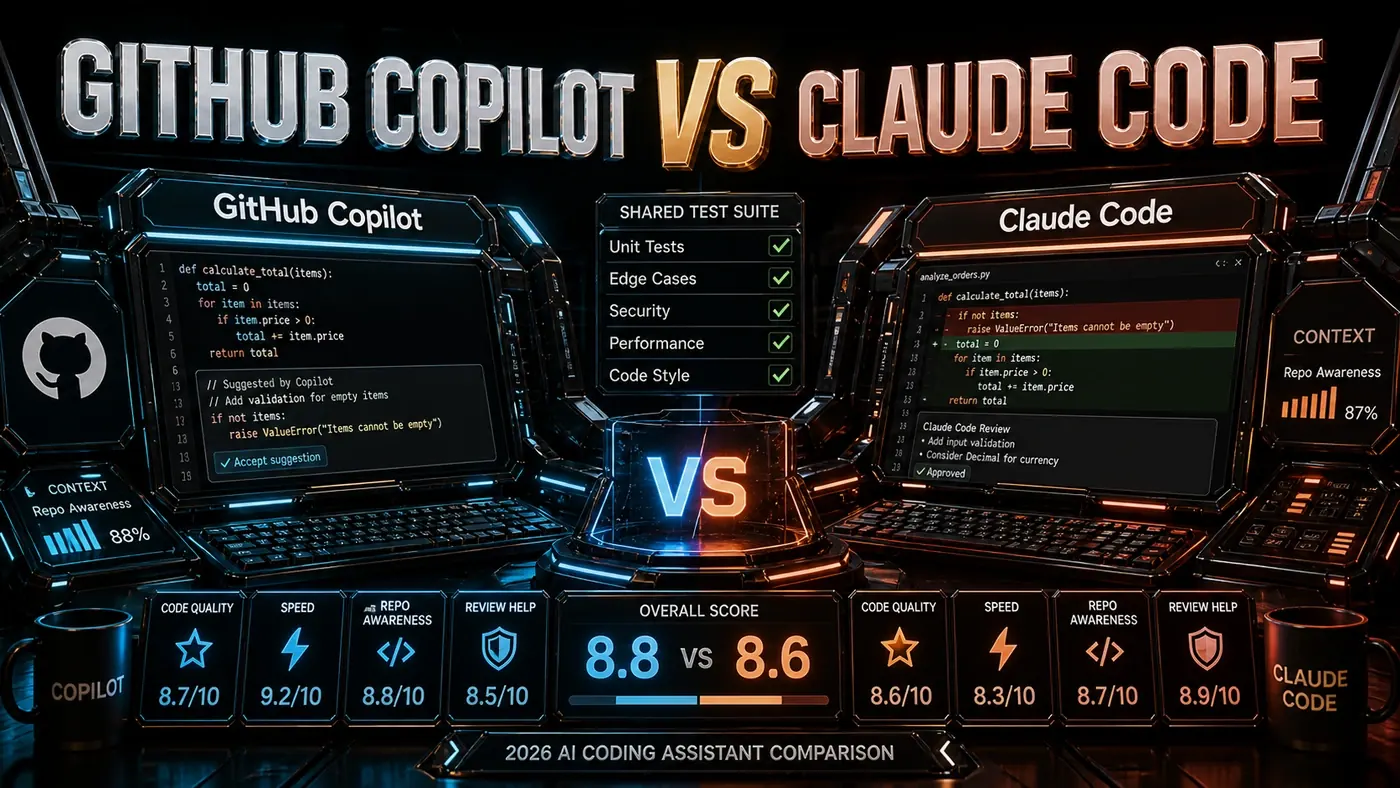
Score: Copilot 9.2 | Claude Code 6.0
2. Multi-File Refactors
Winner: Claude Code
Claude Code's Plan Mode and task system are made for changes that span many files. It maps out the work, pauses for your approval, then carries it across the codebase (Claude Code Guide 2026 (opens in a new tab)). Copilot's multi-file editing is more hands-on and leans on you to pick the files.
Score: Copilot 6.5 | Claude Code 9.5
3. IDE Integration
Winner: Copilot
Copilot runs in VS Code, JetBrains, Vim, Neovim, and Visual Studio (GitHub Copilot (opens in a new tab)). Claude Code has narrower IDE reach but it isn't terminal-only, despite what you may have read: there's an official VS Code extension (opens in a new tab) and a JetBrains plugin, alongside desktop, web, and Slack. Copilot still covers more editors out of the box.
Score: Copilot 9.5 | Claude Code 5.0
4. Code Quality
Winner: Claude Code
On SWE-bench Verified, the usual yardstick for coding agents, Claude's flagship model scores in the high 80s; Opus 4.8 is reported at about 88.6% (Vellum (opens in a new tab)). (Earlier figures of 63.4% for Claude and 54.8% for Copilot circulated widely but match no real leaderboard, so ignore them.) In our use, Claude Code produces fewer bugs and tidier structure.
Score: Copilot 7.5 | Claude Code 9.0
5. Natural Language Understanding
Winner: Claude Code
Claude Code, running on Opus 4.8 (opens in a new tab), copes better with loose requirements. Tell it "make this more robust" and you get real, considered changes. Copilot tends to want clearer instructions before it does much.
Score: Copilot 7.0 | Claude Code 9.2
6. Speed of Response
Winner: Copilot
Copilot's underlying model, GPT-5.5, is now generally available in GitHub Copilot (GitHub Changelog (opens in a new tab)). It's noticeably quicker than Opus 4.8 on simple questions. For a fast "what does this function do?", Copilot wins. (Worth noting: the "GPT-5.5 Instant" label actually belongs to the Microsoft 365 Copilot variant, not GitHub's coding model.)
Score: Copilot 9.0 | Claude Code 7.5
7. Terminal/CLI Usage
Winner: Claude Code
Claude Code lives in the terminal. It can grep, read files, run tests, and execute commands as part of a task. Copilot has caught up here, though: GitHub Copilot CLI reached general availability in February 2026 (opens in a new tab) as a full agentic terminal agent that plans work, edits files, and runs tests, so it's no longer the afterthought it once was. Claude Code still feels more at home on the command line.
Score: Copilot 5.0 | Claude Code 9.5
8. Test Generation
Winner: Tie (different strengths)
Copilot fires off inline tests faster. Claude Code writes broader suites with better edge-case coverage. Which you prefer depends on whether you want speed or thoroughness.
Score: Copilot 8.0 | Claude Code 8.5
9. Documentation
Winner: Claude Code
Claude Code writes docstrings and README updates you can actually use. Copilot's documentation suggestions lean toward boilerplate.
Score: Copilot 7.0 | Claude Code 9.0
10. Security Review
Winner: Claude Code
In our own test on a private repo, Claude Code flagged three issues Copilot missed: an SQL injection vector, a hardcoded secret, and an insecure dependency. That's one repo and one run, so read it as a signal rather than proof, but it tracks with how the two tools approach the work.
Score: Copilot 6.5 | Claude Code 9.0
11. Cost Efficiency
Winner: Copilot (for individuals)
At $10/mo for a Copilot individual seat versus roughly $20/mo for Claude Pro, Copilot is the cheaper solo option. For teams the picture is less clear-cut and turns on how many seats you need; see the corrected pricing above before you assume Claude Code is the bargain.
Score: Copilot 8.5 | Claude Code 7.5
12. Learning Curve
Winner: Copilot
Copilot works out of the box with almost no setup. Claude Code asks you to learn Plan Mode, hooks syntax, and the task system before you get the most out of it (Claude Code Features and Settings Reference 2026 (opens in a new tab)).
Score: Copilot 9.0 | Claude Code 6.5
Final Scorecard
| Dimension | Copilot | Claude Code |
|---|---|---|
| Tab Completion | 9.2 | 6.0 |
| Multi-File Refactors | 6.5 | 9.5 |
| IDE Integration | 9.5 | 5.0 |
| Code Quality | 7.5 | 9.0 |
| NL Understanding | 7.0 | 9.2 |
| Response Speed | 9.0 | 7.5 |
| Terminal/CLI | 5.0 | 9.5 |
| Test Generation | 8.0 | 8.5 |
| Documentation | 7.0 | 9.0 |
| Security Review | 6.5 | 9.0 |
| Cost Efficiency | 8.5 | 7.5 |
| Learning Curve | 9.0 | 6.5 |
| AVERAGE | 7.8 | 8.0 |
These averages reflect our weighting of the dimensions above. Change what you value and the result shifts.
The Recommendation
| Developer Type | Best Tool |
|---|---|
| Solo developer, daily coding | Copilot ($10/mo) |
| Solo developer, complex projects | Both: Copilot + Claude Pro (~$30/mo) |
| Small team (2-5) | Copilot Business + Claude Code |
| Large team (10+) | Copilot Enterprise + Claude Code |
| DevOps / SRE | Claude Code |
| Code reviewer / architect | Claude Code |
Overall: Claude Code edges it on our scorecard (8.0 vs 7.8), but the honest answer is that they do different jobs, and a lot of teams pay for both.
*Published June 11, 2026 | Benchmark figures via SWE-bench Verified reporting, 2026*
GitHub Copilot vs Claude Code: answer-first summary
GitHub Copilot vs Claude Code matters because it can change how Founders and operators plan, build, or govern an tool evaluation workflow. The two titans of AI coding go head-to-head.
The direct answer is this: do not treat the topic as a standalone trend. Treat it as a decision about inputs, outputs, review ownership, data exposure, and whether the workflow produces a result that is faster, safer, or more useful than the current process.
GitHub Copilot vs Claude Code: implementation checklist
- Define the user, job to be done, and success metric for the tool evaluation workflow.
- Collect real examples, policies, source files, customer questions, or search queries before writing prompts or choosing tools.
- Separate low-risk drafts from decisions that need approval, privacy checks, or senior review.
- Document what the AI is allowed to access, what it must not access, and who signs off before production use.
- Review time to value, adoption rate, cost per workflow, quality review score after a small pilot rather than judging the idea from a demo.
This keeps the work practical. It also gives search engines and AI answer engines a clean factual structure: what the topic is, who it helps, what to do next, and which risks matter before implementation.
Decision criteria for GitHub Copilot vs Claude Code
| Decision area | What to check | Production signal |
|---|---|---|
| Intent | Does GitHub Copilot vs Claude Code solve a real workflow problem? | The use case has a named owner and measurable outcome. |
| Data | Can the required data be used safely? | Sensitive data is classified and access is controlled. |
| Quality | Can a reviewer judge the output consistently? | Examples, rubrics, or acceptance criteria exist. |
| Scale | Can the workflow be repeated without hero effort? | The process is documented and can be handed to another team member. |
Practical example for GitHub Copilot vs Claude Code
A small business could use this article to choose one practical test. For example, a manager might take one customer-facing process, one internal document workflow, or one recurring content task and redesign only that step with AI support. The goal is not to automate the whole business at once; it is to learn where AI Tools creates reliable leverage.
The useful deliverable is a short operating note: the trigger, the source material, the prompt or tool, the review checklist, the escalation rule, and the metric. That note becomes the handover asset for staff training, SEO/GEO content, service delivery, or future agent work.
Risks and controls for GitHub Copilot vs Claude Code
The common failure pattern is moving too quickly from a promising idea into an unmanaged workflow. For GitHub Copilot vs Claude Code, the risk is not only bad output. It can also be unclear data permission, staff confusion, duplicate content, unreviewed customer advice, or a tool that quietly changes cost or capability.
- Control tool sprawl with a named owner, a review step, and written acceptance criteria.
- Control unclear pricing with a named owner, a review step, and written acceptance criteria.
- Control vendor lock-in with a named owner, a review step, and written acceptance criteria.
- Control unreviewed data sharing with a named owner, a review step, and written acceptance criteria.
Measurement plan for GitHub Copilot vs Claude Code
A useful AI or SEO initiative should leave evidence. Track time to value, adoption rate, cost per workflow, quality review score and compare the pilot against the current process. If the measure does not improve, keep the learning but avoid scaling the workflow.
For GEO readiness, the page should also answer the core question directly, define the entities involved, include implementation steps, explain tradeoffs, and link readers to the next relevant AI Kick Start service, guide, tool, or article.
Definitions and entities for GitHub Copilot vs Claude Code
For search, GEO, and staff handover, define the core entities in plain language. In this article the important entities are the workflow owner, the AI tool or model, the source material, the review process, the risk boundary, and the measurable business outcome. Clear definitions make the page easier for people to scan and easier for AI answer engines to quote accurately.
- Workflow owner: the person accountable for deciding whether GitHub Copilot vs Claude Code belongs in the business process.
- Source material: the documents, examples, policies, URLs, prompts, videos, or customer questions that ground the output.
- Review boundary: the point where a human checks accuracy, privacy, brand voice, or customer impact before the result is used.
- Success metric: the measure that proves whether the tool evaluation workflow is worth repeating.
GitHub Copilot vs Claude Code versus doing nothing
Doing nothing is also a decision. The cost may be slow manual work, weaker search visibility, inconsistent advice, duplicated effort, or staff using unmanaged AI tools without a shared process. The practical question is whether a controlled pilot can reduce that cost without creating a larger governance problem.
| Option | When it makes sense | What to watch |
|---|---|---|
| Do nothing | The workflow is rare, low value, or already reliable. | Competitors may improve speed, content depth, or service consistency first. |
| Run a small pilot | The task repeats often and has clear review criteria. | Keep scope tight and measure the result against the current process. |
| Build a production workflow | The pilot is repeatable and risk controls are documented. | Assign ownership, monitoring, training, and a rollback path. |
AI Kick Start handover package for GitHub Copilot vs Claude Code
A production handover should be concrete enough that another person can run it. For GitHub Copilot vs Claude Code, that means a short brief, a workflow map, approved prompts or tool settings, source material, a review checklist, internal links to supporting resources, and a simple measurement sheet. This is the difference between reading about AI and turning it into operational capability.
That packaging also strengthens E-E-A-T. It shows experience through implementation notes, expertise through decision criteria, authoritativeness through source-aware structure, and trust through risks, controls, and review steps. The article becomes useful even if the reader never buys a tool because it helps them make a better operational decision.