



Introduction: Why This One Belongs on the Watchlist
The video-editing skill demonstrates how Claude can scan transcripts, structure cuts, and produce an edit plan when the assets are prepared. The reason it matters for AI Kick Start readers is practical: this is not just another launch to admire from a distance. It changes how founders, operators, and technical teams should think about creative AI work over the next few months.
The source transcript repeatedly centres on Claude, video editing and skills, with the video framing the topic as a practical workflow rather than a detached product announcement. That is the useful lens. The video is worth treating as implementation intelligence: what should be tested, what should be ignored for now, and what should become part of a repeatable operating system.
For Australian small businesses and technical teams, the right question is not "is this impressive?" The right question is "where does this reduce friction without creating a larger governance, security, or maintenance problem?"
What the Video Actually Shows
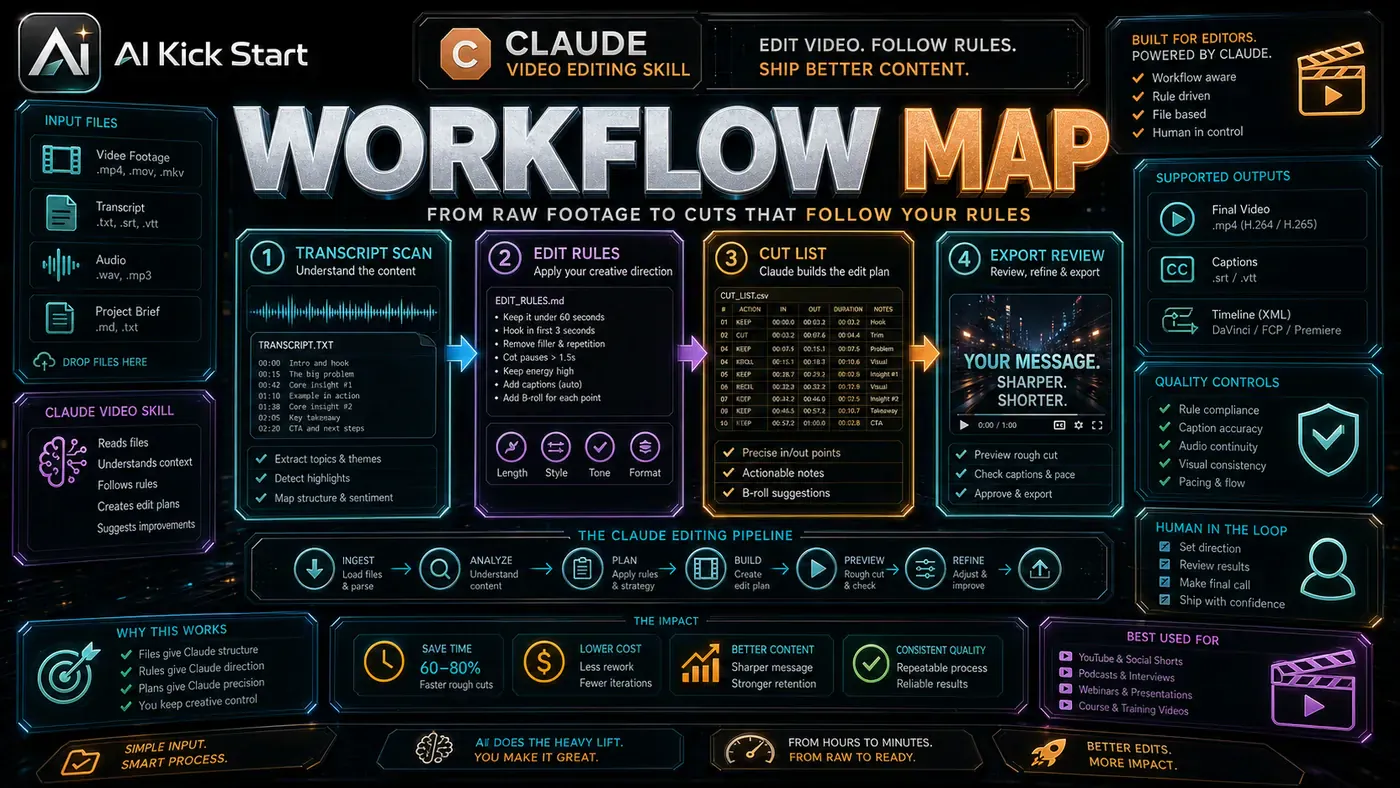
The core pattern is simple: AI video editing works best when the creative task is converted into structured files. Claude is not magically becoming an editor; the skill gives it a workflow, constraints, and source material. This pattern can save time on rough cuts, highlights, and repetitive content assembly.
In practice, that means the update sits inside a broader shift from isolated AI prompts to managed systems. A tool, model, or method only becomes valuable when it has clear inputs, a measurable output, a review path, and a way to repeat the result next week.
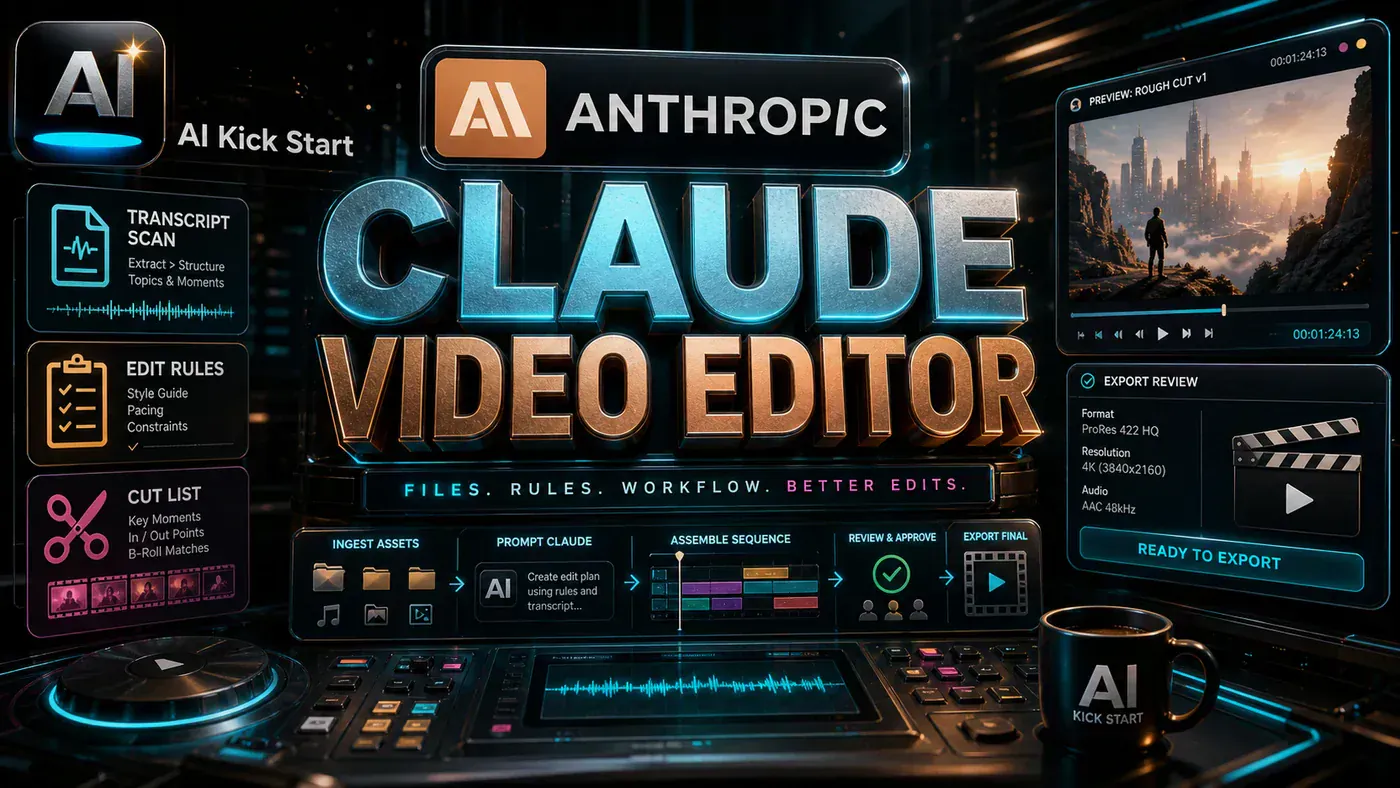
The video's most useful signal is the workflow shape. The moving parts can be summarised as:
- Transcript scan
- Edit rules
- Cut list
- Export review
That is the level at which teams should evaluate it. A demo can be entertaining, but a workflow must survive messy source files, staff handoff, data boundaries, and real deadlines.
The Implementation Pattern
The first implementation lesson is to narrow the scope. Start with transcript-driven edits. Broad adoption is usually where AI systems fail first because nobody knows which decision the tool is allowed to make and which decision still belongs to a human.
The second lesson is to create a test harness. Keep the final creative review human. A useful harness does not have to be complicated. It can be a short brief, a fixed sample dataset, a few expected outputs, and one person responsible for judging whether the result is good enough.
The third lesson is to capture the process. Store the edit rules with the project for repeatability. When the process is documented, it can become a reusable skill, checklist, prompt pack, repo pattern, or operating procedure. When it is not documented, the team is back to improvising in chat.
Research Update: What To Correct
This update adds a current-source pass rather than treating the original video summary as enough. The important corrections are the product surface, plan or pricing constraints, and what should be verified before a team depends on the workflow.
- Claude is not a native nonlinear video editor here. The useful pattern is Claude Code plus a skill plus scripts and review loops.
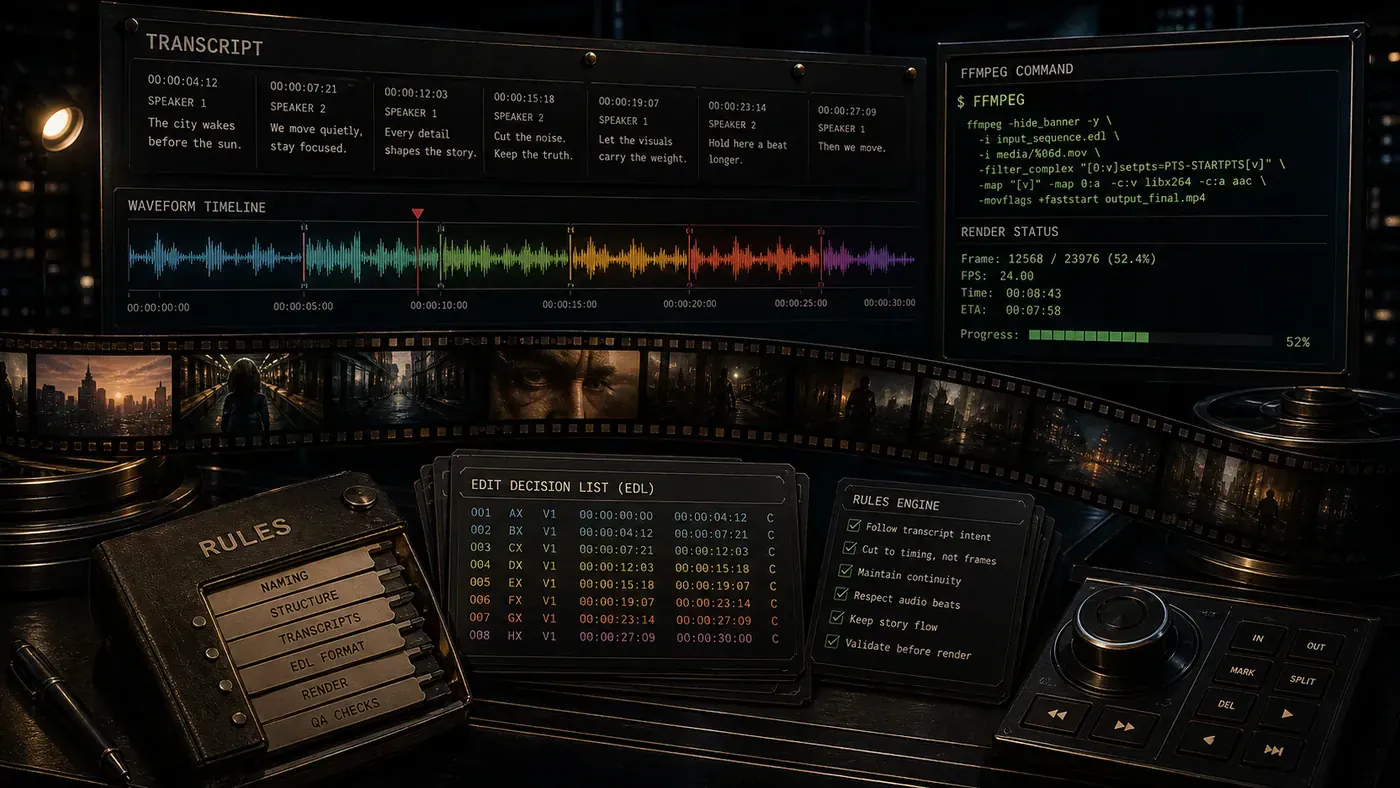
- A production workflow should transform transcript, cut plan, EDL, render command, and review evidence.
- Human approval is required before replacing source media or publishing a final cut.
Practical Setup and How-To
The useful next step is a controlled pilot with a named owner, fixed inputs, a measurable output, and a review point. Use the sequence below as the first implementation path before expanding the workflow.
- Copy source media into a working folder and keep originals read-only.
- Extract transcript and scene markers, then ask the skill for an edit plan.
- Render a draft through ffmpeg, Remotion, or the project's chosen toolchain.
- Review pacing, captions, rights, audio, and platform export specs before final output.
Pricing, Access, and Comparison Notes
Pricing and access should be checked at implementation time because AI products change quickly. The safer decision is to compare the tool against the job-to-be-done, not against launch hype.
- Compare Claude Code skills with Descript, CapCut, DaVinci Resolve automation, and script-first video pipelines.
- The cost is review and render iteration, not only model tokens.
- Use dedicated editors when precise manual timeline control matters most.
| Decision area | What to compare |
|---|---|
| Access | Plan, preview status, region, account type, admin controls, and rate limits. |
| Cost | Subscription, credits, API tokens, retries, hardware, review time, and support burden. |
| Fit | Workflow reliability, data handling, output quality, observability, and human approval needs. |
Implementation Notes for Teams
For AI Kick Start readers, this is the production filter: keep the first rollout narrow, make the evidence visible, and do not let the tool cross a business boundary until the review model is clear.
- Use non-destructive editing.
- Keep all generated EDLs and commands in reviewable files.
- Never use media without rights and release checks.
Screenshot and Visual Guidance
The second inline image for this article should make the implementation concrete: A cinematic editing bay with transcript ribbon, waveform, EDL cards, and ffmpeg terminal wrapping a film strip. If the team is documenting a real rollout, capture setup screens, before/after outputs, permission settings, cost meters, and review evidence rather than decorative screenshots.
Where It Fits for Real Teams
For founders, the opportunity is speed with evidence. This kind of workflow can reduce the time between idea and first useful output, but it should still produce artefacts that a customer, manager, or developer can inspect.
For operators, the value is consistency. If the same task is done slightly differently every time, AI can either make the inconsistency worse or help standardise the path. The difference is whether the workflow has rules, examples, and review checkpoints.
For technical teams, the value is leverage. A strong setup lets agents, models, or creative systems take on repeatable work while engineers keep control over architecture, security, deployment, and final judgement.
The practical fit is strongest when the task has clear source material, a known output format, and a low-cost way to verify quality. It is weaker when the task is vague, politically sensitive, legally risky, or dependent on facts that cannot be checked.
Trade-offs and Risks
The main risk is bad pacing. That risk can be managed, but only if it is named before the workflow becomes normal.
A second risk is context lost from visuals. AI systems often look better in a screen recording than they feel inside a production workflow. The test is whether the result is repeatable when the source material changes, the operator changes, and the deadline is real.
The third risk is rights and source-media handling. This is why AI Kick Start generally recommends a staged rollout: sandbox first, internal use second, customer-facing deployment last.
The Next Sensible Test
The next sensible test is a small controlled implementation. Pick one workflow, one owner, one expected output, and one acceptance check. Run it twice. If the second run is easier than the first, the pattern is worth keeping.
Do not judge the workflow by the best possible demo. Judge it by the worst acceptable production case. Ask: what happens when the source file is incomplete, the tool is unavailable, the output is wrong, or a staff member needs to explain the result to a customer?
If those answers are clear, this belongs in the roadmap. If they are not, it belongs in the lab until the operating model catches up.
Helpful Resources
- skool.com (opens in a new tab)
- instagram.com (opens in a new tab)
- tiktok.com (opens in a new tab)
- viclaranja.com (opens in a new tab)
- Anthropic Claude documentation (opens in a new tab)
- ComfyUI project (opens in a new tab)
- Video Source:
- Video Editing Is So Boring I Made Claude Do It for Me by Systems by Vic
Claude Can Edit Video When the Workflow Is Turned into Files and Rules: answer-first summary
Claude Can Edit Video When the Workflow Is Turned into Files and Rules matters because it can change how Creators, founders and operators plan, build, or govern an AI implementation workflow. The video-editing skill demonstrates how Claude can scan transcripts, structure cuts, and produce an edit plan when the assets are prepared.
The direct answer is this: do not treat the topic as a standalone trend. Treat it as a decision about inputs, outputs, review ownership, data exposure, and whether the workflow produces a result that is faster, safer, or more useful than the current process.
Claude Can Edit Video When the Workflow Is Turned into Files and Rules: implementation checklist
- Define the user, job to be done, and success metric for the AI implementation workflow.
- Collect real examples, policies, source files, customer questions, or search queries before writing prompts or choosing tools.
- Separate low-risk drafts from decisions that need approval, privacy checks, or senior review.
- Document what the AI is allowed to access, what it must not access, and who signs off before production use.
- Review time saved, quality score, review effort, business outcome after a small pilot rather than judging the idea from a demo.
This keeps the work practical. It also gives search engines and AI answer engines a clean factual structure: what the topic is, who it helps, what to do next, and which risks matter before implementation.
Decision criteria for Claude Can Edit Video When the Workflow Is Turned into Files and Rules
| Decision area | What to check | Production signal |
|---|---|---|
| Intent | Does Claude Can Edit Video When the Workflow Is Turned into Files and Rules solve a real workflow problem? | The use case has a named owner and measurable outcome. |
| Data | Can the required data be used safely? | Sensitive data is classified and access is controlled. |
| Quality | Can a reviewer judge the output consistently? | Examples, rubrics, or acceptance criteria exist. |
| Scale | Can the workflow be repeated without hero effort? | The process is documented and can be handed to another team member. |
Practical example for Claude Can Edit Video When the Workflow Is Turned into Files and Rules
A small business could use this article to choose one practical test. For example, a manager might take one customer-facing process, one internal document workflow, or one recurring content task and redesign only that step with AI support. The goal is not to automate the whole business at once; it is to learn where Creative AI creates reliable leverage.
The useful deliverable is a short operating note: the trigger, the source material, the prompt or tool, the review checklist, the escalation rule, and the metric. That note becomes the handover asset for staff training, SEO/GEO content, service delivery, or future agent work.
Risks and controls for Claude Can Edit Video When the Workflow Is Turned into Files and Rules
The common failure pattern is moving too quickly from a promising idea into an unmanaged workflow. For Claude Can Edit Video When the Workflow Is Turned into Files and Rules, the risk is not only bad output. It can also be unclear data permission, staff confusion, duplicate content, unreviewed customer advice, or a tool that quietly changes cost or capability.
- Control unclear use case with a named owner, a review step, and written acceptance criteria.
- Control weak data quality with a named owner, a review step, and written acceptance criteria.
- Control missing governance with a named owner, a review step, and written acceptance criteria.
- Control no measurement with a named owner, a review step, and written acceptance criteria.
Measurement plan for Claude Can Edit Video When the Workflow Is Turned into Files and Rules
A useful AI or SEO initiative should leave evidence. Track time saved, quality score, review effort, business outcome and compare the pilot against the current process. If the measure does not improve, keep the learning but avoid scaling the workflow.
For GEO readiness, the page should also answer the core question directly, define the entities involved, include implementation steps, explain tradeoffs, and link readers to the next relevant AI Kick Start service, guide, tool, or article.
Definitions and entities for Claude Can Edit Video When the Workflow Is Turned into Files and Rules
For search, GEO, and staff handover, define the core entities in plain language. In this article the important entities are the workflow owner, the AI tool or model, the source material, the review process, the risk boundary, and the measurable business outcome. Clear definitions make the page easier for people to scan and easier for AI answer engines to quote accurately.
- Workflow owner: the person accountable for deciding whether Claude Can Edit Video When the Workflow Is Turned into Files and Rules belongs in the business process.
- Source material: the documents, examples, policies, URLs, prompts, videos, or customer questions that ground the output.
- Review boundary: the point where a human checks accuracy, privacy, brand voice, or customer impact before the result is used.
- Success metric: the measure that proves whether the AI implementation workflow is worth repeating.
Claude Can Edit Video When the Workflow Is Turned into Files and Rules versus doing nothing
Doing nothing is also a decision. The cost may be slow manual work, weaker search visibility, inconsistent advice, duplicated effort, or staff using unmanaged AI tools without a shared process. The practical question is whether a controlled pilot can reduce that cost without creating a larger governance problem.
| Option | When it makes sense | What to watch |
|---|---|---|
| Do nothing | The workflow is rare, low value, or already reliable. | Competitors may improve speed, content depth, or service consistency first. |
| Run a small pilot | The task repeats often and has clear review criteria. | Keep scope tight and measure the result against the current process. |
| Build a production workflow | The pilot is repeatable and risk controls are documented. | Assign ownership, monitoring, training, and a rollback path. |
AI Kick Start handover package for Claude Can Edit Video When the Workflow Is Turned into Files and Rules
A production handover should be concrete enough that another person can run it. For Claude Can Edit Video When the Workflow Is Turned into Files and Rules, that means a short brief, a workflow map, approved prompts or tool settings, source material, a review checklist, internal links to supporting resources, and a simple measurement sheet. This is the difference between reading about AI and turning it into operational capability.
That packaging also strengthens E-E-A-T. It shows experience through implementation notes, expertise through decision criteria, authoritativeness through source-aware structure, and trust through risks, controls, and review steps. The article becomes useful even if the reader never buys a tool because it helps them make a better operational decision.