


From a simple CLAUDE.md router to an always-on autonomous system - finding the right level for your AI second brain, and why the highest tier might actually make your workflow worse.
The idea of an "AI second brain" has become one of the most discussed concepts in the productivity and automation space. Every week, a new tool promises to ingest your notes, meeting transcripts, and scattered thoughts into an intelligent system that will finally organise your digital life. But beneath the excitement lies a fundamental question that very few creators address: *how* should this information actually be structured so your AI can use it effectively?
In a recent deep-dive video, Nate Herk - founder of the AI Automation community and creator of the Herku AI operating system - breaks down exactly this problem. Rather than treating the second brain as a monolithic concept, he maps out five distinct levels of implementation, each with different capabilities, trade-offs, and costs. His core argument? The highest level isn't always the best one. The goal is to find the *lowest* level that solves your actual pain point.
Too many builders climb the complexity ladder because it feels sophisticated, not because their workflow demands it. The result is over-engineered systems that consume more time than they save. Herk's framework - built from his own real-world experience running the Herku 2 project - offers a pragmatic path forward.
The Philosophy Behind the Second Brain
Before diving into the five levels, Herk establishes a foundational principle: your data is your moat. In a world where AI models are becoming commoditised, the proprietary information locked in your head - your business decisions, client relationships, project history, and personal insights - is the one asset that no competitor can replicate.
The second brain exists to extract that intellectual property from your mind and place it into a structured system where AI agents can actually retrieve it. But simply dumping files into a folder doesn't work. If your agent cannot find information when it needs it, you haven't built a second brain. You've built a digital junk drawer.
Herk emphasises what he calls "reverse engineering from the question." Rather than organising files by what feels intuitive today, you should design your system around the questions you'll ask tomorrow. The format of your data should be determined by how it will be accessed and recalled. The ultimate goal is a system that knows your business and relationships so thoroughly that it recalls information faster and more accurately than you can.
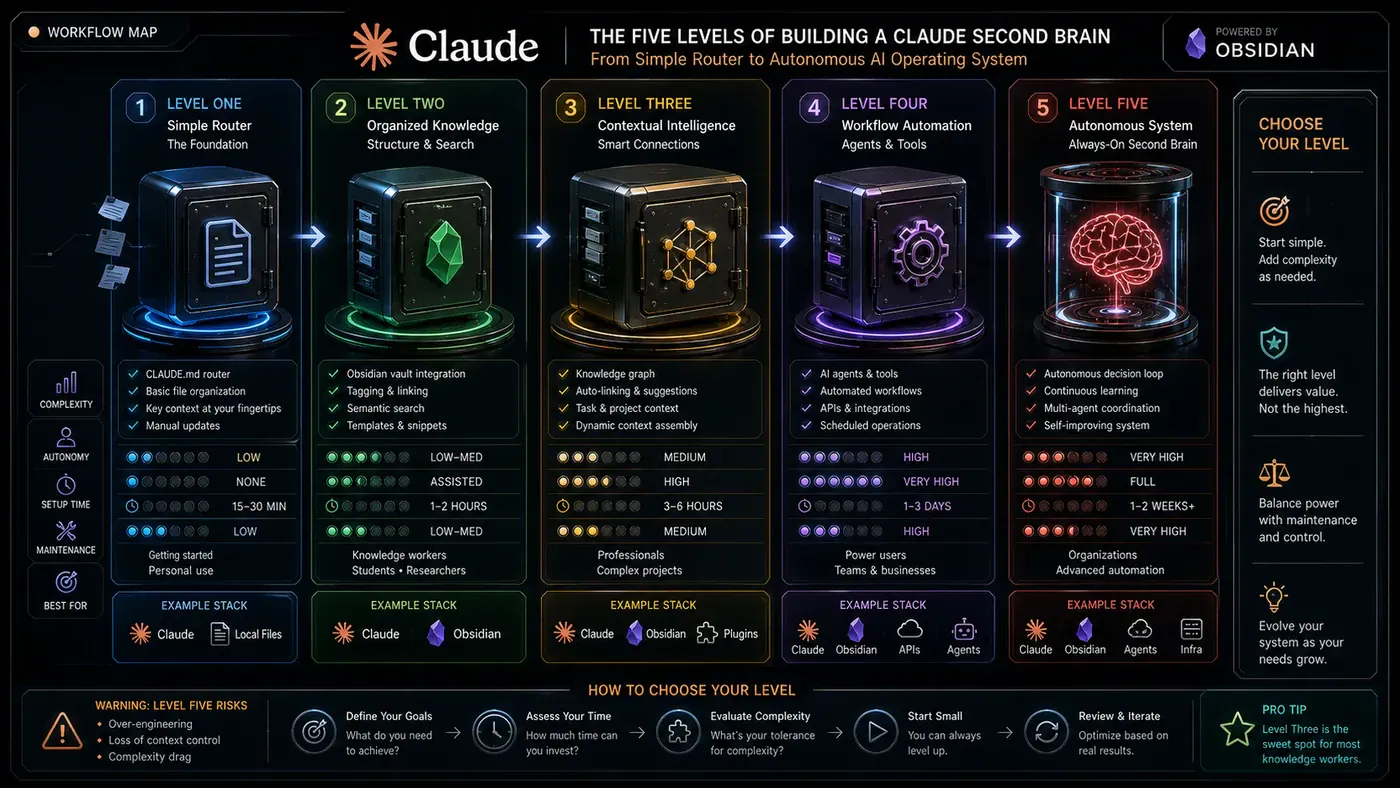
The Five Levels at a Glance
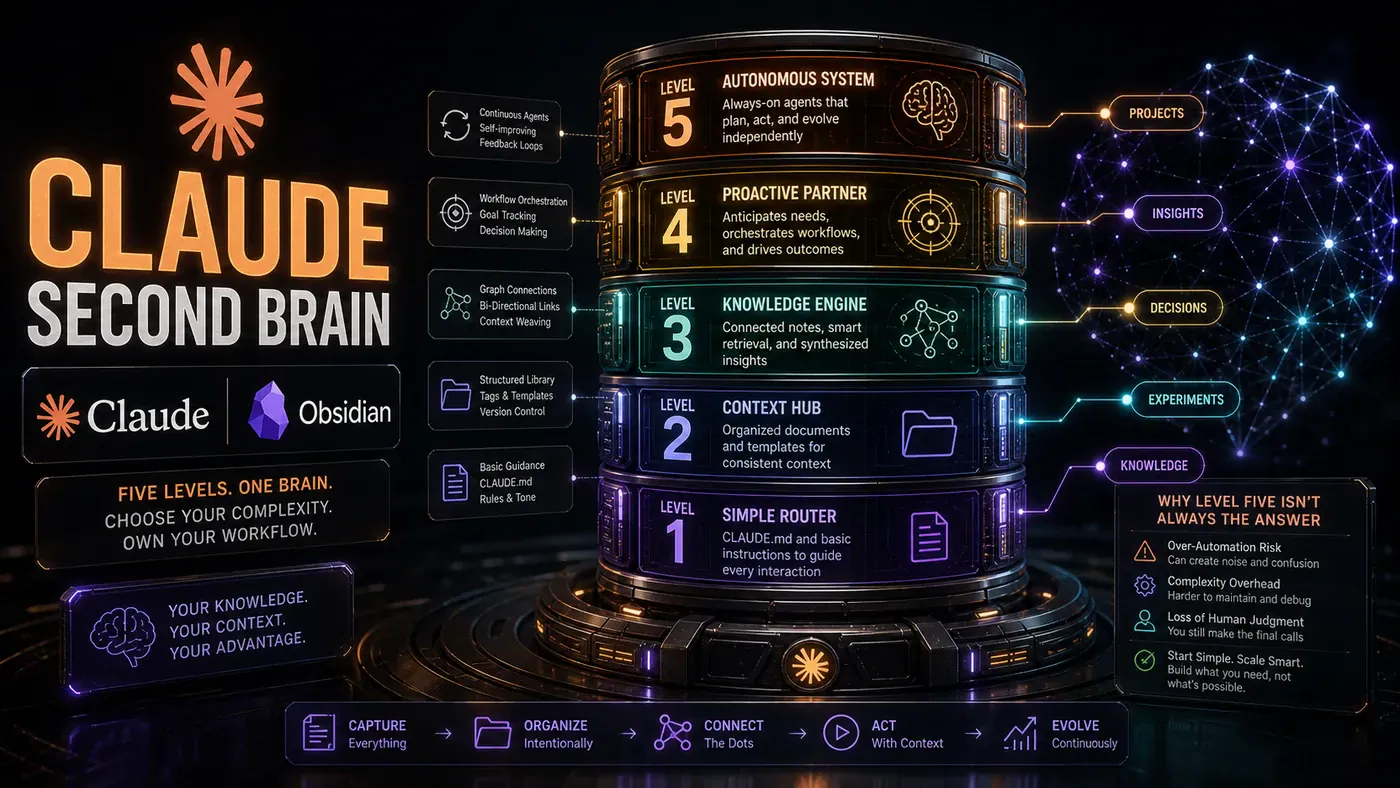
Herk structures his framework around five ascending capabilities:
- Level One - Exact word or filename matching through a CLAUDE.md router
- Level Two - Topic aggregation through an LLM wiki with interconnected notes
- Level Three - Semantic search via vector databases and embeddings
- Level Four - Knowledge graphs with traced relationship chains between entities
- Level Five - Autonomous always-on systems that continuously sync and update
Critically, he stresses that these are not necessarily progressive stages you must climb. Different folders within the same project might operate at different levels. Your meeting transcripts might benefit from semantic search (Level Three), while your quarterly project files remain simple markdown folders (Level One). The architecture should match the data.
Level One: The CLAUDE.md Router
Every second brain begins here. Level One is deceptively simple: a single CLAUDE.md file that loads automatically whenever you open your project in Claude Code. This file functions as both a system prompt and a routing layer - it tells the AI who you are, how you work, and where things live.
A properly configured CLAUDE.md eliminates the frustrating cycle of re-explaining context. Instead of the agent asking, "Can you give me more info?" it follows routing rules you've embedded. If the question is about personal background, it looks in the context folder. If it's about Q1 priorities, it checks the projects directory. If it's about past decisions, it consults the decision log.
The folder structure at this level is intentionally straightforward: a context folder with an "about me" file, a stack and conversations file, a decisions log, and a projects folder organised by date or client. These are just markdown files. The magic lies entirely in the routing rules and consistent naming conventions.
This level answers one question: *can you find a file by searching for an exact word or name?* The limitations emerge when the system grows too large for simple keyword routing or when you need to connect concepts across files. But for many solo operators, Herk argues that Level One - done well - remains sufficient far longer than most people expect.
Level Two: The LLM Wiki
Level Two builds on Level One by introducing a wiki structure - what Herk calls the "LLM wiki" - inspired by Andrej Karpathy's knowledge management approach. This is where your second brain begins to connect ideas rather than simply storing them.
The wiki ingests raw materials - YouTube transcripts, meeting recordings, research notes - and automatically organises them into interconnected pages with concepts, comparisons, sources, and techniques. When Herk feeds a transcript into his wiki, Claude Code processes it and creates linked pages that reference related tools, concepts, and previous videos. The result is a web of backlinks that lets the AI follow a trail from a broad topic down to a specific detail.
At this level, the CLAUDE.md expands to include routing to the wiki, references, and a memory file. The memory file deserves special attention: Claude Code's auto-memory feature (toggled with /memory) automatically writes and updates this file based on your conversations, creating a self-maintaining layer of context.
Herk is transparent about where he personally operates: despite running a sophisticated business, he runs his entire Herku 2 project at Level Two. The wiki's indexed structure - where the AI can follow a conceptual trail from "agentic workflows" to "WAT framework" to "CLAUDE.md system prompts" - gives him what he needs without introducing higher-level complexity.
He also clarifies the role of visual tools like Obsidian. Many people see Obsidian's graph view of interconnected notes and assume the visualisation itself is valuable. Herk barely opens Obsidian. The underlying markdown files and their connections are what matter. If your AI can traverse the relationships, you don't need a pretty graph to benefit from the structure.
Level Three: Semantic Search and Vector Databases
Level Three introduces semantic search through vector databases. Rather than matching exact keywords, semantic search uses embeddings to find content that is *meaningfully similar* to your query - even if it doesn't contain the same words.
Herk demonstrates this practically: searching for "feedback" via keyword search returns only files with that exact word. Running the same query through semantic search returns results about "live test results," "Claude Code skills," and "evaluations" - concepts topically related to feedback without explicitly containing it.
The technical pipeline is well-established: documents are chunked, run through an embeddings model to create vector representations, and stored in a database like Pinecone or Supabase. Queries are similarly vectorised, and the database returns the nearest neighbours in vector space.
But Herk offers a crucial reality check: semantic search is not magic, and it is often worse than simply reading a full markdown file. He illustrates this with a sales data example. Asking "Which week had the highest sales?" might retrieve a chunk mentioning "highest sales" pointing to Week 6, completely missing that Week 14 and Week 19 were actually higher because those numbers live in different chunks. When a question requires full-context understanding - like summarising a complete meeting transcript - reading the entire markdown file is almost always more accurate.
The genuine use case for semantic search is narrow but powerful: when you have enormous text volumes and need a very specific answer from within them. If you store a thousand rules and need just Rule 17, vector search shines. If you need that rule *in context of all the others*, markdown wins.
Herk's practical advice: identify specific units where semantic retrieval adds value - perhaps YouTube transcripts or a large rules database - and apply vector search surgically while keeping everything else in markdown.
Level Four: Knowledge Graphs and Relationship Chains
Level Four represents a significant jump in complexity. Knowledge graphs don't just store information or find similar content - they model the *relationships* between entities in a structured, queryable way. In a knowledge graph, "Jordan" is a person, "Acme" is a company, and "works at" connects them. "PostPilot" might be "endorsed by" one entity and a "competitor of" another.
This enables what Herk calls "relationship chain tracing." You can ask about Topic X and follow connections all the way back to Topic A, traversing a network of semantic relationships that no wiki backlink or vector search could replicate.
Herk demonstrates this with LightRAG, visualising his actual second brain data. The graph reveals collaboration relationships, build dependencies, and provider connections. His "7-day AI OS Challenge" node connects to YouTube as a provider, links to the AIS Plus onboarding process, and traces back to a specific developer. These are *semantic* relationships, not just co-occurrences.
However, Herk is candid: he does not run knowledge graphs day-to-day. His project-based, content-heavy work doesn't require the complex relationship modelling that a large CRM or multi-client agency might need. The labour of building and maintaining a knowledge graph outweighs the benefits for his workflow.
He recommends a clever technique for those building towards a knowledge graph: a skill called "grill me" (from Matt Picioccio, customised for his workflow). This skill relentlessly interviews him about a topic - a client, a business unit, a project - creating a comprehensive brainstorm file for graph ingestion. The bottleneck is rarely the graph technology; it's getting the knowledge out of your head and into the system.
Level Five: The Autonomous Always-On Brain
Level Five is the frontier. The second brain stops being a repository you manually maintain and becomes a continuously syncing, self-updating system. Herk points to GBrain - created by Garry Tan, CEO of Y Combinator - as the archetypal example. GBrain pairs with GStack and constantly refreshes memories and adds new information, maintaining an always-current picture of your knowledge.
For those running local agents - particularly frameworks like Hermes - GBrain offers a compelling vision. Multiple agents sync their state through a central brain, maintaining coherence across distributed tasks.
But Herk introduces an important caution: the risk of too much context. He maintains deliberate control over what his second brain ingests, distinguishing between two types of data using the "two C's" - context and connections.
Context is evergreen, structural information: quarterly priorities, business decisions, project statuses. This forms your second brain's foundation because it remains valuable over time. Connections are transient: Slack threads, emails, live customer data. Ingesting this creates noise and forces periodic purging.
Herk's litmus test: *"In a year, will it be good for me to have this memory?"* If the answer is no, it shouldn't live in the core brain. Instead, your routing should direct the AI to fetch transient data from its original source when needed. This controlled approach means Herk doesn't currently run a Level Five system. The cognitive overhead isn't justified by his workflow. But for those with massive data volumes and offline agent fleets, Level Five tools like GBrain may be exactly right.
Finding Your Level: A Practical Guide
Herk closes with a diagnostic framework. Match your symptoms to the right level:
- Choose Level One if you're constantly re-explaining your setup and need to find things by exact filenames or words. This is the foundation - start here.
- Choose Level Two if you have thirty-plus notes and keep forgetting what's in them. The LLM wiki solves the "where did I put that?" problem.
- Choose Level Three if your agent is consistently missing notes you know exist despite proper routing. Semantic search handles cases where you're searching with different words than you used when writing.
- Choose Level Four if you need to trace relationship chains across complex domains - CRM data, multi-client agencies, research with many interconnected entities.
- Choose Level Five if you're running offline agents with massive data volumes and need autonomous synchronisation across a distributed system.
Herk also touches on the team dimension. When multiple people build their own second brains, the challenge isn't which platform to use - Google Drive, Notion, GitHub, or cloud plugins all work. The real problem is habit shift. How do you ensure process owners update documentation? How do you stop people from pinging colleagues instead of querying the shared brain? The technology is straightforward; the change management is hard.
His recommendation: get your own second brain working first. Understand your routing patterns, data types, and query patterns. Only then can you credibly lead a team-wide implementation.
Helpful Resources
Video Source:
- Every Level of a Claude Second Brain Explained - Nate Herk | AI Automation (originally published 17 June 2026)
Creator & Community:
- Nate Herk on YouTube (opens in a new tab) - Full archive of AI automation tutorials
- Nate Herk on X/Twitter (opens in a new tab) - Regular updates on AI tooling and workflows
Core Tools Mentioned:
- Claude Code (opens in a new tab) - Anthropic's agentic coding tool and foundation of the second brain architecture
- CLAUDE.md Documentation (opens in a new tab) - Official docs for the CLAUDE.md system prompt and routing file
- Obsidian (opens in a new tab) - Markdown-based knowledge base with graph visualisation (optional visual layer)
- LightRAG (opens in a new tab) - Open-source knowledge graph implementation for relationship mapping
- GBrain (opens in a new tab) - Garry Tan's always-on second brain system (Level Five)
- GStack (opens in a new tab) - Companion to GBrain for autonomous data syncing
Vector Database & Semantic Search:
- Pinecone (opens in a new tab) - Managed vector database for semantic search implementations
- Supabase Vector (opens in a new tab) - Open-source alternative with built-in vector capabilities
- Quadrant (opens in a new tab) - Vector similarity search engine
Skills & Prompts Referenced:
- "Grill Me" skill - Available through Nate Herk's Free School community; an AI interview technique for extracting knowledge comprehensively
Local/Private AI Alternatives:
- Ollama (opens in a new tab) - Run open-source LLMs locally for privacy-sensitive second brain data
- Hermes Agent Framework (opens in a new tab) - Local agent harness compatible with file-based second brain architecture