
Lesson 01 of 3 · CLI - 12 min
Codex CLI: Setup, Login, Resume, Exec, Review, and Apply
Walk the terminal-native Codex surface end to end: confirm the build you are running, verify sign-in, read the full command map, and be able to say in one sentence what exec, resume, review and apply each do — so the first time you run them on real work, nothing surprises you.
Codex Professional
Codex in the terminal is the same agent you meet in the app, stripped to a fast, scriptable interface. Before you point it at real work, you confirm the build you are running, check that sign-in and the local environment are healthy, and learn the handful of subcommands that carry the whole workflow. Everything in this lesson is a real, read-only command — nothing is submitted, changed, or applied.
What to understand
- The CLI exposes one agent through a small set of subcommands: exec, review, login, mcp, plugin, resume, and apply — mcp and plugin get their own lesson two stops from here.
- codex doctor is your first stop — it reports runtime, install method, search backend, terminal, and auth health.
- Interactive mode is for teaching and decisions; exec is for scripted, one-shot, CI-shaped runs.
- Resume continues real work without losing context — by picker, or --last for the most recent session.
- Always review a diff before you apply or commit it. The CLI keeps that gate explicit.
Deeper dive
Interactive or exec?
Interactive mode keeps a human in the loop — Codex asks before risky actions, and you can course-correct mid-task — so it suits teaching, exploration, and judgement calls. exec runs once with no questions asked: it reads its prompt from an argument or from stdin and can write the final message to a file, which is why it suits scripts and CI — automated pipelines (continuous integration) that run the same job on every change with no human at the keyboard. Pick by asking one question: does this task need a decision made mid-run, or is it the same job every time?
About these screens
Every screen in these CLI lessons is a real capture of codex-cli 0.139.0 with private values sanitised before publishing. Trust your live terminal wherever it differs, and note the drift. Follow the same habit when you run these commands live: avoid anything that prints environment variables or private paths on screen, especially while screen-sharing or recording.
The terminal Codex loop
Each command below maps to one stage of this loop.
- 1Confirm
Check version and doctor health.
- 2Authenticate
Verify login status.
- 3Run
Interactive session or one-shot exec.
- 4Resume
Continue a prior session with context.
- 5Review
Read the proposed diff.
- 6Apply
Apply only after you have checked it.
Step by step
Confirm the installed build

Run codex --version. Always know which build you are teaching or troubleshooting against before anything else. Expect a single line such as codex-cli 0.139.0 — note your number down.
HintIf a screen in this lesson differs from your build, trust your live output and note the drift.
Read the full command surface
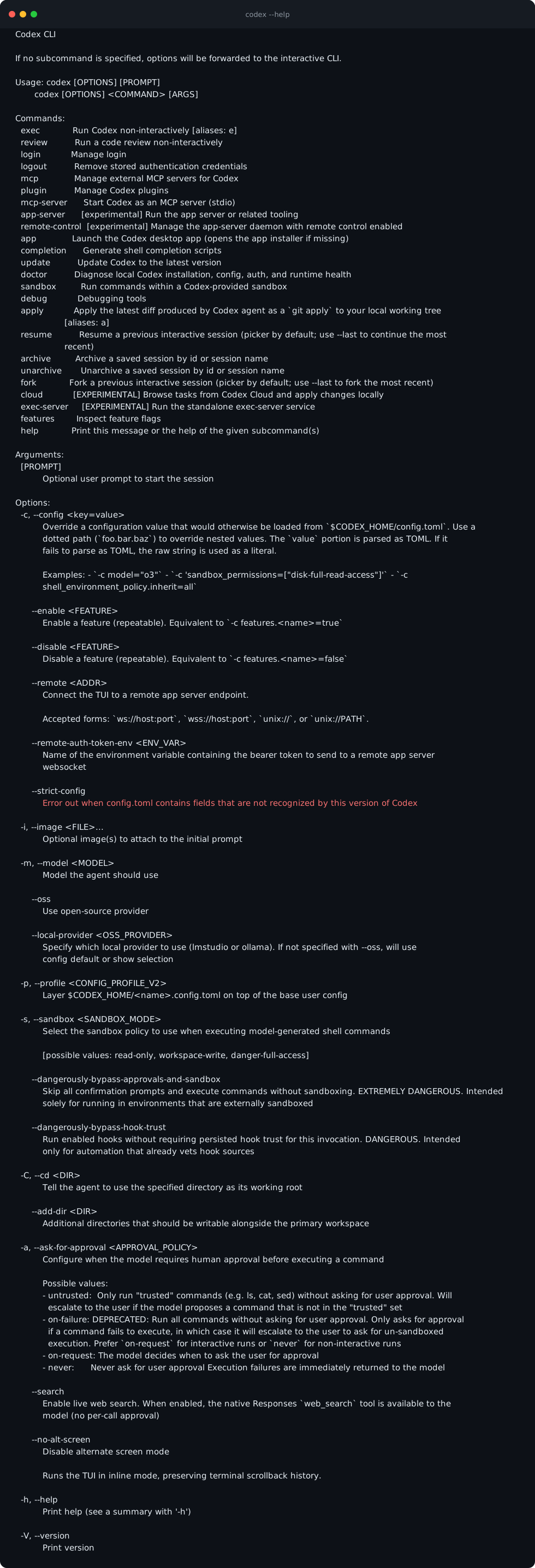
Run codex --help. Expect a Commands block listing exec, review, login, mcp, plugin, resume, apply and doctor — mcp, plugin and cloud are covered in the third CLI lesson.
HintThe top-level help is the map for the rest of this lesson.
Run the health check
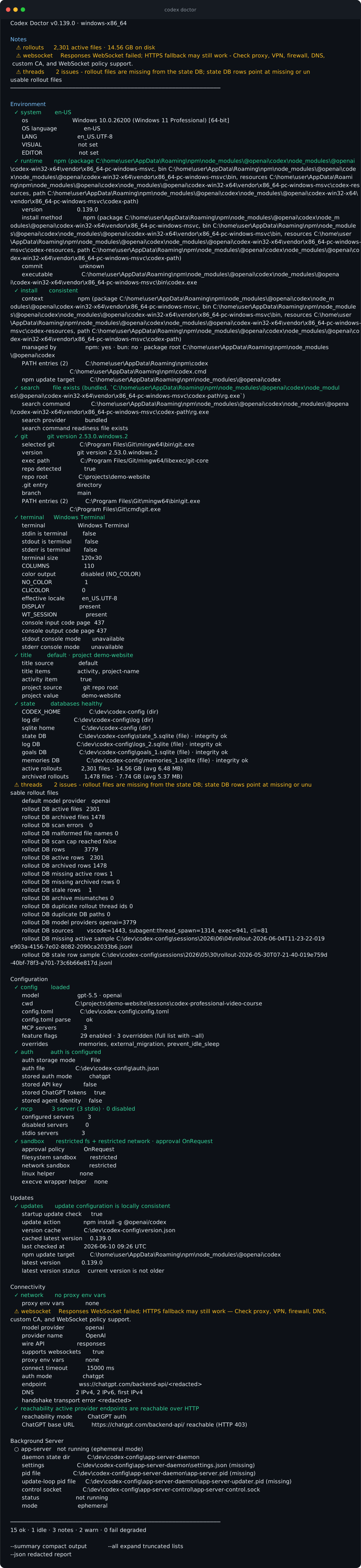
codex doctor diagnoses runtime, install method, search backend, terminal, and auth — entirely read-only. Scroll to the final line for the verdict — what matters is 0 fail; warns flag environment quirks worth reading (the real capture here shows a couple), not a broken install.
HintDoctor is the fastest way to explain a broken local setup without guessing.
Verify sign-in

Run codex login status. Expect a single line confirming the active sign-in — for example that you are logged in with your ChatGPT account. If it reports you are not logged in, run codex login and complete the browser flow before continuing.
HintConfirm auth before a session so you fail fast, not mid-task.
Understand login management
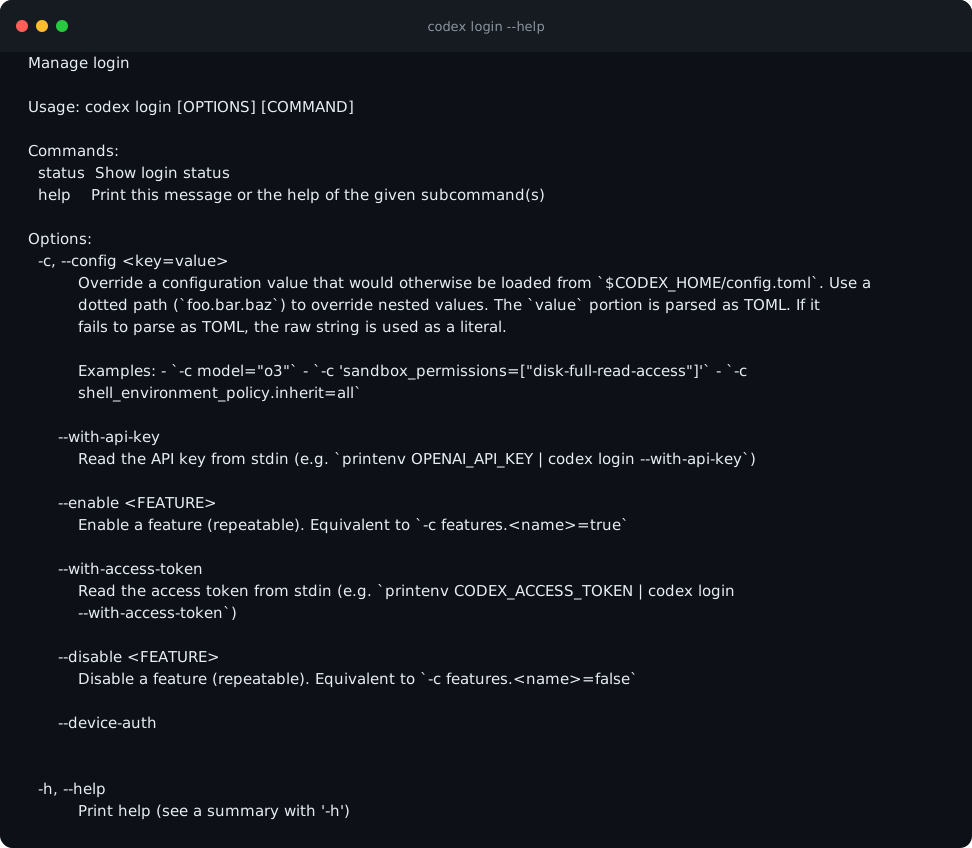
codex login --help shows how sign-in is managed from the terminal. Expect a status subcommand plus --with-api-key and --with-access-token options that read credentials from stdin instead of the screen.
HintAuth flows are permission-sensitive — read them before clicking through.
One-shot execution with exec
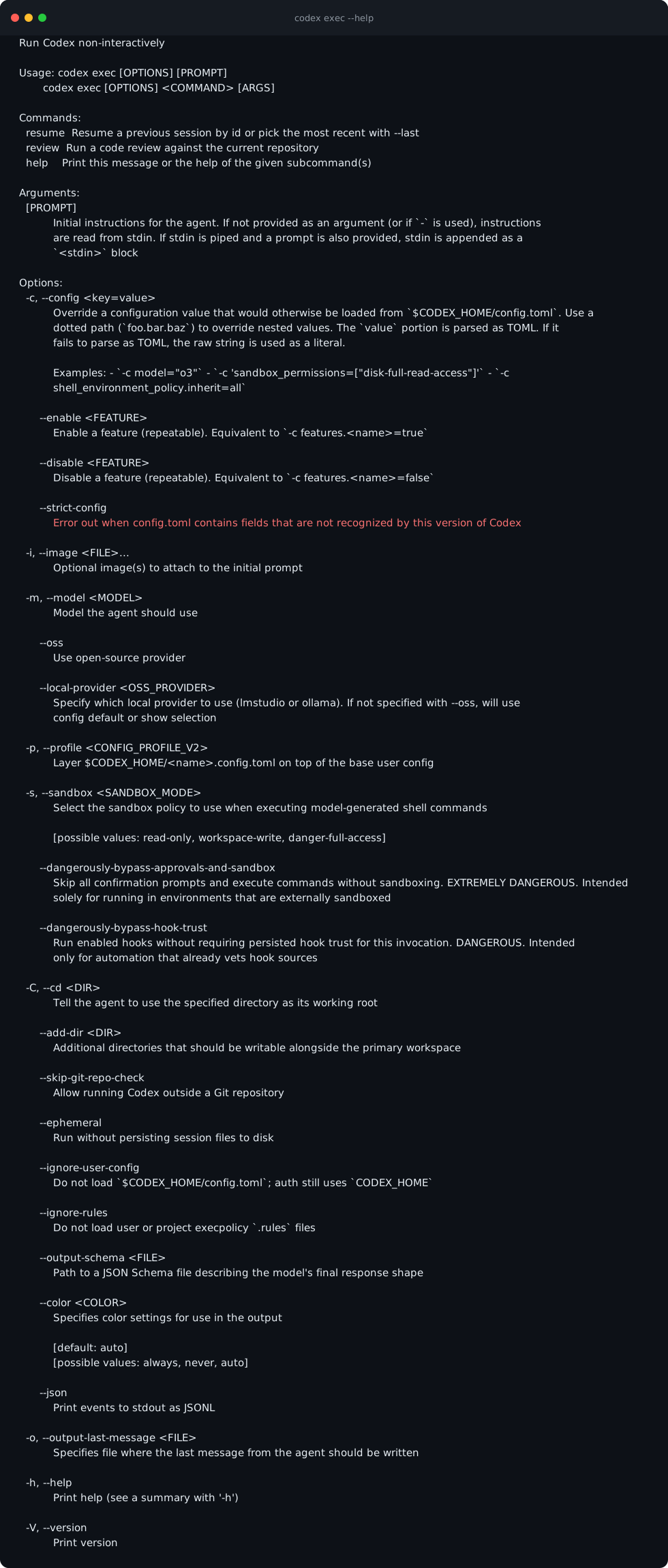
codex exec --help covers non-interactive runs — the basis of scripted, scoped, CI-like work. Expect Usage: codex exec [OPTIONS] [PROMPT] — the prompt can also arrive on stdin, which is what makes exec scriptable.
HintUse exec when the task is already terminal-shaped and repeatable.
Review code from the CLI
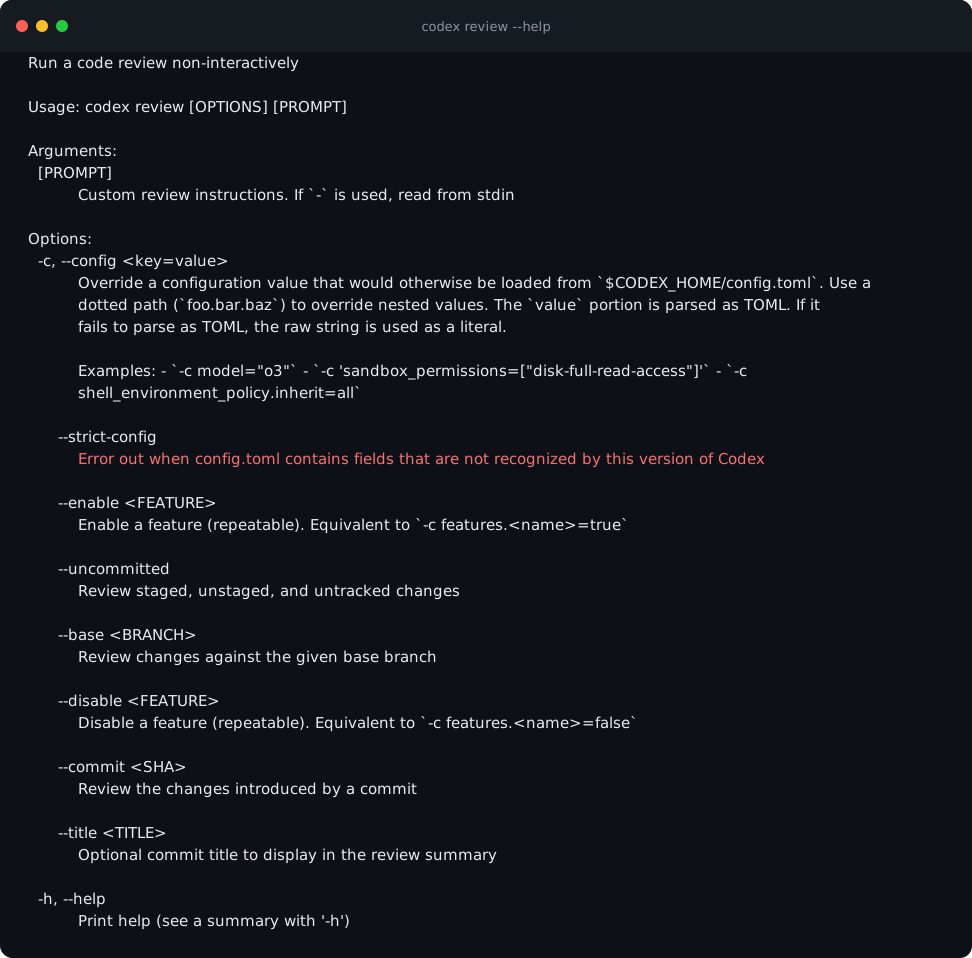
codex review --help runs a code review non-interactively. Look for --uncommitted, --base <BRANCH> and --commit <SHA> — the three ways to point the review at exactly the changes you mean.
HintReviewing before applying is the habit that keeps agent output safe.
Resume a previous session
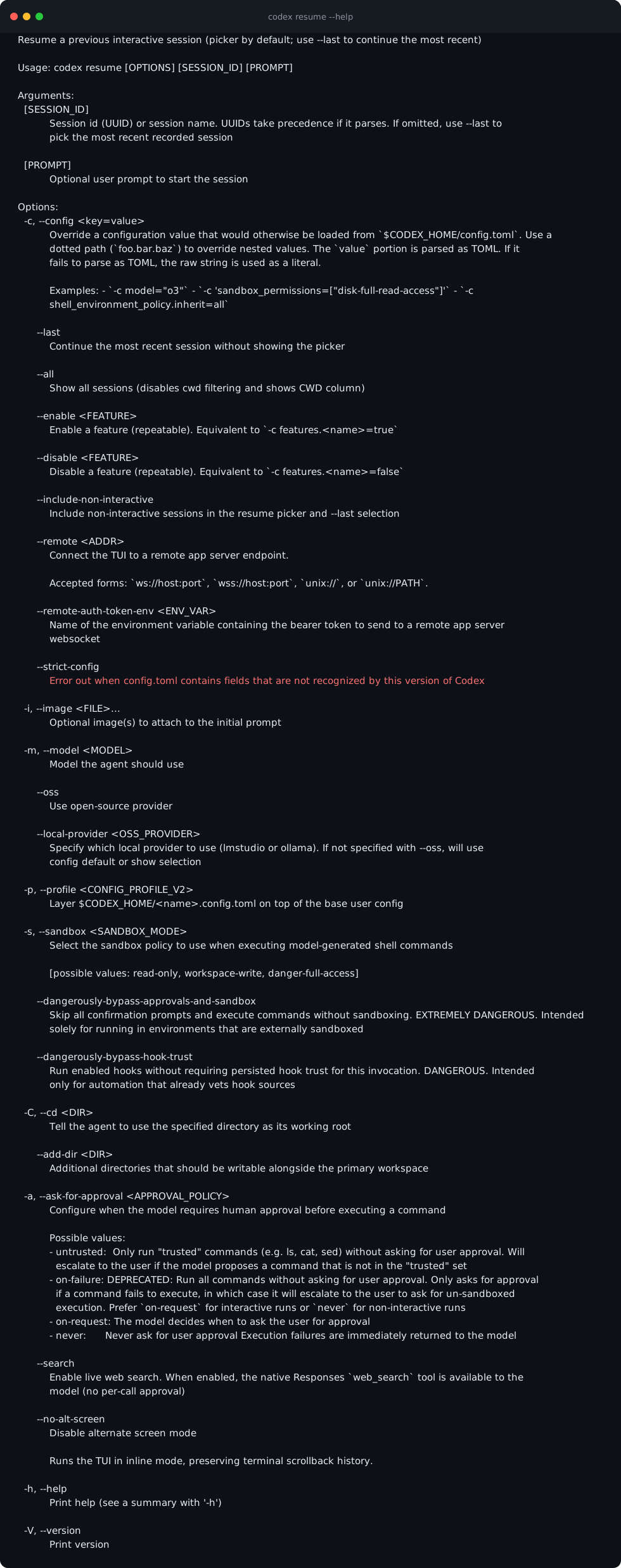
codex resume --help shows how sessions continue. Look for the [SESSION_ID] argument and the --last flag — picker by default, --last to skip it.
HintResume is how learners continue real work across days.
Apply the agent's diff
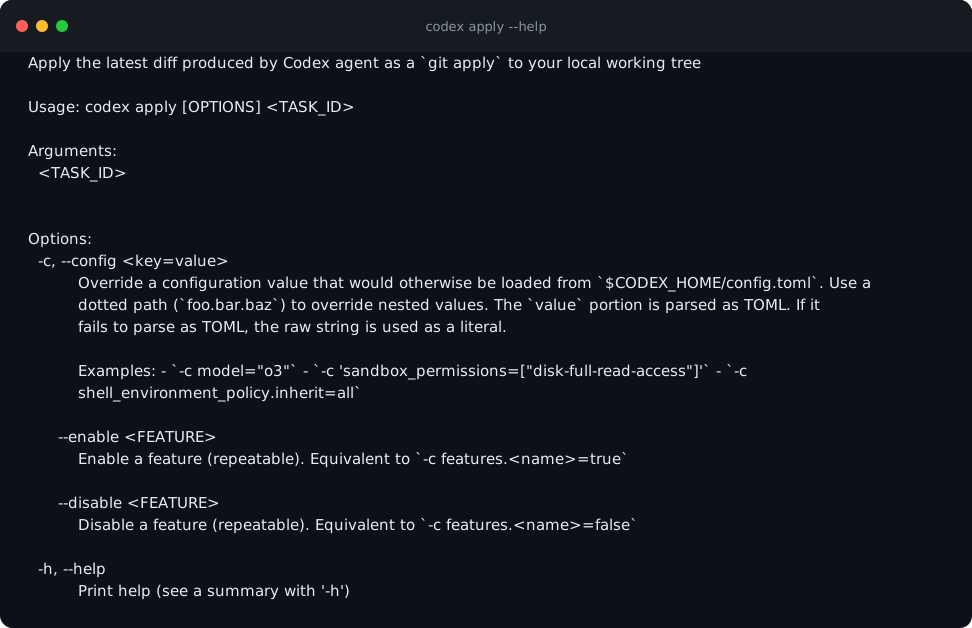
codex apply --help applies the latest agent diff as a git apply to your working tree — the final, reviewed step. Note the Usage line: apply takes a TASK_ID, because the diff belongs to a specific Codex task — you will meet task IDs again when the Cloud lesson delegates work off your machine.
HintOnly apply after you have read the diff. The gate is yours.
In a clean demo repo, run codex --version, codex doctor, and codex login status. Then open codex resume --help and codex apply --help and say out loud, in one sentence each, what they do. You are done when doctor's final line reports 0 fail and login status confirms you are signed in.
A verified CLI baseline: your version number recorded, a clean doctor verdict, confirmed sign-in, and a one-sentence answer in your own words for what exec, resume, review and apply each do.
Common mistakes to avoid
- Teaching against an unknown build instead of confirming codex --version first.
- Running commands that print environment variables or private paths on screen.
- Applying a diff before reading it.
- Treating exec and interactive mode as interchangeable.
Key terms
- doctor
- The read-only health check for runtime, install, search, terminal, and auth.
- exec
- Run Codex non-interactively — one-shot, scriptable execution.
- resume
- Continue a previous session, by picker or --last.
- apply
- Apply the agent's latest diff to your working tree as a git apply.
- diff
- The line-by-line record of what changed — additions and removals — that you read before accepting any change.
- git apply
- The git command that takes a diff and writes those changes into your working files.
- CI
- Continuous integration — automation that runs the same checks or tasks on every change, with no human at the keyboard.
- picker
- The interactive session list resume shows by default, so you can choose which conversation to continue.
Resources
Checkpoint